
Sublime-IJulia Official Debut
820 views
Skip to first unread message

Jacob Quinn
Feb 6, 2014, 9:30:44 PM2/6/14
to julia...@googlegroups.com
I'm grateful for those who have patiently hacked through the platform issues in getting this working, but I think we're finally out of alpha and into beta mode!
For those who don't know, this is the official successor to the Sublime-Julia (no longer being developed), based on the IJulia kernel backend. Basically, we start up an IJulia kernel and use a Sublime Text view as a "console". This allows for rapid development all within Sublime. Once your setup is ready (setting the path to your julia executable, ZMQ library), you can open up a console view by typing `ctrl+shift+p`, then typing "Open IJulia". If the setup is correct, you'll see the julia banner displayed after a few seconds in a new sublime view. At that point, you're free to enter in code directly in the REPL view, or send code to it from any .jl file with the ctrl+enter commands.
Other major features include sublime snippets (code completions) for .jl files based on the function API reference of the standard library, as well as the official julia syntax file for sublime with a quick command to apply the syntax to all your .jl files currently open (ctrl+shift+p, then type "Apply Julia syntax").
Anyway, hopefully this is helpful to people. I know it's my personal preferred IDE/terminal on windows with a lack of other great options.
If you run into issues installing or have a great idea for a feature, feel free to open an issue here, I'm more than happy to help/discuss.
Cheers,
-Jacob

Isaiah Norton
Feb 6, 2014, 9:42:39 PM2/6/14
to julia...@googlegroups.com
I don't use Sublime (yet?) -- could you put up a screenshot or two of this setup? Does inline plotting work?
Nice work!
Isaiah
Jacob Quinn
Feb 6, 2014, 10:10:50 PM2/6/14
to julia...@googlegroups.com
Hey Isaiah,
No inline plotting yet, though I'm ready to start exploring what we can do here; possibly open up the plot in the default browser, sublime also recently got support for image viewing, so if we can get an image object back for the plot, we could open it up directly in sublime. I actually haven't used the different plotting packages a ton, so I'm not entirely sure on what the best approach is here. I think we can get something working though.
Here are a few screenshots of my setup.
Basic setup with the console open.
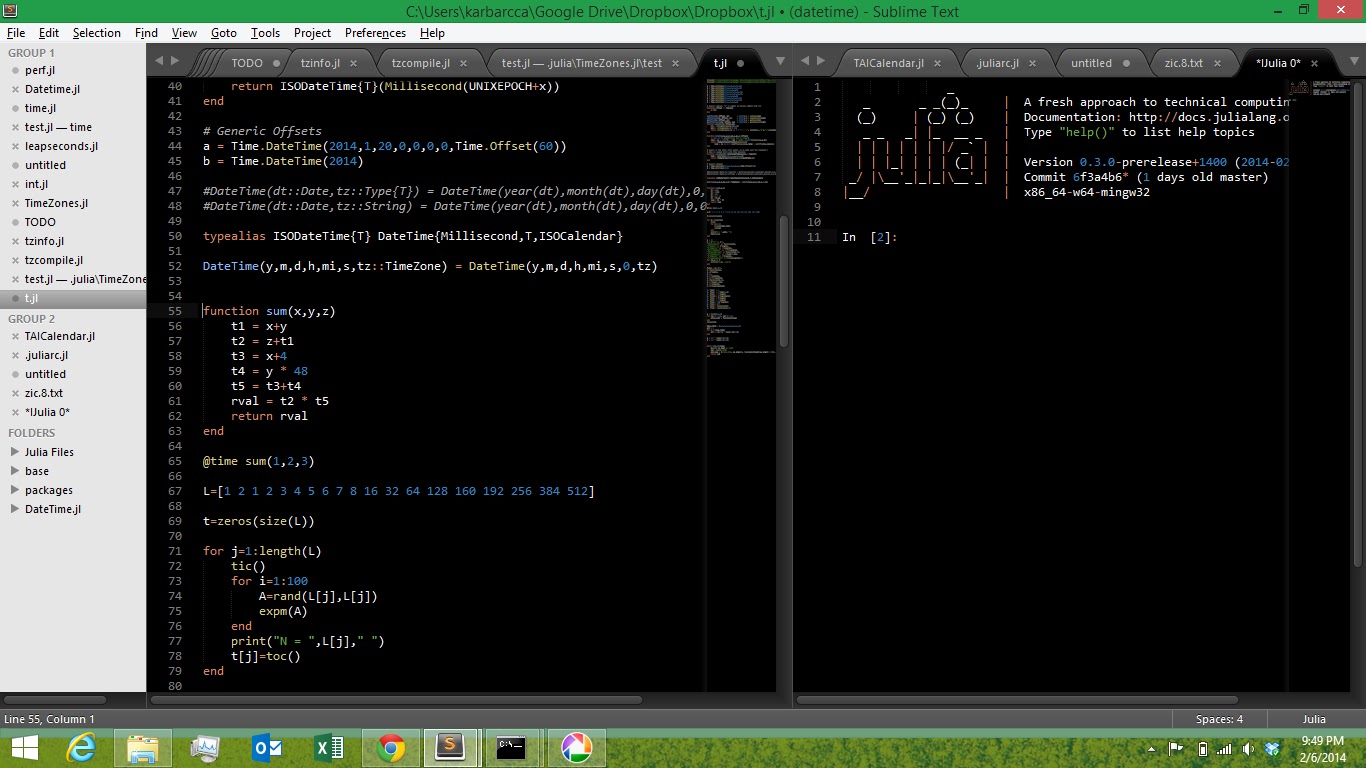
Sending some selected text to the console from a .jl file.

Running an entire file at once

Using sublime's "Find in Directory" feature to search for all occurrences of "fld" in base.

Using sublime's "Goto Line #" command (ctrl+g) to go to a specific line number. Helpful with error backtraces

Showing the standard library completions tool. Start typing "cont" and "contains" comes up, then pressing "tab" results in the "contains(haystack, needle" you see below. It highlights "haystack" first, which you can type your collection name, then pressing tab again takes you over to highlight "needle".


Ismael VC
Feb 7, 2014, 1:05:51 AM2/7/14
to julia...@googlegroups.com
Wow! Jacob I love it!
multiline statements don't work at all.
I just noticed that in:
ipython qtconsole --profile=juliaENTER just goes to the next line until you run the "cell" code with SHIFT+ENTER.
But in Sublime-IJulia you use CTRL+ENTER to go to the next line, and ENTER to run the "cell" code, not to mention I lose the CTRL+ENTER functionality in Sublime (New line below) in all .jl files!
Whereas in:
ipython console --profile=julia
multiline statements don't work at all.
In the IJulia notebook, the cells work the same as in IPython notebook (CTRL+ENTER, SHIFT+ENTER).
Ismael VC
Feb 7, 2014, 1:20:31 AM2/7/14
to julia...@googlegroups.com
I forgot to say CTRL+ENTER for new line below, is the single most useful and used command for me in all SublimeText.
Wouldn't it be better to use SHIFT+ENTER, to run the "cell", (as oposed to ENTER)
and just ENTER for next line , (as oposed to CTRL+ENTER)
as it is the way IJulia qtconsole works for now, I would apreciate the consistency, besides, I dont see SHIFT+ENTER doing anything in SublimeText, please consider the CTRL+ENTER shortcut override, thanks!
Ismael VC

Jacob Quinn
Feb 7, 2014, 7:00:15 AM2/7/14
to julia...@googlegroups.com
Thanks for the suggestion Ismael. Yeah, I originally came from the RStudio world, so I was mirroring ctrl+enter from that world and personally have never used ctrl+enter in sublime (really, the most useful command?!).
But yeah, I've though several times we should probably try to match the notebook a little better on this. If you open an issue above I can post progress on this.
Jacob Quinn
Feb 7, 2014, 9:42:30 AM2/7/14
to julia...@googlegroups.com
Ok, I just pushed changes for this. The behavior, as now noted in the README is:
#### Using Sublime-IJulia* Commands can be entered directly in the IJulia console view, pressing `shift+enter` to execute.* A newline can be entered without executing the command by typing `Enter` for multi-line commands.* Pressing the `up` and `down` arrows in the console view will navigate through command history (if any).* `escape` will clear the current command* All other regular sublime features should work as normal also in the console view (multiple cursors, macros, etc.)From a julia file (extension .jl), you also have the ability to "send" code to the console to be evaluated.* `Shift+enter` without any code selected will send the current line to the console to be executed* `Shift+enter` with code selected will send the selected text to the console to be executed* `Ctrl+shift+enter` will send the entire file's contents to the console to be executed
-Jacob

Steven G. Johnson
Feb 7, 2014, 9:57:33 AM2/7/14
to julia...@googlegroups.com
On Thursday, February 6, 2014 10:10:50 PM UTC-5, Jacob Quinn wrote:
Hey Isaiah,No inline plotting yet, though I'm ready to start exploring what we can do here; possibly open up the plot in the default browser, sublime also recently got support for image viewing, so if we can get an image object back for the plot, we could open it up directly in sublime.
Most of the plotting packages use the display/writemime facilities in Julia, so that inline plotting works in IJulia+browser. They typically support writemime to image/png.
On your end, you just need to look at the "data" fields of the pyout and display_data messages, which is a dictionary mapping MIME types to data. Presumably, you are already looking at the text/plain output in order to display results. You just need to look for image/png data and display it, and most of the plotting packages should work.
Ismael VC
Feb 7, 2014, 10:15:32 AM2/7/14
to julia...@googlegroups.com
That's great Jacob!
Since I haven't coded for that long, I am barely getting used to typing symbols in my keyboard, that I had never used, before learning to programm. But I guess in the end it's a matter of muscle memory.
Ismael VC
Jacob Quinn
Feb 7, 2014, 11:58:21 AM2/7/14
to julia...@googlegroups.com
Steven,
Thanks for the reply, I'd definitely like to get something working for plots. I just did a quick test, but I wasn't able to see an image/png tag in display_data when I ran the following:
using Gadfly
plot(x=[1:10], y=[1:10], Geom.point)
Do I need to explicitly push the image/png mime type onto the display stack? (I'm not entirely up to speed on the display() machinery). All I saw for the above command was text/html. Is it just Gadfly that doesn't support pngs this way?
Thanks.
-Jacob
Steven G. Johnson
Feb 7, 2014, 1:43:56 PM2/7/14
to julia...@googlegroups.com, quinn....@gmail.com
It looks like Gadfly does not currently support writemime to any image backend:
https://github.com/dcjones/Gadfly.jl/blob/5554d3a1bcdc5fc6852cc8f1e469dd3a0f65f220/src/Gadfly.jl#L726-L744
But image/png writemime output be easy to add (maybe file an issue?) since Gadfly already supports export to PNG images via Cairo. (The disconnect here is partly due to the fact that the writemime stuff was bolted on afterwards.) For example, I think you can do:
p = plot(x=[1:10], y=rand(10), Geom.point)
draw(PNG(4inch,3inch), p)
Or you can use PyPlot.
https://github.com/dcjones/Gadfly.jl/blob/5554d3a1bcdc5fc6852cc8f1e469dd3a0f65f220/src/Gadfly.jl#L726-L744
But image/png writemime output be easy to add (maybe file an issue?) since Gadfly already supports export to PNG images via Cairo. (The disconnect here is partly due to the fact that the writemime stuff was bolted on afterwards.) For example, I think you can do:
p = plot(x=[1:10], y=rand(10), Geom.point)
draw(PNG(4inch,3inch), p)
Or you can use PyPlot.

Maxim Grechkin
Feb 7, 2014, 2:28:25 PM2/7/14
to julia...@googlegroups.com
Shameless plug: SublimeIPythonNotebook works right away with Julia-backed IPython notebooks (and it is much simpler to instull - you don't need to use ZMQ because you are interacting with it through websockets). Right now it can connect to IJulia notebooks, edit and execute them. Syntax highlighting is currently from Python, but it should be easy to fix that. The fact that Sublime doesn't provide a way to insert an inline graph is much bigger issue for me though...

Robert Feldt
Feb 10, 2014, 2:52:24 AM2/10/14
to julia...@googlegroups.com
Thanks Jacob, this sounds great.
Problem when following the installation instructions though:
After successfully installing ZMQ and IJulia in the Julia (0.2.0) console and then installing IJulia in Sublime I get:
"ZMQ Shared Library not found at /usr/local/Cellar/zeromq/3.2.4/lib/libzmq.dylib"
in an Sublime error pop-up. I tried:
$ brew install zmq
Warning: zeromq-4.0.3 already installed
but it seems to be installed alright. Any ideas?
Regards,
Robert
Reply all
Reply to author
Forward
0 new messages