
transparent area in connection bounding box blocks mouse interaction
198 views
Skip to first unread message

Aras Balali Moghaddam
Dec 21, 2012, 5:17:36 AM12/21/12
to jsp...@googlegroups.com
Hello,
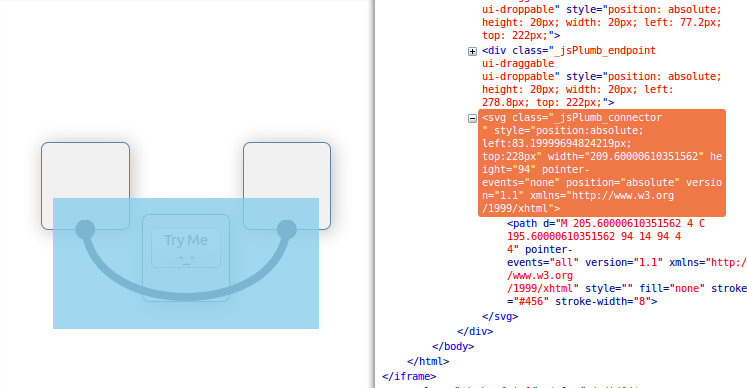
I am running into an issue in my application where the transparent bounding box around the connections end up on top of some element such as buttons or endpoints and blocks the mouse click or drag events from getting to that element.
Please take a look at this example jsFiddle I made to show what I mean: http://jsfiddle.net/a2aVf/2/
I also attach an image to show the bounding box around the SVG element that is on top of the button.
One way to deal with this issue is to change the z-index of the connection to be lower that the button (or any other interactive elements). However, that does not look good, and breaks the visual continuity of the connection. This is specially a problem when elements are not transparent, so you cant see the connections passing under them at all.
My question is: is there a way to render connections on top, but pass mouse events through the transparent areas of the bounding box of the connection and capture it only when the mouse is on top of a rendered path? If that is asking for too much from SVG elements -- is there a way to pass the mouse events through the whole area of the connection?
I think this is more of a browser SVG rendering question, but I would appreciate any help that I can get in dealing with this problem.
Cheers,
Aras
I am running into an issue in my application where the transparent bounding box around the connections end up on top of some element such as buttons or endpoints and blocks the mouse click or drag events from getting to that element.
Please take a look at this example jsFiddle I made to show what I mean: http://jsfiddle.net/a2aVf/2/
I also attach an image to show the bounding box around the SVG element that is on top of the button.
One way to deal with this issue is to change the z-index of the connection to be lower that the button (or any other interactive elements). However, that does not look good, and breaks the visual continuity of the connection. This is specially a problem when elements are not transparent, so you cant see the connections passing under them at all.
My question is: is there a way to render connections on top, but pass mouse events through the transparent areas of the bounding box of the connection and capture it only when the mouse is on top of a rendered path? If that is asking for too much from SVG elements -- is there a way to pass the mouse events through the whole area of the connection?
I think this is more of a browser SVG rendering question, but I would appreciate any help that I can get in dealing with this problem.
Cheers,
Aras

Simon Porritt
Dec 26, 2012, 7:54:17 PM12/26/12
to jsp...@googlegroups.com
Sorry for the delay on this....been distracted by christmas cheer.
so if you go to this page:
and move the windows around then drag a connection across one of them (see pic)

then go to the console and type
$("svg").css("z-index", 80000);
you'll get the SVG to appear on top. notice in the screenshot how 'disable dragging' is highlighted? the mouse events are passed through to the underlying element.
Aras Balali Moghaddam
Dec 26, 2012, 8:49:50 PM12/26/12
to jsp...@googlegroups.com
Thanks for looking into this Simon. I just followed your instructions in Firefox and indeed in your demo the SVG elements behave as expected, which is great since it proves that a solution exist. Can you comment on why in my jsFiddle (http://jsfiddle.net/a2aVf/2/) this is not working? As you may have noticed I am setting the z-index of the connectors in that example:
._jsPlumb_connector { z-index:52; }
._jsPlumb_connector { z-index:52; }
52 is the higher z-index in that fiddle. I am puzzled as to what is different. This behaviour happens in my own app too, so it is not an issue with jsFiddle.

Simon Porritt
Dec 28, 2012, 1:25:27 AM12/28/12
to jsp...@googlegroups.com
I'll try to find a moment to take a look at this over the next few days.
Aras Balali Moghaddam
Dec 31, 2012, 5:36:58 PM12/31/12
to jsp...@googlegroups.com
Hi Simon,
I just want to give an update on this issue. My teammate looked into this problem and he found the root of the problem is the pointer-events property which is set on the SVG elements. He found that as a workaround we could do something like:
$('path').attr('pointer-events','visibleStroke');
After setting the `pointer-event` property to visibleStroke the element behaves as expected, and you can click through the transparent area: http://jsfiddle.net/hbTjt/
An issue with this workaround is than when you move the elements around and connections are repainted they will again get incorrect `pointer-event` value. Of course I could try to set the property after every change, but I think there is something in jsPlumb that will do this by default for me, am I right to think so? I am still interested in finding what is the proper jsPlumb way to deal with this issue.
Cheers,
Aras
ps: Happy new year to you and the jsPlumb community. I hope 2013 will be a year full of connections for jsPlumb :)
I just want to give an update on this issue. My teammate looked into this problem and he found the root of the problem is the pointer-events property which is set on the SVG elements. He found that as a workaround we could do something like:
$('path').attr('pointer-events','visibleStroke');
After setting the `pointer-event` property to visibleStroke the element behaves as expected, and you can click through the transparent area: http://jsfiddle.net/hbTjt/
An issue with this workaround is than when you move the elements around and connections are repainted they will again get incorrect `pointer-event` value. Of course I could try to set the property after every change, but I think there is something in jsPlumb that will do this by default for me, am I right to think so? I am still interested in finding what is the proper jsPlumb way to deal with this issue.
Cheers,
Aras
ps: Happy new year to you and the jsPlumb community. I hope 2013 will be a year full of connections for jsPlumb :)
Simon Porritt
Dec 31, 2012, 6:05:43 PM12/31/12
to jsp...@googlegroups.com
Thanks for the update. 'pointer-events' is indeed reset each time the connector is repainted (it probably doesn't need to be, in fact, but that's a different question), and currently jsPlumb uses 'all' for that value. if you read the description of 'all' on this page you can kind of see why it might be the case that all mouse events are trapped:
like in your original fiddle. that doesn't not, of course, explain why in the jsplumb demo this is not a problem.
i could change pointer events to 'visibleStroke' - it seems to be the logical choice - but i'm not a big fan of loose ends...i'd like to know why there is a discrepancy between your jsfiddle and the jsplumb demos.
in the meantime you can probably force this behaviour by overriding the 'paint' method of each connection...add a 'connection' listener to jsplumb and then do something like this (not tested):
jsPlumb.bind("connection", function(info) {
var c = info.connection,
p = c.paint;
c.paint = function() {
p.apply(c, arguments);
$(c.canvas).find("path").css("pointer-events", "visibleStroke");
};
});
Aras Balali Moghaddam
Dec 31, 2012, 7:25:44 PM12/31/12
to jsp...@googlegroups.com
Binding to paint method works great: http://jsfiddle.net/arasbm/7f8yY/2/
I am happy with this workaround. In terms of a longer term solution, I dont think there is one best choice for how events are handled and it would be best to have it configurable. It likely depends a lot on the type of interface people will be building. My vote would be to have a property for connections to set the `pointer-events` type. That way a library user can set the pointer-events parameter for all connections with something like:
jsPlumb.Defaults.Connector = [ "Bezier", { curviness: 90, pointerEvents: 'fill' } ];
and then also be able to configure that option for each connection with something like:
That is just a suggestion based on my limited understanding of jsPlumb so far. Should I open a feature request?
Thanks a lot for your help!
Aras
I am happy with this workaround. In terms of a longer term solution, I dont think there is one best choice for how events are handled and it would be best to have it configurable. It likely depends a lot on the type of interface people will be building. My vote would be to have a property for connections to set the `pointer-events` type. That way a library user can set the pointer-events parameter for all connections with something like:
jsPlumb.Defaults.Connector = [ "Bezier", { curviness: 90, pointerEvents: 'fill' } ];
and then also be able to configure that option for each connection with something like:
jsPlumb.connect({ source:"div3", target:"div4", pointerEvents: 'fill'});That is just a suggestion based on my limited understanding of jsPlumb so far. Should I open a feature request?
Thanks a lot for your help!
Aras
Simon Porritt
Dec 31, 2012, 7:52:12 PM12/31/12
to jsp...@googlegroups.com
That sounds kind of cool actually. do you want to open a feature request and link to this discussion?
Aras Balali Moghaddam
Dec 31, 2012, 8:22:36 PM12/31/12
to jsp...@googlegroups.com
Let me know if I can help in any way.
Reply all
Reply to author
Forward
0 new messages