
Manhattan router ignoring embedded elements
481 views
Skip to first unread message

James Connell
Apr 17, 2015, 6:06:06 PM4/17/15
to joi...@googlegroups.com
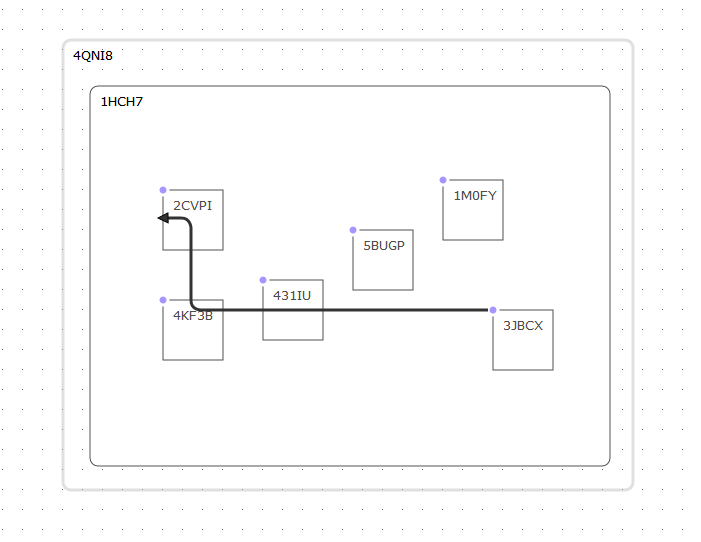
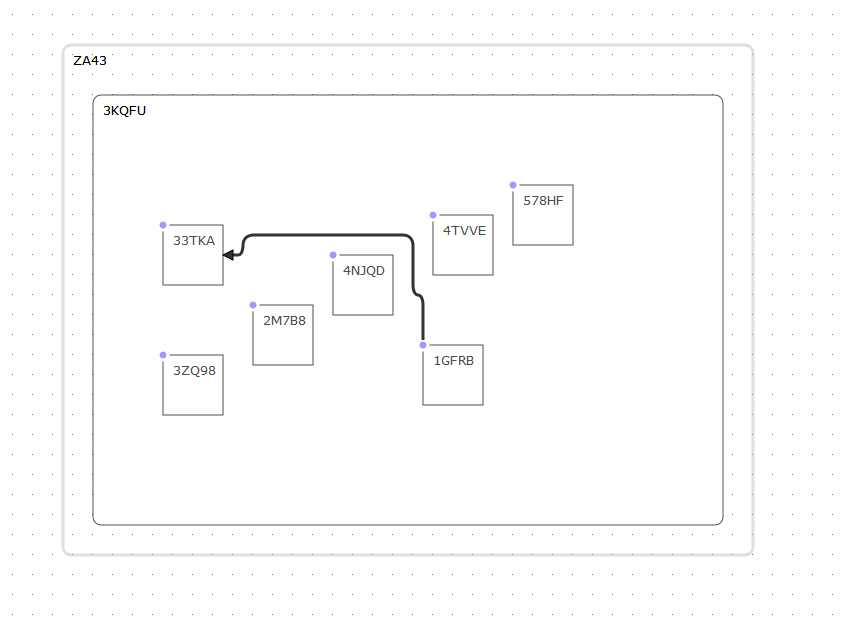
The manhattan router seems to ignore (or draw a link straight through) elements that are embedded inside other elements. However in the same drawing it will successfully route around top-level elements. If an embedded element is connected to a top level element, the routing will also fail to 'see' any other elements, and draw the link right through them. Is this a known issue?
James Connell
Apr 20, 2015, 12:33:58 PM4/20/15
to joi...@googlegroups.com
After doing some more research, it seems to behave better if I exclude
the parent container elements, basically it seems to completely fail if
the parent elements end up in set of elements to route around (fist one):


Roman Bruckner
Apr 20, 2015, 1:01:05 PM4/20/15
to joi...@googlegroups.com
Hi James,
you might try to increase `maximumLoops` on the router (https://github.com/DavidDurman/joint/blob/master/plugins/routers/joint.routers.manhattan.js#L24).
In the case that maximum number of loops is exceeded during routing algorithm a fallback route (some simple orthogonal route) is used instead.
e.g link.set('router', { name: 'manhattan', args: { maximumLoops: 1000 }});
Regards,
Roman
--
---
You received this message because you are subscribed to the Google Groups "JointJS" group.
To unsubscribe from this group and stop receiving emails from it, send an email to jointjs+u...@googlegroups.com.
For more options, visit https://groups.google.com/d/optout.
James Connell
Apr 20, 2015, 1:26:34 PM4/20/15
to joi...@googlegroups.com
Thank you-
Adjusting maximumLoops does seem to help reduce overlap in the working case- however when the parent elements are not excluded (in { args : { excludeTypes: ['foo','bar'] }}, the router always fails (ie falls back to the basic L shaped route in image 1 ), even when maximumLoops is set to a very high number (10000). It seems like it cant find an ideal route, because every point would have at least 2 obstacles (the parent elements)....
Adjusting maximumLoops does seem to help reduce overlap in the working case- however when the parent elements are not excluded (in { args : { excludeTypes: ['foo','bar'] }}, the router always fails (ie falls back to the basic L shaped route in image 1 ), even when maximumLoops is set to a very high number (10000). It seems like it cant find an ideal route, because every point would have at least 2 obstacles (the parent elements)....
Roman Bruckner
Apr 20, 2015, 1:34:57 PM4/20/15
to joi...@googlegroups.com
Yeah, excluding the parent elements was definitely a good idea. So I would stick to that if possible.
James Connell
Apr 20, 2015, 2:12:26 PM4/20/15
to joi...@googlegroups.com
Ok. If I find time I might writeup a bug on github... seems it wouldn't be too hard to adjust the pathfinding to account for this;
James Connell
Apr 20, 2015, 2:13:39 PM4/20/15
to joi...@googlegroups.com
On a different topic, what is opt.draggingRoute for and how would it get used?
Roman Bruckner
Apr 21, 2015, 6:45:02 AM4/21/15
to joi...@googlegroups.com
Hi James,
the `draggingRoute` is an experimental option. However the idea is to provide a different routing for the links that does not connect 2 elements. (A link might connect a point and an element or 2 points).
mylink.set('router', { name: 'manhattan', args: { draggingRoute: function(p1, p2, opt) { return []; }}});
// And now try to drag an arrowhead of 'mylink'.
Reply all
Reply to author
Forward
0 new messages