
Get audio from the soundcard

Davide Perini
I want to create a Volume Level meter showing RMS and peaks.
I'm trying to figure out if sound of any kind is playing in
Windows/Linux (by any application).
If something is making a noise somewhere, I want to know about it and
show it in my Volume Level Meter.
I'm not interested in the sound but on the volume level only.
I don't think that this is possible with Java. Is this possible with JNA?
Thanks
Davide

Neil C Smith
<perini...@dpsoftware.org> wrote:
> I'm not interested in the sound but on the volume level only.
>
> I don't think that this is possible with Java. Is this possible with JNA?
this - https://docs.microsoft.com/en-us/windows/win32/api/endpointvolume/nn-endpointvolume-iaudiometerinformation
I'm not sure if there's a C API for that, or alternative way to access
it, though.
Best wishes,
Neil
--
Neil C Smith
Codelerity Ltd.
www.codelerity.com
Codelerity Ltd. is a company registered in England and Wales
Registered company number : 12063669
Registered office address : Office 4 219 Kensington High Street,
Kensington, London, England, W8 6BD

Tres Finocchiaro
Neil C Smith
<tres.fin...@gmail.com> wrote:
> I know ALSA mixer can monitor the output devices, so ALSA may be the winner here, but I assume if a ALSA is being bypassed you'd miss the opportunity to capture.
other APIs in most cases.
> For daily use, PulseAudio is what the average media player is going to use on the majority of Linux desktops, ...
PulseAudio also has the benefit of having monitor ports that can be
easily accessed via the GStreamer bindings that Davide is already
using. Although getting levels directly would probably be nicer.
Did you mean WASAPI has a direct Java binding? In Jitsi?
Davide Perini
another option for the purpose could be to enable an "audio loopback",
on Linux there are some commands to do it, on macOS too, I think.
On Windows audio loopback is as simple as enabling it via the GUI, but how to enable it via a Java program?
audio loopback create a new recording device and those kind of devices can be easily managed with the Java Audio API.

I need to understand what is the better option... there is lot of things to study :)

Thank you Neil for the hint!

Bye
Davide
Tres Finocchiaro
On Windows audio loopback is as simple as enabling it via the GUI, but how to enable it via a Java program?

Did you mean WASAPI has a direct Java binding? In Jitsi?
ALSA is very unlikely to be bypassed - it's the common backend of the other APIs in most cases.

Durchholz, Joachim
Actually you only sort-of wrong that ALSA may be bypassed.
From https://linuxhint.com/guide_linux_audio/, I gather the following information:
- ALSA is indeed the one layer that all modern Linuxes pass their audio through.
- On top of that, there may be sound servers like PulseAudio (for ease of use and low CPU usage) or JACK (for low latency and to include MIDI).
- The sound control panel of the distribution defines which of these three APIs is in what ways, e.g. to display channel names.
- Actually ALSA has standardized channel names.
- PulseAudio and JACK can synthesize channels by mixing them; I don’t know how to retrieve those channel names, and how to determine what channels went into what PulseAudio/JACK channel.
You’re probably better off asking a forum that specializes in sound on Linux, and how distributions handle the confusions.
From: jna-...@googlegroups.com <jna-...@googlegroups.com>
On Behalf Of Tres Finocchiaro
Sent: Mittwoch, 12. Mai 2021 19:27
To: jna-...@googlegroups.com
Subject: [External Sender] Re: Get audio from the soundcard
On Windows audio loopback is as simple as enabling it via the GUI, but how to enable it via a Java program?
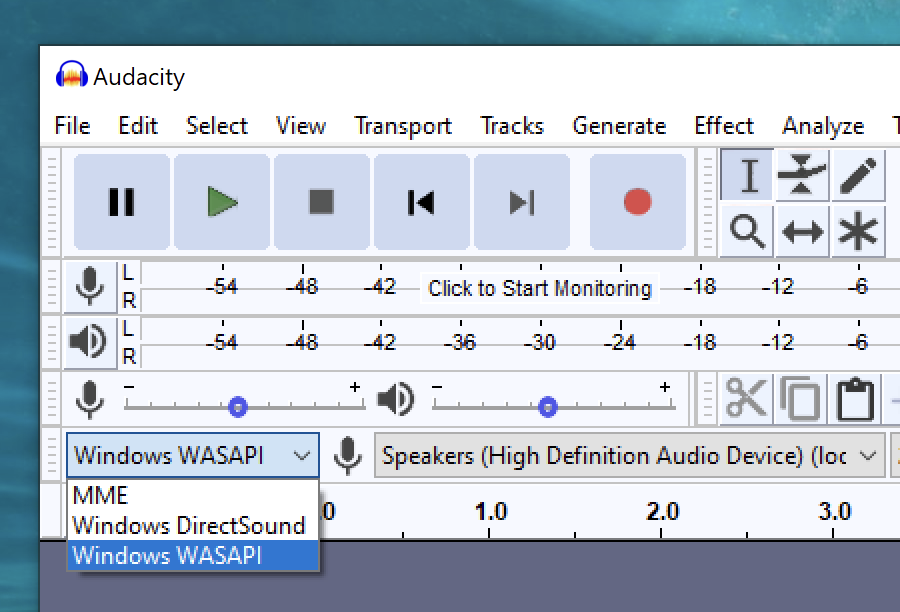
Right, and Audacity has access to this without visiting the control panel. See attached screenshot:

Note, I use this configuration on several machines (virtual and physical) as well as x86_64 and ARM64, this seems to be the winner for monitoring output on Windows.
Did you mean WASAPI has a direct Java binding? In Jitsi?
Yes, I believe so see here: https://github.com/jitsi/libjitsi/blob/master/src/org/jitsi/impl/neomedia/jmfext/media/protocol/wasapi/WASAPI.java
ALSA is very unlikely to be bypassed - it's the common backend of the other APIs in most cases.
Thank you for this information, I was under the impression that several back-ends had direct hardware access and bypassed ALSA altogether, sorry if this information was inaccurate or misleading.
--
You received this message because you are subscribed to the Google Groups "Java Native Access" group.
To unsubscribe from this group and stop receiving emails from it, send an email to
jna-users+...@googlegroups.com.
To view this discussion on the web visit
https://groups.google.com/d/msgid/jna-users/CANQs7dDCGE%2B3WYT-UwvxtJfDppEwMwSYZwmTjNuDXc1_UT2Avg%40mail.gmail.com.
Sensitivity: C2 Internal
The content of this e-mail is intended only for the
confidential use of the person addressed.
If you are not the intended
recipient, please notify the sender and delete this e-mail immediately.
Thank
you.
Davide Perini
In Windows the configuration required to use the audio loopback is very small if any, some Windows users have loopback enabled by default.
In every Linux distro I tried it works by default, it seems that most Linux distros have an audio loopback enabled by default.
This is the class that implements how to get Peaks and RMS using Java Audio.
https://github.com/sblantipodi/firefly_luciferin/blob/effects_vu_meter_loopback/src/main/java/org/dpsoftware/audio/AudioLoopback.java
... and if you want to laugh this is the "peasant" result xD
https://youtu.be/ax9pNscWrT0
Thank you all guys, this community is awesome here.
Davide
To view this discussion on the web visit https://groups.google.com/d/msgid/jna-users/AM5PR0102MB272333B3D65205B84BD14139B9529%40AM5PR0102MB2723.eurprd01.prod.exchangelabs.com.
Davide Perini
It seems that stereo mix is not available on some devices for a strange agreement between manfufacturers and Microsoft.
I am just focusing on Windows now, WASAPI could be a ready to use feature thanks to the libjitsi as suggested by Tres.
But is there an example on how to use libjitsi to get Peaks and RMS volume?
I see no docs, no example, nothing where to start...
Thank you
Davide
To view this discussion on the web visit https://groups.google.com/d/msgid/jna-users/816518d4-c425-f9f2-ce74-a1748b1f9120%40dpsoftware.org.
Tres Finocchiaro
It seems that stereo mix is not available on some devices for a strange agreement between manufacturers and Microsoft.
Windows offers WASAPI, which has bindings available and is capable of monitoring the playback device (try it out in Audacity!)
...
Note, I use this configuration on several machines (virtual and physical) as well as x86_64 and ARM64, this seems to be the winner for monitoring output on Windows.
...
Right, and Audacity has access to this without visiting the control panel. See attached screenshot:
To view this discussion on the web visit https://groups.google.com/d/msgid/jna-users/b8cff9cb-40d6-6ab1-e3cd-d37371148cb9%40dpsoftware.org.
Davide Perini
I have installed Audacity on my Lenovo Thinkpad that is known to have a driver limitation on the Windows Stereo Mix loopback.
Speakers recording does not work even using Audacity with WASAPI.
It says: Error code -9996 Invalid Device.
It seems that I'm out of lock on those devices.
At this point, Neil's suggestion seems to be the better choice but it's the most difficult to me currently.
https://docs.microsoft.com/en-us/windows/win32/api/endpointvolume/nn-endpointvolume-iaudiometerinformation
I'll investigate every alternatives, thank you guys.
Davide
To view this discussion on the web visit https://groups.google.com/d/msgid/jna-users/CANQs7dA7ba3L_Gst0178H0XnMcZvfFzxxCL%2BR7McwuK-p2dgDA%40mail.gmail.com.
Davide Perini
without user interaction, when it works. Stereo mix must be manually enabled.
WASAPI works even on some PCs I have that doesn't have stereo mix at all.
Now I need to understand how to use it in Java :)
To view this discussion on the web visit https://groups.google.com/d/msgid/jna-users/013d0990-1683-f59f-e349-532ffdef7046%40dpsoftware.org.
Davide Perini
I'm using WASAPI thanks to this very good binding from Sjoerd van Kreel.
https://github.com/sjoerdvankreel/xt-audio
Long live JNA and his community. :D
Thanks guys,
Davide
To view this discussion on the web visit https://groups.google.com/d/msgid/jna-users/ef369df6-8948-3b9b-0b7c-4052c045ba35%40dpsoftware.org.