
Regarding 'Total' row of 90% Line column in Aggregate Report
395 views
Skip to first unread message

Manoj Kapuganti
Mar 5, 2015, 1:04:17 AM3/5/15
to jmeter-...@googlegroups.com
Hello Everyone,
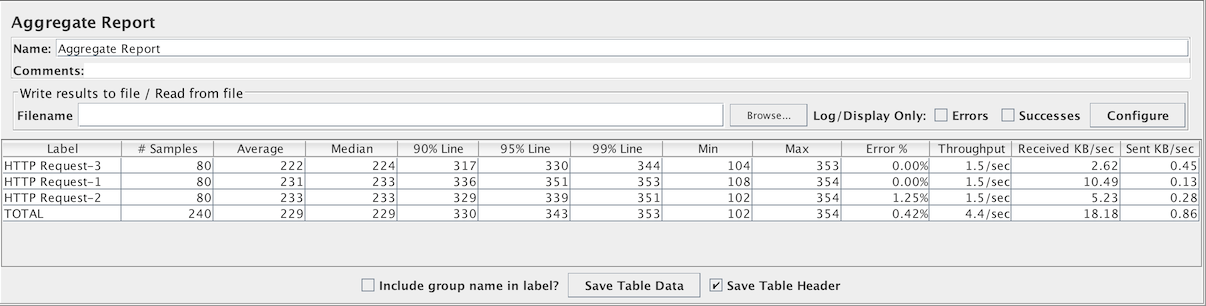
Could you please let me know how 'Total' row of '90% Line' column is calculated in Aggregate report
If you observe below image, 'Total' row of '90% Line' column, its 421
But 90% line of 328 and 437 is 426.1
Thank you,
Manoj Kapuganti
Manoj Kapuganti
Mar 12, 2015, 1:35:34 AM3/12/15
to jmeter-...@googlegroups.com
Nobody knows this???

Vincent Daburon
Mar 12, 2015, 4:20:11 AM3/12/15
to jmeter-...@googlegroups.com
Hi,
What is the 90th-percentile ?
http://softwaretesttips.com/2011/04/11/what-is-the-90th-percentile-and-how-is-it-calculated/
Regards.
Vincent D.
What is the 90th-percentile ?
http://softwaretesttips.com/2011/04/11/what-is-the-90th-percentile-and-how-is-it-calculated/
Regards.
Vincent D.
Manoj Kapuganti
Jun 30, 2015, 3:29:18 AM6/30/15
to jmeter-...@googlegroups.com
Hey my question is not about 90% line
I am showing up a bug in Aggregate report
Thank you,
Manoj

Vladimir Sitnikov
Jun 30, 2015, 3:34:26 AM6/30/15
to jmeter-...@googlegroups.com
Manoj,
>But 90% line of 328 and 437 is 426.1
It does not work that way.
1) "Total row of 90% column" is 365, not 421 as you state. Please
double check the screenshot.
2) It is computed exactly as Vincent described, however it uses _all
554 individual samples_, not just two "134 and 382" (the ones for 90%
of Home Page and 90% of Changes).
Vladimir
>But 90% line of 328 and 437 is 426.1
1) "Total row of 90% column" is 365, not 421 as you state. Please
double check the screenshot.
2) It is computed exactly as Vincent described, however it uses _all
554 individual samples_, not just two "134 and 382" (the ones for 90%
of Home Page and 90% of Changes).
Vladimir
Manoj Kapuganti
Jul 1, 2015, 9:58:13 AM7/1/15
to jmeter-...@googlegroups.com
Let me rephrase my question again with the current screenshot on http://jmeter.apache.org/images/screenshots/aggregate_report.png

From above image 90% line of 'Home Page' is 134 and 'Changes' is 375
If you compute 90% for 134 and 375 it will be 350.9
If you check above image it shows 365 against TOTAL of 90% line
So could you please let me know why it's 365 instead of 350.9
I kindly request you to please explain me how you calculated to get 365
Similarly if average of 131 and 339 is 235 which is correct. Min of 119 and 231 is 119. Max of 631 and 423 is 631. All are self explanatory except 90%, 95% and 99%
Below is the formula I used to compute 90% line =PERCENTILE(array,k)
Thank you,
Manoj Kapuganti
Vladimir Sitnikov
Jul 1, 2015, 9:59:50 AM7/1/15
to jmeter-...@googlegroups.com
Manoj,
Try to reproduce 134.
When you manage to do that, you'll see there is no bug in JMeter.
Vladimir
Manoj Kapuganti
Jul 6, 2015, 10:32:52 AM7/6/15
to jmeter-...@googlegroups.com
Sorry Vladimir,
I really didn't understand what you said
Please spend couple of minutes to make me understand 'TOTAL' of 90%Line how you computed from above aggregate report took from JMeter site
Vladimir Sitnikov
Jul 6, 2015, 11:41:34 AM7/6/15
to jmeter-...@googlegroups.com
Manoj,
I'm sorry I have no idea how to explain more.
Here's the java code:
https://github.com/apache/jmeter/blob/d81bcc77ba8db075fcd2a173a487424ade518f1b/src/components/org/apache/jmeter/visualizers/StatVisualizer.java#L139
PS. If you claim a bug, you need to supply an "expected output" and justify it.
Vladimir
I'm sorry I have no idea how to explain more.
Here's the java code:
https://github.com/apache/jmeter/blob/d81bcc77ba8db075fcd2a173a487424ade518f1b/src/components/org/apache/jmeter/visualizers/StatVisualizer.java#L139
PS. If you claim a bug, you need to supply an "expected output" and justify it.
Vladimir

cha...@labs.epiuse.com
Sep 28, 2015, 5:32:49 AM9/28/15
to jmeter-plugins
Hi,
Did you manage to find the way the total was calculated?
Regards,
Channel

veerend...@gmail.com
Dec 20, 2018, 10:36:35 PM12/20/18
to jmeter-plugins
Hello Manoj,
Let me know, How to compute 90% line?
Any formula... ?

tome...@gmail.com
Dec 21, 2018, 3:39:51 AM12/21/18
to jmeter-plugins
Hi Manoy
90% Line - 90% of the samples took no more than this time.
The remaining samples took at least as long as this. (90th percentile)
It's mean Aggregate Report compute 90 percentil for each "sampler name" however TOTAL row contains 90 percentil computing for all request.
For example:
Load Times of:
HTTP_Request_1 (1,2,3,4,5,6,7,8,9,10) ms
HTTP_Request_2 (10,20,30,40,50,60,70,80,90,100) ms
90 percentil of HTTP_Request_1 = 9ms
90 percentil of HTTP_Request_2 = 90ms
90 percentil of TOTAL = 80ms
Best Regrads
Tomek
Reply all
Reply to author
Forward
0 new messages