
Jenkins installed but stuck at bower installation with NodeJSPlugin
922 views
Skip to first unread message

Sarjerao Jadhav
Jul 24, 2017, 9:10:50 AM7/24/17
to Jenkins Users
Hello All,
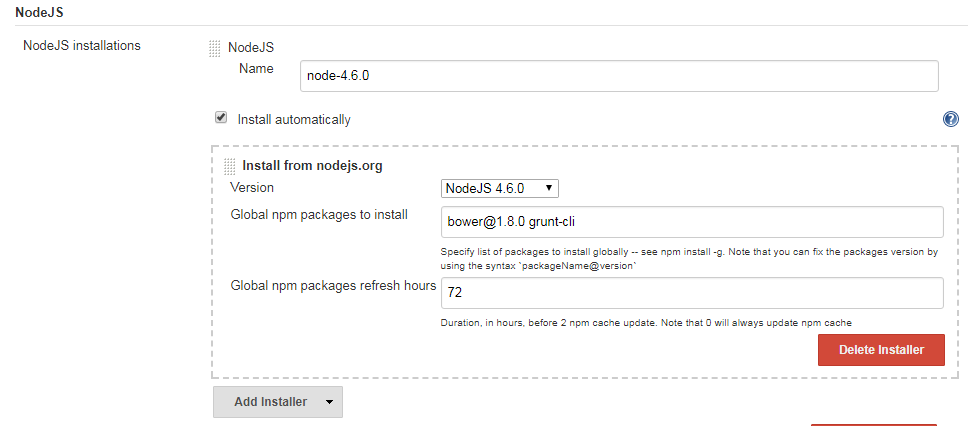
I have installed jenkins on my local windows 7. I have installed java 8. I have downloaded jenkins from official website & completed setup by signing up.
I have spring boot project with jenkinsFile so I started creating job with pipeline. I have setup pipeline from SCM git/bitbucket. I have also added specific Branch in Branches to build & script path as jenkinsFile path.
I have installed plugins like NodeJSPlugin. & configured in global tool configuration for NodeJS installation.
I tried multiple ways to install bower package but it won't give me success. Also after bower I want to install gulp.
This is how my job is created.
please find below error log.
[Pipeline] tool$ cmd /c "C:\Program Files (x86)\Jenkins\tools\jenkins.plugins.nodejs.tools.NodeJSInstallation\node-4.6.0\npm.cmd" install -g npm install -g npmC:\Program Files (x86)\Jenkins\tools\jenkins.plugins.nodejs.tools.NodeJSInstallation\node-4.6.0\npm -> C:\Program Files (x86)\Jenkins\tools\jenkins.plugins.nodejs.tools.NodeJSInstallation\node-4.6.0\node_modules\npm\bin\npm-cli.jsC:\Program Files (x86)\Jenkins\tools\jenkins.plugins.nodejs.tools.NodeJSInstallation\node-4.6.0\npx -> C:\Program Files (x86)\Jenkins\tools\jenkins.plugins.nodejs.tools.NodeJSInstallation\node-4.6.0\node_modules\npm\bin\npx-cli.js+ ins...@0.10.1+ n...@5.3.0+ n...@5.3.0updated 2 packages in 89.036s[Pipeline] stage[Pipeline] { (check tools)[Pipeline] sh[C:\Program Files (x86)\Jenkins\workspace\test-project-v0.1] Running shell script+ node -vv6.10.0[Pipeline] sh[C:\Program Files (x86)\Jenkins\workspace\test-project-v0.1] Running shell script+ npm -v3.10.10[Pipeline] sh[C:\Program Files (x86)\Jenkins\workspace\test-project-v0.1] Running shell script+ bower -vC:/Program Files (x86)/Jenkins/workspace/test-project-v0.1@tmp/durable-4ecb94cf/script.sh: line 2: bower: command not found[Pipeline] }[Pipeline] // stage[Pipeline] }[Pipeline] // node[Pipeline] End of PipelineERROR: script returned exit code 127Finished: FAILURE
I tried multiple ways to install by trying Global npm packages to install as - npm install -g grunt-bower-cli, npm install -g bower, bo...@1.8.0 grunt-cli .
So can someone help me to resolve the issue ?

Joshua Noble
Jul 24, 2017, 12:48:37 PM7/24/17
to Jenkins Users
The version of NodeJS that you're able to call doesn't appear to be installed by Jenkins, it's likely already installed on the system and just happens to be there. I say this because your terminal output clearly shows 6.10.0, but your Jenkins screen shot says 4.6.0. There is a difference in versions. Where is 6.10.0 coming from?
On a related note, why are you using npm AND bower? Pretty much everything available in bower can be pulled in via npm as well. Using two JavaScript package managers will complicate things for sure. Bower lost this battle a long time ago and most of the community is solely using npm now since bower has been deprecated: https://github.com/bower/bower/issues/2298
Sarjerao Jadhav
Jul 25, 2017, 2:41:39 AM7/25/17
to Jenkins Users
Thanks for the reply Joshua.
Let me explain. I have bower packages & it is well working on dev side. Now project will be moving to production. I have both npm & bower. I can't change bower packages to npm. So whats alternative for that ?
I need to make CI-CD & I have pipeline which generated from jhipster ci-cd generator.
Please see below pipeline :-
node {stage('checkout') {checkout scm}// uncomment these 2 lines and edit the name 'node-4.6.0' according to what you choose in configurationdef nodeHome = tool name: 'node-4.6.0', type: 'jenkins.plugins.nodejs.tools.NodeJSInstallation'env.PATH = "${nodeHome}/bin:${env.PATH}"stage('check tools') {sh "node -v"sh "npm -v"sh "bower -v"sh "gulp -v"}stage('npm install') {sh "npm install"}stage('clean') {sh "./mvnw clean"}stage('backend tests') {try {sh "./mvnw test"} catch(err) {throw err} finally {step([$class: 'JUnitResultArchiver', testResults: '**/target/surefire-reports/TEST-*.xml'])}}stage('frontend tests') {try {sh "gulp test"} catch(err) {throw err} finally {step([$class: 'JUnitResultArchiver', testResults: '**/target/test-results/karma/TESTS-*.xml'])}}stage('packaging') {sh "./mvnw package -Pprod -DskipTests"}}
I am stuck at line sh "bower -v" in check tools stage.
Please suggest someway to overcome this issue.
C:/Program Files (x86)/Jenkins/workspace/test-project-v0.1 AtTheRate tmp/durable-4ecb94cf/script.sh: line 2: bower: command not found
[Pipeline] }[Pipeline] // stage[Pipeline] }[Pipeline] // node[Pipeline] End of PipelineERROR: script returned exit code 127Finished: FAILURE
Sarjerao Jadhav
Jul 25, 2017, 7:17:38 AM7/25/17
to Jenkins Users
I have done some R&D for these errors. Please see the
When choose Job Type as "Free Style Project" then we can set option Provide Node & npm bin/ folder to PATH Then we can build project successfully with bower & it is also displaying bower version. Refer below snapshot where we can do settings for Free Style project.

In other case we face issues which I mentioned above for bower. If we choose Job Type as Pipeline then we don't have any option to check or select Provide Node & npm bin/ folder to PATH.
Refer below snapshot where we can do settings for pipeline project.

@Jenkins Team, can you check this ?
can we not make available option (Provide Node & npm bin/ folder to PATH) for both the Job/Project type. If we can do that then this issues will be solved for all.
C:/Program Files (x86)/Jenkins/workspace/test-project-v0.1 AtTheRate tmp/durable-4ecb94cf/script.sh: line 2: bower: command not found
[Pipeline] }[Pipeline] // stage[Pipeline] }[Pipeline] // node[Pipeline] End of PipelineERROR: script returned exit code 127Finished: FAILURE
Reply all
Reply to author
Forward
0 new messages