
Need help/guidance on jenkins/plot plugin setup and configure

Charley Yen
|
I am new to Jenkins and need some help to configure it so that it can display my test results in pie chart. It's my first time being here and still getting to know this group so if someone has already asked the same or similar question before, my apology. I actually did a search. But still, I could have missed the previous posts. I have a tool to run a smoke test which is to install a piece of software on multiple hosts. And my tool can keep track the number of passed/failed/skipped installations. I want to display the test statistics in a pie chart on jenkins. What plug-ins am I supposed to use? What kind of data file am I supposed to provide? Please show me step by step with data file format and the screen shots.I guess I should generate either csv or xml files. But I don't know what the exact formats in either file. And I don't know how to configure my jenkins to read this file. I don't even know what plugin I should use, plot plugin or dashboard plugin or something else? I hope I have made myself clear and your help is highly appreciated. |

Mark Waite
--
You received this message because you are subscribed to the Google Groups "Jenkins Users" group.
To unsubscribe from this group and stop receiving emails from it, send an email to jenkinsci-use...@googlegroups.com.
For more options, visit https://groups.google.com/groups/opt_out.
Charley Yen
I visited the link you gave me. But I don't see any charts/plots there. Maybe I misunderstood you?
My tests are not JUnit tests.
Here is what we do at work:
I developed a cmdline test tool in perl. This tool tests whether our nightly builds (in perforce, mainly c codes at kernel level) can be installed on 100+ Linux hosts. So it is merely a smoke test.
My tool can compile a report in html format which lists pass/fail/skip on every host with links to the detailed log files.
I have configured my test tool run through Jenkins. What I am trying to do now is as follows:
Besides publish the html report, it would be nice to draw a pie chart to show the results visually, such as 90% pass (in green), 2% fail (in red) and 8% skipped (in yellow).
But I don't know --
1) How to format the data for Jenkins to use? CSV of XML? Please show me smaple files.
2) What plugin to use? I guess it might be either plot plugin or dashboard view plugin?
3) How to configure my jenkins to read the data file? Please show me what-to-do/how-to-do step by step with screen shots. All I know is that this has to be done in "Post-build Actions" stage.
In addition, I have read this book: "Jenkins Continous Integration Cookbook" by Alan Mark Berg:
http://s1.downloadmienphi.net/file/downloadfile7/171/1380449.pdf
The book has an example and I could make it work on my jenkins.
However, the book also says (pp. 91):
"There are currently two other data formats that you can use: XML and CSV. However, until the online help clearly explains the structures used, I would recommend staying with the properties format."
That's exactly what I need, I guess. :(
Again, thank you, Mark. Your help is highly appreciated. Have a wonderful 2014.
Charley
Mark Waite
Mark Waite
Charley Yen
I should be the one to apologize for not having made myself clear.
What is the JUnit format? Could you show me an example?
Yes, I can write my tool to produce any formats to feed jenkins. My problem is I don't know WHAT format my tool should produce. I need a sample data file to show me the format, either CSV or XML.
BTW, I don't know much about Java and/or JUnit. I just want to have jenkins plot a pie chart after EACH run of my tool which is implemented in perl.
Please show me a sample data file. for instance, would the following formats work?
CSV:
pass,fail,skip
90%,2%,8%
XML:
<pass>90%</pass>
<fail>2%</fail>
<skip>8%</skip>
If they work, what configurations do I need to do in "Post-build Actions"? Please show me the screen shots.
For the links ou gave me, I wish I could see the configure page.
Again, thank you so much, mark, for your time, effort, and help!
Mark Waite
Charley Yen
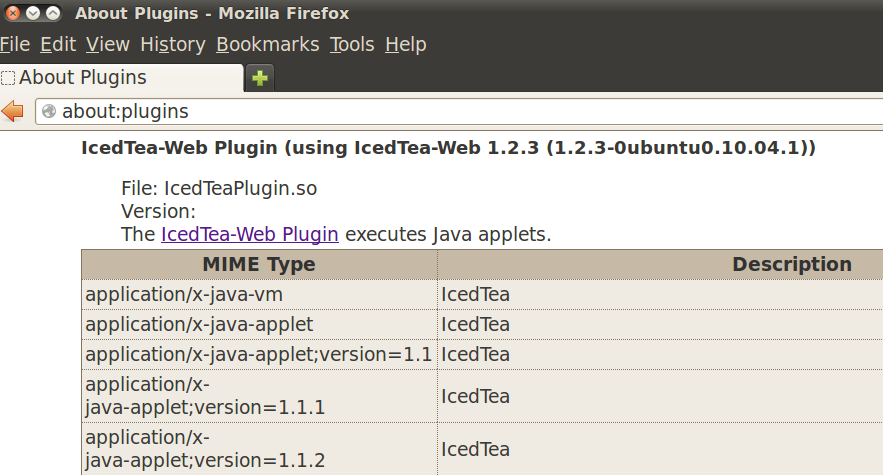
The error msg is:

However, I have java plugin installed and configured.
% java -version
java version "1.6.0_27"
OpenJDK Runtime Environment (IcedTea6 1.12.6) (6b27-1.12.6-1ubuntu0.10.04.4)
OpenJDK 64-Bit Server VM (build 20.0-b12, mixed mode)
% update-alternatives --display java
java - auto mode
link currently points to /usr/lib/jvm/java-6-openjdk/jre/bin/java
/usr/lib/jvm/java-6-openjdk/jre/bin/java - priority 1061
slave java.1.gz: /usr/lib/jvm/java-6-openjdk/jre/man/man1/java.1.gz
Current `best' version is /usr/lib/jvm/java-6-openjdk/jre/bin/java.
Please also refer to the attached screen shot.
What am I missing here?
Again, thank you so much, mark.
Mark Waite
Sorry, I don't have any idea how to make that site work with your browser configuration.
You will need to find your way without that screencast.
Mark Waite
Charley Yen
Thank you for your prompt reply. Before I figure out how to watch your screen cast, please allow me asking you another question.
First of all, thank you so much for the links provided in your reply. They are indeed very helpful.
Now I also found a sample JUnit format:
<testsuite tests="3"> <testcase classname="foo" name="ASuccessfulTest"/> <testcase classname="foo" name="AnotherSuccessfulTest"/> <testcase classname="foo" name="AFailingTest"> <failure type="NotEnoughFoo"> details about failure </failure> </testcase> </testsuite>Post-build Actions? Some screen shots would very helpful.
Let's assume my test tool created this file. What configurations should I do inside my jenkins/
Again, thank you for your help.
Charley Yen


The 1st screen shot shows my configuration.
After save and rerun the build, I can only see the html report (2nd screen shot).
But I don't know where to find the "JUnit test report".is it because I missed some plug-ins? what plug-in do I need?
Thanks.
Charley Yen
Please, someone please tell me which one I should use. I just want to a visual display of my test results.
Thanks and wish you all a wonderful 2014!!
Mark Waite

--
Charley Yen
I just want to tell you that I watched your video from my home machine (I cannot watch it from work). It's very helpful. Thank you so much.
So I configured my jenkins by following your video.
I wrote a small perl code which does nothing but creating an xml file.
After a run in jenkins, the console output is like this:
Recording test results
Build step 'Publish JUnit test result report' changed build result to UNSTABLE

Why am I getting this?

In addition, I still don't know how to create a pie chart by publishing the JUnit test result report.

Again, thanks for your help. It would be nice to publish your video in youtube.
Mark Waite
--
Charley Yen
Line numbers are also included here. Could you please tell me which line(s) would cause a test result failure?
Thanks.
1 #!/usr/bin/perl
2
3 use strict;
4 use warnings;
5 use File::Path;
6 use File::Copy;
7 use FindBin '$Bin';
8
9 my $org_rslt = "$Bin/TEST-results.xml.org"; # a predefined static xml file
10 my $rslt = "$Bin/TEST-results.xml";
11 rmtree($rslt) if(-e $rslt);
12
13 if(-e $org_rslt) {
14 if(!copy($org_rslt, $rslt)) { # To create a fresh xml file
15 print "Failed to copy '$org_rslt' to '$rslt'!\n";
16 }
17 }
18 else {
19 print "===--->>>The original result file '$org_rslt' does not exist!!\n";
20 }
21
22 if(-e $rslt) {
23 print "The NEW result file '$rslt' exists!\n";
24 }
25 else {
26 print "===--->>>The NEW result file '$rslt' does not exists!\n";
27 }
28 exit 0; # always exit gracefully no matter what

Kevin Fleming (BLOOMBERG/ 731 LEXIN)
Charley Yen
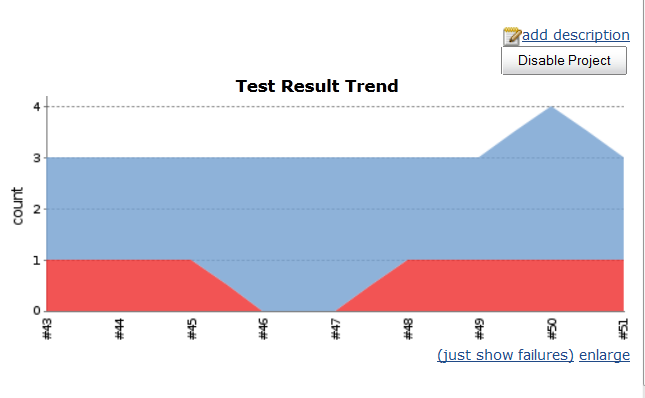
And I got the plot working (See the attached screen shot). Though it's not a pie chart I want, it still serves my purpose.
Now I have some follow-up questions:
1) As it's shown in the attached screen shot, there were two passes & one fail. Is there a way to display it as 67% passed and 33% failed, instead?
The xml file I am using now is list below:
<testsuite tests="4">
<testcase classname="foo" name="ASuccessfulTest"/>
<testcase classname="foo" name="AnotherSuccessfulTest"/>
<testcase classname="foo" name="AFailingTest">
</testcase>
</testsuite>
2) What is the appropriate way to the failed log file in the link, e.g. <failure type="NotEnoughFoo"> <a href="log.html">details about failure</a></failure>?
3) How to construct the xml file to include skipped tests, if any?
Thanks.
Charley Yen

While publishing JUnit test result, is there a way we can define "Number of builds to include"?
Please refer to the attached screen shot, which includes more than 20 runs. How can I configure my jenkins to let it only include last ten runs?
Thanks!
Charley Yen
|
I just found out two ways to handle this issue by removing old build history. 1) Refer to answers to this thread: http://stackoverflow.com/questions/3410141/how-do-i-clear-my-hudson-build-history
2) In config page, you can set number of builds & artifacts you want to keep. Please refer to the screen shot attached. There should a way just to limit number of builds in the plot without remove them from the server. But I have not figured out how, yet. I'd appreciate someone could kindly show me. |
