[JIRA] (JENKINS-60264) Running a multibranch pipeline job results in missing workspace error

12 views
Skip to first unread message

soundcracker@gmail.com (JIRA)

unread,
Nov 25, 2019, 6:02:02 AM11/25/19
to jenkinsc...@googlegroups.com
Daniel Estermann updated an issue
 
Jenkins / Bug JENKINS-60264
Running a multibranch pipeline job results in missing workspace error
Change By: Daniel Estermann
I build my own Jenkins image and check it's sanity by starting in in a docker container and trying to login to it. I achieve this using the following Jenkinsfile:

{code}
    stages {
        stage('Build Jenkins Master Image') {
            steps {
                sh(
                     script: """
                     cd Jenkins-Master
                     docker pull jenkins:latest
                     docker build --rm -t ${IMAGE_TAG} .
                     """
                )
            }
        }
        stage('Image sanity check') {
            steps {
                withCredentials([string(credentialsId: 'CASC_VAULT_TOKEN', variable: 'CASC_VAULT_TOKEN'),
                     usernamePassword(credentialsId: 'Forge_service_account', passwordVariable: 'JENKINS_PASSWORD', usernameVariable: 'JENKINS_LOGIN')]) {
                    sh(
                     script: """
                     docker run -e CASC_VAULT_TOKEN=${CASC_VAULT_TOKEN} \
                     --name jenkins \
                     -d \
                     -p 8080:8080 ${IMAGE_TAG}
                     mvn -Djenkins.test.timeout=${GLOBAL_TEST_TIMEOUT} -B -f Jenkins-Master/pom.xml test
                     """
                    )
                }
            }
        }
{code}

The test is successful, but the build fails with the following log:

{code}
[2019-11-25T10:33:38.333Z] Nov 25, 2019 11:33:37 AM ch.ti8m.forge.jenkins.logintest.LocalhostJenkinsRule before
[2019-11-25T10:33:38.333Z] INFO: Waiting for Jenkins instance... (response code 503)
[2019-11-25T10:33:43.628Z] Nov 25, 2019 11:33:42 AM ch.ti8m.forge.jenkins.logintest.LocalhostJenkinsRule before
[2019-11-25T10:33:43.628Z] INFO: Waiting for Jenkins instance... (response code 503)
[Pipeline] }
[Pipeline] // withCredentials
[Pipeline] }
[Pipeline] // withEnv
[Pipeline] }
[Pipeline] // stage
[Pipeline] stage
[Pipeline] { (Push Jenkins Master Image)
Stage "Push Jenkins Master Image" skipped due to earlier failure(s)
[Pipeline] }
[Pipeline] // stage
[Pipeline] }
[Pipeline] // withEnv
[Pipeline] }
[Pipeline] // ansiColor
[Pipeline] }
[Pipeline] // timeout
[Pipeline] }
[Pipeline] // timestamps
[Pipeline] }
[Pipeline] // withEnv
[Pipeline] }
[Pipeline] // withEnv
[Pipeline] }
[Pipeline] // node
[Pipeline] End of Pipeline
ERROR: missing workspace /data/ci/workspace/orge_ti8m-ci-2.0_main-instance_8 on srvzh-jenkinsnode-tst-005
Finished: FAILURE
{code}

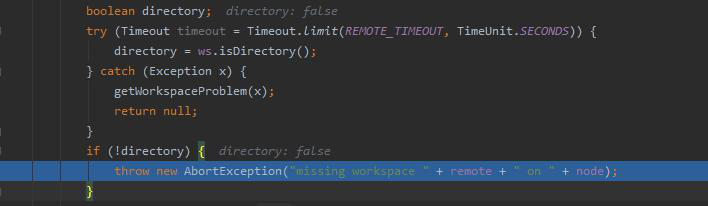
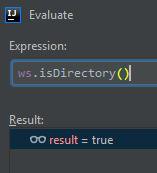
As I debug in {{workflow-durable-task-step}} I notice a strange behavior. My breakpoint is set to [DurableTaskStep.java#L386|https://github.com/jenkinsci/workflow-durable-task-step-plugin/blob/bbc10c7ef26ba70cd2e85b3b3105c12ee9ec9692/src/main/java/org/jenkinsci/plugins/workflow/steps/durable_task/DurableTaskStep.java#L386], when it halts there, it means {{ws.isDirectory()}}
} returned {{false}}. But during this break in debugger I evaluate {{ws.isDirectory()}} manually and it returns {{true}}.

!image-2019-11-25-12-00-07-262.png|thumbnail!
!image-2019-11-25-12-00-29-961.png|thumbnail!
!image-2019-11-25-12-00-35-176.png|thumbnail!

Any ideas what might cause this?
Add Comment Add Comment
 
This message was sent by Atlassian Jira (v7.13.6#713006-sha1:cc4451f)
Atlassian logo

soundcracker@gmail.com (JIRA)

unread,
Nov 25, 2019, 6:02:03 AM11/25/19
to jenkinsc...@googlegroups.com
Daniel Estermann created an issue
Issue Type: Bug Bug
Assignee: Unassigned
Attachments: image-2019-11-25-12-00-07-262.png, image-2019-11-25-12-00-29-961.png, image-2019-11-25-12-00-35-176.png
Components: workflow-durable-task-step-plugin
Created: 2019-11-25 11:01
Environment: jenkins-core 2.205
workflow-durable-task-step 2.35
Priority: Major Major
Reporter: Daniel Estermann

I build my own Jenkins image and check it's sanity by starting in in a docker container and trying to login to it. I achieve this using the following Jenkinsfile:

    stages {
        stage('Build Jenkins Master Image') {
            steps {
                sh(
                        script: """
                            cd Jenkins-Master
                            docker pull jenkins:latest
                            docker build --rm -t ${IMAGE_TAG} .
                        """
                )
            }
        }
        stage('Image sanity check') {
            steps {
                withCredentials([string(credentialsId: 'CASC_VAULT_TOKEN', variable: 'CASC_VAULT_TOKEN'),
                                 usernamePassword(credentialsId: 'Forge_service_account', passwordVariable: 'JENKINS_PASSWORD', usernameVariable: 'JENKINS_LOGIN')]) {
                    sh(
                        script: """
                                docker run -e CASC_VAULT_TOKEN=${CASC_VAULT_TOKEN} \
                                           --name jenkins \
                                           -d \
                                           -p 8080:8080 ${IMAGE_TAG}
                                mvn -Djenkins.test.timeout=${GLOBAL_TEST_TIMEOUT} -B -f Jenkins-Master/pom.xml test
                                """
                    )
                }
            }
        }

The test is successful, but the build fails with the following log:

[2019-11-25T10:33:38.333Z] Nov 25, 2019 11:33:37 AM ch.ti8m.forge.jenkins.logintest.LocalhostJenkinsRule before
[2019-11-25T10:33:38.333Z] INFO: Waiting for Jenkins instance... (response code 503)
[2019-11-25T10:33:43.628Z] Nov 25, 2019 11:33:42 AM ch.ti8m.forge.jenkins.logintest.LocalhostJenkinsRule before
[2019-11-25T10:33:43.628Z] INFO: Waiting for Jenkins instance... (response code 503)
[Pipeline] }
[Pipeline] // withCredentials


As I debug in workflow-durable-task-step I notice a strange behavior. My breakpoint is set to DurableTaskStep.java#L386, when it halts there, it means ws.isDirectory()} returned false. But during this break in debugger I evaluate ws.isDirectory() manually and it returns true.


Any ideas what might cause this?

jenkins@gavinmogan.com (JIRA)

unread,
Jan 8, 2020, 7:51:07 AM1/8/20
to jenkinsc...@googlegroups.com
Gavin Mogan commented on Bug JENKINS-60264
 
Re: Running a multibranch pipeline job results in missing workspace error

Repeating from on gitter:

your bug essentially reads "I am building my own docker image using secret steps. The secret tests fail, and my pipeline fails". Which seems right, when tests fail, mvn exit code > 0, and pipeline exits


Based on your super truncated error message / log, I'm pretty sure its failing on the mvn test. I don't know what jenkins, or your pom file does for mvn test, but it doesn't feel like a pipeline issue to me.

soundcracker@gmail.com (JIRA)

unread,
Jan 8, 2020, 8:40:03 AM1/8/20
to jenkinsc...@googlegroups.com

Thank you for pointing that out! Now I see something else, which is also suspicious. Maven doesn't print a report on test result as usual. Usually it outputs the number of tests run, how many are failed or skipped, no matter if test fails or succeeds.

soundcracker@gmail.com (JIRA)

unread,
Jan 24, 2020, 6:58:03 AM1/24/20
to jenkinsc...@googlegroups.com

I still cannot resolve this because I don't understand why maven process just quits. I mean if the test would fail, maven still should output the test summary. It looks like the process gets killed for some inexplicable reason...

soundcracker@gmail.com (JIRA)

unread,
Feb 3, 2020, 12:13:04 PM2/3/20
to jenkinsc...@googlegroups.com

soundcracker@gmail.com (JIRA)

unread,
Feb 3, 2020, 12:13:04 PM2/3/20
to jenkinsc...@googlegroups.com
 

I fixed it... it makes some sense now. The jenkins image I started within the test was using the same buildslave-configuration as the jenkins instance itself. It seems that it somehow affected the connections to the buildslaves, especially to the node where the test was running. I could workaround it like this:

                        script: """
                                mkdir /tmp/casc_configs/ && echo "" > /tmp/casc_configs/nodes.yaml && chown -R 1000:1000 /tmp/casc_configs/
                                docker run -e CASC_VAULT_TOKEN=${CASC_VAULT_TOKEN} \
                                           --name jenkins \
                                           -d \
                                           -p 8080:8080 \
                                           -v /tmp/casc_configs/:/var/jenkins_home/casc_configs/ \
                                           ${IMAGE_TAG}
                                mvn -Djenkins.test.timeout=${GLOBAL_TEST_TIMEOUT} -B -f Jenkins-Master/pom.xml test
                                """
Change By: Daniel Estermann
Status: Open Fixed but Unreleased
Resolution: Fixed
Reply all
Reply to author
Forward
0 new messages