[JIRA] [git-parameter-plugin] (JENKINS-34876) Git Parameters not working for Pipeline projects and Jenkinsfile from SCM

127 views
Skip to first unread message

andreas.oetken@siemens.com (JIRA)

unread,
May 17, 2016, 5:41:01 AM5/17/16
to jenkinsc...@googlegroups.com
Andreas Oetken created an issue
 
Jenkins / Improvement JENKINS-34876
Git Parameters not working for Pipeline projects and Jenkinsfile from SCM
Issue Type: Improvement Improvement
Assignee: Andreas Oetken
Components: git-parameter-plugin
Created: 2016/May/17 9:40 AM
Environment: Jenkins version 2.3, all Plugins up to date. Debian 8 64 Bits x86.
Priority: Minor Minor
Reporter: Andreas Oetken

I try to setup a pipeline project to build tags using a Jenkinsfile from SCM (Git). Therefore I want to be be able to set the tag I wish to build via the Git Parameter Plugin. If I setup the project like this and hit the "Build with Parameters" button the git parameter plugin tells me "!No Git repository configured in SCM configuration".

Add Comment Add Comment
 
This message was sent by Atlassian JIRA (v6.4.2#64017-sha1:e244265)
Atlassian logo

sebastian.mandrean@gmail.com (JIRA)

unread,
Jun 7, 2016, 11:38:01 AM6/7/16
to jenkinsc...@googlegroups.com

jstroot@cyverse.org (JIRA)

unread,
Jul 13, 2016, 5:20:02 PM7/13/16
to jenkinsc...@googlegroups.com

Me as well. You can't pass a parameter into the `Branch specifier` field of the pipeline SCM section, can you? I tried, unsuccessfully.

This message was sent by Atlassian JIRA (v7.1.7#71011-sha1:2526d7c)
Atlassian logo

klimas7@gmail.com (JIRA)

unread,
Jul 27, 2016, 7:17:01 AM7/27/16
to jenkinsc...@googlegroups.com

jglick@cloudbees.com (JIRA)

unread,
Aug 16, 2016, 5:04:03 PM8/16/16
to jenkinsc...@googlegroups.com

jglick@cloudbees.com (JIRA)

unread,
Aug 16, 2016, 5:04:03 PM8/16/16
to jenkinsc...@googlegroups.com
Jesse Glick commented on Improvement JENKINS-34876
 
Re: Git Parameters not working for Pipeline projects and Jenkinsfile from SCM

Not a duplicate. Rather missing Pipeline integration with this plugin.

ganthore@gmail.com (JIRA)

unread,
Aug 17, 2016, 2:50:03 PM8/17/16
to jenkinsc...@googlegroups.com

I observed the same problem.

I came up with a workaround, note that you need git 2.0 in order to do this...

1) I wrote a script that is executed inside of the git checkout root:

[code]
git tag -l --sort=version:refname | sort -r | xargs echo -n | sed 's/ /,/g' | sed '1s/^/key=/' > versions.properties
[code]

ganthore@gmail.com (JIRA)

unread,
Aug 17, 2016, 2:50:10 PM8/17/16
to jenkinsc...@googlegroups.com
Mark Austin updated an issue
 
Change By: Mark Austin
Comment:
I observed the same problem.

I came up with a workaround, note that you need git 2.0 in order to do this...

1) I wrote a script that is executed inside of the git checkout root:

[code]
git tag -l --sort=version:refname | sort -r | xargs echo -n | sed 's/ /,/g' | sed '1s/^/key=/' > versions.properties
[code]

ganthore@gmail.com (JIRA)

unread,
Aug 17, 2016, 2:53:05 PM8/17/16
to jenkinsc...@googlegroups.com
Mark Austin updated an issue
Change By: Mark Austin
Attachment: Screenshot_20160817_145201.png

ganthore@gmail.com (JIRA)

unread,
Aug 17, 2016, 2:57:14 PM8/17/16
to jenkinsc...@googlegroups.com
Mark Austin updated an issue
Change By: Mark Austin
Attachment: Screenshot_20160817_145625.png

ganthore@gmail.com (JIRA)

unread,
Aug 17, 2016, 2:58:06 PM8/17/16
to jenkinsc...@googlegroups.com
 
Re: Git Parameters not working for Pipeline projects and Jenkinsfile from SCM

I observed the same behavior, but I came up with a hacky workaround...

I wrote a shell script that will dump git tags into a sorted list that can be ingested as a property file when using the the Extended Choice Parameter plugin.

1) Run this script in the root of your git checkout dir:

genVers.sh
git tag -l --sort=version:refname | sort -r | xargs echo -n | sed 's/ /,/g' | sed '1s/^/key=/' > /tmp/versions.properties

2) Install the Extended Choice Parameter plugin and add it to your job
https://wiki.jenkins-ci.org/display/JENKINS/Extended+Choice+Parameter+plugin

3) Point the config to the property file you generated and set the key. See my attached example:

4) Test it

klimas7@gmail.com (JIRA)

unread,
Aug 17, 2016, 3:29:05 PM8/17/16
to jenkinsc...@googlegroups.com
Boguslaw Klimas started work on Improvement JENKINS-34876
 
Change By: Boguslaw Klimas
Status: Open In Progress

scott.crooks@vacasa.com (JIRA)

unread,
Aug 23, 2016, 1:46:01 PM8/23/16
to jenkinsc...@googlegroups.com

Mark Austin With your script, does this assume that the Git repo has already been checked out? I'm just wondering how to run the script before the Pipeline starts. It seems you need to run the script before the pipeline actually starts so that you can populate some variable with your desired tag. The question would be, where would the one line BASH command be executed?

klimas7@gmail.com (JIRA)

unread,
Aug 23, 2016, 3:34:06 PM8/23/16
to jenkinsc...@googlegroups.com

Hi Guys,
I working on resolving this issue. I have prototype solution.
Which supports Pipline job.
I hope to resolved this in release 0.7.0 Releases schedule

Regards

deep.anu98@yahoo.co.in (JIRA)

unread,
Aug 25, 2016, 10:32:02 AM8/25/16
to jenkinsc...@googlegroups.com

ganthore@gmail.com (JIRA)

unread,
Aug 25, 2016, 10:37:04 AM8/25/16
to jenkinsc...@googlegroups.com
Mark Austin commented on Improvement JENKINS-34876
 
Re: Git Parameters not working for Pipeline projects and Jenkinsfile from SCM

Hey Scott,

Yes that is correct. I'd have the git repo poll and then ensure that the script is executed after each run. I know it's not ideal, but it works for now until Boguslaw Klimas get's things patched up.

ganthore@gmail.com (JIRA)

unread,
Aug 25, 2016, 10:37:11 AM8/25/16
to jenkinsc...@googlegroups.com
Mark Austin edited a comment on Improvement JENKINS-34876
Hey Scott,

Yes that is correct. I'd have the git repo poll and then ensure that the script is executed after each run. I know it's not ideal, but it works for now until [~klimas7]
get's gets things patched up. :-)

ganthore@gmail.com (JIRA)

unread,
Aug 25, 2016, 10:37:15 AM8/25/16
to jenkinsc...@googlegroups.com
Mark Austin edited a comment on Improvement JENKINS-34876
Hey Scott,

Yes that is correct. I'd have the git repo poll and then ensure that the script is executed after each
run poll . I know it's not ideal, but it works for now until [~klimas7] gets things patched up. :-)

scott.crooks@vacasa.com (JIRA)

unread,
Aug 25, 2016, 2:09:02 PM8/25/16
to jenkinsc...@googlegroups.com

Mark Austin Mark,

Can you be a bit more detailed about your job setup? I get that the BASH command you have above will grab the list of tags, and that it will put that in a file, and that the Extended Choice parameter will read that file at build time. What I don't get is when that BASH command is executed? In Jenkins pipeline, there's no option to run a BASH script before the Extended Choice plugin grabs the list of tags.

scott.crooks@vacasa.com (JIRA)

unread,
Aug 25, 2016, 2:18:02 PM8/25/16
to jenkinsc...@googlegroups.com
Scott Crooks edited a comment on Improvement JENKINS-34876
[~ganthore] Mark ,

Can you be a bit more detailed about your job setup? I get that the BASH command you have above will grab the list of tags, and that it will put that in a file, and that the Extended Choice parameter will read that file at build time. What I don't get is when that BASH command is executed? In Jenkins pipeline, there's no option to run a BASH script _before_ the Extended Choice plugin grabs the list of tags.

ganthore@gmail.com (JIRA)

unread,
Aug 25, 2016, 2:19:03 PM8/25/16
to jenkinsc...@googlegroups.com

Hey Scott,

There are a number of ways you could do this. The end goal is to make sure that the script runs on a regular basis or immediatley after the slave builder has polled the git repo.

For instance, you could have the script execute on the slave directly through something as simple as a cron job.

Or, you could also try running it with a post-merge git hook, that way it runs each time after a "git pull" occurs. Here is a basic example that you could modify for your needs:
https://gist.github.com/sindresorhus/7996717

If you're familiar with incron (http://inotify.aiken.cz/?section=incron&page=why&lang=en), you could have that daemon execute the script each time it notices a file change in the git checkout folder on the slave.

... or just wait for this bug to get patched.

Hope this helps...

ganthore@gmail.com (JIRA)

unread,
Aug 25, 2016, 3:14:02 PM8/25/16
to jenkinsc...@googlegroups.com
Mark Austin edited a comment on Improvement JENKINS-34876
Hey Scott,

There are a number of ways you could do this. The end goal is to make sure that the script runs on a regular basis or
immediatley immediately after the slave builder jenkins workspace has polled the git repo.

For instance, you could have the script execute on the
slave jenkins master directly through something as simple as a cron job.

Or, you could also try running it with a post-merge git hook
in the workspace , that way it runs each time after a "git pull" occurs. Here is a basic example that you could modify for your needs:
https://gist.github.com/sindresorhus/7996717

If you're familiar with incron (http://inotify.aiken.cz/?section=incron&page=why&lang=en), you could have that daemon execute the script each time it notices a file change in the git checkout folder on the
slave workspace .

... or just wait for this bug to get patched. :-)

Hope this helps...

ganthore@gmail.com (JIRA)

unread,
Aug 25, 2016, 3:31:05 PM8/25/16
to jenkinsc...@googlegroups.com
Mark Austin edited a comment on Improvement JENKINS-34876
Hey Scott,

I guess we could just run a script like this as an alternative on the Jenkins master so that the main workspace has access to the properties file:

git ls-remote -t https://github.com/jenkinsci/github-plugin | awk '{print $2}' | cut -d '/' -f 3 | cut -d '^' -f 1 | sort -b -t . -k 1,1nr -k 2,2nr -k 3,3r -k 4,4r -k 5,5r | uniq | xargs echo -n | sed 's/ /,/g' | sed '1s/^/key=/' > /tmp/versions.properties

That way we don't have to force Jenkins to double checkout the git repo per my older example.

There are a number of ways you could do this. The end goal is to make sure that the script runs on a regular basis or immediately after the jenkins workspace has polled the git repo.

For instance, you could have the script execute on the jenkins master directly through something as simple as a cron job.

Or, you could also try running it with a post-merge git hook in the workspace, that way it runs each time after a "git pull" occurs. Here is a basic example that you could modify for your needs:
https://gist.github.com/sindresorhus/7996717

If you're familiar with incron (http://inotify.aiken.cz/?section=incron&page=why&lang=en), you could have that daemon execute the script each time it notices a file change in the git checkout folder on the workspace.


... or just wait for this bug to get patched. :-)

Hope this helps...

ganthore@gmail.com (JIRA)

unread,
Aug 25, 2016, 3:32:03 PM8/25/16
to jenkinsc...@googlegroups.com
Mark Austin edited a comment on Improvement JENKINS-34876
Hey Scott,

I guess we could just run a script like this as an alternative on the Jenkins master so that the main workspace has access to the properties file:

{code}
git ls-remote -t https://github.com/jenkinsci/github-plugin | awk '{print $2}' | cut -d '/' -f 3 | cut -d '^' -f 1 | sort -b -t . -k 1,1nr -k 2,2nr -k 3,3r -k 4,4r -k 5,5r | uniq | xargs echo -n | sed 's/ /,/g' | sed '1s/^/key=/' > /tmp/versions.properties
{code}

That way we don't have to force Jenkins to double checkout the git repo per my older example.

There are a number of ways you could do this. The end goal is to make sure that the script runs on a regular basis or immediately after the jenkins workspace has polled the git repo.

For instance, you could have the script execute on the jenkins master directly through something as simple as a cron job.

Or, you could also try running it with a post-merge git hook in the workspace, that way it runs each time after a "git pull" occurs. Here is a basic example that you could modify for your needs:
https://gist.github.com/sindresorhus/7996717

If you're familiar with incron (http://inotify.aiken.cz/?section=incron&page=why&lang=en), you could have that daemon execute the script each time it notices a file change in the git checkout folder on the workspace.

... or just wait for this bug to get patched. :-)

Hope this helps...

scott.crooks@vacasa.com (JIRA)

unread,
Aug 25, 2016, 4:41:03 PM8/25/16
to jenkinsc...@googlegroups.com

Mark Austin We currently "solve" the problem by doing essentially what you suggested at build time using a pipeline stage:

parallel (
getRepo1Tags: {
sh("git ls-remote --quiet --tags --heads $

{repo1GitUrl} | awk '{print \$2}' | grep -vi '{}' | cut -d/ -f1,2 --complement > ${repo1TmpTags}")
},
getRepo2Tags: {
sh("git ls-remote --quiet --tags --heads ${repo1GitUrl}

| awk '

{print \$2}

' | grep -vi '{}' | cut -d/ -f1,2 --complement > $

{repo2TmpTags}

")
}
)

After that we use the "input" command in pipeline to pause the build and wait for user input.

def listofRepo1TagsBranches = readFile(repo1TmpTags).trim()
def repo1TagBranch = input([message: 'Select a Git branch / tag', parameters: [[$class: 'ChoiceParameterDefinition', choices: listofRepo1TagsBranches, description: '', name: 'Repo 1 branch / tag to build']]])

def listofRepo2TagsBranches = readFile(repo2TmpTags).trim()
def repo2TagBranch = input([message: 'Select a Git branch / tag', parameters: [[$class: 'ChoiceParameterDefinition', choices: listofRepo2TagsBranches, description: '', name: 'Repo 2 branch / tag to build']]])

This works if you're not using automated deployments. However, for our staging environments, we rely on a webhook to be called so that code is automatically pushed to staging. I'm not sure how you would parameterize this without this plugin getting updated for pipeline support. Anyway, I'll figure out another solution in the meantime.

scott.crooks@vacasa.com (JIRA)

unread,
Aug 25, 2016, 4:43:02 PM8/25/16
to jenkinsc...@googlegroups.com
Scott Crooks edited a comment on Improvement JENKINS-34876
[~ganthore] We currently "solve" the problem by doing essentially what you suggested at build time using a pipeline stage:


{code:java}
parallel (
getRepo1Tags: {
  sh("git ls-remote --quiet --tags --heads ${repo1GitUrl} | awk '{print \$2}' | grep -vi '{}' | cut -d/ -f1,2 --complement > ${repo1TmpTags}")
},
getRepo2Tags: {
  sh("git ls-remote --quiet --tags --heads ${repo1GitUrl} | awk '{print \$2}' | grep -vi '{}' | cut -d/ -f1,2 --complement > ${repo2TmpTags}")
}
)
{code}


After that we use the "input" command in pipeline to pause the build and wait for user input.


{code:java}
def listofRepo1TagsBranches = readFile(repo1TmpTags).trim()
def repo1TagBranch = input([message: 'Select a Git branch / tag', parameters: [[$class: 'ChoiceParameterDefinition', choices: listofRepo1TagsBranches, description: '', name: 'Repo 1 branch / tag to build']]])

def listofRepo2TagsBranches = readFile(repo2TmpTags).trim()
def repo2TagBranch = input([message: 'Select a Git branch / tag', parameters: [[$class: 'ChoiceParameterDefinition', choices: listofRepo2TagsBranches, description: '', name: 'Repo 2 branch / tag to build']]])
{code}


This works if you're not using automated deployments. However, for our staging environments, we rely on a webhook to be called so that code is automatically pushed to staging. I'm not sure how you would parameterize this _without_ this plugin getting updated for pipeline support. Anyway, I'll figure out another solution in the meantime.

scott.crooks@vacasa.com (JIRA)

unread,
Aug 25, 2016, 4:44:01 PM8/25/16
to jenkinsc...@googlegroups.com
Scott Crooks edited a comment on Improvement JENKINS-34876
[~ganthore] We currently "solve" the problem by doing essentially what you suggested at build time using a pipeline stage:


{code:java}
parallel (
getRepo1Tags: {
  sh("git ls-remote --quiet --tags --heads ${repo1GitUrl} | awk '{print \$2}' | grep -vi '{}' | cut -d/ -f1,2 --complement > ${repo1TmpTags}")
},
getRepo2Tags: {
  sh("git ls-remote --quiet --tags --heads ${ repo1GitUrl repo2GitUrl } | awk '{print \$2}' | grep -vi '{}' | cut -d/ -f1,2 --complement > ${repo2TmpTags}")

}
)
{code}


After that we use the "input" command in pipeline to pause the build and wait for user input.


{code:java}
def listofRepo1TagsBranches = readFile(repo1TmpTags).trim()
def repo1TagBranch = input([message: 'Select a Git branch / tag', parameters: [[$class: 'ChoiceParameterDefinition', choices: listofRepo1TagsBranches, description: '', name: 'Repo 1 branch / tag to build']]])

def listofRepo2TagsBranches = readFile(repo2TmpTags).trim()
def repo2TagBranch = input([message: 'Select a Git branch / tag', parameters: [[$class: 'ChoiceParameterDefinition', choices: listofRepo2TagsBranches, description: '', name: 'Repo 2 branch / tag to build']]])
{code}


This works if you're not using automated deployments. However, for our staging environments, we rely on a webhook to be called so that code is automatically pushed to staging. I'm not sure how you would parameterize this _without_ this plugin getting updated for pipeline support. Anyway, I'll figure out another solution in the meantime.

scm_issue_link@java.net (JIRA)

unread,
Aug 28, 2016, 7:00:02 PM8/28/16
to jenkinsc...@googlegroups.com

Code changed in jenkins
User: Boguslaw Klimas
Path:
pom.xml
src/findbugs/excludesFilter.xml
src/main/java/net/uaznia/lukanus/hudson/plugins/gitparameter/GitParameterDefinition.java
src/main/java/net/uaznia/lukanus/hudson/plugins/gitparameter/jobs/AbstractJobWrapper.java
src/main/java/net/uaznia/lukanus/hudson/plugins/gitparameter/jobs/AbstractProjectJobWrapper.java
src/main/java/net/uaznia/lukanus/hudson/plugins/gitparameter/jobs/JobWrapper.java
src/main/java/net/uaznia/lukanus/hudson/plugins/gitparameter/jobs/JobWrapperFactory.java
src/main/java/net/uaznia/lukanus/hudson/plugins/gitparameter/jobs/UnsupportedJobType.java
src/main/java/net/uaznia/lukanus/hudson/plugins/gitparameter/jobs/WorkflowJobWrapper.java
src/main/resources/net/uaznia/lukanus/hudson/plugins/gitparameter/jobs/Messages.properties
src/main/resources/net/uaznia/lukanus/hudson/plugins/gitparameter/jobs/Messages_pl.properties
src/test/java/net/uaznia/lukanus/hudson/plugins/gitparameter/GitParameterDefinitionTest.java
http://jenkins-ci.org/commit/git-parameter-plugin/3885d16c08943acd696a1c618d78687c4d63a0cb
Log:
JENKINS-34876 Git Parameters not working for Pipeline projects and Jenkinsfile from SCM

klimas7@gmail.com (JIRA)

unread,
Aug 28, 2016, 7:12:03 PM8/28/16
to jenkinsc...@googlegroups.com

Hi
I was created branch feature/JENKINS-34876 where I added support to pipeline job.
I was left to implement one method - perhaps is not necessary I must check it. If you want, you can build plugin from source and check it
I plan to release plugin about 10 sep

Regards
Boguslaw

scm_issue_link@java.net (JIRA)

unread,
Aug 31, 2016, 6:21:05 PM8/31/16
to jenkinsc...@googlegroups.com

Code changed in jenkins
User: Boguslaw Klimas
Path:
src/main/java/net/uaznia/lukanus/hudson/plugins/gitparameter/GitParameterDefinition.java
src/main/java/net/uaznia/lukanus/hudson/plugins/gitparameter/jobs/AbstractProjectJobWrapper.java
src/main/java/net/uaznia/lukanus/hudson/plugins/gitparameter/jobs/JobWrapper.java
src/main/java/net/uaznia/lukanus/hudson/plugins/gitparameter/jobs/WorkflowJobWrapper.java
src/main/resources/net/uaznia/lukanus/hudson/plugins/gitparameter/jobs/Messages.properties
src/main/resources/net/uaznia/lukanus/hudson/plugins/gitparameter/jobs/Messages_pl.properties
http://jenkins-ci.org/commit/git-parameter-plugin/5fc8a95ef5d23d704ca4e60ff668671be924ee20
Log:
JENKINS-34876 Git Parameters not working for Pipeline projects and Jenkinsfile from SCM

scm_issue_link@java.net (JIRA)

unread,
Aug 31, 2016, 6:29:05 PM8/31/16
to jenkinsc...@googlegroups.com

Code changed in jenkins
User: klimas7
Path:
src/main/java/net/uaznia/lukanus/hudson/plugins/gitparameter/GitParameterDefinition.java
http://jenkins-ci.org/commit/git-parameter-plugin/b9c7ef390108df624f14c88a45b0be5156ebfe86


Log:
JENKINS-34876 Git Parameters not working for Pipeline projects and Jenkinsfile from SCM

klimas7@gmail.com (JIRA)

unread,
Aug 31, 2016, 6:31:04 PM8/31/16
to jenkinsc...@googlegroups.com

scm_issue_link@java.net (JIRA)

unread,
Aug 31, 2016, 6:51:04 PM8/31/16
to jenkinsc...@googlegroups.com

Code changed in jenkins


User: Boguslaw Klimas
Path:
pom.xml
src/findbugs/excludesFilter.xml
src/main/java/net/uaznia/lukanus/hudson/plugins/gitparameter/GitParameterDefinition.java
src/main/java/net/uaznia/lukanus/hudson/plugins/gitparameter/jobs/AbstractJobWrapper.java
src/main/java/net/uaznia/lukanus/hudson/plugins/gitparameter/jobs/AbstractProjectJobWrapper.java
src/main/java/net/uaznia/lukanus/hudson/plugins/gitparameter/jobs/JobWrapper.java
src/main/java/net/uaznia/lukanus/hudson/plugins/gitparameter/jobs/JobWrapperFactory.java
src/main/java/net/uaznia/lukanus/hudson/plugins/gitparameter/jobs/UnsupportedJobType.java
src/main/java/net/uaznia/lukanus/hudson/plugins/gitparameter/jobs/WorkflowJobWrapper.java
src/main/resources/net/uaznia/lukanus/hudson/plugins/gitparameter/jobs/Messages.properties
src/main/resources/net/uaznia/lukanus/hudson/plugins/gitparameter/jobs/Messages_pl.properties
src/test/java/net/uaznia/lukanus/hudson/plugins/gitparameter/GitParameterDefinitionTest.java

deep.anu98@yahoo.co.in (JIRA)

unread,
Sep 12, 2016, 3:09:04 AM9/12/16
to jenkinsc...@googlegroups.com

Hi,

When can we expect the release of Git Parameter Plugin latest version i.e. 0.7.0

klimas7@gmail.com (JIRA)

unread,
Sep 12, 2016, 3:41:04 AM9/12/16
to jenkinsc...@googlegroups.com

Hi,
I didn't have enough time in weekend, I'll do it today.
Sorry, for that

Regards
Boguslaw

deep.anu98@yahoo.co.in (JIRA)

unread,
Sep 12, 2016, 5:03:08 AM9/12/16
to jenkinsc...@googlegroups.com

klimas7@gmail.com (JIRA)

unread,
Sep 12, 2016, 3:57:08 PM9/12/16
to jenkinsc...@googlegroups.com

wyvernnot@gmail.com (JIRA)

unread,
Sep 13, 2016, 3:21:14 AM9/13/16
to jenkinsc...@googlegroups.com
Yan Wang commented on Improvement JENKINS-34876
 
Re: Git Parameters not working for Pipeline projects and Jenkinsfile from SCM

I just tried 0.7.0 and I can choose git branches and tags in the drop down.

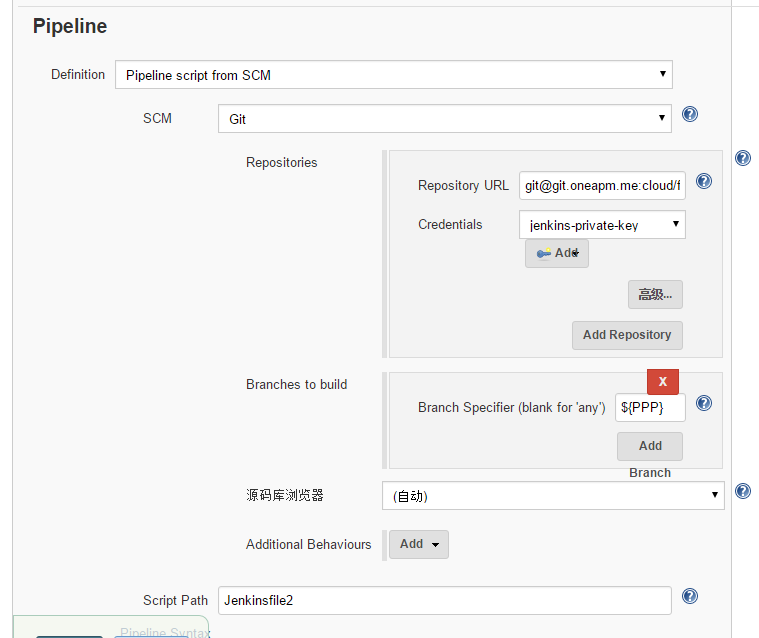
But I failed to use it as a variable in * Branch Specifier*, seems the variable is not parsed at all.

wyvernnot@gmail.com (JIRA)

unread,
Sep 13, 2016, 3:21:15 AM9/13/16
to jenkinsc...@googlegroups.com

klimas7@gmail.com (JIRA)

unread,
Sep 13, 2016, 4:47:03 AM9/13/16
to jenkinsc...@googlegroups.com

klimas7@gmail.com (JIRA)

unread,
Sep 13, 2016, 4:48:02 AM9/13/16
to jenkinsc...@googlegroups.com

klimas7@gmail.com (JIRA)

unread,
Sep 13, 2016, 4:50:04 AM9/13/16
to jenkinsc...@googlegroups.com

klimas7@gmail.com (JIRA)

unread,
Sep 13, 2016, 4:53:01 AM9/13/16
to jenkinsc...@googlegroups.com
Boguslaw Klimas commented on Improvement JENKINS-34876
 
Re: Git Parameters not working for Pipeline projects and Jenkinsfile from SCM

Hi, Yan Wang
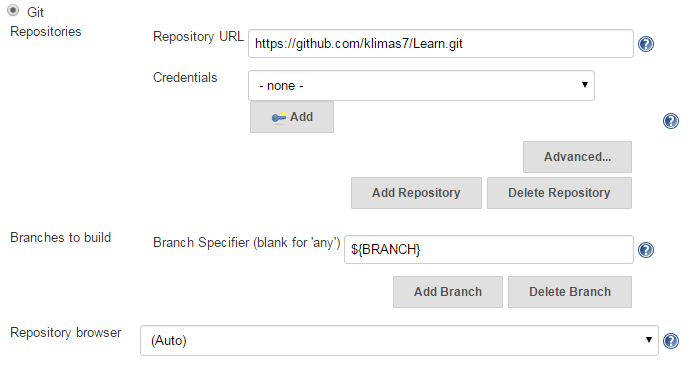
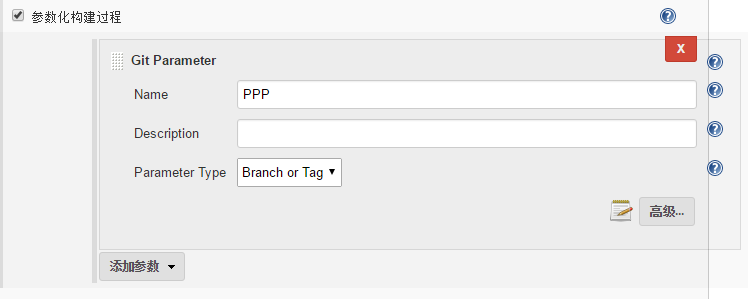
I have configured a simple job:
Parameter:

Git Config:

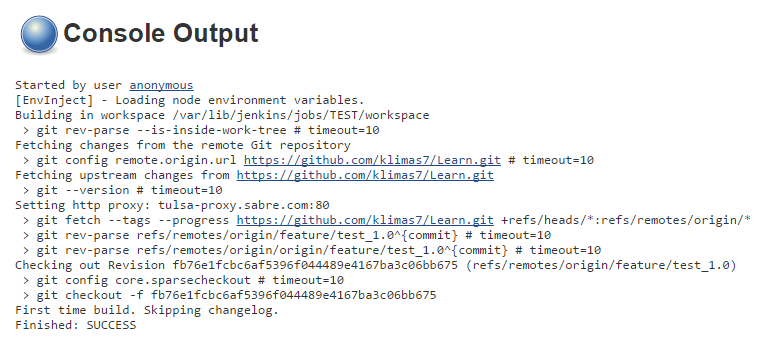
And job work fine

Could you get me something more information? About your configuration.

Regards
Boguslaw

wyvernnot@gmail.com (JIRA)

unread,
Sep 13, 2016, 10:14:02 AM9/13/16
to jenkinsc...@googlegroups.com

wyvernnot@gmail.com (JIRA)

unread,
Sep 13, 2016, 10:15:08 AM9/13/16
to jenkinsc...@googlegroups.com

wyvernnot@gmail.com (JIRA)

unread,
Sep 13, 2016, 10:18:03 AM9/13/16
to jenkinsc...@googlegroups.com
Yan Wang commented on Improvement JENKINS-34876
 
Re: Git Parameters not working for Pipeline projects and Jenkinsfile from SCM

Hi, I am using Jen...@2.7.4 with a pipeline project.

here is the params settings

here is the pipeline settings

wyvernnot@gmail.com (JIRA)

unread,
Sep 13, 2016, 10:37:02 AM9/13/16
to jenkinsc...@googlegroups.com
Yan Wang commented on Improvement JENKINS-34876

Oh, I just tried String Parameters and it does not work neither.

So I guess the problem is not with Git Parameter plugin but SCM plugin.

Related issue is: https://issues.jenkins-ci.org/browse/JENKINS-34540

julian.linux@gmail.com (JIRA)

unread,
Jul 23, 2019, 9:16:03 PM7/23/19
to jenkinsc...@googlegroups.com

it looks like is a problem in scripted pipeline. When i changed the script to declarative it worked

This message was sent by Atlassian Jira (v7.11.2#711002-sha1:fdc329d)

juanjose.ruescas@gmail.com (JIRA)

unread,
Aug 12, 2019, 4:09:02 PM8/12/19
to jenkinsc...@googlegroups.com

Julian Mosquera, were you able to get it fixed. I'm experiencing a similar issue.

nick.nieslanik@livongo.com (JIRA)

unread,
Oct 29, 2019, 1:31:04 PM10/29/19
to jenkinsc...@googlegroups.com

Hi!  I am using Jenkins LTS 2.190.2 via Docker container and I'm experiencing this issue using a SCM declarative pipeline.  I have an Extensible Choice param in the job that is letting me pick a branch, and then I am referring to the branch variable selection as `${my_branch}` in the pipeline settings for the Jenkinsfile in SCM (specifically GIT).  Based on my reading of this issue, it seems as if folks think this is fixed?  I am definitely able to repo consistently across a number of declarative pipeline jobs on my server.  I have config extremely similar to Yan Wang's screenshots from 2016.  Boguslaw Klimas  Any insight here?

This message was sent by Atlassian Jira (v7.13.6#713006-sha1:cc4451f)
Atlassian logo

nick.nieslanik@livongo.com (JIRA)

unread,
Oct 29, 2019, 1:31:10 PM10/29/19
to jenkinsc...@googlegroups.com
Nick Nieslanik edited a comment on Improvement JENKINS-34876
Hi!  I am using Jenkins LTS 2.190.2 via Docker container and I'm experiencing this issue using a SCM declarative pipeline.  I have an Extensible Choice param in the job that is letting me pick a branch, and then I am referring to the branch variable selection as `

{code:java}
${my_branch} ` {code}
in the pipeline settings for the Jenkinsfile in SCM (specifically GIT).  Based on my reading of this issue, it seems as if folks think this is fixed?  I am definitely able to repo consistently across a number of declarative pipeline jobs on my server.  I have config extremely similar to [~wyvernnot]'s screenshots from 2016.  [~klimas7]  Any insight here?


nick.nieslanik@livongo.com (JIRA)

unread,
Oct 29, 2019, 1:37:05 PM10/29/19
to jenkinsc...@googlegroups.com
Nick Nieslanik edited a comment on Improvement JENKINS-34876
Hi!  I am using Jenkins LTS 2.190.2 via Docker container and I'm experiencing this issue using a SCM declarative pipeline.  I have an Extensible Choice param in the job that is letting me pick a branch, and then I am referring to the branch variable selection as
{code:java}
${my_branch}{code}
in the pipeline settings for the Jenkinsfile in SCM (specifically GIT).  Based on my reading of this issue, it seems as if folks think this is fixed?  I am definitely able to repo consistently across a number of declarative pipeline jobs on my server.  I have config extremely similar to [~wyvernnot]'s screenshots from 2016.  [~klimas7]  Any insight here?


Screenshots:

[choice settings|https://www.dropbox.com/s/cnm0ukm5zsx9l31/Screenshot%202019-10-29%2011.31.21.png?dl=0]

[pipeline settings|https://www.dropbox.com/s/zdw303olhk1x9jf/Screenshot%202019-10-29%2011.32.16.png?dl=0]


Error from build:

 
{code:java}
hudson.plugins.git.GitException: Command "git fetch --tags --progress --prune -- origin +refs/heads/${webapp_branch}:refs/remotes/origin/${webapp_branch}" returned status code 128:
stdout:
stderr: fatal: Couldn't find remote ref refs/heads/${webapp_branch} at org.jenkinsci.plugins.gitclient.CliGitAPIImpl.launchCommandIn(CliGitAPIImpl.java:2174)
at org.jenkinsci.plugins.gitclient.CliGitAPIImpl.launchCommandWithCredentials(CliGitAPIImpl.java:1866)
at org.jenkinsci.plugins.gitclient.CliGitAPIImpl.access$500(CliGitAPIImpl.java:78)
at org.jenkinsci.plugins.gitclient.CliGitAPIImpl$1.execute(CliGitAPIImpl.java:547)
at jenkins.plugins.git.GitSCMFileSystem$BuilderImpl.build(GitSCMFileSystem.java:358)
at jenkins.scm.api.SCMFileSystem.of(SCMFileSystem.java:197)
at jenkins.scm.api.SCMFileSystem.of(SCMFileSystem.java:173)
at org.jenkinsci.plugins.workflow.cps.CpsScmFlowDefinition.create(CpsScmFlowDefinition.java:113)
at org.jenkinsci.plugins.workflow.cps.CpsScmFlowDefinition.create(CpsScmFlowDefinition.java:67)
at org.jenkinsci.plugins.workflow.job.WorkflowRun.run(WorkflowRun.java:299)
at hudson.model.ResourceController.execute(ResourceController.java:97)
at hudson.model.Executor.run(Executor.java:429)
Finished: FAILURE
{code}


nick.nieslanik@livongo.com (JIRA)

unread,
Oct 29, 2019, 1:37:11 PM10/29/19
to jenkinsc...@googlegroups.com
Nick Nieslanik edited a comment on Improvement JENKINS-34876
Hi!  I am using Jenkins LTS 2.190.2 via Docker container and I'm experiencing this issue using a SCM declarative pipeline.  I have an Extensible Choice param in the job that is letting me pick a branch, and then I am referring to the branch variable selection as
{code:java}
${ my_branch webapp_branch }{code}
Reply all
Reply to author
Forward
0 new messages