[JIRA] (JENKINS-43593) NPM unable to locate node binary

2 views
Skip to first unread message

mr.marcsmith@me.com (JIRA)

unread,
Nov 13, 2018, 11:45:02 PM11/13/18
to jenkinsc...@googlegroups.com
Marc Smith commented on Bug JENKINS-43593
 
Re: NPM unable to locate node binary

Since this is still a problem in the official Jenkins/BlueOcean can we reopen this? this is a critical bug for anyone using npm.

Add Comment Add Comment
 
This message was sent by Atlassian Jira (v7.11.2#711002-sha1:fdc329d)

mr.marcsmith@me.com (JIRA)

unread,
Nov 13, 2018, 11:59:02 PM11/13/18
to jenkinsc...@googlegroups.com
Marc Smith reopened an issue
 

Hi Nikolas,

This is not fixed in the jenkinsci/[blueocean|https://hub.docker.com/r/jenkinsci/blueocean/] image on docker hub. Your instructions to reproduce require downloading a .war file and running directly from java. This defeats the purpose of having the jenkinsci/[blueocean|https://hub.docker.com/r/jenkinsci/blueocean/] image on docker.   Please reproduce/fix the issue using the official jenkinsci/[blueocean|https://hub.docker.com/r/jenkinsci/blueocean/] on an Ubuntu 16.04 LTS machine. Thank you!

Jenkins / Bug JENKINS-43593
Change By: Marc Smith
Resolution: Duplicate
Status: Closed Reopened

mr.marcsmith@me.com (JIRA)

unread,
Nov 14, 2018, 12:30:02 AM11/14/18
to jenkinsc...@googlegroups.com
Marc Smith edited a comment on Bug JENKINS-43593
 
Re: NPM unable to locate node binary
Hi Nikolas,

This is not fixed in the
[ jenkinsci |https: / /hub.docker.com/u/jenkinsci/]/[ blueocean |https://hub.docker.com/r/jenkinsci/blueocean/] image on docker hub. Your instructions to reproduce require downloading a .war file and running directly from java. This defeats the purpose of having the [   jenkinsci |https: / /hub.docker.com/u/jenkinsci/]/[ blueocean |https://hub.docker.com/r/jenkinsci/blueocean/]  image on docker.   Please reproduce/fix the issue using the official [   jenkinsci |https: / /hub.docker.com/u/jenkinsci/]/[ blueocean |https://hub.docker.com/r/jenkinsci/blueocean/]   on an Ubuntu 16.04 LTS machine. Thank you!

nfalco79@hotmail.com (JIRA)

unread,
Nov 14, 2018, 6:07:03 AM11/14/18
to jenkinsc...@googlegroups.com
Nikolas Falco updated an issue
 
Change By: Nikolas Falco
Attachment: screenshot-1.png

nfalco79@hotmail.com (JIRA)

unread,
Nov 14, 2018, 6:19:02 AM11/14/18
to jenkinsc...@googlegroups.com
Nikolas Falco closed an issue as Won't Fix
Change By: Nikolas Falco
Status: Reopened Closed
Resolution: Won't Fix

nfalco79@hotmail.com (JIRA)

unread,
Nov 14, 2018, 6:19:02 AM11/14/18
to jenkinsc...@googlegroups.com
Nikolas Falco commented on Bug JENKINS-43593
 
Re: NPM unable to locate node binary

Hi the docker image is out the scope of the plugin and with other mantainers.
I had a look on the docker image (it is not a Ubuntu but an alpine image JAVA_ALPINE_VERSION='8.181.13-r0').

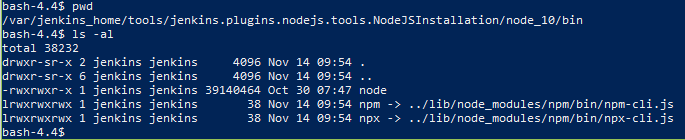
  • the PATH environment variable is correctly setup PATH='/var/jenkins_home/tools/jenkins.plugins.nodejs.tools.NodeJSInstallation/node_10/bin:/usr/local/sbin:/usr/local/bin:/usr/sbin:/usr/bin:/sbin:/bin:/usr/lib/jvm/java-1.8-openjdk/jre/bin:/usr/lib/jvm/java-1.8-openjdk/bin'
  • the node is download and place in the correct folder and the bin folder have the execute (+x) attribute setup correctly

anyway the node command does not work, not only in jenkins but also if you run the node command from a shell it give the same error.

I had a look around and seems the alpine image have a limited symbolic library needed by nodejs. The official nodejs image does not use the distribution archive but compile in place the source code. This could not be done by the plugin

nfalco79@hotmail.com (JIRA)

unread,
Nov 14, 2018, 6:21:02 AM11/14/18
to jenkinsc...@googlegroups.com
Nikolas Falco edited a comment on Bug JENKINS-43593
Hi the docker image is out the scope of the plugin and with other mantainers maintainers .

I had a look on the docker image (it is not a Ubuntu but an alpine image {{JAVA_ALPINE_VERSION='8.181.13-r0'}}).

* the PATH environment variable is correctly setup {{PATH='/var/jenkins_home/tools/jenkins.plugins.nodejs.tools.NodeJSInstallation/node_10/bin:/usr/local/sbin:/usr/local/bin:/usr/sbin:/usr/bin:/sbin:/bin:/usr/lib/jvm/java-1.8-openjdk/jre/bin:/usr/lib/jvm/java-1.8-openjdk/bin'}}
* the node is download and place in the correct folder and the bin folder have the execute (+x) attribute setup correctly
!screenshot-1.png|thumbnail!

anyway the node command does not work, not only in jenkins but also if you run the node command from a shell it give the same error.

I had a look around and seems the alpine image have a limited [ symbolic library needed by nodejs |https://github . com/gliderlabs/docker-alpine/issues/7]. The official nodejs image does not use the distribution archive but compile [in place the source code|https://github.com/nodejs/docker-node/blob/master/Dockerfile-alpine.template]. This could not be done by the plugin

antoniocarvalho800@gmail.com (JIRA)

unread,
Jul 9, 2019, 4:54:02 AM7/9/19
to jenkinsc...@googlegroups.com

I had this error too when creating a pipeline using nodejs. Maybe the tutorials should be updated if the `jenkins/blueocean` image have these problems. https://jenkins.io/doc/book/blueocean/getting-started/#as-part-of-jenkins-in-docker

Reply all
Reply to author
Forward
0 new messages