[JIRA] (JENKINS-52504) Deploy to container Plugin (1.13) doesnt give manager username & password under Post Build Actions

95 views
Skip to first unread message

jammhead@gmail.com (JIRA)

unread,
Jul 11, 2018, 11:44:02 PM7/11/18
to jenkinsc...@googlegroups.com
Soumyadeep Mishra created an issue
 
Jenkins / Bug JENKINS-52504
Deploy to container Plugin (1.13) doesnt give manager username & password under Post Build Actions
Issue Type: Bug Bug
Assignee: Unassigned
Attachments: Jenkins_Job_Screenshot.png
Components: deploy-plugin
Created: 2018-07-12 03:43
Environment: DEV
Priority: Blocker Blocker
Reporter: Soumyadeep Mishra

Hello Jenkins Support,

Kindly help me with this issue due to which I'm not able to deploy war files on Tomcat 7 via Jenkins. I've installed the Deploy to container Plugin (1.13) in Jenkins.

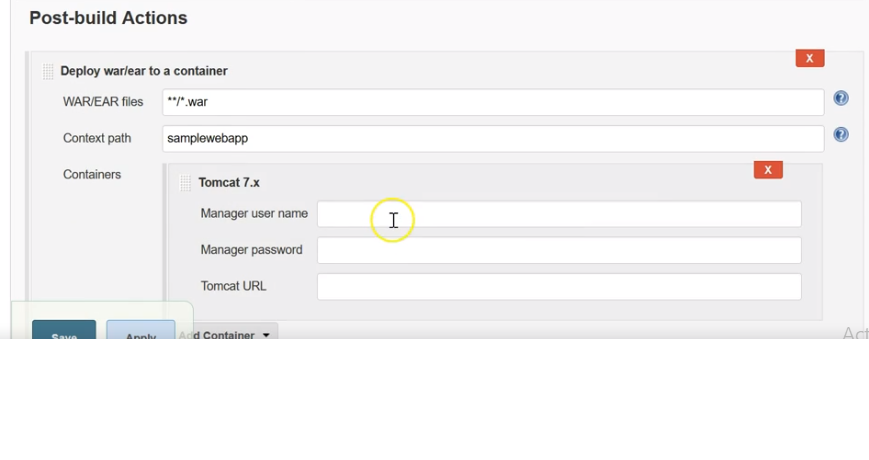
However, when I created a job to deploy war file, on selecting Tomcat 7.x as the container through Post Build Action step, I'm not getting the manager username & password fields. I'm just getting the Jenkins Credentials Provider option which doesn't work for container manager login.

Attached is the screenshot of the Post Build Action section for my Jenkins job.


Add Comment Add Comment
 
This message was sent by Atlassian JIRA (v7.10.1#710002-sha1:6efc396)

o.v.nenashev@gmail.com (JIRA)

unread,
Jul 12, 2018, 2:13:02 AM7/12/18
to jenkinsc...@googlegroups.com

> I'm just getting the Jenkins Credentials Provider option 

As designed, Jenkins credentials API is an engine to store credentials. Plugins are recommended to migrate to it.

> which doesn't work for container manager login.

Needs more information to be diagnosed. If you have configured proper credentials, then it may be an issue in the plugin


jammhead@gmail.com (JIRA)

unread,
Jul 12, 2018, 12:24:01 PM7/12/18
to jenkinsc...@googlegroups.com
Soumyadeep Mishra updated an issue
 
Change By: Soumyadeep Mishra
Attachment: tomcat-users.png
Attachment: Expected_Container_Box.png

jammhead@gmail.com (JIRA)

unread,
Jul 12, 2018, 12:26:01 PM7/12/18
to jenkinsc...@googlegroups.com

jammhead@gmail.com (JIRA)

unread,
Jul 12, 2018, 12:26:02 PM7/12/18
to jenkinsc...@googlegroups.com
Soumyadeep Mishra commented on Bug JENKINS-52504
 
Re: Deploy to container Plugin (1.13) doesnt give manager username & password under Post Build Actions

Thanks Oleg for your quick response to my query!
I agree with your point that Jenkins Credentials Provider is the ideal way to store the credentials for any connectivity usages.
However, it doesn't seem to work for Container managed systems where we need to provide the Manager username/ password.
To be precise, I'm expecting something of a credential entry box like in the screenshot: Expected_Container_Box.png
However, instead of installing Tomcat 7 and installing the 'Deploy to Container' plugin, I'm not getting this container credentials box and just getting the default Jenkins Credentials Provider box (in which I tried providing manager username/ password but it doesn't work).
Also attached is my tomcat-user.xml file for your reference: tomcat-users.png
Kindly help me in how do I get the Manager credentials box provided by the Container.


Attachments:

-------------

daniel.carrington@hpe.com (JIRA)

unread,
Jul 12, 2018, 3:55:02 PM7/12/18
to jenkinsc...@googlegroups.com

Hi Soumyadeep,

Looking at the differences between your "Jenkins Screenshot" image and the "Expected container box" image, that looks like a known change in the 1.13 version of the deploy plugin. This change in user interface implements the security fix mentioned in the change log. https://plugins.jenkins.io/deploy

Using the Credentials plugin to input the username and password instead of providing the username & password fields directly provides enhanced security and functionality.

  1. Credentials plugin stores the password encrypted. The direct password input field stored the password in plain text in config.xml. See the security advisory here: https://jenkins.io/security/advisory/2017-08-07/#deploy-to-container-plugin-stored-plain-text-passwords-in-job-configuration
  2. If you configure the username and password in multiple jobs, you can update the username and password in one place through the credentials plugin and all jobs will be updated.

As Oleg said, use the new interface through the credentials plugin. There is a "Add Credentials" button next to it to do that, and it seems like you have added credentials.
There are several other things that could be going wrong. What have you done to diagnose the issue?


jammhead@gmail.com (JIRA)

unread,
Jul 14, 2018, 8:42:03 AM7/14/18
to jenkinsc...@googlegroups.com

Hi Daniel,

While using the Jenkins Credentials Provider to connect to Tomcat 7.x container for war file deployment, I'm always getting the below exception (The username you provided is not allowed to use the text-based Tomcat Manager (error 403)) instead of using correct username/ password and tomcat-users.xml entry. The snapshot of my tomcat-users.xml file is already provided along with the Container deployment plugin window snapshot for Jenkins.

Kindly help to shed some light on this issue as to how to troubleshoot this:

ERROR: Build step failed with exception
org.codehaus.cargo.container.ContainerException: Failed to redeploy [E:\Somu\Practice\workspace\SampleWebApp\dist\SampleWebApp.war]
at org.codehaus.cargo.container.tomcat.internal.AbstractTomcatManagerDeployer.redeploy(AbstractTomcatManagerDeployer.java:188)
at hudson.plugins.deploy.CargoContainerAdapter.deploy(CargoContainerAdapter.java:77)
at hudson.plugins.deploy.CargoContainerAdapter$DeployCallable.invoke(CargoContainerAdapter.java:147)
at hudson.plugins.deploy.CargoContainerAdapter$DeployCallable.invoke(CargoContainerAdapter.java:117)
at hudson.FilePath.act(FilePath.java:1047)
at hudson.FilePath.act(FilePath.java:1025)
at hudson.plugins.deploy.CargoContainerAdapter.redeploy(CargoContainerAdapter.java:114)
at hudson.plugins.deploy.PasswordProtectedAdapterCargo.redeploy(PasswordProtectedAdapterCargo.java:93)
at hudson.plugins.deploy.DeployPublisher.perform(DeployPublisher.java:64)
at hudson.tasks.BuildStepMonitor$3.perform(BuildStepMonitor.java:45)
at hudson.model.AbstractBuild$AbstractBuildExecution.perform(AbstractBuild.java:744)
at hudson.model.AbstractBuild$AbstractBuildExecution.performAllBuildSteps(AbstractBuild.java:690)
at hudson.model.Build$BuildExecution.post2(Build.java:186)
at hudson.model.AbstractBuild$AbstractBuildExecution.post(AbstractBuild.java:635)
at hudson.model.Run.execute(Run.java:1819)
at hudson.model.FreeStyleBuild.run(FreeStyleBuild.java:43)
at hudson.model.ResourceController.execute(ResourceController.java:97)
at hudson.model.Executor.run(Executor.java:429)
Caused by: org.codehaus.cargo.container.tomcat.internal.TomcatManagerException: The username you provided is not allowed to use the text-based Tomcat Manager (error 403)
at org.codehaus.cargo.container.tomcat.internal.TomcatManager.invoke(TomcatManager.java:704)
at org.codehaus.cargo.container.tomcat.internal.TomcatManager.list(TomcatManager.java:876)
at org.codehaus.cargo.container.tomcat.internal.TomcatManager.getStatus(TomcatManager.java:889)
at org.codehaus.cargo.container.tomcat.internal.AbstractTomcatManagerDeployer.redeploy(AbstractTomcatManagerDeployer.java:173)
... 17 more
Caused by: java.io.IOException: Server returned HTTP response code: 403 for URL:
http://localhost:8090/manager/text/list
at sun.net.www.protocol.http.HttpURLConnection.getInputStream0(Unknown Source)
at sun.net.www.protocol.http.HttpURLConnection.getInputStream(Unknown Source)
at org.codehaus.cargo.container.tomcat.internal.TomcatManager.invoke(TomcatManager.java:571)
... 20 more
org.codehaus.cargo.container.tomcat.internal.TomcatManagerException: The username you provided is not allowed to use the text-based Tomcat Manager (error 403)
at org.codehaus.cargo.container.tomcat.internal.TomcatManager.invoke(TomcatManager.java:704)
at org.codehaus.cargo.container.tomcat.internal.TomcatManager.list(TomcatManager.java:876)
at org.codehaus.cargo.container.tomcat.internal.TomcatManager.getStatus(TomcatManager.java:889)
at org.codehaus.cargo.container.tomcat.internal.AbstractTomcatManagerDeployer.redeploy(AbstractTomcatManagerDeployer.java:173)
at hudson.plugins.deploy.CargoContainerAdapter.deploy(CargoContainerAdapter.java:77)
at hudson.plugins.deploy.CargoContainerAdapter$DeployCallable.invoke(CargoContainerAdapter.java:147)
at hudson.plugins.deploy.CargoContainerAdapter$DeployCallable.invoke(CargoContainerAdapter.java:117)
at hudson.FilePath.act(FilePath.java:1047)
at hudson.FilePath.act(FilePath.java:1025)
at hudson.plugins.deploy.CargoContainerAdapter.redeploy(CargoContainerAdapter.java:114)
at hudson.plugins.deploy.PasswordProtectedAdapterCargo.redeploy(PasswordProtectedAdapterCargo.java:93)
at hudson.plugins.deploy.DeployPublisher.perform(DeployPublisher.java:64)
at hudson.tasks.BuildStepMonitor$3.perform(BuildStepMonitor.java:45)
at hudson.model.AbstractBuild$AbstractBuildExecution.perform(AbstractBuild.java:744)
at hudson.model.AbstractBuild$AbstractBuildExecution.performAllBuildSteps(AbstractBuild.java:690)
at hudson.model.Build$BuildExecution.post2(Build.java:186)
at hudson.model.AbstractBuild$AbstractBuildExecution.post(AbstractBuild.java:635)
at hudson.model.Run.execute(Run.java:1819)
at hudson.model.FreeStyleBuild.run(FreeStyleBuild.java:43)
at hudson.model.ResourceController.execute(ResourceController.java:97)
at hudson.model.Executor.run(Executor.java:429)
Caused by: java.io.IOException: Server returned HTTP response code: 403 for URL:
[http://localhost:8090/manager/text/list]
at sun.net.www.protocol.http.HttpURLConnection.getInputStream0(Unknown Source)
at sun.net.www.protocol.http.HttpURLConnection.getInputStream(Unknown Source)
at org.codehaus.cargo.container.tomcat.internal.TomcatManager.invoke(TomcatManager.java:571)
... 20 more
Build step 'Deploy war/ear to a container' marked build as failure
Finished: FAILURE

daniel.carrington@hpe.com (JIRA)

unread,
Jul 16, 2018, 11:47:01 AM7/16/18
to jenkinsc...@googlegroups.com

Note the first intermediate cause for the exception:


Caused by: org.codehaus.cargo.container.tomcat.internal.TomcatManagerException: The username you provided is not allowed to use the text-based Tomcat Manager (error 403)
at org.codehaus.cargo.container.tomcat.internal.TomcatManager.invoke(TomcatManager.java:704)

Have you restarted tomcat since editing tomcat-users.xml? While your screenshots of tomcat-users.xml show the manager-script role that the manager app needs, (according to http://tomcat.apache.org/tomcat-7.0-doc/manager-howto.html

that doesn't mean that those changes are in effect, because you need to restart Tomcat for a UserDatabaseRealm to pick up the changes to the file.
http://tomcat.apache.org/tomcat-7.0-doc/realm-howto.html#UserDatabaseRealm

Furthermore, you can enable logging for the deploy-plugin by using the Jenkins logging feature. Enabling logs for the org.codehaus.cargo.container.tomcat.internal.TomcatManager component would let you check if the plugin is accessing the expected URL etc.

Note that the deploy-plugin, Jenkins, and Tomcat itself are open-source. If all else fails, you can go read the source code.

robin.jansohn@zf.com (JIRA)

unread,
Jul 19, 2019, 9:44:02 AM7/19/19
to jenkinsc...@googlegroups.com
Robin Jansohn closed an issue as Not A Defect
 

I'm closing this as this appears to be a misconfigured Tomcat instance. The deploy-plugin works as expected.

Change By: Robin Jansohn
Status: Open Closed
Resolution: Not A Defect
This message was sent by Atlassian Jira (v7.11.2#711002-sha1:fdc329d)
Reply all
Reply to author
Forward
0 new messages