
First build fails on Jenkins war
140 views
Skip to first unread message

Kalana Wijethunga
Oct 13, 2019, 3:25:55 AM10/13/19
to Jenkins Developers
Hi,
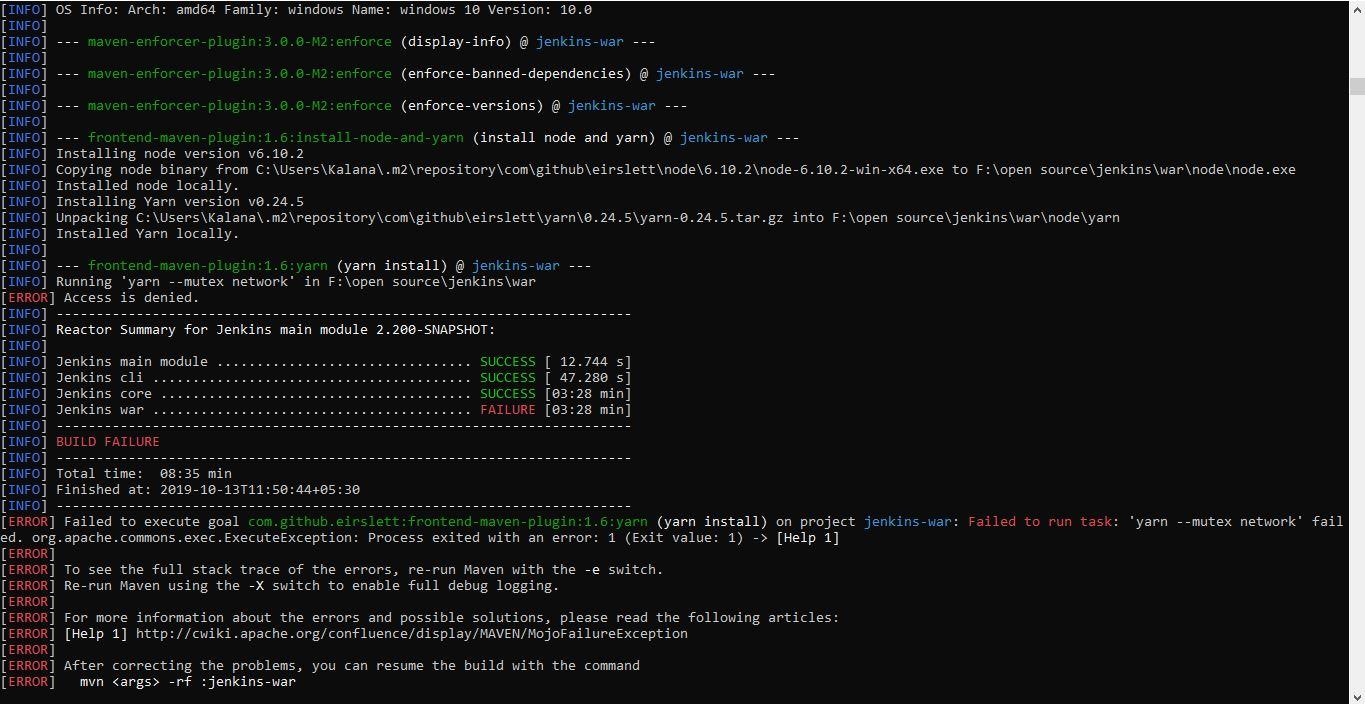
I am a newbie to Jenkins who is looking to contribute Jenkins. I am having some trouble in building the project for the first time. I am building Jenkins [1] on windows by typing the command "mvn clean package -pl war -am -DskipTests -Dfindbugs.skip" given in [2]. But there is a build failure on Jenkins war. I get the error "This app can't run on your PC" from windows and when i close that error, the build fails with the following error
"[INFO] Running 'yarn --mutex network' in F:\open source\jenkins\war
[ERROR] Access is denied."I am assuming that the project can be built on Windows, as you haven't mentioned Ubuntu as prerequisite in building the project. I have tried running the command prompt as an adminstrator as well. Looks like node and yarn do not get permission to run command on the terminal. I have attached an image of the error for further reference. Appreciate your help in resolving this.

Matt Sicker
Oct 14, 2019, 10:43:48 AM10/14/19
to jenkin...@googlegroups.com
This definitely works in Windows (a few Jenkins developers are Windows
users). It appears as though there's an issue with yarn being run as a
subprocess during the JavaScript "compilation" phase (i.e.,
uglify/minify/etc). Do you have a firewall blocking yarn from making
HTTP requests?
> --
> You received this message because you are subscribed to the Google Groups "Jenkins Developers" group.
> To unsubscribe from this group and stop receiving emails from it, send an email to jenkinsci-de...@googlegroups.com.
> To view this discussion on the web visit https://groups.google.com/d/msgid/jenkinsci-dev/5c6e81d1-514d-420c-8e77-b74a4f23053d%40googlegroups.com.
--
Matt Sicker
Senior Software Engineer, CloudBees
users). It appears as though there's an issue with yarn being run as a
subprocess during the JavaScript "compilation" phase (i.e.,
uglify/minify/etc). Do you have a firewall blocking yarn from making
HTTP requests?
> You received this message because you are subscribed to the Google Groups "Jenkins Developers" group.
> To unsubscribe from this group and stop receiving emails from it, send an email to jenkinsci-de...@googlegroups.com.
> To view this discussion on the web visit https://groups.google.com/d/msgid/jenkinsci-dev/5c6e81d1-514d-420c-8e77-b74a4f23053d%40googlegroups.com.
--
Matt Sicker
Senior Software Engineer, CloudBees
Kalana Wijethunga
Oct 14, 2019, 11:00:47 AM10/14/19
to jenkin...@googlegroups.com
Hi Matt,
Thank you for your reply.
I tried the build after turning windows defender off for both public and private networks. Still I am getting the same error.I dont have a virus guard installed.
To view this discussion on the web visit https://groups.google.com/d/msgid/jenkinsci-dev/CAEot4oxhr12RHoWpars_2Z_uK5DboEojH%3DSMgHwraDdoSEQFWA%40mail.gmail.com.
Kalana Wijethunga Undergraduate Department of Computer Science & Engineering University of Moratuwa
Mobile: +94 77 4052085 | |

Matt Sicker
Oct 14, 2019, 1:19:57 PM10/14/19
to jenkin...@googlegroups.com
By the sounds of it, it looks like you have a file access error of some sort when Maven goes to run yarn. You can verify the file permissions in the yarn directory it references to try and debug this.
To view this discussion on the web visit https://groups.google.com/d/msgid/jenkinsci-dev/CAOzcZ0K9kOOpC%2B6Q15fEaLApLWhHc4VE8-f9svygtR5Yc5Zkrw%40mail.gmail.com.

Slide
Oct 14, 2019, 1:27:44 PM10/14/19
to jenkin...@googlegroups.com
Also, are you running on a 32-bit or 64-bit Windows?
To view this discussion on the web visit https://groups.google.com/d/msgid/jenkinsci-dev/CAEot4oxNv3vB%2BTD88uNs0rKo4mo%3DgKLdV48d-T-vk6%2BdUzz8eQ%40mail.gmail.com.
Website: http://earl-of-code.com
Kalana Wijethunga
Oct 14, 2019, 2:08:44 PM10/14/19
to jenkin...@googlegroups.com
Hi Matt, Slide,
I am running 64-bit windows.
The issue for node occurs with the following line at console.
[INFO] Copying node binary from C:\Users\Kalana\.m2\repository\com\github\eirslett\node\6.10.2\node-6.10.2-win-x64.exe to F:\open source\jenkins\war\node\node.exe
I tried giving full control to all the users to the F:\open source\jenkins\war\node\node.exe folder with no luck. I tried to manually run the node.exe file in this location and when I open it,it gives me the error "This app cant run on your pc". It looks like the node and yarn packages in the build are not compatible with my windows for some reason. Can I manually install node and yarn on this location without allowing the build process to do it?
Thanks
To view this discussion on the web visit https://groups.google.com/d/msgid/jenkinsci-dev/CAPiUgVdCZocbtoP_n8RhQPk3Tbewue%3D2SPAPgR6Vdx%3DJN%2BrPUg%40mail.gmail.com.

James Nord
Oct 14, 2019, 2:17:19 PM10/14/19
to Jenkins Developers
Hi Kalana.
try with the check out the code somewhere without a space in the name
/James
> To unsubscribe from this group and stop receiving emails from it, send an email to jenkin...@googlegroups.com.
> To view this discussion on the web visit https://groups.google.com/d/msgid/jenkinsci-dev/5c6e81d1-514d-420c-8e77-b74a4f23053d%40googlegroups.com.
--
Matt Sicker
Senior Software Engineer, CloudBees
--
You received this message because you are subscribed to the Google Groups "Jenkins Developers" group.
To unsubscribe from this group and stop receiving emails from it, send an email to jenkin...@googlegroups.com.
To view this discussion on the web visit https://groups.google.com/d/msgid/jenkinsci-dev/CAEot4oxhr12RHoWpars_2Z_uK5DboEojH%3DSMgHwraDdoSEQFWA%40mail.gmail.com.
----
Kalana Wijethunga
Undergraduate
Department of Computer Science & Engineering
University of Moratuwa
Mobile: +94 77 4052085
You received this message because you are subscribed to the Google Groups "Jenkins Developers" group.


To unsubscribe from this group and stop receiving emails from it, send an email to jenkin...@googlegroups.com.
To view this discussion on the web visit https://groups.google.com/d/msgid/jenkinsci-dev/CAOzcZ0K9kOOpC%2B6Q15fEaLApLWhHc4VE8-f9svygtR5Yc5Zkrw%40mail.gmail.com.
--Matt Sicker--
Senior Software Engineer, CloudBees
You received this message because you are subscribed to the Google Groups "Jenkins Developers" group.
To unsubscribe from this group and stop receiving emails from it, send an email to jenkin...@googlegroups.com.
To view this discussion on the web visit https://groups.google.com/d/msgid/jenkinsci-dev/CAEot4oxNv3vB%2BTD88uNs0rKo4mo%3DgKLdV48d-T-vk6%2BdUzz8eQ%40mail.gmail.com.
--Website: http://earl-of-code.com--
You received this message because you are subscribed to the Google Groups "Jenkins Developers" group.
To unsubscribe from this group and stop receiving emails from it, send an email to jenkin...@googlegroups.com.
James Nord
Oct 14, 2019, 2:37:07 PM10/14/19
to Jenkins Developers
other than that try removing c:\users\kalana\.m2\repository\com\github\eirslett followed by a "git clean -fdx" in your git checkout
Kalana Wijethunga
Oct 14, 2019, 8:26:08 PM10/14/19
to jenkin...@googlegroups.com
Hi all,
The build suceeded after trying James's solution. Looks like the issue was due to a broken/corrupted node and yarn setups. Appreciate your help on resolving this.
Looking forward to contribute to Jenkins.
Thanks and Regards
To unsubscribe from this group and stop receiving emails from it, send an email to jenkinsci-de...@googlegroups.com.
To view this discussion on the web visit https://groups.google.com/d/msgid/jenkinsci-dev/aec58f76-9a5c-45c8-bd76-d49a87e5a523%40googlegroups.com.
Reply all
Reply to author
Forward
0 new messages