
Several files show as not covered when run JUnit test for all the package.
393 views
Skip to first unread message

Robin.von
Jul 31, 2013, 5:50:53 AM7/31/13
to jac...@googlegroups.com
I try to use ecl-emma eclipse plug in to collect coverage data for my project.
Firstly I list 8 JUnit test files in a JUnit suite file, and run the suite file, It run 44 tests, I got the target test package coverage is 70%. I call the package as "A".
Then I right click the test package and choose "Coverage As" -> "JUnit Test" to do a full run of my project. It run 850 tests, I got all the project coverage is 60%, but the package A I test before is 65% now. and I found 2 files in the package A are marked as 0% covered. which is marked as more than 50% covered when I run the single JUnit suite file.
So my question is why these 2 files show as not covered where other files are fine when I unit test all the package? it works well when I run a single suite file.

Marc Hoffmann
Jul 31, 2013, 10:29:13 AM7/31/13
to jac...@googlegroups.com
Are you sure the files are actually executed? You might double-check in
debug mode (break point) or temoporarily add some System.out.println()
statements to verify.
Cheers,
-marc
> --
> You received this message because you are subscribed to the Google
> Groups "JaCoCo and EclEmma Users" group.
> To unsubscribe from this group and stop receiving emails from it,
> send an email to jacoco+un...@googlegroups.com.
> For more options, visit https://groups.google.com/groups/opt_out
> [1].
>
>
>
> Links:
> ------
> [1] https://groups.google.com/groups/opt_out
debug mode (break point) or temoporarily add some System.out.println()
statements to verify.
Cheers,
-marc
> You received this message because you are subscribed to the Google
> Groups "JaCoCo and EclEmma Users" group.
> To unsubscribe from this group and stop receiving emails from it,
> send an email to jacoco+un...@googlegroups.com.
> For more options, visit https://groups.google.com/groups/opt_out
> [1].
>
>
>
> Links:
> ------
> [1] https://groups.google.com/groups/opt_out
Robin.von
Jul 31, 2013, 10:10:58 PM7/31/13
to jac...@googlegroups.com
Hi Marc,
在 2013年7月31日星期三UTC+8下午10时29分13秒,Marc R. Hoffmann写道:
Thanks for your response.
I try to write some string to a file in the not covered file. and confirmed these files are executed.
But these files still show as not covered now.
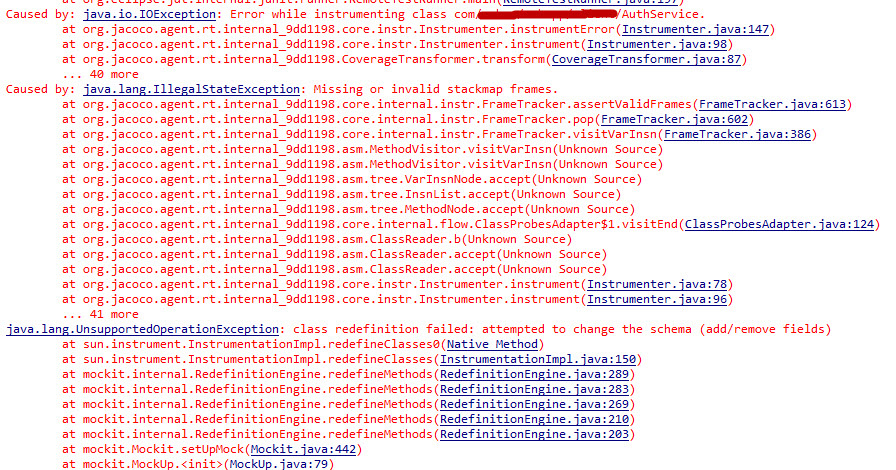
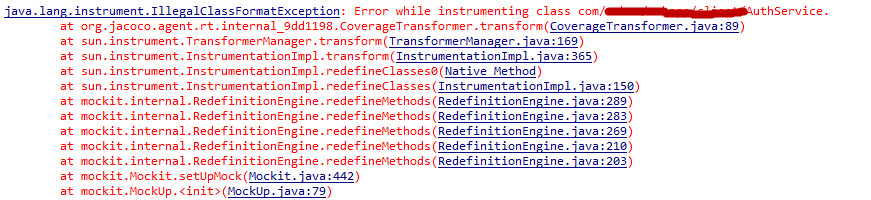
Also I found many instrument exceptions in console. here is some typical exception snapshot:
Can you help to check?

在 2013年7月31日星期三UTC+8下午10时29分13秒,Marc R. Hoffmann写道:
Marc R. Hoffmann
Jul 31, 2013, 10:57:50 PM7/31/13
to jac...@googlegroups.com
Hi,
according to the stack traces it looks like you're using JMockit.
Unfortunatelly JaCoCo and JMockit do not work together, see:
https://github.com/jacoco/jacoco/issues/35
Cheers,
-marc
On 01.08.13 04:10, Robin.von wrote:
> Hi Marc,
>
> Thanks for your response.
> I try to write some string to a file in the not covered file. and
> confirmed these files are executed.
> But these files still show as not covered now.
>
> Also I found many instrument exceptions in console. here is some typical
> exception snapshot:
>
> Can you help to check?
>
> <https://lh4.googleusercontent.com/-N5WQKqh6a1k/UfnDb0r7SlI/AAAAAAAAAW4/MrfLCzG9k78/s1600/coco3.jpg>
>
>
>
> <https://lh6.googleusercontent.com/-NEXRcQDU-AM/UfnDgiD2cxI/AAAAAAAAAXA/3BrkASBBFko/s1600/coco2.jpg>
>
> <https://lh4.googleusercontent.com/-dJIRzZsLaEU/UfnDkau552I/AAAAAAAAAXI/VOwyFe_2n5A/s1600/coco1.jpg>
> > send an email to jacoco+un...@googlegroups.com <javascript:>.
>
according to the stack traces it looks like you're using JMockit.
Unfortunatelly JaCoCo and JMockit do not work together, see:
https://github.com/jacoco/jacoco/issues/35
Cheers,
-marc
On 01.08.13 04:10, Robin.von wrote:
> Hi Marc,
>
> Thanks for your response.
> I try to write some string to a file in the not covered file. and
> confirmed these files are executed.
> But these files still show as not covered now.
>
> Also I found many instrument exceptions in console. here is some typical
> exception snapshot:
>
> Can you help to check?
>
>
>
>
> <https://lh6.googleusercontent.com/-NEXRcQDU-AM/UfnDgiD2cxI/AAAAAAAAAXA/3BrkASBBFko/s1600/coco2.jpg>
>
> <https://lh4.googleusercontent.com/-dJIRzZsLaEU/UfnDkau552I/AAAAAAAAAXI/VOwyFe_2n5A/s1600/coco1.jpg>
> > For more options, visit https://groups.google.com/groups/opt_out
> <https://groups.google.com/groups/opt_out>
> > [1].
> >
> >
> >
> > Links:
> > ------
> > [1] https://groups.google.com/groups/opt_out
> <https://groups.google.com/groups/opt_out>
> <https://groups.google.com/groups/opt_out>
> > [1].
> >
> >
> >
> > Links:
> > ------
> > [1] https://groups.google.com/groups/opt_out
>
Robin.von
Jul 31, 2013, 11:39:42 PM7/31/13
to jac...@googlegroups.com
Hi Marc
在 2013年8月1日星期四UTC+8上午10时57分50秒,Marc R. Hoffmann写道:
Does Jacoco plans to fix this issue in future release?
在 2013年8月1日星期四UTC+8上午10时57分50秒,Marc R. Hoffmann写道:
Marc Hoffmann
Jul 31, 2013, 11:59:28 PM7/31/13
to jac...@googlegroups.com
Currently we have no resources to work in this.
BTW, Mockito seems to work with JaCoCo.
Cheers,
-marc
To unsubscribe from this group and stop receiving emails from it, send an email to jacoco+un...@googlegroups.com.
For more options, visit https://groups.google.com/groups/opt_out.
Reply all
Reply to author
Forward
This conversation is locked
You cannot reply and perform actions on locked conversations.
0 new messages