
Loading APT into JAABA
112 views
Skip to first unread message

Reagan Bullins
Dec 2, 2021, 12:34:28 PM12/2/21
to JAABA
Hi,
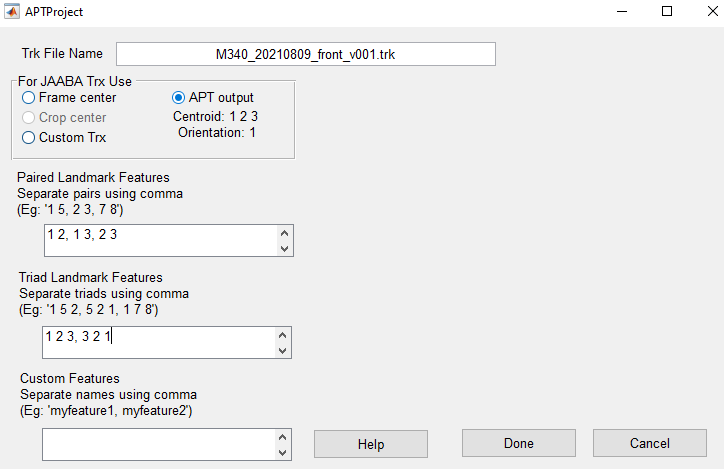


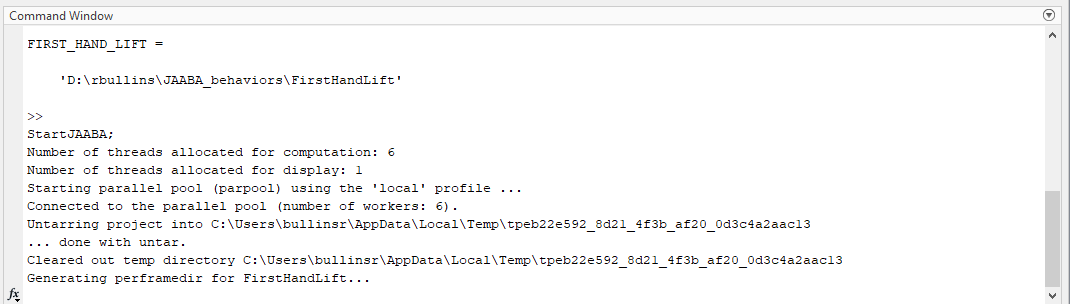
I am using JAABA in Matlab to characterize mouse behavior. I am trying to use JAABA in conjunction with APT and am having trouble generating perframe mat files. I setup an experiment directory labeled 'FirstHandLift', which contains a .avi move file, a .trk output APT file, and an empty perframe folder. I also have a APT tracker .lbl file. These files are uploaded on a google drive here.
I have done the following:
(1) run StartJAABA in matlab (from my understanding, I do not need to run prepareJAABAdata since I will import APT .trk file directly into the StartJAABA GUI)
(2) select import from APT project (select APT tracker .lbl file) and receive the following message and select no: 
(3) Fill out APT information:
(4) Fill in the .avi movie and .trk tracker name on GUI:
(5) Add experiment directory containing .avi movie file, .trk tracking file, and empty perframe folder. Then, I get stuck at generating perframe files (does not start generating). Also, it says the perframedir is missing. I have done the above steps with and without creating the perframe directory by hand and had the same issue each time.
Here is the MATLAB command output:
I believe the perframe mat files are not being generated due to an error I am making when creating the experiment directory and/or importing the APT .trk file. Do you know what the issue may be here?
Thank you!
Reagan Bullins

Mayank Kabra
Dec 5, 2021, 1:32:21 AM12/5/21
to Reagan Bullins, JAABA
Hi Reagan,
Sorry for the late reply. Gmail had sent the mail to the spam folder.
Almost all the steps are correct, except for the filename you entered for "Tracking data file name" and the cause for confusion is that there are two tracking files -- 1) the .trk file that is output of APT, and 2) the trx file that is used by JAABA. JAABA is very tightly tied to the trx format and updating it to use the APT's .trk file format was too difficult. So the way we got around it is to convert the .trk file to trx file when you link APT to JAABA. When you are linking APT to JAABA, in the "New JAABA Project" GUI, you should enter something "trx.mat" for "Tracking data file name" to give the location where you want to save the generated .trx file. And it is likely that the program overwrote the trk file with trx file, so you might want to regenerate the trk file in APT.
And another piece of advice is to name all the movies, trk files and trx files with generic names (movie.avi, apt_tracks.trk, trx.mat) and name the folder above it with the identifying information such as M38_20210809_v001. This is because JAABA expects all the movie files as well as trk and trx to be named the same for all the experiments (http://jaaba.sourceforge.net/DataFormatting.html#ExperimentDirectoryStructure).
HTH,
Mayank
--
You received this message because you are subscribed to the Google Groups "JAABA" group.
To unsubscribe from this group and stop receiving emails from it, send an email to jaaba+un...@googlegroups.com.
To view this discussion on the web visit https://groups.google.com/d/msgid/jaaba/cb5df2b1-4f87-40b8-af05-353b638f9815n%40googlegroups.com.
Reagan Bullins
Dec 6, 2021, 1:35:49 PM12/6/21
to JAABA
Hi Mayank,
Thank you for your reply, I have JAABA working now!
Reagan
Reagan Bullins
Dec 13, 2021, 11:03:03 AM12/13/21
to JAABA
Hello,
I have a follow-up question about training a single JAABA experimental trial on multiple videos. I am wanting to train classifiers using information from two different videos, filmed at the same time (and same number of frames), of mice performing tasks.
Currently, I am able to load in two videos to the JAABA GUI per experimental trial. I do this by adding both movies to the experimental folder and then list them both when making a new JAABA .jab file. In the GUI section, "Movie File Name" I list both as "movie1.avi, movie2.avi". This works to load both movies in the GUI, but I am unsure if the JAABA tracker is using both movies to train my classifiers on.
Do I need a single movie file to train my classifiers on? Or will JAABA automatically use information from both videos to train my classifiers?
Thank you!
Reagan
Mayank Kabra
Dec 14, 2021, 1:10:46 AM12/14/21
to Reagan Bullins, JAABA
Is the APT project a multiview project or are there two separate projects for the different views?
Mayank
To view this discussion on the web visit https://groups.google.com/d/msgid/jaaba/6473e835-ee2a-4394-a29a-df2f164a0b06n%40googlegroups.com.
Reagan Bullins
Dec 14, 2021, 11:07:22 AM12/14/21
to JAABA
Hi Mayank,

The APT project are two separate projects with two separate output tracking files. APT tracking is only plotted in the JAABA GUI on one of the videos (left). I assume the APT tracking of the second video (right) is not contributing to the algorithm, but the pixel information of the second video still is?
Thanks,
Reagan
Mayank Kabra
Dec 15, 2021, 3:29:23 AM12/15/21
to Reagan Bullins, JAABA
Hi Reagan,
Yeah, if the APT project isn't multi-view then JAABA is not using the APT tracking of the second video. And JAABA uses only tracking information and no pixel information unless you use the space-time features.
We did not envisage a situation like yours so currently there is no proper way to create a multi-view project in JAABA. However, a hacky way to make things work would be to create a dummy multi-view APT project. In this dummy project, you don't have to train anything but simply add an example pair of movies and label one or two frames in both the views. When you create the JAABA project, use this multi-view APT project but in the "Trk File Name" field of APTProject GUI, list the trk files that you will generate from the original APT projects separated by a comma, e.g "apt_out_view1.trk,apt_out_view2.trk". The JAABA project then should show the tracking information for both the views and also use the information from both the views as well.
HTH,
Mayank
To view this discussion on the web visit https://groups.google.com/d/msgid/jaaba/452eca42-6b7b-4725-b1eb-63aedffa6c68n%40googlegroups.com.
Reply all
Reply to author
Forward
0 new messages