
authentication with webdav irods
161 views
Skip to first unread message

Chadi Jaber
Mar 29, 2019, 12:53:45 PM3/29/19
to iRODS-Chat
Hello guys,
I am trying the webdav interface to IRODS (https://github.com/DICE-UNC/irods-webdav). I installed it successfully but I am stuck on the authentication step.
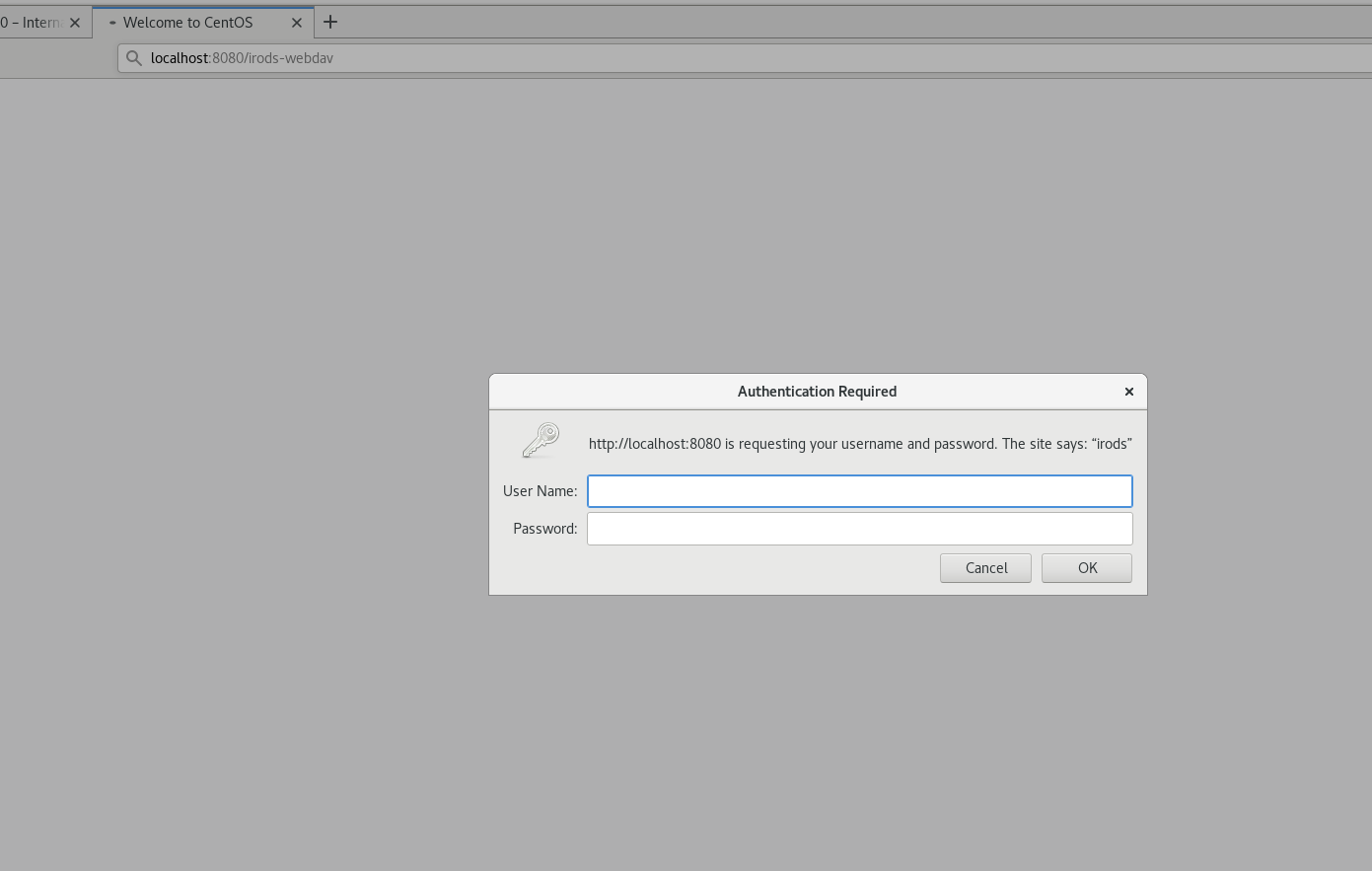
I am not sure what credentials I need to provide, I tried my system credentials and irods credentials without success.
The explanation given on the repo : https://github.com/DICE-UNC/irods-webdav/blob/master/INSTALL.md
"Configure irods-webdav.properties to your particular grid. Note that WebDav uses a preset host/port/zone and translates the Basic Authentication credentials of the user to set the logged in account"
I have made changes to the irods-webdav.properties by setting the appropriate host/port/zone but i'm not sure if these are the so called preset values and if this files is used in any way.
I'm clearly doing something wrong. so i would appreciate some help on how to configure the credentials informations.
Regards,

Terrell Russell
Mar 29, 2019, 1:58:03 PM3/29/19
to irod...@googlegroups.com
Hi Chadi,
I'm not sure the answer to your particular question, but alternatively...
The Milton-based webdav project from DICE has been superseded by the davrods implementation from the University of Utrecht.
Please give it a try as well,
Terrell
--
--
"iRODS: the Integrated Rule-Oriented Data-management System; A community driven, open source, data grid software solution" https://www.irods.org
iROD-Chat: http://groups.google.com/group/iROD-Chat
---
You received this message because you are subscribed to the Google Groups "iRODS-Chat" group.
To unsubscribe from this group and stop receiving emails from it, send an email to irod-chat+...@googlegroups.com.
For more options, visit https://groups.google.com/d/optout.
Chadi Jaber
Mar 30, 2019, 9:53:53 AM3/30/19
to iRODS-Chat
Hello Terrell and Thanks a lot for your availability!!
I seems to have an ssl issue when davrods connects to irods.
Am I missing something ?
I installed davrods as recommended and I have the following issue on the httpd:
5243 2019] [suexec:notice] [pid 110041] AH01232: suEXEC mechanism enabled (wrapper: /usr/sbin/suexec)[Sat Mar 30 13:41:21.356168 2019] [auth_digest:notice] [pid 110041] AH01757: generating secret for digest authentication ...[Sat Mar 30 13:41:21.356753 2019] [lbmethod_heartbeat:notice] [pid 110041] AH02282: No slotmem from mod_heartmonitor[Sat Mar 30 13:41:21.359843 2019] [mpm_prefork:notice] [pid 110041] AH00163: Apache/2.4.6 (CentOS) mod_wsgi/3.4 Python/2.7.5 configured -- resuming normal operations[Sat Mar 30 13:41:21.359866 2019] [core:notice] [pid 110041] AH00094: Command line: '/usr/sbin/httpd -D FOREGROUND'remote addresses: 10.120.43.98 ERROR: [-]       /tmp/tmpkfeEjV/lib/core/src/sockComm.cpp:783:int connectToRhost(rcComm_t *, int, int) :  status [SSL_HANDSHAKE_ERROR]  errno [] -- message [error in SSL_connect]        [-]     /tmp/tmpkfeEjV/lib/core/src/sockComm.cpp:68:irods::error sockClientStart(irods::network_object_ptr, rodsEnv *) :  status [SSL_HANDSHAKE_ERROR]  errno [] -- message [error in SSL_connect]                [-]     /tmp/tmpkfeEjV/plugins/network/ssl/libssl.cpp:691:irods::error ssl_client_start(irods::plugin_context &, rodsEnv *) :  status [SSL_HANDSHAKE_ERROR]  errno [] -- message [error in SSL_connect]
remote addresses: 10.120.43.98 ERROR: _rcConnect: connectToRhost error, server on XXXXXXXXXXXXXXXX:1247 is probably down status = -2103000 SSL_HANDSHAKE_ERROR[Sat Mar 30 13:41:46.759165 2019] [davrods:error] [pid 110042] [client 10.120.43.98:40982] Could not connect to iRODS using address <XXXXXXXXXXXX:1247>, username <rods> and zone <datalake>. iRODS says: '_rcConnect: connectToRhost failed\n'
on irods:
[SSL_INIT_ERROR]  errno [] -- message [couldn't initialize SSL context]        [-]     /tmp/tmpkfeEjV/lib/core/src/sockComm.cpp:132:irods::error sockAgentStart(irods::network_object_ptr) :  status [SSL_INIT_ERROR]  errno [] -- message [couldn't initialize SSL context]                [-]     /tmp/tmpkfeEjV/plugins/network/ssl/libssl.cpp:817:irods::error ssl_agent_start(irods::plugin_context &) :  status [SSL_INIT_ERROR]  errno [] -- message [couldn't initialize SSL context]
Mar 30 13:35:32 pid:99243  ERROR: Agent process [108848] exited with status [16]Mar 30 13:41:46 pid:110126 remote addresses: XXXXXX ERROR: sslInit: couldn't read certificate chain file. SSL error: error:02001002:system library:fopen:No such file or directoryMar 30 13:41:46 pid:110126 remote addresses: XXXXXXXXXXXX ERROR: sslInit: couldn't read certificate chain file. SSL error: error:20074002:BIO routines:FILE_CTRL:system libMar 30 13:41:46 pid:110126 remote addresses: XXXXXXXXX ERROR: sslInit: couldn't read certificate chain file. SSL error: error:140DC002:SSL routines:SSL_CTX_use_certificate_chain_file:system libMar 30 13:41:46 pid:110126 remote addresses: XXXXXXXXXXX ERROR: [-]    /tmp/tmpkfeEjV/server/core/src/rodsAgent.cpp:519:int runIrodsAgent(sockaddr_un) :  status [SSL_INIT_ERROR]  errno [] -- message [couldn't initialize SSL context]        [-]     /tmp/tmpkfeEjV/lib/core/src/sockComm.cpp:132:irods::error sockAgentStart(irods::network_object_ptr) :  status [SSL_INIT_ERROR]  errno [] -- message [couldn't initialize SSL context]                [-]     /tmp/tmpkfeEjV/plugins/network/ssl/libssl.cpp:817:irods::error ssl_agent_start(irods::plugin_context &) :  status [SSL_INIT_ERROR]  errno [] -- message [couldn't initialize SSL context]
Mar 30 13:41:46 pid:99243  ERROR: Agent process [110126] exited with status [16]
I confirm that irods is running on the same machine and working
here is my httpd vhost conf:
<VirtualHost *:80>
    # Enter your server name here.    ServerName XXXXXXXXXX
    # NB: Some webdav clients expect the server to implement webdav at the root    # location (they execute an OPTIONS request to verify existence of webdav    # protocol support).
    <Location />
        # Options needed to enable Davrods. {{{        # =================================
        # Disable built-in Apache directory listings - Davrods will        # provide this instead.        DirectoryIndex disabled
        # Restrict access to authenticated users.        AuthType Basic        Require valid-user
        # The realm name that will be shown to clients upon authentication        AuthName DAV
        # Use the 'irods' HTTP basic authentication provider, implemented by Davrods.        AuthBasicProvider irods
        # The DAV provider for this location.        #        # Davrods implements multiple dav providers, use either:        # - davrods-nolocks:                 WebDAV class 1 provider, no support for locking        # - davrods-locallock (recommended): WebDAV class 2 provider, uses a DBM lock database local to this webserver        #        # Note that the davrods-locallock provider requires an apache-writable lockdb directory        # (/var/lib/davrods, or a path specified using the DavRodsLockDB directive - see further down this file).        # The RPM/DEB distribution creates this directory for you.        #        Dav davrods-locallock
        # }}}
        # Davrods configuration directives. {{{        # =================================
        # Location of the iRODS environment file that specifies the iRODS        # client configuration used by Davrods.        #        # Note: When options in the iRODS environment file overlap with Davrods        # configuration directives, as with the host, port, and zone of the        # iRODS server, the values specified in the iRODS environment file are        # NOT used.        #        DavRodsEnvFile  /etc/httpd/irods/irods_environment.json
        # The following options can be used to customize Davrods for your environment.        # These options and their default values are provided below.        # Having these directives commented out has the effect of enabling        # the listed default option.
        # Hostname and port of the iRODS server to connect to.        #        DavRodsServer XXXXXXXXXX 1247
        # Data grid zone id of the iRODS server.        #        DavRodsZone datalake
        # Authentication type to use when connecting to iRODS.        #        # Supported authentication types are 'Native' and 'Pam'.        # ('Native' corresponds to what was formerly called 'Standard' auth in iRODS).        #        DavRodsAuthScheme Native
        # Anonymous mode switch.        #        # (default: Off)        # When 'Off', basic authentication is required to log into        # Davrods. AuthType must be set to 'Basic' and AuthBasicProvider        # must be set to 'irods'. There must also be a 'Require valid-user'        # line.        #        # When 'On', Davrods will log into iRODS with a preset        # username and password (See options DavRodsAnonymousLogin and        # DavRodsAuthScheme). AuthType must be unset, or set to None,        # and there should be no 'Require valid-user' line        # (instead: Require all granted).        #        # This allows users to access Davrods without being prompted        # for a login, making public access and embedding in web pages        # easier.        #DavRodsAnonymousMode Off
        # iRODS authentication options for Davrods anonymous mode.        #        # This option is used only when DavRodsAnonymousMode is set to        # 'On'.        #        # Specifies the username and password to use for anonymous login.        # The default value is 'anonymous', with an empty password.        # (this user, if created, is treated specially within iRODS)        #        # The special 'anonymous' iRODS user normally requires the        # DavRodsAuthScheme to be set to Native.        #        #DavRodsAnonymousLogin "anonymous" ""
        # iRODS default resource to use for file uploads.        #        # Leave this empty to let the server decide.        #        #DavRodsDefaultResource ""
        # Exposed top collection of iRODS.        #        # Note that the collection chosen MUST be readable for all users,        # otherwise they will experience problems when mounting the drive.        # For example, if you set it to "Home", then as a rodsadmin user        # execute the icommand: ichmod read public /zone-name/home        #        # Davrods accepts the following values for exposed-root:        # - 'Zone'      (collection /zone-name)        # - 'Home'      (collection /zone-name/home)        # - 'User'      (collection /zone-name/home/logged-in-username)        # - full-path   (named collection, must be absolute path, starts with /)        #        DavRodsExposedRoot /datalake/home
        # Size of the buffers used for file transfer to/from the iRODS server.        #        # The default values optimize performance for regular configurations.        # The Tx buffer is used for transfer to iRODS (PUT), while the Rx        # buffer is used for transfer from iRODS (GET).        # Buffer sizes lower than 1024K will lead to decreased file transfer performance.        #        # The buffer sizes are specified as a number of kibibytes ('1' means 1024 bytes).        # We use 4 MiB transfer buffers by default.        #        #DavRodsTxBufferKbs     4096        #DavRodsRxBufferKbs     4096
        # Optionally Davrods can support rollback for aborted uploads. In this scenario        # a temporary file is created during upload and upon succesful transfer this        # temporary file is renamed to the destination filename.        # NB: Please note that the use of temporary files may conflict with your iRODS        # data policies (e.g. a acPostProcForPut would act upon the temporary filename).        # Valid values for this option are 'On'/'Yes' and 'Off'/'No'.        #        #DavRodsTmpfileRollback Off
        # When using the davrods-locallock DAV provider (see the 'Dav'        # directive above), this option can be used to set the location of the        # lock database.        #        #DavRodsLockDB          /var/lib/davrods/lockdb_locallock
        # Davrods provides read-only HTML directory listings for web browser access.        # The UI is basic and unstyled by default, but can be modified with three        # theming directives.        #        # Each of these directives points to a local HTML file that must be readable        # by the apache user.        #        # The default value for each of these is "", which disables the option.        #        # - DavRodsHtmlHead   is inserted in the HEAD tag of the listing.        # - DavRodsHtmlHeader is inserted at the top of the listing's BODY tag.        # - DavRodsHtmlFooter is inserted at the bottom of the listing's BODY tag.        #        # Example HTML files are provided in /etc/httpd/irods. You should edit these        # before enabling them.        #        # To see an example, uncomment the following three lines:        #        #DavRodsHtmlHead   "/etc/httpd/irods/head.html"        #DavRodsHtmlHeader "/etc/httpd/irods/header.html"        #DavRodsHtmlFooter "/etc/httpd/irods/footer.html"
        # Depending on file type, web browser clients will either display        # files directly or offer a download to the user.        # This behavior can be influenced with the 'Content-Disposition' header.        #        # By default (value 'Off'), no such header is sent by Davrods.        # When DavRodsForceDownload is 'On', Davrods will send        # 'Content-Disposition: attachment' for all data objects, signalling that        # web browsers should not display files inline, but offer a download        # instead.        #        #DavRodsForceDownload Off
        # }}}
    </Location>
    # To avoid cleartext password communication we strongly recommend to    # enable Davrods only over SSL.    # For HTTPS-only access, change the port at the start of the vhost block    # from 80 to 443 and add your SSL options below.
</VirtualHost>
Am I missing something ?
Thanks in advance
Chadi
To unsubscribe from this group and stop receiving emails from it, send an email to irod...@googlegroups.com.

Ton Smeele
Mar 31, 2019, 6:45:15 AM3/31/19
to irod...@googlegroups.com
Hi Chadi,
Looks as if your iRODS server cannot find its certificates and hence cannot accept secure connections.
In /var/lib/irods/.irods/irods_environment.json file add the following lines:
"irods_ssl_certificate_chain_file": "/etc/irods/localhost_and_chain.crt",
"irods_ssl_certificate_key_file": "/etc/irods/localhost.key",
"irods_ssl_dh_params_file": "/etc/irods/dhparams.pem",
"irods_ssl_verify_server": "cert",
Note that your certificate related files could be located elsewhere and you may need to use different paths.
Cheers, Ton
-----Original Message-----
Date: Sat, 30 Mar 2019 06:53:53 -0700 (PDT)
Subject: Re: [iROD-Chat:18117] authentication with webdav irods & davrods
To: iRODS-Chat <irod...@googlegroups.com>
Reply-to: irod...@googlegroups.com
From: Chadi Jaber <chadij...@gmail.com>
--
Chadi Jaber
Mar 31, 2019, 7:08:12 AM3/31/19
to iRODS-Chat
Hello Ton,
Thanks for your answer. these files do not seem to exist or generated by the basic installation of IRODS (these configuration parameters are optionnal). Do you confirm that these files have to be generated ?
Chadi
Ton Smeele
Mar 31, 2019, 8:54:57 AM3/31/19
to irod...@googlegroups.com
That's correct Chadi, you will need to add them to your server to support secure communications. To obtain and maintain a signed server certificate you can use for instance Let's Encrypt services see https://letsencrypt.org/getting-started/
Now if you just want to have a test environment, configure your iRODs server to allow for insure connections. See https://docs.irods.org/4.2.5/system_overview/ssl/
and use 'irods_client_server_negotiation': 'none'
Ton
-----Original Message-----
Date: Sun, 31 Mar 2019 04:08:11 -0700 (PDT)
Subject: Re: [iROD-Chat:18120] authentication with webdav irods & davrods
--
Chadi Jaber
Mar 31, 2019, 9:00:56 AM3/31/19
to iRODS-Chat
Thanks a lot! I generated them and it works now !!
IMHO, this configuration aspect deserves a place in the readme at https://github.com/UtrechtUniversity/davrods
Thanks again,
Chadi
Ton Smeele
Mar 31, 2019, 9:23:28 AM3/31/19
to irod...@googlegroups.com
It is not specific to the Davrods client, it is iRODS server side configuration.
Glad it works for you :)
-----Original Message-----
Date: Sun, 31 Mar 2019 06:00:56 -0700 (PDT)
Subject: Re: [iROD-Chat:18122] authentication with webdav irods & davrods
--
Reply all
Reply to author
Forward
0 new messages