
Which IOIO supported Bluetooth dongle has a wide range?
812 views
Skip to first unread message

FelixG
Jun 10, 2012, 5:25:34 PM6/10/12
to ioio-...@googlegroups.com
Hello
The very cheap bluetooth dongle from dealextreme has arrieved me this weekend. But with my Nexus S I only get connection within some meters (~3-5m). Because of this I want to ask you for your experiences. Which IOIO supported bluetooth dongle has a wide or the widest range? My aim is to get a connection in a normal house from everywhere (~20-30m through walls). Or in other words, the smartphone should be the limiting factor for the range and not the bluetooth adapter.
I searched in the internet and found some products with external antennas:
Especially the last two ones from LM Technologies seems to have a wide range from the datasheet of LM. But the price is quite high.
But the problem is always the same. Are the information which are written in the online shop correct.... I don't need a dongle which gives me 1000m connectivity. 20-30m trough walls would be enough.
Here are two fotos.
The first is from the Bluetooth dongle which is linked in the wiki (the one with the external antenna). The antenna is a fake.

The second one is the very cheap dongle from the wiki. I attached a WIFI antenna. The range doubles (10m through walls), but I think it is not a class 1 dongle.

Thank you for your experiences.
Cheers
Felix
FelixG
Jun 11, 2012, 4:58:34 AM6/11/12
to ioio-...@googlegroups.com
Hello
I found a test of bluetooth devices test in a computer magazine. I translated it into English. I hope it helps.
Place 1: It looks great. I ordered it.
Place 5: the device looks like the very cheap one of dealextreme.com
Place 7: I tested it. It is not working with the IOIO board.

Cheers
Felix
FelixG
Jun 20, 2012, 10:47:34 AM6/20/12
to ioio-...@googlegroups.com
Hello
I bought this wonderful looking "Gembird BTD-Mini 2" dongle. Amazon link
But it is not supported of the IOIO board (not displayed on the phone). I want to ask, where the USB BT driver is implemented and where I can check, why the dongle is not supported. Do you think that it is possible to modify the BT driver for this dongel. Any idea how?
But it is not supported of the IOIO board (not displayed on the phone). I want to ask, where the USB BT driver is implemented and where I can check, why the dongle is not supported. Do you think that it is possible to modify the BT driver for this dongel. Any idea how?
Thanks for all answers.
Felix

Ytai Ben-Tsvi
Jun 20, 2012, 9:22:58 PM6/20/12
to ioio-...@googlegroups.com
The first thing to check is whether the dongle presents itself as a USB hub. Some dongles do that, and when they do they are not supported. You can check that by connecting the dongle to a PC and dumping the USB descriptors.
The code for the USB driver is under firmware/libusb and the bluetooth stack is under firmware/libbtstack.
If you have any questions on building the firmware, please join the ioio-dev list and dig there before opening a new thread.
Ytai
To view this discussion on the web visit https://groups.google.com/d/msg/ioio-users/-/n8oHQx9sSk0J.--
You received this message because you are subscribed to the Google Groups "ioio-users" group.
To post to this group, send email to ioio-...@googlegroups.com.
To unsubscribe from this group, send email to ioio-users+...@googlegroups.com.
For more options, visit this group at http://groups.google.com/group/ioio-users?hl=en.
FelixG
Jun 21, 2012, 2:44:13 PM6/21/12
to ioio-...@googlegroups.com
Dear Ytai
Am Donnerstag, 21. Juni 2012 03:22:58 UTC+2 schrieb Ytai:
Very good help with the USB hub.
I connected the Gembird Bluetooth adapter.
Windows7 device manager (only information of the first page):
Device typ: Bluetooth USB
Manifacturer: IVT Corporation
Location: Port_#0001.Hub_#0002
BlueSoleil:
Manifacturer: Cambridge Silion Radio
HCI-version: unknown
HCI-revison: 149C
LMP-revision: unknown
LMP-subversion: 149C
Only for comparison the cheep dealextram adapter for $1,80
Windows7 device manager (only information of the first page):
Device typ: Bluetooth USB
Manifacturer: IVT Corporation
Location: Port_#0001.Hub_#0002
BlueSoleil:
Manifacturer: Cambridge Silion Radio
HCI-version: 2.0
HCI-revison: 44
LMP-revision: 2.0
LMP-subversion: 3
It seems that both deviced presents itself as a USB hub? Which information from the windows device manager or Linux libusb would be useful to identify what's the problem?
Cheers
Felix
Am Donnerstag, 21. Juni 2012 03:22:58 UTC+2 schrieb Ytai:
The first thing to check is whether the dongle presents itself as a USB hub. Some dongles do that, and when they do they are not supported. You can check that by connecting the dongle to a PC and dumping the USB descriptors.The code for the USB driver is under firmware/libusb and the bluetooth stack is under firmware/libbtstack.If you have any questions on building the firmware, please join the ioio-dev list and dig there before opening a new thread.
Ytai
To unsubscribe from this group, send email to ioio-users+unsubscribe@googlegroups.com.
FelixG
Jun 21, 2012, 5:27:31 PM6/21/12
to ioio-...@googlegroups.com
Hello
I opend this nice BT dongle of Gembird to see the hardware. Here are two pictures:

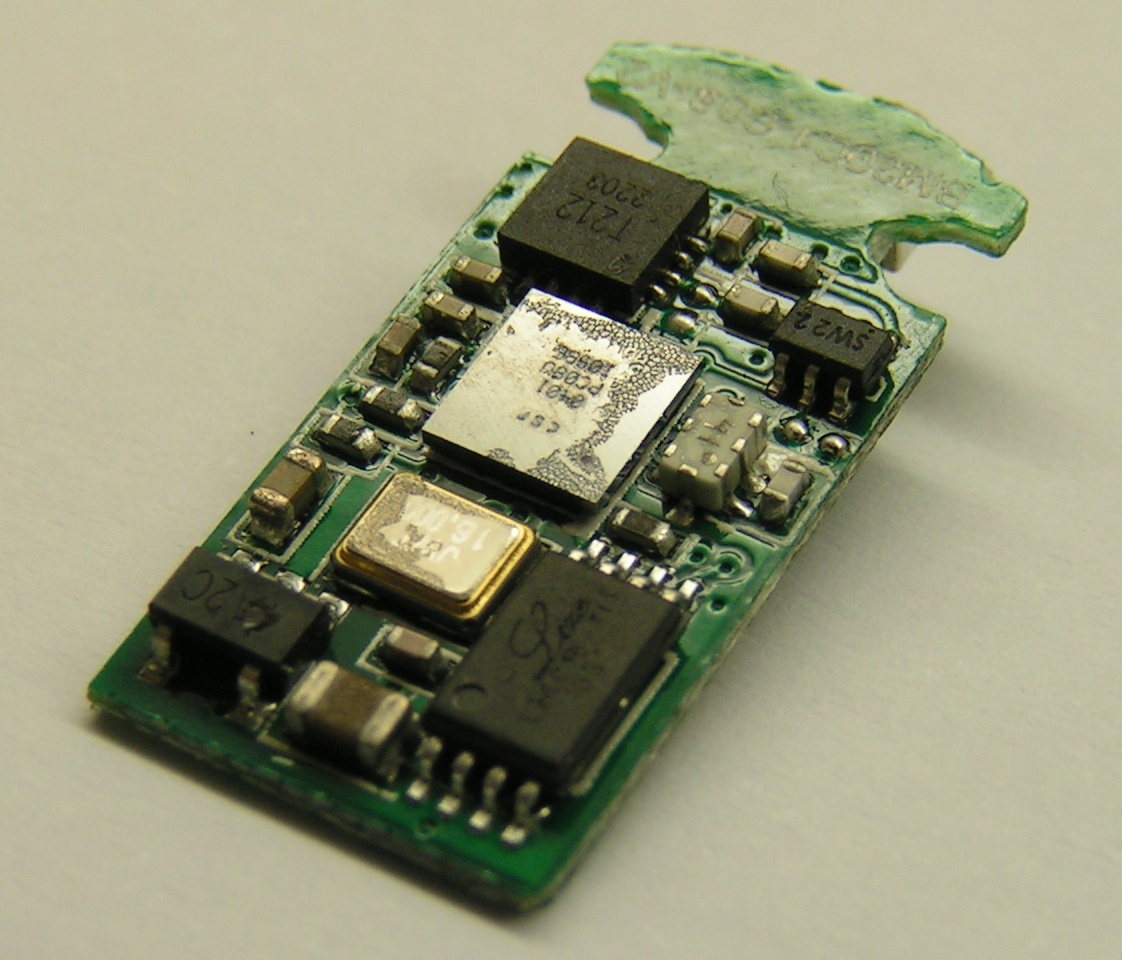
Additionally, I copied all information from the device page of windows. Here is the list. It looks really similar to the $1.80 dongle from dealextreme. Are these information useful to know, why the dongle is not supported by IOIO? Does anyone know, how the driver should be modified? I think this would be a quite nice device for the community....
device destribtion: CSR Bluetooth Device
hardware IDs: USB\VID_0A12&PID_0001&REV_5276
USB\VID_0A12&PID_0001
compatibe IDs: USB\Class_E0&SubClass_01&Prot_01
USB\Class_E0&SubClass_01
USB\Class_E0
service: Btcsrusb
device class: Bluetooth
device class GUID: {f12d3cf8-b11d-457e-8641-be2af2d6d204}
driver key: {f12d3cf8-b11d-457e-8641-be2af2d6d204}\0000
config flag: 00000000
manifacturer: IVT Corporation
local information: Port_#0001.Hub_#0002
object name of physical device: \Device\USBPDO-7
features: 00000084
CM_DEVCAP_REMOVABLE
CM_DEVCAP_SURPRISEREMOVALOK
bustype GUID: {9d7debbc-c85d-11d1-9eb4-006008c3a19a}
legacybustyp: 0000000F
bus number: 00000000
enumerator: USB
address: 00000001
power data: current power status:
D0
power capacity:
0000005D
PDCAP_D0_SUPPORTED
PDCAP_D2_SUPPORTED
PDCAP_D3_SUPPORTED
PDCAP_WAKE_FROM_D0_SUPPORTED
PDCAP_WAKE_FROM_D2_SUPPORTED
power status matching:
S0 -> D0
S1 -> D2
S2 -> D2
S3 -> D2
S4 -> D2
S5 -> D3
guidline distance: 00000003
default value for guideline distance: 00000003
installation status: 00000000
root path: PCIROOT(0)#PCI(1A01)#USBROOT(0)#USB(1)
basiscontainer ID: {f98bc69d-bbc5-11e1-a1e8-001c26e889c4}
displayed name: CSR Bluetooth Device
device instance path: USB\VID_0A12&PID_0001\5&1EE2AC2A&0&1
DevNode status: 0180600A
DN_DRIVER_LOADED
DN_STARTED
DN_DISABLEABLE
DN_REMOVABLE
DN_NT_ENUMERATOR
DN_NT_DRIVER
problem code: 00000000
superior: USB\ROOT_HUB\4&2cfc940c&0
container ID: {f98bc69d-bbc5-11e1-a1e8-001c26e889c4}
safe disconnect necessary: <false>
device destribtion from bus: Bluetooth2.1+EDR CLASS1
hard name of driver knot: oem17.inf:IVT.NTamd64:Btusb_DDI:6.0.15.63:usb\vid_0a12&pid_0001
installtion date: 21.06.2012 20:05:27
date of first installation: 21.06.2012 20:05:27
driver assembly date: 24.06.2007 02:00:00
driver assembly version:6.0.15.63
driver assembly destcripton: CSR Bluetooth Device
inf name: oem17.inf
inf block: Btusb_DDI
matching device ID: usb\vid_0a12&pid_0001
provider: IVT Corporation
rank of insalled driver: 00FF0001
long class name: Bluetooth USB
short class name: Bluetooth
class standard symbol: 100
class installer: btinstall.dll,BTUSBInstaller
no install class: <true>
class for auto install: <true>
class symbol path: C:\Windows\system32\btinstall.dll,-100
display name: Bluetooth USB
Ytai Ben-Tsvi
Jun 21, 2012, 11:23:24 PM6/21/12
to ioio-...@googlegroups.com
Felix,
I cannot do a lot with this information. The only valuable data point I could notice is that your dongle does not appear to be acting as a hub.
If, for some reason, it is really important for you to get this specific dongle working, try to build your own firmware with debug output and find out what is going on. If you have any question on that, please join the ioio-dev list and read a little there before asking.
To view this discussion on the web visit https://groups.google.com/d/msg/ioio-users/-/UzHoZaskbT8J.
To unsubscribe from this group, send email to ioio-users+...@googlegroups.com.

Scot Wilcoxon
Jun 28, 2012, 3:07:22 PM6/28/12
to ioio-...@googlegroups.com
On Sunday, June 10, 2012 4:25:34 PM UTC-5, FelixG wrote:
My aim is to get a connection in a normal house from everywhere (~20-30m through walls).
Bluetooth's maximum range is usually 10m, and that's what I've seen with many devices. A dipole antenna would be 2.5 inches long, but you'd probably have to add it to the transmitter and receiver -- does your phone have a 2.5 inch Bluetooth antenna?
And you can't trust a Bluetooth dongle which seems to have an antenna: http://scanlime.org/2010/04/failed-antenna-design-101/
FelixG
Jul 7, 2012, 4:03:32 PM7/7/12
to ioio-...@googlegroups.com
Hello
I created a page in the wiki with all bluetooth adapters I tested in the last view month:
I would be happy if everybody will add his dongle to this list (if it is not already posted).
Cheers
Felix
Reply all
Reply to author
Forward
0 new messages