
How to remotely log out of Gmail ..
4 views
Skip to first unread message

Robert Kroschel
May 27, 2015, 6:10:50 AM5/27/15
to intoitsap...@googlegroups.com
I found this really handy being a bit of a dill sometimes I can forget to log out .
If you’ve left Gmail logged in on another computer, there’s a quick and easy fix for logging out remotely.
First, log into Gmail on your home computer and scroll all the way down past your inbox to the bottom right of the screen where Gmail displays the last time your account was logged into. Click the Details link to see all the IP addresses that have accessed your account. If someone logs into your account from a suspicious location, Google sends you an alert.
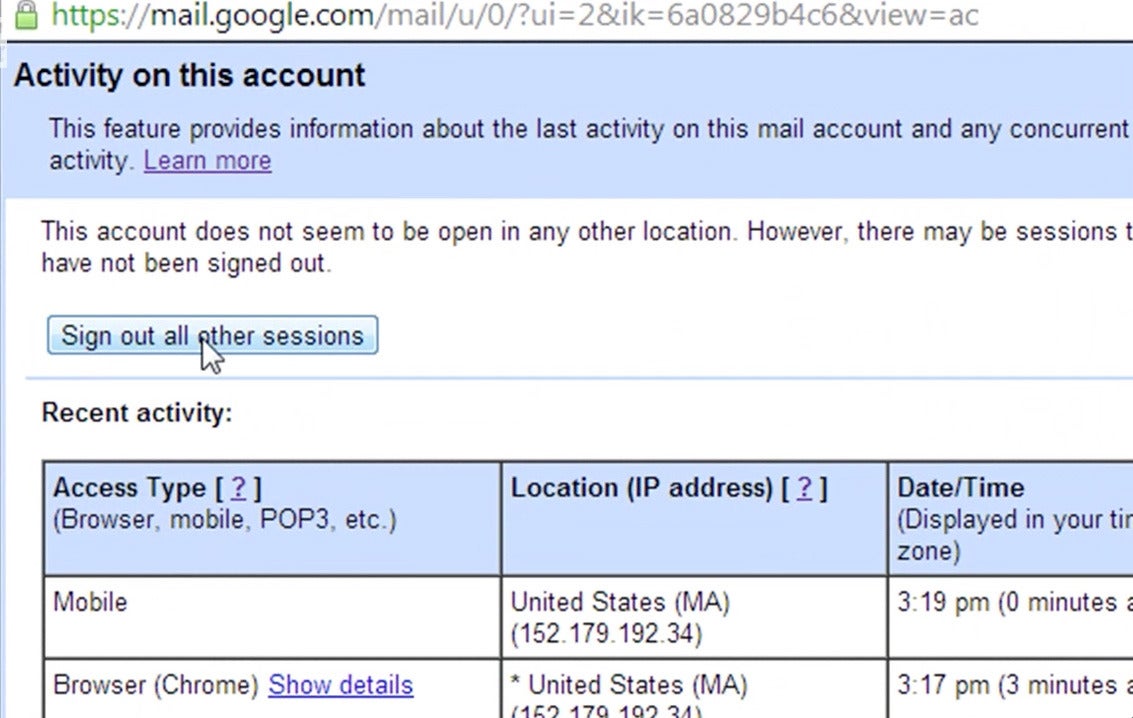
That Details screen contains a Sign Out All Other Sessions button. Click it if you’ve forgotten to log out from another computer.
Reply all
Reply to author
Forward
0 new messages