
is there any way to switch input to the slave from the console (batch file / command line)?
372 views
Skip to first unread message

mmasco
Jan 11, 2020, 6:04:41 AM1/11/20
to Input Director
I tried to simulate pressing hot keys, using various utilities - it does not work.
mmasco
Jan 11, 2020, 6:04:41 AM1/11/20
to Input Director

Shane
Jan 11, 2020, 6:35:47 AM1/11/20
to Input Director
Hi,
You can run InputDirector.exe from the command line / batch file with the flag -slave. Adding -hide will ensure that the UI doesn't pop up.
e.g.:
"C:\Program Files (x86)\Input Director\InputDirector.exe" -slave -hide
Regs,
Shane.
mmasco
Jan 11, 2020, 7:12:15 AM1/11/20
to Input Director
You misunderstood me. I do not need to change the ID working mode, I need to switch input (focus) to the slave. Just like this happens when i press a hotkey. OK, I will try to explain. I have two computers connected to the same monitor, to different inputs. And I want to switch between computers by easy clicking on the shortcut icon. Shortcut launches a batch file that switches inputs at the monitor (via the DDC/CI interface) and it would be logical also to switch the focus of the mouse and keyboard to the active computer.
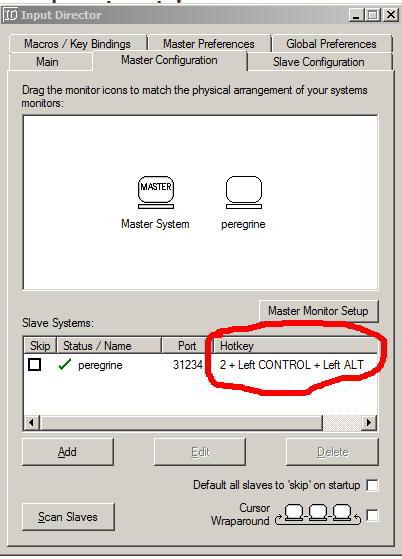
How do I activate the event shown in the screenshot from the command line?
Shane
Jan 12, 2020, 6:51:19 AM1/12/20
to Input Director
Hi,
Okay, I get it. You can't switch control between systems programatically (I did ask the community a few years ago if this would be useful and didn't get much of a response).
You may be able to use another program to simulate the slave hotkey. There's a setting you'll need to change in Input Director for this to work:
1. Open Input Director on the master system and switch to the "Master Preferences" tab
2. Scroll all the way down to the "Advance" settings
3. Enable the option "Logitech keyboard macro compatibility mode".
Regs,
Shane.

Moo
Feb 1, 2020, 10:03:14 PM2/1/20
to Input Director
Programmatic control would be useful to me. I wasn't able to successfully send a "switch to slave" type command to Input Director using AHK at all, using any of its sending methods, and with that Logitech option enabled or disabled. Switching back to the master would be even more difficult, as my inputs would be sent to the slave at that point, and so the slave would need to tell the master to return the pointer.
While I'm here, I'd also like a way to send keys to specific hosts. I'm currently using some unused scancodes as key bindings in ID as a way to send keys to a slave while the pointer isn't there, which isn't really ideal, and something more versatile would be nice. And a way to retrieve which machine was currently being controlled. If it was up to me, something a bit more "direct" than a command-line thing would be good, as that'd be kind of slow. Maybe good old Winamp-style WM_COMMAND/WM_USER messages? That should be easy enough to use from other programs, and a command-line program could maybe use that too.
mmasco
Feb 27, 2020, 12:48:34 AM2/27/20
to Input Director
I solved this problem. if you're interested - https://groups.google.com/d/msg/input-director/jAMmiMsnyek/qlhLzZzKCgAJ
Reply all
Reply to author
Forward
0 new messages