
MyRobotLab inmoov2 no sound when it's talking
451 views
Skip to first unread message

Eyton Branhan
Feb 27, 2016, 5:54:50 PM2/27/16
to InMoov
Hello,
I'm currently testing MyRobotLab and the voice recognition system, it works great, it's so simple to use, a real pleasure, the same when I am creating new movements but I can't hear the voice of my InMoov in the headphones : /
I think it's well set because I can hear all others OS sounds but not from MyRobotLab.
Is there anybody to help me with that please ?
I can provide needed screenshot so don't hesitate to ask me.
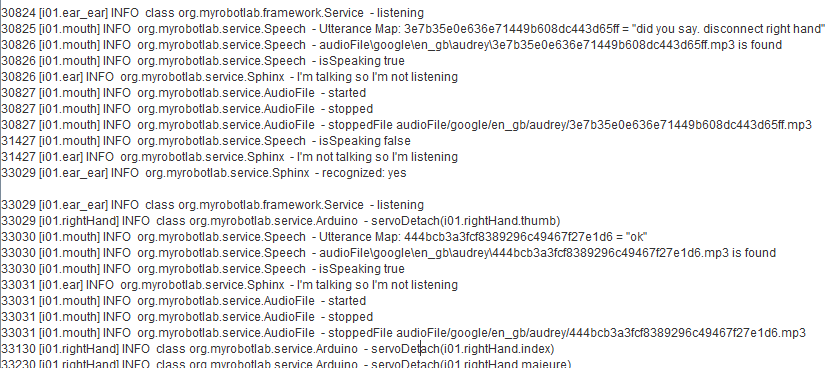
Here a screenshot to let you see that all works good but not the voice :
Audio files are in the right folder but I can't hear them..
I'm currently testing MyRobotLab and the voice recognition system, it works great, it's so simple to use, a real pleasure, the same when I am creating new movements but I can't hear the voice of my InMoov in the headphones : /
I think it's well set because I can hear all others OS sounds but not from MyRobotLab.
Is your microphone correctly set as default in your sound system of the PC ? YES
Are the speakers also set as default in your sound system ? YES, I think so because I can hear all videos, music, firefox and OS sounds...When you execute the script can you hear the servo powered ? YES
When you say "disconnect head" and then say "yes"(even if the robot says nothing) are the servos unpowered ? YES
When you say something in the mic can you see a reaction in the python window, like bunch of words added ? YESWhen you say "disconnect head" and then say "yes"(even if the robot says nothing) are the servos unpowered ? YES
Is there anybody to help me with that please ?
I can provide needed screenshot so don't hesitate to ask me.
Here a screenshot to let you see that all works good but not the voice :
Audio files are in the right folder but I can't hear them..

gael langevin
Feb 28, 2016, 7:55:29 AM2/28/16
to Eyton Branhan, InMoov
Hello Eyton,
A few days ago I tested the recent build 1.0.1015 and had an issue with sound as well.http://inmoov.fr/how-to-start-myrobotlab/
--
You received this message because you are subscribed to the Google Groups "InMoov" group.
To unsubscribe from this group and stop receiving emails from it, send an email to inmoov+un...@googlegroups.com.
To post to this group, send email to inm...@googlegroups.com.
Visit this group at https://groups.google.com/group/inmoov.
For more options, visit https://groups.google.com/d/optout.
Eyton Branhan
Feb 28, 2016, 8:33:32 AM2/28/16
to InMoov, eyton....@gmail.com
Hello Gael,
thank you for the answer, I am using the last (I think) build which is the 1.0.1019 with jre1.8.0_73.
When I try to play directly these mp3 files, I have no sound too, is that correct ?
Oh okay, thanks for the information about beta versions of MRL, I didn't know that.
I will try the one you give me the link right now and I will come back, I hope so, with good news :)
Thank you very much for the advice !
(the InMoov project is so fuckin' awesome I can't believe it yet !)
thank you for the answer, I am using the last (I think) build which is the 1.0.1019 with jre1.8.0_73.
When I try to play directly these mp3 files, I have no sound too, is that correct ?
Oh okay, thanks for the information about beta versions of MRL, I didn't know that.
I will try the one you give me the link right now and I will come back, I hope so, with good news :)
Thank you very much for the advice !
(the InMoov project is so fuckin' awesome I can't believe it yet !)
Eyton Branhan
Feb 28, 2016, 9:44:32 AM2/28/16
to InMoov, eyton....@gmail.com
okay thank you very much again, it works perfectly now with the build 107 !
I think this is because there is no same files in audioFiles folder in the build 1019 and in the build 107.
Build 107 :
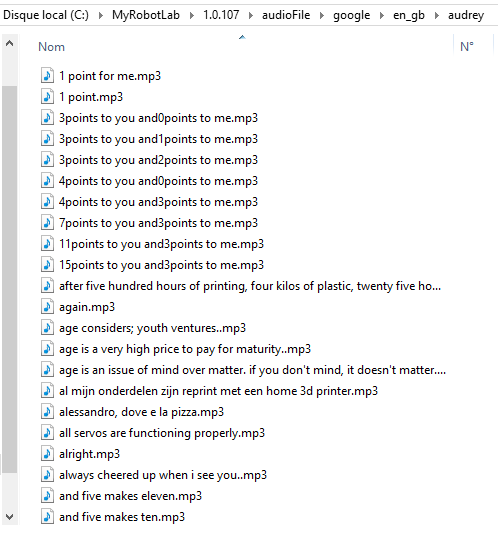
Build 1019 :

By the way, I got 2 errors when decompress zip folder of build 107 :

and :

I tried to create an account on myrobotlab.org but still waiting for approval to let them know this bug with build 1019.
See ya !
I think this is because there is no same files in audioFiles folder in the build 1019 and in the build 107.
Build 107 :
Build 1019 :
By the way, I got 2 errors when decompress zip folder of build 107 :
and :
I tried to create an account on myrobotlab.org but still waiting for approval to let them know this bug with build 1019.
See ya !
Eyton Branhan
Feb 28, 2016, 2:12:35 PM2/28/16
to InMoov, eyton....@gmail.com
maybe It could help someone : with the help of kwatters we found that
java 32 was installed on my 64 system, associate with the wrong mrl
arduino sketch, it generate this error
gael langevin
Feb 28, 2016, 7:19:25 PM2/28/16
to Eyton Branhan, InMoov
I am glad it works now.
Keep the version 1.0.0107 folder preciously if you want to try a latest build.:)
2016-02-28 20:12 GMT+01:00 Eyton Branhan <eyton....@gmail.com>:
maybe It could help someone : with the help of kwatters we found that java 32 was installed on my 64 system, associate with the wrong mrl arduino sketch, it generate this error
--

Pedro Rego
May 8, 2016, 10:09:36 AM5/8/16
to InMoov
Hello all,
im having the same problem! and since im using linux im not beeing able to get the version 1.0.107. Im using the latest version of MRL and can't even listen to the audio files in the folder! Does anyone have a clue how to work this out?
im having the same problem! and since im using linux im not beeing able to get the version 1.0.107. Im using the latest version of MRL and can't even listen to the audio files in the folder! Does anyone have a clue how to work this out?

Mats Önnerby
May 8, 2016, 6:06:13 PM5/8/16
to InMoov
Hi Pedro.
Many things can stop the sound.
Are the speakers connected ? Do they have a volume control that migt be turned off or low volume. Do they have a power switch ?
Are all Linux sound controls unmuted and have a volume set to more than 0 ?
I found this guide for Linux sound system that I hope can help. http://www.troubleshooters.com/linux/sound/sound_troubleshooting.htm#sound_troubleshooting_script_go_fast_or_go_home
If it still doesn't work, then send a "No worky" to the MRL team.
You can do that from MyRobotLab => help => about => "Help it no-worky"
Pedro Rego
Jun 9, 2016, 7:40:12 AM6/9/16
to InMoov
I actually worked out the problem, by replacing the mp3 with new ones with same name, and it work now... so the files were corrupted possible
Mats Önnerby
Jun 9, 2016, 9:15:21 AM6/9/16
to InMoov
Hi Pedro
That's good to know, That can probably happen, because MRL save files with sounds/sentences so that it only has to ask Acapelaspeech for a sentence once. Then it uses the saved mp3 file next time the same sentence is used.
If something was wrong the first time a sentence was used, perhaps the connection to Internet was down, it's possible that MRL saved a file without any sound.
I will check to code to see if that can be prevented.
Thanks for explaining what you did to make it work. That can help other people that experience the same problem :-)
/Mats
Pedro Rego
Jun 9, 2016, 9:52:53 AM6/9/16
to InMoov
Actually does anyone knows where is the code where it fetches the mp3? i mean for the "openHand" he will fetch the mp3 but i dont seem to find where the code is!! Maybe in the mouth service? tbh im a bit lost with MRL i seem to find very few information on how to program it or use the services!
Mats Önnerby
Jun 9, 2016, 8:11:40 PM6/9/16
to InMoov
Hi Pedro
I agree that it can be a bit confusing at the start. The service that will fetch the mp3 file, is the AcapelaSpeech service. The best way to lean MRL is to try the basic services that the InMoov services are built from. Some of the services that you should learn about first is Arduino and Servo. You can create scripts in Python using the Python service. It starts up when MRL starts. If you start MRL and go to the runtimetab, you can rightclick in the service name and select info. That will take you to some information about each service. It's only a few people working on MRL, doing more development than documentation.
If you register on http://www.myrobotlab.org, you will be able to search for more information. There is a lot of information, but it can be difficult to find. If you have a question then ask it in the shoutbox or write it in the Forum. We will try to make our best to answer.
/Mats
gael langevin
Jun 10, 2016, 4:52:35 AM6/10/16
to Pedro Rego, InMoov
I'm guessing you are maybe using version 1.0.107 of MRL with my minimal.py scripts.
Since AcapelaSpeech replaced Speech, the fetching creates corrupted empty mp3 files.Currently the script have this:
i01 = Runtime.createAndStart("i01", "InMoov")
i01.startMouth()
i01.mouth.setGoogleURI("http://thehackettfamily.org/Voice_api/api2.php?voice=Ryan&txt=")
when normally it should be getting,:
botVoice = "Ryan"
mouth = Runtime.createAndStart("i01.mouth", "AcapelaSpeech")
mouth.setVoice(botVoice)
--
Pedro Rego
Jun 10, 2016, 9:14:14 AM6/10/16
to InMoov
thanks for the answer, actully the arduino and servo services ive been using with no problem :)
i have been trying now the chatbot and create gesture, i definitely look for the AcapelaSpeech, thank you all so much for all the help, i dont think i am yet in a position to help develop but as soon as i feel ready i will help the inmoov community in something :)
i have been trying now the chatbot and create gesture, i definitely look for the AcapelaSpeech, thank you all so much for all the help, i dont think i am yet in a position to help develop but as soon as i feel ready i will help the inmoov community in something :)
Pedro Rego
Jun 10, 2016, 9:16:03 AM6/10/16
to InMoov, pedrogil...@gmail.com
Thank you Gael, i really appreciate you beeing so halpfull!!
So does that mean i should change the minimal script for the snippets you say after?
So does that mean i should change the minimal script for the snippets you say after?

Andy Duncan
Jun 11, 2016, 5:50:33 AM6/11/16
to InMoov
I saw a documentary on your inMoove robot, an was very very impressed. I have never done anything like this, but would love to get into it.
I would like to get involved, and build my own inMoov.
What is a good 3D printer to enable me to 3D pri t all the necessary parts.
I live in Cronulla, Sydney, Australia
Cronulla is a beautiful beach suburd 30km south of Sydney City
Any help to get me started would be great
Thanks
I would like to get involved, and build my own inMoov.
What is a good 3D printer to enable me to 3D pri t all the necessary parts.
I live in Cronulla, Sydney, Australia
Cronulla is a beautiful beach suburd 30km south of Sydney City
Any help to get me started would be great
Thanks

bigfilsing
Jun 11, 2016, 5:55:06 AM6/11/16
to Andy Duncan, InMoov
Hi Andy.
Get on you tube and look for makers muse. Nice guy outta Sydney and has a ton of reviews on 3D printing. For simplicity cost and ease the Wanhow looked like a good start.
Good luck
gael langevin
Jun 13, 2016, 3:35:58 PM6/13/16
to bigfilsing, Andy Duncan, InMoov
Hello Duncan and welcome,
There is many posts on the forum about 3D printers that you might want to read.Reply all
Reply to author
Forward
0 new messages