
Skip to first unread message

Zach DuFran
Feb 6, 2019, 5:37:51 PM2/6/19
to iNaturalist
I am typing a blog post and have created a simple nested list in my post to show some taxonomy. The formatting is not showing up correctly in the preview of the post. I have pasted the same snippet into an html validator and it appears correct and passes validation. What could be wrong?
Here's the snippet:
<ul>
<li><b>Noctuoidea</b> (2514 observations; 318 species)
<ul>
<li>Erebidae (1259 observations; 131 species)</li>
<li>Noctuidae (1027 observations; 157 species)</li>
</ul>
</li>
<li><b>Pyraloidea</b> (948 observations; 139 species)
<ul>
<li>Crambidae (685 observations; 98 species)</li>
<li>Pyralidae (239 observations; 41 species)</li>
</ul>
</li>
<li><b>Geometroidea</b> (663 observations; 89 species)
<ul>
<li>Geometridae (661 observations; 88 species)</li>
</ul>
</li>
<li><b>Bombycoidea</b> (518 observations; 46 species)
<ul>
<li>Sphingidae (363 observations; 32 species)</li>
<li>Saturniidae (153 observations; 13 species)</li>
</ul>
</li>
</ul>
It appears as:
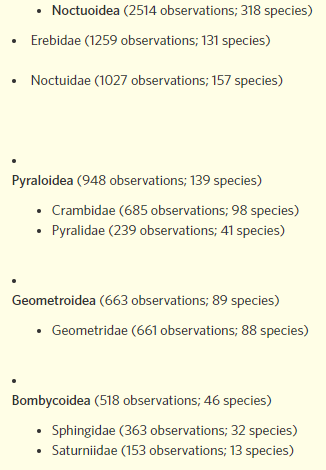
I have tested this in multiple browsers (Chrome and Edge) and it appears the same in both.

bonifacio barrio hijosa
Feb 7, 2019, 6:55:33 AM2/7/19
to inatu...@googlegroups.com
I think is missing a first <li>, like:
<li>
<ul>
<li><b>Noctuoidea</b> (2514 observations; 318 species)
<li><b>Noctuoidea</b> (2514 observations; 318 species)
...
and about the dots not aligned, maybe is a question of css, don't know really.
best,
bonfacio barrio hijosa
--
You received this message because you are subscribed to the Google Groups "iNaturalist" group.
To unsubscribe from this group and stop receiving emails from it, send an email to inaturalist...@googlegroups.com.
To post to this group, send email to inatu...@googlegroups.com.
Visit this group at https://groups.google.com/group/inaturalist.
For more options, visit https://groups.google.com/d/optout.
Zach DuFran
Feb 7, 2019, 9:32:04 AM2/7/19
to iNaturalist
HTML lists begin with either <ul> or <ol> depending on whether you want an unordered list (dots) or ordered list (numbers).
Zach

Patrick Leary
Feb 7, 2019, 10:54:23 AM2/7/19
to iNaturalist
In this case you'll want to change your "Formatting" option from Simple, which is best when not using custom HTML, to None, which will mostly leave your HTML alone so it will format correctly
Zach DuFran
Feb 7, 2019, 4:24:22 PM2/7/19
to iNaturalist
Thanks Patrick! That works for me.

Bryan Milstead
Feb 18, 2019, 9:32:50 AM2/18/19
to iNaturalist
Hi, we are having the same problem and it looks like you have the solution. The only problem is I can't find were to change the formatting option. Can you help? Thanks.
Reply all
Reply to author
Forward
0 new messages