Safari - wrong mimeTypes selection webm

777 views
Skip to first unread message

jakub.f...@etnetera.cz

unread,
Oct 21, 2020, 4:49:51 AM10/21/20
to Interactive Media Ads SDK
Hello,
I would like to ask, I came across unexpected behavior of selecting an ad source according to mimetypes in Safari.

If VAST has multiple sources and I limit the selection using adsRenderingSettings-> mimeTypes to mp4 and webm. In Safari, webm are selected, which causes an error and the ad not playing.

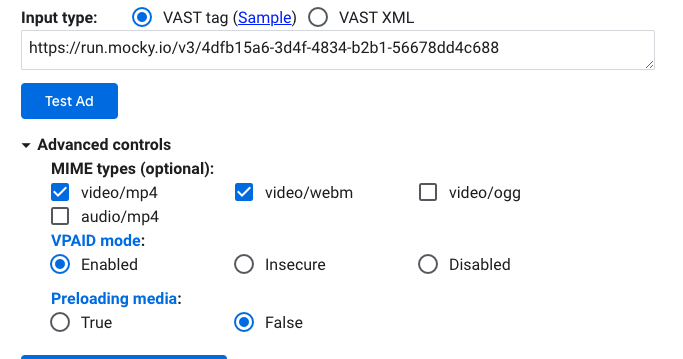
I managed to simulate the situation on a demo of the IMA player.

Here is the mimeTypes setting for IMA. (The order of the types does not matter, it happens in whether the webm is in the first or second position.)

adsRenderingSettings: {
mimeTypes: [
'video/mp4',
'video/webm',
],
}

Here is a link to the VAST demo, which I modified to contain only two parameter-identical files: https://run.mocky.io/v3/4dfb15a6-3d4f-4834-b2b1-56678dd4c688

Here I am already sending a share link to the demo player:

Snímek obrazovky 2020-10-21 v 10.47.46.png


Thank you for answer,
Jakub

IMA SDK

unread,
Oct 21, 2020, 5:54:10 AM10/21/20
to jakub.f...@etnetera.cz, ima...@googlegroups.com

Hi Jakub,

Thank you for reporting this to us.

Using the links provided, I was able to reproduce the issue you’re experiencing. I’m going to share this information with the team and we will get back to you once we have our findings.

Regards,


Google Logo
Sherwin Diesta
IMA SDK Team


ref:_00D1U1174p._5004Q26AwyU:ref

IMA SDK

unread,
Oct 23, 2020, 8:42:26 AM10/23/20
to jakub.f...@etnetera.cz, ima...@googlegroups.com

Hi Jakub,

I received an update from the team. Upon testing the ad tag via Chrome browser we can also see the 400 error (please see attached screenshot). This indicates an issue with the ad tag. For us to pinpoint the source of the issue, is there a way to successfully play the ad tag?

Regards,

img001.png

Frydrych, Jakub

unread,
Oct 26, 2020, 5:11:28 AM10/26/20
to IMA SDK, ima...@googlegroups.com
Hi Sherwin,

when I created the demo, I used one of the IMA examples directly at: https://developers.google.com/interactive-media-ads/docs/sdks/html5/client-side/tags

Specifically this: Single Inline Linear

I removed other types from it and left only .webm and .mp4 with the same size 640x360px and bitrate 118 and 119.

The problem that you describe is probably the durability of the webm and mp4 files referenced in my VAST demo. That is, the server then returns 403.

I've created a new VAST demo, but I understand that before the team gets a solution, it may "expire" again. Therefore, please try to proceed as I did above.


pá 23. 10. 2020 v 14:42 odesílatel IMA SDK <imasdkfor...@gmail.com> napsal:


--
 
Etnetera logo
Jakub Frydrych
Synergy - Team Leader
Console.log professional
Etnetera a.s. Jankovcova 1037/49, Praha 7
Map  |  Facebook  |  Twitter  |  www.etnetera.cz


IMA SDK

unread,
Oct 26, 2020, 8:22:04 AM10/26/20
to jakub.f...@etnetera.cz, ima...@googlegroups.com

Hi Jakub,

Thank you for your response. Let me share this information to my teammates to investigate further. We will keep you posted.

Regards,

IMA SDK

unread,
Feb 24, 2021, 6:59:27 AM2/24/21
to jakub.f...@etnetera.cz, ima...@googlegroups.com

Hi Jakub,

Hope you’re doing well.

My apologies for not getting back to you about this issue sooner. However, just wanted to get your confirmation if you’re still experiencing this issue. Please let us know and we’ll be glad to assist you. 

In case the issue is still occuring, could you kindly provide us with a new ad tag for our reference? I tried to create my own VAST sample by following your instructions on your earlier email. However, this seems to be not working anymore as I wasn’t able to reproduce the issue (VAST sample also not working via Chrome browser) on my end.


Regards,

Tomas Bucher

unread,
Mar 4, 2021, 4:26:35 AM3/4/21
to Interactive Media Ads SDK
I'll reply instead of my colleague Jakub.

Yes, the issue is still replicable on Safari. Instead of providing you with another VAST with expirable media links, please try with this ad tag where the media content has persistent urls https://devs.origin.cdn.cra.cz/ima/mp4,webm.xml or directly https://developers.google.com/interactive-media-ads/docs/sdks/html5/client-side/vastinspector?tag=https%253A%252F%252Fdevs.origin.cdn.cra.cz%252Fima%252Fmp4%252Cwebm.xml.

Please do not forget to manually select mp4 and webm mime types in Inspector's advanced options. We have to do this as some ad providers occasionally add 3gp media and it causes issues with some mobile browsers when we leave the selection in default mode.

With regards to your comment of VAST sample not working in Chrome, I ran into something similar on one computer where the page https://developers.google.com/interactive-media-ads/docs/sdks/html5/client-side/vastinspector refused to work properly on Chrome. The fix in that case was to go to Chrome's dev tools, disable Service Workers in Application tab by clicking on "Bypass for network" and reload the page. The dev tools just need to stay open for that to work. Not sure why that workaround was needed on that particular computer, though. All the same, our issue is with Safari and not Chrome as Chrome supports both mp4 and webm.

Regards,
Tomas Bucher

IMA SDK

unread,
Mar 4, 2021, 9:59:35 AM3/4/21
to collapsin...@gmail.com, ima...@googlegroups.com
Hi Thomas,

I work with Sherwin and will assist you. Thank you for the ad tag and the detailed explanation. I replicated the issue and gave them to the rest of my team. We will get back to you as soon as possible.

Regards,

Google Logo
Aryeh Baker
IMA SDK Team


ref:_00D1U1174p._5004Q26AwyU:ref

Tomas Bucher

unread,
Mar 24, 2021, 10:55:07 AM3/24/21
to Interactive Media Ads SDK
Hello,

just wanted to make sure, since there was no response here, that version 3.447.1 solves this as noted in https://developers.google.com/interactive-media-ads/docs/sdks/html5/client-side/history and that the solution is final.

Strange thing is that yes, IMA on Safari now selects mp4, if both mp4 and webm are listed in allowed mimeTypes, but if only webm is listed, it still selects mp4. Therefore it seems that the whole additional mimeType config is now pointless and it is running in autoselect default mode and we worry that it may cause problems again with mobile browsers where IMA will pick 3gp container, which we wanted to filter out by this configuration in the first place. I mentioned the reasoning behind using this filter in my previous message.

Can you please comment on that?

Regards,
Tomas Bucher

IMA SDK

unread,
Mar 24, 2021, 3:42:50 PM3/24/21
to collapsin...@gmail.com, ima...@googlegroups.com
Hi Tomas,

You are correct that your input created that fix.

Regarding the issue that .mp4 files play when not selected, I replicated this in Safari. Note that .webm isn't yet supported in Safari, so the fix gives a non requested type that works in the player. When asking for .webm in Chrome, only the available .webm file played. When adding 'adsRenderingSettings.mimeTypes = ['video/webm','video/3gpp'];' then the .3pg file played in Safari and not the .mp4.

Are you requesting that an ad shouldn't play at all if the requested type isn't supplied in the VAST? Or is the functionality as is what you want?

Tomas Bucher

unread,
Mar 25, 2021, 4:50:35 AM3/25/21
to Interactive Media Ads SDK
Thanks for the reply.

The specification for mimeTypes states that "If specified, the SDK will include media that matches the MIME type(s) specified in the list and exclude media that does not match the specified MIME type(s)...... If not specified, the SDK will pick the media based on player capabilities."

Based on the perceived new behavior I would say that the first sentence is no longer fully true, because the flow now ignores explicitly listed types. MimeTypes gave developers more granular means to solve specific scenarios that would not be solvable in default autoselect mode.

My expectation when using adsRenderingSettings.mimeTypes would be:
1. check available media types from VAST
2. check what is listed in mimeTypes config
3. check what browser supports
4. If there is a match among all three, use given preferred type
5. If mimeTypes do not match what is in the VAST or browser does not support any of them, skip the ad
6. If no mimeTypes are defined, obviously autoselect media based on the match between VAST and browser support.

Would that make sense?
Thank you,
Tomas Bucher

IMA SDK

unread,
Mar 25, 2021, 6:46:56 AM3/25/21
to collapsin...@gmail.com, ima...@googlegroups.com

Hi Tomas,

Thanks for your response. I’m going to relay this information with the team. We will get back to you once we receive an update.


Regards,


Google Logo
Sherwin Diesta
IMA SDK Team


ref:_00D1U1174p._5004Q26AwyU:ref

IMA SDK

unread,
Mar 25, 2021, 3:47:14 PM3/25/21
to collapsin...@gmail.com, ima...@googlegroups.com
Hi Tomas,

My team got back to me, this is expected because we're treating a publisher providing only unsupported mime types the same as if they had provided no mimeTypes at all (We're only respecting playable mimeTypes as preferred mimeTypes). A publisher preferring an unsupported type doesn't make sense. When using the following code:
 

if (navigator.vendor &&
    navigator.vendor.indexOf('Apple') > -1 &&
    navigator.userAgent &&
    navigator.userAgent.indexOf('CriOS') == -1 &&
    navigator.userAgent.indexOf('FxiOS') == -1){adsRenderingSettings.mimeTypes = ['video/3gpp'];}

On Safari .3gp played while on Chrome .mp4 played. If I added "'video/mp4'" then the .mp4 played in Safari.

I got the above snippet from https://storage.googleapis.com/interactive-media-ads/hosted-samples/DAI%20Live%20HLS/index.html.  .webm doesn't yet work in Safari, so if that's the only mimeType preferred the preference is ignored. I just tested by taking out of our Single Inline Linear the .3gpp files and the ad didn't run. If this doesn't address fully your use case please get back to us. 

Regards,

Tomas Bucher

unread,
Mar 26, 2021, 10:05:46 AM3/26/21
to Interactive Media Ads SDK
Hello,

thank you for the explanation. In my opinion it still takes the control away from developers. As you said yourself, you had specified 3gp container, but mp4 played on Chrome in your example. I understand that it is leveraging the ability to play the ad at all if the browser supports it, but I believed that adsRenderingSettings.mimeTypes filter serves an explicit role in what types can be used and not just a preference role. This was the likely reason for confusion.

Since this is intentional behavior as you explained, let's leave it at that and let me just thank you again for fixing the issue on Safari when using webm in mimeTypes.

Regards,
Tomas Bucher

IMA SDK

unread,
Mar 26, 2021, 10:36:16 AM3/26/21
to collapsin...@gmail.com, ima...@googlegroups.com
Hi Tomas,

Thank you for you getting back to me. Let me clarify my sample code. What the code does is conditionally supply preferred mimeTypes if the browser is Safari by using the Navigator Interface to determine that the browser is Safari. This is why Chrome defaulted to .mp4, because if the browser is Chrome then the "if statement" is false and the code snippet doesn't supply mimeTypes.

What I was trying to illustrate was that for different browsers you can set different mimeTypes. This way there is no reason to supply a list of mimeTypes that none can play on a specific device with a specific browser.

If you are concerned about 3gpp on a mobile device then you can supply mimeTypes that work on mobile and you will never have a 3gpp ad play on mobile. If only a 3gpp mediaFile is available for mobile, then no ad plays.

If you supply a list of mimeTypes that none of them work on mobile to a mobile device, then the SDK will ignore the mimeTypes and play what the SDK deems the most appropriate type.

Please get back to us for more clarification or if this doesn't address your use case.
Reply all
Reply to author
Forward
0 new messages