
How to add editable column with dropdown in "Workflow Activity screen grid"
114 views
Skip to first unread message

Hansa Jha
Jul 26, 2022, 12:07:34 AM7/26/22
to iDempiere
Hii,
I have to implement editable grid in "Workflow Activity" screen. In this i need to add a new column with editable combobox/dropdown.
I am unable to add combobox in this grid. This grid is implemented using Wlistbox.
Can you let me know if this grid is editable for a combobox? and if yes then how can i implement it?
Thank you.

Duman Zhunissov
Jul 26, 2022, 3:59:29 PM7/26/22
to iDempiere
Hi.
I think it's possible. You can look an example of Listbox with Combobox here https://www.zkoss.org/zkdemo/listbox/selection_control
Hansa Jha
Jul 27, 2022, 2:33:03 AM7/27/22
to iDempiere
Thank You for replying.
Is it possible to implement this using only java?
I have tried the following code using java but it is not working..
ListCell c1 = new ListCell();
Listbox lbox = new Listbox();
lbox.setMold("select");
lbox.setHflex("1");
ListItem i1 = new ListItem();
i1.setLabel("hansa");
ListItem i2 = new ListItem();
i2.setLabel("jha");
lbox.appendChild(i1);
lbox.appendChild(i2);
c1.appendChild(lbox);
rowData.add(c1);
model.add(rowData);
Listbox lbox = new Listbox();
lbox.setMold("select");
lbox.setHflex("1");
ListItem i1 = new ListItem();
i1.setLabel("hansa");
ListItem i2 = new ListItem();
i2.setLabel("jha");
lbox.appendChild(i1);
lbox.appendChild(i2);
c1.appendChild(lbox);
rowData.add(c1);
model.add(rowData);
listbox.setModel(model); // Wlistbox grid
Please note :
rowData is an arraylist used to store the rows of Wlistbox grid table (listbox)
Now setting the dropdown column as editable :
listbox.setColumnClass(10, Listbox.class, false); // also tried setting it editable through minitable but its not working.
Thanks and Regards.
Duman Zhunissov
Jul 27, 2022, 4:16:37 AM7/27/22
to iDempiere
Why do you need adding editable combobox in the screen? I understand why it's not editable by design.
Still, if you need to add editable combobox you should do these steps:
1. Add a row into rowData in WWFActivity.loadActivities()
row 401
rowData.add(activity.getSummary());
rowData.add(activity.getWFState());
model.add(rowData);
2. Add a column in WWFActivity.loadActivities()
rowData.add(activity.getWFState());
model.add(rowData);
2. Add a column in WWFActivity.loadActivities()
row 426
String[] columns = new String[]{Msg.translate(Env.getCtx(), "Priority"),
Msg.translate(Env.getCtx(), "AD_WF_Node_ID"),
Msg.translate(Env.getCtx(), "Summary"),
Msg.translate(Env.getCtx(), "State")};
Msg.translate(Env.getCtx(), "AD_WF_Node_ID"),
Msg.translate(Env.getCtx(), "Summary"),
Msg.translate(Env.getCtx(), "State")};
3. Add a combobox in WListItemRenderer.Listcell getCellComponent(WListbox table, Object field,
int rowIndex, int columnIndex)row 350
if (isCellEditable)
{
Textbox textbox = new Textbox();
textbox.setValue(field.toString());
textbox.addEventListener(Events.ON_CHANGE, this);
ZkCssHelper.appendStyle(textbox, "width: 96%;");
listcell.appendChild(textbox);
} else if (columnIndex == 3) {
Combobox combobox = new Combobox();
combobox.setValue(field.toString());
combobox.addEventListener(Events.ON_CHANGE, this);
ZkCssHelper.appendStyle(combobox, "width: 96%;");
listcell.appendChild(combobox);
}
else
{
listcell.setLabel(field.toString());
}

{
Textbox textbox = new Textbox();
textbox.setValue(field.toString());
textbox.addEventListener(Events.ON_CHANGE, this);
ZkCssHelper.appendStyle(textbox, "width: 96%;");
listcell.appendChild(textbox);
} else if (columnIndex == 3) {
Combobox combobox = new Combobox();
combobox.setValue(field.toString());
combobox.addEventListener(Events.ON_CHANGE, this);
ZkCssHelper.appendStyle(combobox, "width: 96%;");
listcell.appendChild(combobox);
}
else
{
listcell.setLabel(field.toString());
}
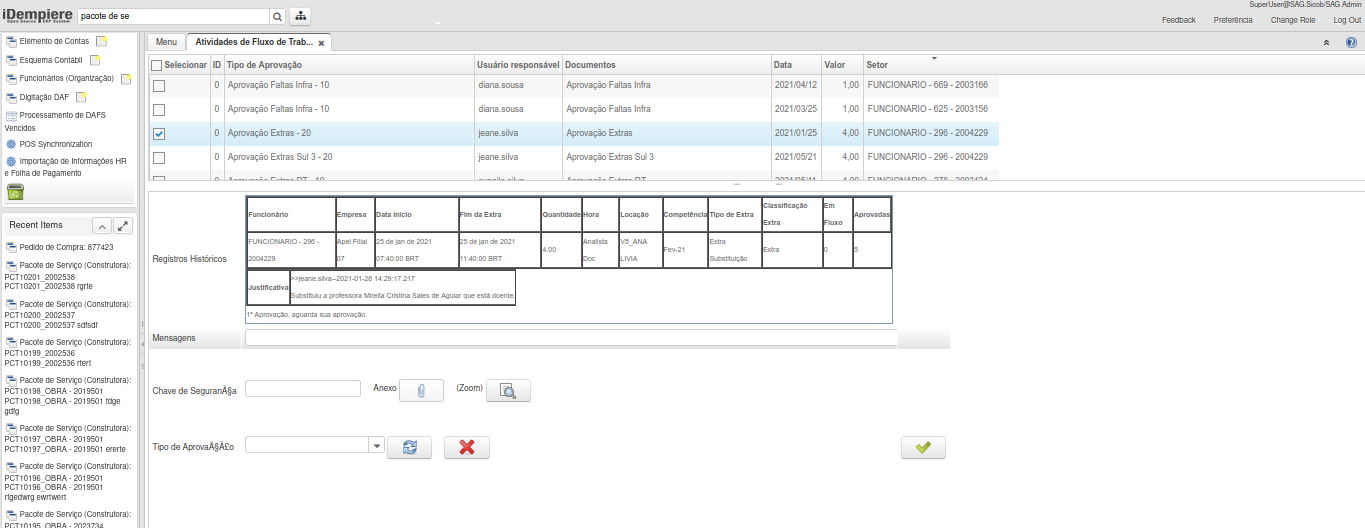
And you will get something like this:
It's just an example. Maybe more experienced developers will advise how to do it.
Hansa Jha
Jul 27, 2022, 7:01:16 AM7/27/22
to iDempiere
Thank you so much!!!!
I am now able to implement it.
Duman Zhunissov
Jul 27, 2022, 7:35:13 AM7/27/22
to iDempiere
The step 3 is wrong.
WListItemRenderer should not be change because it affects all windows.
Hansa Jha
Jul 27, 2022, 8:03:51 AM7/27/22
to iDempiere
yea I wrote a case just specific case for my column by giving "column header name" instead of index


0 new messages