
Start iDempiere server, run SvrProcess then exit, within Eclipse
780 views
Skip to first unread message

Neil Gordon
Jan 8, 2015, 8:30:53 AM1/8/15
to idem...@googlegroups.com
It would be a great time saver for the task I am busy with, if I could start the iDempiere server, run a SvrProcess then stop again, all within the Eclipse IDE.
I used to do this with Compiere, but iDempiere has Tomcat and the OSGI services. How could one achieve this in the iDempiere environment?
It would save a great deal of time for a variety of tasks, as one doesn't need to login to iDempiere every time, select menu option, etc to test code changes (even with hot code replacement, one often needs to restart the server).

Hiep Lq
Jan 8, 2015, 9:51:57 AM1/8/15
to idem...@googlegroups.com
if requirement only auto rebuild, run server, run a process you can try buckminster headless.

redhuan d. oon
Jan 8, 2015, 3:30:12 PM1/8/15
to idem...@googlegroups.com
I used the GenerateModel to make a separate plugin to do DocBook generate which depends minimal plugins and avoid web ui. Maybe that can also be changed to handle svrprocess. Do you want to see the plugin? I can upload it. Haven't done so because Docbook involves more work with PDF and ePub in progress.
Such a plugin you suggest would then feed the ID and params via arguments.
WDYT? AIR (am I right?)
Such a plugin you suggest would then feed the ID and params via arguments.
WDYT? AIR (am I right?)
Neil Gordon
Jan 9, 2015, 7:11:03 AM1/9/15
to idem...@googlegroups.com
Hi Hiep,
Thanks for the info, but yes, Eclipse would be a requirement.
It's similar to running a unit test...
Neil Gordon
Jan 9, 2015, 7:12:10 AM1/9/15
to idem...@googlegroups.com
Hi Red1,
Sounds good! Yes, please...
redhuan d. oon
Jan 9, 2015, 5:48:54 PM1/9/15
to idem...@googlegroups.com
Since you said please, https://bitbucket.org/red1/docbookgenerator :)
Neil Gordon
Jan 9, 2015, 11:10:56 PM1/9/15
to idem...@googlegroups.com
Thanks Red1 :-) :-) , I will be looking into it...
Neil Gordon
Jan 15, 2015, 8:59:37 AM1/15/15
to idem...@googlegroups.com
Hi Red1,
Once I've loaded the plugin into my workspace, how do I run it?
I get this error: Application "DocBookGenerator.DocBookGeneratorApplication" could not be found in the registry. The applications available are: ...
redhuan d. oon
Jan 15, 2015, 4:00:21 PM1/15/15
to idem...@googlegroups.com
I will wait for u to be online to look into that because in mine, as it is defined in the Eclipse RUN configuration, it can be launched. (However i just really test it now - my DB cannot start. I included my PG provider plugin set to true start and still get :
04:25:54.997 Adempiere.startup: iDempiere(r) Release 2.1_2014-10-31 -Smart Suite ERP, CRM and SCM- (c) 1999-2013 iDempiere(r); Implementation: iDempiere - Supported by iDempiere community [1]
04:25:55.022 Ini.loadProperties: /Applications/eclipse/Eclipse.app/Contents/MacOS/idempiere.properties #28 [1]
04:25:55.727===========> Adempiere.startupEnvironment: No Database [1]
04:25:54.997 Adempiere.startup: iDempiere(r) Release 2.1_2014-10-31 -Smart Suite ERP, CRM and SCM- (c) 1999-2013 iDempiere(r); Implementation: iDempiere - Supported by iDempiere community [1]
04:25:55.022 Ini.loadProperties: /Applications/eclipse/Eclipse.app/Contents/MacOS/idempiere.properties #28 [1]
04:25:55.727===========> Adempiere.startupEnvironment: No Database [1]
redhuan d. oon
Jan 15, 2015, 7:37:15 PM1/15/15
to idem...@googlegroups.com
False alarm on my part. The minimalist plugin works! Just copy over iDempiere properties files to where it is looking for. And tick the plugin for DB provider (postgresql in my case) and click on 'Add Required Plugins'.
Neil Gordon
Jan 16, 2015, 4:42:05 AM1/16/15
to idem...@googlegroups.com
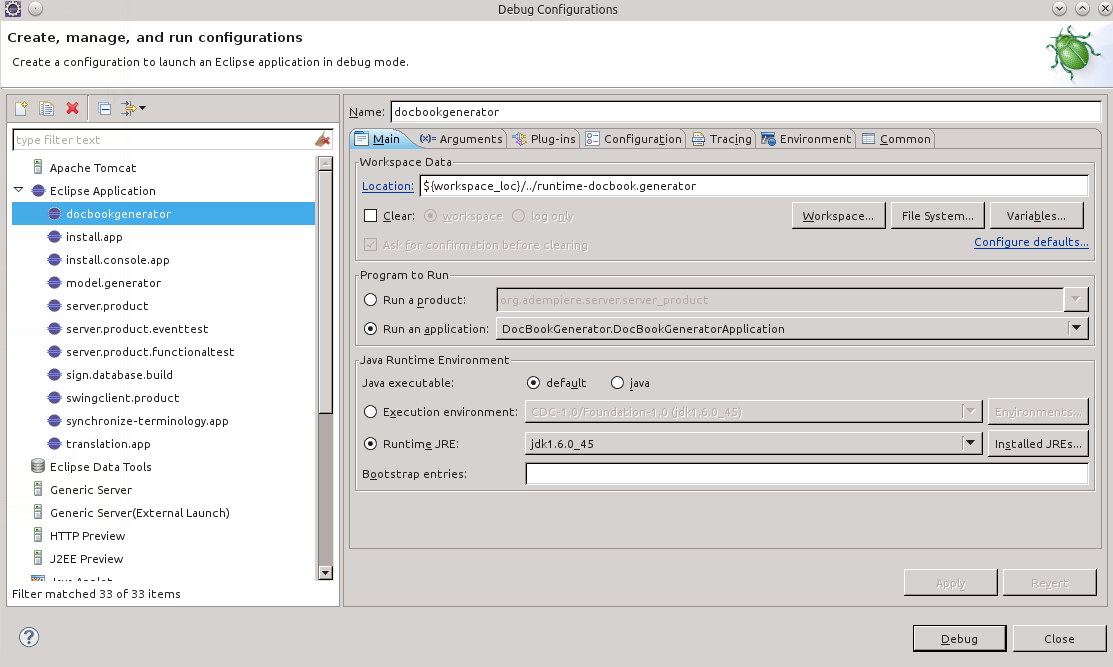
How do I add the application to the registry? This is the error I am getting (see also my screenshot):
java.lang.RuntimeException: Application "DocBookGenerator.DocBookGeneratorApplication" could not be found in the registry. The applications available are: org.adempiere.base.ModelGeneratorApplication, org.adempiere.base.PostMigration, org.adempiere.base.SignDatabaseBuildApplication, org.eclipse.ant.core.antRunner, org.adempiere.install.application, org.adempiere.install.console-application, org.eclipse.equinox.app.error.
at org.eclipse.equinox.internal.app.EclipseAppContainer.startDefaultApp(EclipseAppContainer.java:248)
at org.eclipse.equinox.internal.app.MainApplicationLauncher.run(MainApplicationLauncher.java:29)
at org.eclipse.core.runtime.internal.adaptor.EclipseAppLauncher.runApplication(EclipseAppLauncher.java:110)
at org.eclipse.core.runtime.internal.adaptor.EclipseAppLauncher.start(EclipseAppLauncher.java:79)
at org.eclipse.core.runtime.adaptor.EclipseStarter.run(EclipseStarter.java:344)
at org.eclipse.core.runtime.adaptor.EclipseStarter.run(EclipseStarter.java:179)
at sun.reflect.NativeMethodAccessorImpl.invoke0(Native Method)
at sun.reflect.NativeMethodAccessorImpl.invoke(NativeMethodAccessorImpl.java:39)
at sun.reflect.DelegatingMethodAccessorImpl.invoke(DelegatingMethodAccessorImpl.java:25)
at java.lang.reflect.Method.invoke(Method.java:597)
at org.eclipse.equinox.launcher.Main.invokeFramework(Main.java:622)
at org.eclipse.equinox.launcher.Main.basicRun(Main.java:577)
at org.eclipse.equinox.launcher.Main.run(Main.java:1410)
at org.eclipse.equinox.launcher.Main.main(Main.java:1386)

Jan Thielemann
Jan 17, 2015, 9:01:37 AM1/17/15
to idem...@googlegroups.com
Hi Neil,
take a look at how a SvrProcess is started. I believe you need two or three object. The SvrProcess, a ProcessUtil or Para or something like this. Then you just can create a class with a main method, call A/IDempier.startup() setup() or something like this and then you can start the process. I did it once and it didn't took more than a few hours to find out how to start the process. You don't need to "Start the Server" like starting the Server-App from eclipse. Its just 20 lines of plain code and your done.
By the way: i did this because i needed to run import processes from the command line so we would get daily prices from our vendors every day. The process was scheduled with cron and a simple shell script.
Neil Gordon
Jan 19, 2015, 12:55:57 AM1/19/15
to idem...@googlegroups.com
> You don't need to "Start the Server" like starting the Server-App from eclipse.
Perfect, thanks Jan!
Subject line should've read:
Run SvrProcess then exit, within Eclipse
Reply all
Reply to author
Forward
0 new messages