
Skip to first unread message

Carolina Melo
Oct 25, 2017, 4:04:34 PM10/25/17
to AtoM Users
Hi all,
I'm trying to update an existing description via CSV import, updating matches, ignoring blank fields in CSV, but I think I'm not doing right.
I'm trying to look for the match on the title (Outras Digitalizações), the repository (Arquivo Público Estadual Jordão Emerenciano2, and the identifier (OD).
The job report says:
I can see that my current description is inheriting the repository from its parent. Even if I try to put manually, I can't.
So this information is not in the database. I don't if this is the reason of my unsuccessful update...
Can anyone help me?
Best regards,
Carolina Melo
I'm trying to update an existing description via CSV import, updating matches, ignoring blank fields in CSV, but I think I'm not doing right.
I'm trying to look for the match on the title (Outras Digitalizações), the repository (Arquivo Público Estadual Jordão Emerenciano2, and the identifier (OD).
The job report says:
Row 1: Unable to match row. Skipping record: Outras Digitalizações (id: OD)
I can see that my current description is inheriting the repository from its parent. Even if I try to put manually, I can't.
So this information is not in the database. I don't if this is the reason of my unsuccessful update...
Can anyone help me?
Best regards,
Carolina Melo

Dan Gillean
Oct 27, 2017, 11:14:49 AM10/27/17
to ICA-AtoM Users
Hi Carolina,
What fields are you trying to update? I'm assuming you have reviewed the documentation here first, yes?
Have you tried using the Match limiting options? For example, limiting matches to the top-level description you are targeting?
Regarding matching on the repository when the repo is being inherited... this is interesting, and worthy of more testing. In your CSV, are you adding the repository name? Have you tried it without the repository name to see if it matches better?
AtoM first looks for matches on legacyID and source-name (if one exists - i.e. if the records were originally created via import), so making sure these match will probably help. One way to make sure that the legacyID and parentID values match those in the database is to first export the record(s) from AtoM using the clipboard, and use that CSV file to add your updates for re-import.
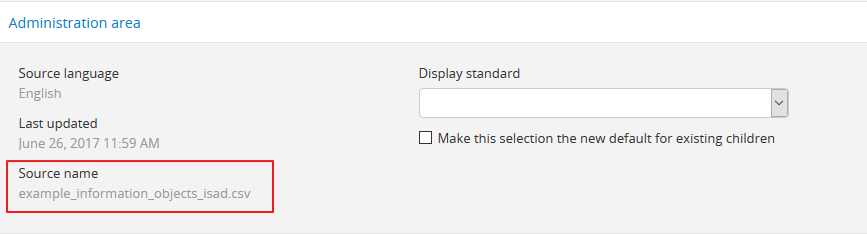
You can also enter edit-mode on the target record and look in the administration area to see the source-name of the original record (if it was created via import):
Because there is no option to input a source_name in the user interface, the filename of the original CSV is used when one is not provided. So you could also try renaming the CSV to see if that helps.
This is outlined in the docs here: https://www.accesstomemory.org/docs/2.4/user-manual/import-export/csv-import/#matching-criteria-for-archival-descriptions
Let us know how it goes! In the meantime, I will try to find some time to do more testing around how inherited repository names affect import matching behaviors.
Cheers,
--
You received this message because you are subscribed to the Google Groups "AtoM Users" group.
To unsubscribe from this group and stop receiving emails from it, send an email to ica-atom-users+unsubscribe@googlegroups.com.
To post to this group, send email to ica-atom-users@googlegroups.com.
Visit this group at https://groups.google.com/group/ica-atom-users.
To view this discussion on the web visit https://groups.google.com/d/msgid/ica-atom-users/c6076db3-e405-4b42-b091-8a172a35136f%40googlegroups.com.
For more options, visit https://groups.google.com/d/optout.
Carolina Melo
Oct 27, 2017, 3:43:12 PM10/27/17
to AtoM Users
Thanks, Dan!
The idea to export the CSV file using clipboard is very good, but unfortunatelly some descriptions were not uploaded by CSV, so they don't have the source_name.
So I have to use the match on title, repository and identifier, wich is not working. Besides, what if I want to update the title?
The idea to export the CSV file using clipboard is very good, but unfortunatelly some descriptions were not uploaded by CSV, so they don't have the source_name.
So I have to use the match on title, repository and identifier, wich is not working. Besides, what if I want to update the title?
To unsubscribe from this group and stop receiving emails from it, send an email to ica-atom-user...@googlegroups.com.
To post to this group, send email to ica-ato...@googlegroups.com.
Dan Gillean
Oct 27, 2017, 5:16:36 PM10/27/17
to ICA-AtoM Users
Hi Carolina,
[info] [2017-10-27 14:05:52] Job 2003039 "arFileImportJob": Row 1: Unable to match row. Skipping record: Irving Steinberg Sudbury Slide Collection (id: 7)
[info] [2017-10-27 14:05:52] Job 2003039 "arFileImportJob": Row 2: Matching description found, updating in place; row (id: 71477, culture: en, legacyId: )...
[info] [2017-10-27 14:05:52] Job 2003039 "arFileImportJob": Row 3: Matching description found, updating in place; row (id: 71478, culture: en, legacyId: )...
[info] [2017-10-27 14:05:52] Job 2003039 "arFileImportJob": Row 4: Matching description found, updating in place; row (id: 71479, culture: en, legacyId: )...
[info] [2017-10-27 14:05:52] Job 2003039 "arFileImportJob": Row 5: Matching description found, updating in place; row (id: 71480, culture: en, legacyId: )...
I still think you should consider exporting from the clipboard to get the records you want to update, even if they were created in the user interface. Since the update is first looking for a match on legacyID, anything you add to your update csv will not match. It's true that when a match on source_name and legacyID can't be made, the system should next check for a match on title/repository/identifier, but since we have already identified a potential issue with matching on repository, better to try to match on legacyID if we can!
As for updating titles this way.... it is in imperfect system. We went almost double over the project budget when developing this feature because of its complexity, and we still could have spend many many more hours refining and improving it further. We're hoping that users like yourself will help us identify where things are not working, and help us to sponsor iterative improvements through subsequent releases so the feature keeps getting better. In the meantime - you may need to update some fields manually, unfortunately!
I think that having the legacyID present, as it is exported, may help. In the meantime, I ran a little test with my Vagrant box with this collection from our demo site:
I added it to the clipboard, and exported with all levels included. I then opened the CSV locally.
- In test 1, I removed the repository row entirely and changed the identifier values, to see if legacyID alone would be enough. It was not - all rows were skipped on re-import.
- In test 2, I only changed the extent and scope and content fields -so legacy and parentID as well as title + identifier + repository were all present for matching. Interestingly, the top-level record was skipped, but all the rest updated successfully.
- In test 3, I removed legacyID and parentID columns and changed the extent and scope/content fields. So now matching had to proceed via title + identifier + repository. Same result! The parent was skipped, but the rest still managed to match and update.
Some things of note:
RE: repository - even though the repository is inherited at lower levels, it still is included in the export for each row. After my update import, it was still inherited - so it seems that the import is smart enough to find a match even if the value is inherited, and it will not update an inherited value with a literal one.
I also noticed something interesting in the console output. Whenever the description found a match, the id provided by the console was the internal object ID in the database. If these descriptions are created via the user inteface (and these ones are, then the objectID is used as the legacyID on export). It was ONLY when no match is found that the console output the id as the identifier value.
Here's a sample of my console output:
[info] [2017-10-27 14:05:52] Job 2003039 "arFileImportJob": Row 1: Unable to match row. Skipping record: Irving Steinberg Sudbury Slide Collection (id: 7)
[info] [2017-10-27 14:05:52] Job 2003039 "arFileImportJob": Row 2: Matching description found, updating in place; row (id: 71477, culture: en, legacyId: )...
[info] [2017-10-27 14:05:52] Job 2003039 "arFileImportJob": Row 3: Matching description found, updating in place; row (id: 71478, culture: en, legacyId: )...
[info] [2017-10-27 14:05:52] Job 2003039 "arFileImportJob": Row 4: Matching description found, updating in place; row (id: 71479, culture: en, legacyId: )...
[info] [2017-10-27 14:05:52] Job 2003039 "arFileImportJob": Row 5: Matching description found, updating in place; row (id: 71480, culture: en, legacyId: )...
I don't quite know what to make of that, but I thought it was interesting, and is something I can ask our developers about. It may help us improve matching in the future. In the meantime, I think if you have the legacyID present, you might still get better results. My tests do not prove this however, so... I'm not sure what to recommend.
Let me know how it goes. I'll keep experimenting here.
To unsubscribe from this group and stop receiving emails from it, send an email to ica-atom-users+unsubscribe@googlegroups.com.
To post to this group, send email to ica-atom-users@googlegroups.com.
Visit this group at https://groups.google.com/group/ica-atom-users.
To view this discussion on the web visit https://groups.google.com/d/msgid/ica-atom-users/630669db-e271-402c-aca6-3ea2ca8b645f%40googlegroups.com.
Carolina Melo
Nov 8, 2017, 6:14:58 AM11/8/17
to AtoM Users
Yeah, Dan! I tried again and the repository was inherited by the other descriptions.
The major problem is the source_name. Some descriptions were not imported using csv, so they don't have the source_name. :(
The major problem is the source_name. Some descriptions were not imported using csv, so they don't have the source_name. :(
Reply all
Reply to author
Forward
0 new messages