
Mass unemployment insurance address
78 views
Skip to first unread message

Preetam Alluri
Jul 22, 2013, 9:24:42 AM7/22/13
to ibm...@googlegroups.com
Hi Deb,
Attached are what I had saved from the application process for applying for Unemployment benefits.
- on Page2 is the address where the documentation needs to be sent:
- Paperwork that needs to be sent must be different for each individual.
Apologies for the delay. I had been busy in last few days and couldn't send earlier.
Thanks,
-Preetam

Brian Jones
Jul 22, 2013, 3:41:02 PM7/22/13
to Preetam Alluri, ibm...@googlegroups.com
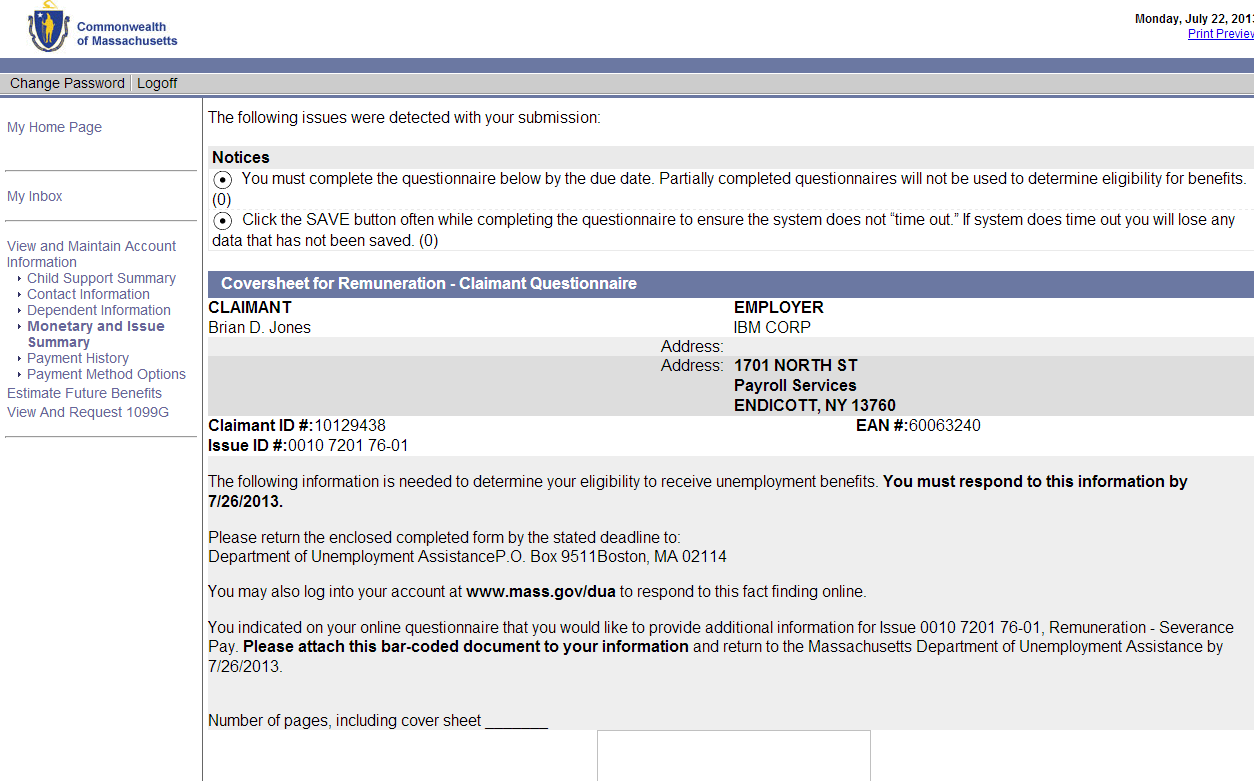
If anyone needs to print out the cover sheet to send with the severance agreement, you can find it under the home page > View and Maintain Account Information > Monetary and Issue Summary.

Hope this helps...
Under "Determination of Eligibility" there are links to "Issue Identification Number" items that you can click on. Each lists the status, and I believe that the ones that need something sent in are labeled Pending. I think the severance agreement is "Remuneration". When you click on the item, it looks like this:
Click on the Incomplete link, then on the number for the Remuneration Coversheet (326498), and it brings you to the coversheet with a user-specific barcode to print out. Unfortunately for me, the barcode image isn't loading right now, so I'll try again later. But presumably it'll look something like this:
Hope this helps...
--
You received this message because you are subscribed to the Google Groups "IBM_BDC" group.
To unsubscribe from this group and stop receiving emails from it, send an email to ibm_bdc+u...@googlegroups.com.
For more options, visit https://groups.google.com/groups/opt_out.


Sven Meier
Jul 22, 2013, 5:48:17 PM7/22/13
to Brian Jones, Preetam Alluri, ibm...@googlegroups.com
Hi Brian,
Thanks for the info.
When I do the same, I see that it says my application is complete, so I can't get to the form for sending in my separation agreement. Though it says complete, the issue is still pending and I even tried checking the box and submitting, but nothing happened.
I will try to catch them tomorrow by phone.
-Sven
| Determination of Eligibility |
| Issue Identification Number | Employer Name | Issue Type | Status | Date Mailed |
|---|---|---|---|---|
| 0010 7690 38-01 | IBM CORP | Corporate Officer/Shareholder | Completed | |
| 0010 7693 07-01 | IBM CORP | Remuneration | Pending |
| Pending Eligibility Issue Detail |
| Employer Name: | IBM CORP |
| Issue Identification Number: | 0010 7693 07-01 |
| Issue Type: | Remuneration |
| Correspondence Issued Date: | |
| Determination: |
| Questionnaire: | Complete |
| Provide Additional Information for this Issue: |
On Jul 22, 2013, at 3:41 PM, Brian Jones <brian....@gmail.com> wrote:
If anyone needs to print out the cover sheet to send with the severance agreement, you can find it under the home page > View and Maintain Account Information > Monetary and Issue Summary.Under "Determination of Eligibility" there are links to "Issue Identification Number" items that you can click on. Each lists the status, and I believe that the ones that need something sent in are labeled Pending. I think the severance agreement is "Remuneration". When you click on the item, it looks like this:
<image.png>
Click on the Incomplete link, then on the number for the Remuneration Coversheet (326498), and it brings you to the coversheet with a user-specific barcode to print out. Unfortunately for me, the barcode image isn't loading right now, so I'll try again later. But presumably it'll look something like this:
<image.png>
Hope this helps...
Reply all
Reply to author
Forward
0 new messages