Can I automatically improve stitching?

490 views
Skip to first unread message

Pawel Rozenek

unread,
Mar 19, 2014, 3:04:22 AM3/19/14
to hugi...@googlegroups.com
Hi Panoramers :)

Quite often stitching pictures in Hugin gives e a result like here:

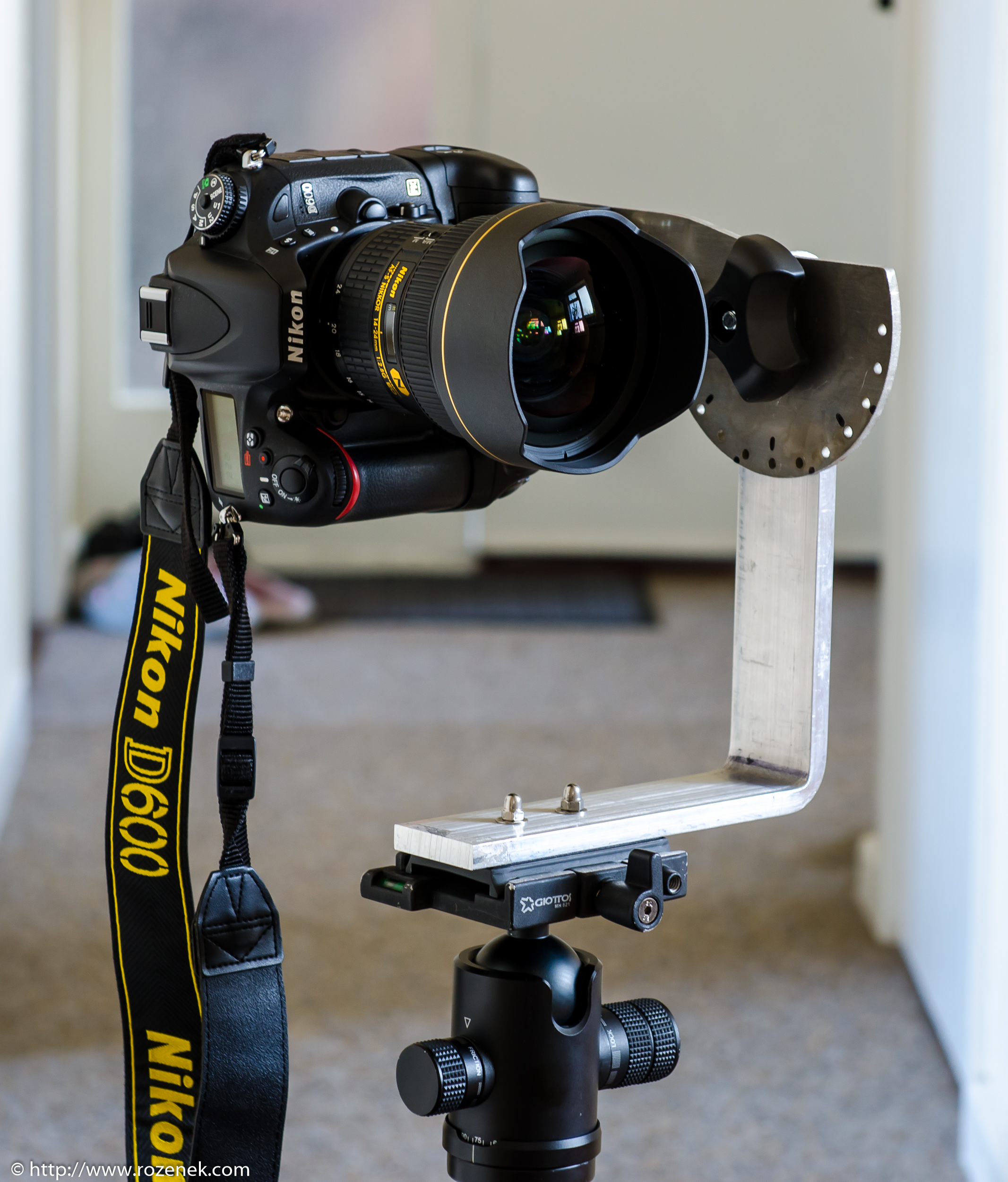
It is NOT a problem with my bracket, because I designed a special bracket just for my camera:

so I have got a perfect nodal point.

Of course I can add a few control points by hand but it is annoying :)

Is any chance to change any Hugin settings to improve stitching even if it takes more time?

Thank you for answers :)

Terry Duell

unread,
Mar 19, 2014, 4:59:13 AM3/19/14
to hugi...@googlegroups.com
On Wed, 19 Mar 2014 18:04:22 +1100, Pawel Rozenek <sq8...@googlemail.com>
wrote:

> Hi Panoramers :)
>
> Quite often stitching pictures in Hugin gives e a result like here:
> http://www.rozenek.com/images/forum/hugin-problem.jpg
>
[snip]
>
> Of course I can add a few control points by hand but it is annoying :)
> Is any chance to change any Hugin settings to improve stitching even if
> it takes more time?
>
The current source (hugin-2014.1.0) has a new feature that might help.
The Fast Panorama preview window now has an "Edit CP" button, which allows
you to drag out a rectangle in the preview and choose to automatically
create new control points, or delete the existing control points in that
rectangle.
Not sure if this is the sort of thing that you had in mind.
To make use of this feature prior to the release of hugin-2014.2.0, you
will either have to build from the current source, or get a build of a
recent snapshot.
What operating system are you using?

Cheers,
--
Regards,
Terry Duell

Pawel Rozenek

unread,
Mar 19, 2014, 5:06:26 AM3/19/14
to hugi...@googlegroups.com
Hi Tduell and thank you for your answer.

I have got Windows 8 and I do not feel good enough to compile Hugin from source if this is what you meant (I am not sure). A few weeks ago I tried to install windows version of Hugin 2014 but it kept crashing so I decided to stay with 2013.

Actually I was asking if I can change any settings in file->preferences->control points editor(???) - sorry if the path is incorrect I am at work now. Is there anything which I can change to improve this situation?

Thank you again,
Regards
Pawel 


Carlos Eduardo G. Carvalho (Cartola)

unread,
Mar 19, 2014, 7:16:42 AM3/19/14
to hugi...@googlegroups.com
Hi,

I have posted recently a try to automate panorama creation with scripts (I did it in unix shell script) and I tried to deal with this kind of problem. In my experience cpfind didn't spread very well the CPs and I was trying to guarantee that it would find CPs at the extreme parts of the image to avoid this kind of problem. To solve it I have used imagemagick to split the original image and use the image parts I wanted it to find CPs at. Much like what Terry told that hugin is gonna do and that PTGui already does for some time, but I tried to automate it with some success results at the end, but the script got a little complex.

Don't know if you can do a windows script, but if you (or other one) want we can talk about it. My case is just a little different, because I don't think my DIY head is so completely, perfectly, precisely set up. I think it is a little out of axis when rotating vertically - probably the bent L base I did is not perfectly at 90º. From my experience with NN4, the NPP needs to be very precisely set (one millimeter can make difference) to get a perfect result.

Cheers,

--
A list of frequently asked questions is available at: http://wiki.panotools.org/Hugin_FAQ
---
You received this message because you are subscribed to the Google Groups "hugin and other free panoramic software" group.
To unsubscribe from this group and stop receiving emails from it, send an email to hugin-ptx+...@googlegroups.com.
To view this discussion on the web visit https://groups.google.com/d/msgid/hugin-ptx/f0d7463f-dbef-4eca-a4fc-b57aecb8c984%40googlegroups.com.

For more options, visit https://groups.google.com/d/optout.

Pawel Rozenek

unread,
Mar 19, 2014, 9:32:18 AM3/19/14
to hugi...@googlegroups.com
Hi Carlos,

It sounds too complicated like for me :) I am still thinking about changing options in Hugin's preferences tab, however I have no idea how to change it, this is a reason why I am looking for help here - maybe someone had the same problem :)

Felix Hagemann

unread,
Mar 19, 2014, 10:07:23 AM3/19/14
to hugi...@googlegroups.com
On 19 March 2014 08:04, Pawel Rozenek wrote:
> [snip]
> http://www.rozenek.com/images/forum/hugin-problem.jpg
>
> It is NOT a problem with my bracket, because I designed a special bracket just for my camera:
> http://www.rozenek.com/a-new-version-of-the-panoramic-bracket-for-my-camera/
> so I have got a perfect nodal point.

Just a two quick remarks:
If you are using a fisheye lens (but rectilinear one as well) then
there is no such thing as a perfect nodal point:
the http://michel.thoby.free.fr/Fisheye_history_short/Entrance_Pupil_Shift_on_real_lenses.html

In my experience the errors that you observe are mainly due to either
not optimising for d,e (which should even be done if you have a good
lens profile due to play in the mount) or caused by an insufficient
spread of control points.

Regards,
Felix

Carl von Einem

unread,
Mar 19, 2014, 11:09:48 AM3/19/14
to hugi...@googlegroups.com
Hi Pawel,

Pawel Rozenek schrieb am 19.03.14 08:04:
> Quite often stitching pictures in Hugin gives e a result like here:
> http://www.rozenek.com/images/forum/hugin-problem.jpg
>
> It is NOT a problem with my bracket, because I designed a special
> bracket just for my camera:
> http://www.rozenek.com/a-new-version-of-the-panoramic-bracket-for-my-camera/
>
> so I have got a perfect nodal point.

I admire the confidence you show about the quality of your setup.

However I'd suspect that there is plenty of room for alignment issues
every time you set up such a heavy camera (D600 with battery grip and
f2.8/14-24mm wide angle zoom): the bracket itself might work ok, but
there are two quick release plates and it seems as if you use a ball
head as a panorama plate...

A ball head between the rotating base and the bracket is the first thing
I'd change.

Cheers,
Carl

David W. Jones

unread,
Mar 19, 2014, 3:20:59 PM3/19/14
to hugi...@googlegroups.com
Plus doesn't the nodal point change with focal length and/or aperture?

I mostly shoot handheld, with an occasional set on a tripod without a
pano head. So I don't know.

--
David W. Jones
gnome...@gmail.com
wandering the landscape of god
http://dancingtreefrog.com

Pawel Rozenek

unread,
Mar 19, 2014, 4:52:13 PM3/19/14
to hugi...@googlegroups.com
Thank you anyone who decided to say something in my post.

The L bracket is made from 10 mm thic aluminium, plate plate is 4mm thick and please believe me that the maximum fluctuation is +/-2 2 mm so in MY opinion with 14mm focal length is nothing (am I wrong?)

The head ball... Hm.. It is a better point. Of course I always try to adjust it as horizontal as possible which is not very easy and not accurate. However please DO NOT forget that once the head ball is locked, then I can rotate it perfectly in one axis. The ball head is locked forever when I do panoramas, only horizontal plate rotates - which maight be not always in perfwectly horizontal orientation, because of the ball head. So in the worst case all frames are not exactly vertical/horizontal, however all are equal. 
Is any chance that makes my problem?

If not, I am still wondering if there is a chance to use better hugin settings even if it takes more time.

Thank you guys again.
Pawel

Carlos Eduardo G. Carvalho (Cartola)

unread,
Mar 19, 2014, 7:14:04 PM3/19/14
to hugi...@googlegroups.com

2014-03-19 12:09 GMT-03:00 Carl von Einem <ca...@einem.net>:
A ball head between the rotating base and the bracket is the first thing I'd change.

I haven't noticed this and I share this opinion that this is a great point of a great chance to change the NPP out of its perfect place.

paul womack

unread,
Mar 20, 2014, 5:11:50 AM3/20/14
to hugi...@googlegroups.com
The obvious test is to carefully place a large number of fine-tuned control point by
hand (No automatic points at all), on a test set, then optimize.

This will confirm or deny that your nodal setting is perfect.

BugBear

Pawel Rozenek

unread,
Mar 20, 2014, 5:14:55 AM3/20/14
to hugi...@googlegroups.com
Hi Guys,

I looked at my tripod, head and bracket and the ball head does not make any different. It is always locked during rotating. Only a plate on top of head ball rotates always in one plane (axis). Also it does not make a different if the ball head it not adjusted exactly horizontally - then just a nadir and zenith are not exactly where they should be. If you do not believe me, I can make a short video showing how it works :)

Anyway, still no one answered my question - is it possible to improve stitching by changing Hugin settings?

Thank you again for trying to help me.

Regards
Pawel Rozenek

Felix Hagemann

unread,
Mar 20, 2014, 5:19:22 AM3/20/14
to hugi...@googlegroups.com
On 20 March 2014 10:14, Pawel Rozenek wrote:
> [...] Also it does not make a different
> if the ball head it not adjusted exactly horizontally - then just a nadir
> and zenith are not exactly where they should be. If you do not believe me, I
> can make a short video showing how it works :)

While I don't know your setup, I was unpleasently suprised a number of
times by the amount of flex added by anything between my tripod and a
pano head (e.g. a ball head).

> Anyway, still no one answered my question - is it possible to improve
> stitching by changing Hugin settings?

As I said before: I might be enough to include d and e during the
optimization, if you haven't done that before.

Regards
Felix

paul womack

unread,
Mar 20, 2014, 5:23:15 AM3/20/14
to hugi...@googlegroups.com
Pawel Rozenek wrote:
> Hi Guys,
>
> I looked at my tripod, head and bracket and the ball head does not make any different. It is always locked during rotating. Only a plate on top of head ball rotates always in one plane (axis). Also it does not make a different if the ball head it not adjusted exactly horizontally - then just a nadir and zenith are not exactly where they should be. If you do not believe me, I can make a short video showing how it works :)
>
> *Anyway, still no one answered my question - is it possible to improve stitching by changing Hugin settings?*

That would depend on the particular cause of the trouble, which we
are still trying to diagnose.

First the diagnosis, then the cure.

BugBear

Pawel Rozenek

unread,
Mar 20, 2014, 5:57:38 AM3/20/14
to hugi...@googlegroups.com
Hi bugbear and Felix,


While I don't know your setup, I was unpleasently suprised a number of
times by the amount of flex added by anything between my tripod and a
pano head (e.g. a ball head).


I will do a short video showing how my tripod, head and pano bracket works.

 
As I said before: I might be enough to include d and e during the
optimization, if you haven't done that before.


I apologise but I have no idea what you mean saying "include d and e" so possibly I have not done this before :) I am now looking at Hugin 2013 and I have no idea where I can change that options:


Pawel Rozenek

unread,
Mar 20, 2014, 6:16:07 AM3/20/14
to hugi...@googlegroups.com
I think I need to apologise everyone who told me that it is a ball head problem. I can't look at my bracket now for two reasons: because I am at work and also because I sent the bracket for powder coating. However I found my 3d model of the bracket and when I looked I realised that if I tilt the camera I will loose my nodal point!!!


Brandan

unread,
Mar 20, 2014, 6:57:23 AM3/20/14
to hugi...@googlegroups.com
How do you pan up and down? If you use the ball then it will change the nodal point quite a bit. If the ball stays locked and has no wiggle then I do not see how the ball can hurt anything and it would give you the option to do things at slants, which could be handy once in a while.

If you are using the arm that you built into the panohead and you tilt up and down, it should work if you have things set right.

I see that you did not build any side to side adjustments, but sounds like you are confident that you put the holes in the right spot. I can not tell from your photos if you have adjustments so that you can move the camera forward and back on the arm or not. If you do, check them. I find the arm to be a bugger to adjust, but well worth it if you can figure out how. Another thing to keep in mind when you build them is that the pivot point of the arm needs to be inline with the pivot point on the ball head. Get it out of line, then perfect adjustment forward to back will be wrong for side to side and vise verse.(In your build if in the main chunk both sets of holes are in the center of the metal and the corner has a good bend it should be good.)


As far as making hugin work better, have you tried adding the control points by hand on one set and seeing the results? That would be an easy way to check if it is hugin or your camera set up. If it is hugin, I often select the problem photos and set the control points just on those 2-how ever many at that one place at a time. It is slow figuring out which photos to select to run CPfind on just them, but it often beats looking for control points by hand.

Pawel Rozenek

unread,
Mar 20, 2014, 7:13:02 AM3/20/14
to hugi...@googlegroups.com
Brandan,

Thank you for your amazing answer. The ball head is always lock and I do NOT use it at all. To rotate left-right I use a head feature - connection, which is under a ball head. My L bracket in NOT adjustable. Has been designed by me and cut on CNC machine especially to my camera, grip and accessories. There is no way than the lens is not in nodal point apart of one detail, which I just realised today:

If I tilted forward or backward my L bracket on my ball head, they the nodal point will be moved. I always adjust the L bracket on my ball head by eye! It could be an issue!!! If I use a tripod without any head the nodal point will be in perfect position then!

To answer your question I pan up or down my camera without using the ball head. I do it by changing position of plate which is attached to the L bracket - you can see this on the photo below:

So I think I need to change my tripod or pay more attention to adjusting the head ball.


Anyway, I still do not know what are the Hugin settings for:

Carlos Eduardo G. Carvalho (Cartola)

unread,
Mar 20, 2014, 8:10:02 AM3/20/14
to hugi...@googlegroups.com
Hi Pawel,

to optimize d and e you first have to choose the Expert interface at the menu Interface / Expert

Then you go to the Photos tab and at the Geometric combo in the Optimise section (bottom part of the window) you choose "Custom parameters". When choosing this a new tab "Optimizer" will appear and there you will be able to optimize every variable separatedly.

The bold underlined items will be optimized. You can toggle an item optimization by clicking it with Ctrl key pressed. 'd' and 'e' are lens parameters, which are shown below the image parameters.

On the 'calibration of your head' subject, you can also test it by doing the 'tape on the window' test or anything equivalent. Here a good link about testing it:

http://www.johnhpanos.com/epcalib.htm

I think that looking at the lens pupil from front is less precise but can be an easier first test. And don't forget to do tilt to test, cause at that link they don't do that and this is probably your possible main problem with using a ball head.

Cheers,

--
A list of frequently asked questions is available at: http://wiki.panotools.org/Hugin_FAQ
---
You received this message because you are subscribed to the Google Groups "hugin and other free panoramic software" group.
To unsubscribe from this group and stop receiving emails from it, send an email to hugin-ptx+...@googlegroups.com.

Pawel Rozenek

unread,
Mar 20, 2014, 8:21:11 AM3/20/14
to hugi...@googlegroups.com
Hi Carlos,

Thank you again for your answer. I think that I need to invest in something like this: http://www.ebay.co.uk/itm/SUNWAYFOTO-DDP-64S-Low-Profile-Indexing-Rotator-Tripod-Head-HDR-Panorama-/251368998052?pt=UK_Tripods_Heads_Stablisers&hash=item3a86c284a4 - which is just a left-right rotating head. One plane rotating head this is what I need I think.

Also, thank you very much for your help with Hugin - I will try this at night, when I am at home.

Thanks a lot.

Carlos Eduardo G. Carvalho (Cartola)

unread,
Mar 20, 2014, 9:20:59 AM3/20/14
to hugi...@googlegroups.com
Oh, I have one of that, and it is a really good thing to have. You can also try to rotate manually if your tripod let you do that, but surely it is a big risk to let the ball head there.

Also take a look on how I did a tripod head with an indexed rotator:
https://vimeo.com/75536341 (that's me in the video - Hi!)

and other DIY models that can inspire you:
http://wiki.panotools.org/Heads#Self_made

With a fish eye lens you can rotate manually with no problem. An indexed rotator is comfortable, mainly if you plan to make it professionally - I mean, a lot of times :)

Cheers,

Carlos Eduardo G. Carvalho (Cartola)

unread,
Mar 20, 2014, 9:24:13 AM3/20/14
to hugi...@googlegroups.com
You can also buy it at aliexpress.com, where I've bought. Just forgot to mention.

I also think that bent a hard aluminum bar like yours or mine is hard and can be very difficult to put it precisely at 90º with no problem at all. I plan to try someday to fix separated parts to avoid that. Maybe doing it with a CNC machine is also a good idea to have more precision.

Cheers,

Carlos Eduardo G. Carvalho (Cartola)

unread,
Mar 20, 2014, 9:34:55 AM3/20/14
to hugi...@googlegroups.com
Here the one I've bought. Sorry for the many messages.

http://www.aliexpress.com/snapshot/305809149.html

Brandan

unread,
Mar 20, 2014, 10:32:33 AM3/20/14
to hugi...@googlegroups.com
I had to look at the pictures again to figure out what you are saying. If the ball is not perfectly in line and the pivot is below the ball that could be a problem :)

As for the settings in hugin, if anyone has a good set of instructions it would be nice to know what all of the different settings on all of the different tabs do. I have been going through trying different things and figuring them out by trail and error, but have not gotten to the settings you are asking about. Maybe someone else has some ideas.

Carl von Einem

unread,
Mar 20, 2014, 11:11:24 AM3/20/14
to hugi...@googlegroups.com
See http://wiki.panotools.org/Lens_correction_model
for a description of the different lens parameters

and

> A list of frequently asked questions is available at:
> http://wiki.panotools.org/Hugin_FAQ

Indeed the whole panotools wiki is worth spending some time with...

From Hugins 'Interface' menu choose Advanced or Expert mode.

In the 'Photos' tab > Optimise > Geometric choose 'Custom parameters'
from the drop down list of presets.

Now Hugin shows the Optimiser tab where you can optimise lens parameters
like d or e. Just right click on a value for a variety of options. Also
try to right click a column header.

Great! I just found the OS X equivalent to ctrl+click a value: cmd+click


Brandan schrieb am 20.03.14 15:32:

Pawel Rozenek

unread,
Mar 20, 2014, 4:13:32 PM3/20/14
to hugi...@googlegroups.com
to optimize d and e you first have to choose the Expert interface at the menu Interface / Expert

Then you go to the Photos tab and at the Geometric combo in the Optimise section (bottom part of the window) you choose "Custom parameters". When choosing this a new tab "Optimizer" will appear and there you will be able to optimize every variable separatedly.

The bold underlined items will be optimized. You can toggle an item optimization by clicking it with Ctrl key pressed. 'd' and 'e' are lens parameters, which are shown below the image parameters.


 Hi Carlos,

Thank you for your amazing help. I really many times was looking for help about Hugin and it is always very difficult to find a clear information. It is a shame because Hugin is a great piece of software with no sensible website and help... I am sure that a lot of people just give up...

Anyway, I am saying this because I have never found anywhere that I can change this option to custom parameters and even now I have no idea what I can do with these highlighted parameters :)
It means I found that option, but I am not sure if I have to change anything or not. I tried to stitch my panorama by just choosing custom parameters but without changing anything. Unfortunately panorama still has some errors.

What can I (and should I) change, how can I know it, what to change it these custom parameters option?

Thanks a lot again 
Pawel

Carl von Einem

unread,
Mar 21, 2014, 10:23:06 AM3/21/14
to hugi...@googlegroups.com
Pawel Rozenek schrieb am 20.03.14 21:13:
> (...) Unfortunately panorama still
> has some errors.

Your input images might contain parallax errors due to setup errors.

Try to set up your gear correctly and check if you still have parallax
errors in the overlap regions of your images.

Carl

Pawel Rozenek

unread,
Mar 25, 2014, 3:04:43 PM3/25/14
to hugi...@googlegroups.com, ca...@einem.net
Thank you Carl and EVERYBODY for your help!

I will try do a few panos this weekend

kfj

unread,
Mar 27, 2014, 4:02:20 AM3/27/14
to hugi...@googlegroups.com


On Wednesday, March 19, 2014 8:04:22 AM UTC+1, Pawel Rozenek wrote:
Hi Panoramers :)

Quite often stitching pictures in Hugin gives e a result like here:

It is NOT a problem with my bracket, because I designed a special bracket just for my camera:

so I have got a perfect nodal point.

Let me point out that the center of gravity shifts when the camera is tilted up or down, and with a pano head like the one you are using this can't be totally avoided - ideally you'd have to readjust the setup for each level of tilt to compensate for the minute differences due to tilting - no matter how hard you try, your pano head plus tripod will always be slightly elastic.

The comment about there being no true NPP with a fisheye lens is also true, and you can only try and avoid the issue as best as possible by using a shooting pattern where the overlap areas are at a similar distance from the image center - try a pattern of twelve, like looking at a a dodecahedron's faces from it's center.

When it comes to having lots of good control points to get a better result, have you tried woa?

Kay


Of course I can add a few control points by hand but it is annoying :)

Is any chance to change any Hugin settings to improve stitching even if it takes more time?

Thank you for answers :)

Pawel Rozenek

unread,
Jun 7, 2014, 4:54:52 AM6/7/14
to hugi...@googlegroups.com
Hi Guys,

A few months ago we had a conversation about a stitching problem in my panorama.
The print screen from my panorama is here:

Despite having a proper u-bracket for my camera we have found that the problem was created by a ball head in my tripod which was not in a perfect vertical position.
IT WAS FAIR ENOUGH :) so I assumed it was my fault and that's all :)

However, just a few days I realised (my brain works slowly :P ) that the parallax error appears on the roof, near the zenith point (see link). Zenith is miles away from my tripod so I would like to raise the question again - how is it possible that the not perfect nodal point affects zenith?

I am not saying you were not right. I just do not get it why not perfect nodal point affects zenith!

Any clues? :)
And thank you again.

panostar

unread,
Jun 7, 2014, 2:46:05 PM6/7/14
to hugi...@googlegroups.com
There are dozens of stitching errors in the Norwich panorama, both at the horizontal level and the zenith.  It's possible that the zenith errors, despite being further away, are not unconnected with the efforts made to align the images lower down.  If you care to make a set of images available (half size jpegs would do), maybe we could give a more informed opinion about what's going on.

John

Pawel Rozenek

unread,
Jun 8, 2014, 10:50:30 AM6/8/14
to hugi...@googlegroups.com
Hi John,

Thank you for your reply. Well, this panorama is only a example and ONLY one reason why I posted my question here was I' like to inform the owner of the Hugin software about possible problem. However, if anybody says it is my nodal point problem - I do not blame Hugin than :) Thank you :)

dkloi

unread,
Jun 8, 2014, 7:33:13 PM6/8/14
to hugi...@googlegroups.com
It could be that your no-parallax-point is not set correctly but more likely is that your workflow in setting the control points and optimising the geometry is the real issue. I once took a whole batch of panos with the NPP 10mm offset to the right (I forgot I'd omitted the camera mounting plate on the NN3MkII when taking them) but was still able to salvage the final spherical panoramas by a lot of tweaking of the control points and arcane trickery, https://www.360cities.net/image/glasgow-science-centre-dusk was one of them. If you could post the source imagery, I could try stitching it in Hugin to see if there are problems with the geometry.

Daniel.

Pawel Rozenek

unread,
Jun 14, 2014, 5:26:00 AM6/14/14
to hugi...@googlegroups.com
Hi Daniel,

I really apologise -I missed your email.

I uploaded my panorama files together with hugin files here: http://www.rozenek.com/temp/panorama.zip (300MB)

If you have a spare time - you can look at this. But please note this is not a very important panorama for me. I just got the problem and I try to understand why. 
Possibly you all have a right - my nodal point was not perfect. I just do not understand why it affected so far parts of the picture :)

Thank you Daniel and everybody who tried to help.

Pawel Rozenek

panostar

unread,
Jun 14, 2014, 1:53:30 PM6/14/14
to hugi...@googlegroups.com
Pawel, Daniel's suspicions proved to be well founded.  Your images can be stitched very well, which would suggest your head setup was satisfactory. 

There's a 6000x3000 jpeg at http://ge.tt/4lsO3Uk1/v/0?c 

Some minor parallax problems can be seen, though, on examining the images in detail.

NB.  I used only half of the number of images supplied in the above stitch.  The rest were surplus to requirements as there was ample overlap.  I also stitched with PTGui rather than Hugin, but Hugin should produce a similar stitch using the same care that I exercised.  I did do another stitch using the entire set of images and that was fine too.  I would also recommend taking a zenith shot to help clean up any potential problems resulting from blending 12 images overlapping at the zenith.

John

panostar

unread,
Jun 15, 2014, 3:18:10 AM6/15/14
to hugi...@googlegroups.com
Pawel, Your images stitch quite well, though some evidence of parallax problems can be seen.  See this animated gif: http://ge.tt/1vEx1Wk1/v/0?c .  This indicates that the setup of your panorama head could be improved.

While a good stitch was obtained using all the supplied images, half of them can be discarded as the remainder have adequate overlap.  There's a 6000x3000 jpeg at http://ge.tt/4lsO3Uk1 made from 18 images .  Actually, I did this with PTGui, but Hugin should give a similar result, given the same amount of care in the assignment of control points etc.

John

Pawel Rozenek

unread,
Jun 15, 2014, 3:56:03 AM6/15/14
to hugi...@googlegroups.com
Hi All,

I have just received an answer from John Houghton, for a strange reasons he couldn't post the message to this group. He prepared an animated gif here: http://ge.tt/1vEx1Wk1/v/0?c  proofing the nodal point should have been improved.
I am still very surprised that such a small imperfection could cause so big problem on objects which are quite far away - but, I have got  proof so I can;t argue with optic rules :)

Thank you all again.

Pawel Rozenek

dkloi

unread,
Jun 16, 2014, 5:45:16 AM6/16/14
to hugi...@googlegroups.com
Using your PTO file:
- Rough optimization of positions
- Deleted outlying control points
- Optimized Positions, View, Barrel
- Optimized Everything except translations
- Stitched
Took about a minute or two to do the optimizations. Some minor errors but should be a problem to correct. I also created a project where I manually placed all the control points and got practically no stitching errors after proper optimization. I don't think the problem is with your no-parallax point (please don't call it a nodal point as it is not any kind of nodal point).

Daniel.

BTW There are a couple of improvements to make it easier to shoot and assemble panos, separate from the issue of the NPP position.

Bruno Postle

unread,
Jun 17, 2014, 4:57:47 AM6/17/14
to Hugin ptx
On Sun 15-Jun-2014 at 00:56 -0700, Pawel Rozenek wrote:
>
>I have just received an answer from John Houghton, for a strange reasons he
>couldn't post the message to this group. He prepared an animated gif here:
>http://ge.tt/1vEx1Wk1/v/0?c proofing the nodal point should have been
>improved.

I'm not sure why John couldn't post this, it hasn't been 'held' for
moderation by googlegroups.

>I am still very surprised that such a small imperfection could cause so big
>problem on objects which are quite far away - but, I have got proof so I
>can;t argue with optic rules :)

It looks to me that your parallax point is out by 10-20mm.

--
Bruno

panostar

unread,
Jun 17, 2014, 9:55:13 AM6/17/14
to hugi...@googlegroups.com
On Tuesday, June 17, 2014 9:57:47 AM UTC+1, Bruno Postle wrote:
I'm not sure why John couldn't post this, it hasn't been 'held' for
moderation by googlegroups.

I made two attempts to post a response but they didn't appear immediately in the web forum listing.  I see they have now appeared at last after some 3 days delay.

John 


Pawel Rozenek

unread,
Jul 12, 2014, 12:57:51 PM7/12/14
to hugi...@googlegroups.com

Hi Guys,


I know what was wrong with my panorama!!! :)


Autofocus caused the problem. When it slightly changes the distance, also it slightly changes the magnification :)

--

A list of frequently asked questions is available at: http://wiki.panotools.org/Hugin_FAQ

---
You received this message because you are subscribed to a topic in the Google Groups "hugin and other free panoramic software" group.
To unsubscribe from this topic, visit https://groups.google.com/d/topic/hugin-ptx/neh7DKLYD7g/unsubscribe.
To unsubscribe from this group and all its topics, send an email to hugin-ptx+...@googlegroups.com.
To view this discussion on the web visit https://groups.google.com/d/msgid/hugin-ptx/48751a91-6ab9-495a-94b0-8cd847bc6543%40googlegroups.com.


For more options, visit https://groups.google.com/d/optout.


This email is free from viruses and malware because avast! Antivirus protection is active.


David W. Jones

unread,
Jul 16, 2014, 4:00:46 PM7/16/14
to hugi...@googlegroups.com
Hmm, I've never seen autofocus change magnification on my Minolta 7D.
Magnification is a function of focal length; focus is not.

But if you're using a large opening and have little depth of field,
autofocus can definitely mess up a panorama!

On 07/12/2014 06:57 AM, Pawel Rozenek wrote:
> Hi Guys,
>
> I know what was wrong with my panorama!!! :)
>
> Autofocus caused the problem. When it slightly changes the distance,
> also it slightly changes the magnification :)
>
> *From:*hugi...@googlegroups.com [mailto:hugi...@googlegroups.com]
> *On Behalf Of *panostar
> *Sent:* 15 June 2014 08:18
> *To:* hugi...@googlegroups.com
> *Subject:* [hugin-ptx] Re: Can I automatically improve stitching?
David W. Jones
gnome...@gmail.com
wandering the landscape of god
http://dancingtreefrog.com

Pawel Rozenek

unread,
Jul 16, 2014, 4:15:11 PM7/16/14
to hugi...@googlegroups.com
Hi David and thank you for your email.

OK, fair enough. If it is NOT my fake focal length, so what causes the problem?

I had not enough time to closely check how my lens works when I change the focus, I might be not right. I will do better tests soon, however how to explain why "focal length" is different on image 1 with my girlfriend here:
http://www.rozenek.com/images/forum/pic1.jpg
and without my girlfriend:
http://www.rozenek.com/images/forum/pic2.jpg

Both are in full size, the same size 6016 x 4016, both taken from tripod without moving it, taken in just a few seconds different time.

Magic? :)

I am saying again - maybe I am not right, but where is the problem? Because before everybody said it was a problem with my not perfect nodal point. Then I was asking everybody why then not very well stitched places are so far away from my camera? Everybody said it was a problem with a nodal point so I just believed them.

Now I am in doubt again and the pictures from attached links are kind of the proof! (I hope)

Thank you gain for your email!!!
--
A list of frequently asked questions is available at: http://wiki.panotools.org/Hugin_FAQ
---
You received this message because you are subscribed to a topic in the Google Groups "hugin and other free panoramic software" group.
To unsubscribe from this topic, visit https://groups.google.com/d/topic/hugin-ptx/neh7DKLYD7g/unsubscribe.
To unsubscribe from this group and all its topics, send an email to hugin-ptx+...@googlegroups.com.
To view this discussion on the web visit https://groups.google.com/d/msgid/hugin-ptx/53C6D9E6.7030506%40gmail.com.
For more options, visit https://groups.google.com/d/optout.


---
This email is free from viruses and malware because avast! Antivirus protection is active.
http://www.avast.com

Erik Krause

unread,
Jul 16, 2014, 4:51:30 PM7/16/14
to hugi...@googlegroups.com
Am 16.07.2014 22:00, schrieb David W. Jones:
> Hmm, I've never seen autofocus change magnification on my Minolta 7D.
> Magnification is a function of focal length; focus is not.

...and many modern lenses change focal length while focusing (rear or
inner element focusing). An extreme example is a 100mm Macro lens which
at 1:1 has a near focus distance of 30cm (measured from sensor to
object). Since least possible focus distance is 4 times the focal
length, the focal length must be at most 75mm at 1:1.

But magnification changes with object distance anyway, even in the thin
lens model. See wikipedia article: http://tinyurl.com/qhqspz

So changing focus while shooting a panorama is not a good idea.

--
Erik Krause
http://www.erik-krause.de

Pawel Rozenek

unread,
Jul 17, 2014, 1:22:13 AM7/17/14
to hugi...@googlegroups.com

> So changing focus while shooting a panorama is not a good idea.

I did not know about it :)

However it means there was nothing wrong with my home made bracket on the
ball head and also I was right saying it was something strange because the
problem used to appear far away from the nodal point - for example the
horizon was not stitched incorrectly etc etc.

Happy days - problem finally sorted! :)

--
Erik Krause
http://www.erik-krause.de

--
A list of frequently asked questions is available at:
http://wiki.panotools.org/Hugin_FAQ
---
You received this message because you are subscribed to a topic in the
Google Groups "hugin and other free panoramic software" group.
To unsubscribe from this topic, visit
https://groups.google.com/d/topic/hugin-ptx/neh7DKLYD7g/unsubscribe.
To unsubscribe from this group and all its topics, send an email to
hugin-ptx+...@googlegroups.com.
To view this discussion on the web visit
https://groups.google.com/d/msgid/hugin-ptx/53C6E5CD.2010706%40gmx.de.
For more options, visit https://groups.google.com/d/optout.


---
This email is free from viruses and malware because avast! Antivirus protection is active.
http://www.avast.com

panostar

unread,
Jul 17, 2014, 3:18:20 AM7/17/14
to hugi...@googlegroups.com, sq8...@googlemail.com
On Thursday, July 17, 2014 6:22:13 AM UTC+1, Pawel Rozenek wrote:

> So changing focus while shooting a panorama is not a good idea.

I did not know about it :)

It is not actually wrong to change focus between shots.  Sometimes it is necessary in order to get the nearest and farthest features properly in focus when the depth of field is limited. However, when variable focus is used, the consequent variable fov can be properly accommodated by using individual lens parameters so that the optimizer can change the fov of individual images.  Doing so with your panorama improved the optimization figures from an average of 2 and maximum of 6 to an average of 1.4 and maximum of 4.  These figures don't tell the whole story, though, as I deleted the worst points in a points cleaning operation and many of these were accurately positioned but affected by parallax.  Using a fixed focus setting is recommended for easier processing.
 

However it means there was nothing wrong with my home made bracket on the
ball head and also I was right saying it was something strange because  the
problem used to appear far away from the nodal point - for example the
horizon was not stitched incorrectly etc etc.

There may be nothing wrong with the bracket, but the fact that there are significant parallax errors means that it is not correctly adjusted to eliminate parallax.  When the images are stitched with care and attention to detail, the resulting panorama image is very good, but  close inspection still shows small stitching errors that are not hidden by the blending process.

Happy days - problem finally sorted! :)

Problems diagnosed but not necessarily sorted! 

David W. Jones

unread,
Jul 19, 2014, 2:59:48 AM7/19/14
to hugi...@googlegroups.com
Thanks. I've not noticed autofocus changing focal length on my lenses,
but I'd forgotten the one that has a Macro setting. When set on macro,
you focus by changing focal length.

I've taken to shooting my outdoor panos with a smaller aperture than my
usual f/3.2 - my short zoom lens is very sharp at 3.2, 5.6 and 6.3. Not
so good beyond 7.1.

So, Pawel, sorry for confusing the matter. I shoot handheld almost all
the time and don't particularly pay attention to nodal point, and my
simple panos come out reasonably.

Pawel Rozenek

unread,
Jul 20, 2014, 3:28:57 PM7/20/14
to hugi...@googlegroups.com, sq8...@googlemail.com
Hi Erik,

Thank you for your email.
There is nothing (IMO) else to say at this stage, lol :)

I have already taken a few panoramas with locked AF and we will see the result soon. I took them whis weekend and if all is oK, it means it was a problem with AF. I will share results.

Thank you all again!!! 

Drozilla

unread,
Jul 30, 2014, 9:04:48 AM7/30/14
to hugi...@googlegroups.com
Hi Eduardo

thanks for that piece of info. It did solve issues I had.
Question: Can I define this to be the default behaviour?

Best regards
Serge

Carlos Eduardo G. Carvalho (Cartola)

unread,
Jul 30, 2014, 1:33:22 PM7/30/14
to hugi...@googlegroups.com
I don't think so, but you can, as a workaround, use the same project to a new stitch by removing all images in the Photo tab. I guess this way the optimization will stay where it was left and all new images parameters will be zero, allowing to start from the start.

I didn't test it here :)

Bests,
--
A list of frequently asked questions is available at: http://wiki.panotools.org/Hugin_FAQ
---
You received this message because you are subscribed to the Google Groups "hugin and other free panoramic software" group.
To unsubscribe from this group and stop receiving emails from it, send an email to hugin-ptx+...@googlegroups.com.
To view this discussion on the web visit https://groups.google.com/d/msgid/hugin-ptx/53D8ED65.10100%40drozilla.ch.

Drozilla

unread,
Jul 31, 2014, 12:07:34 PM7/31/14
to hugi...@googlegroups.com
That's what I suspected.
So maybe this would be a feature request:
Allow hugin to store settings as Profiles (or whatever you name them),
let it choose a default one.

Cheers
Serge


On 30.7.14 19:32 , Carlos Eduardo G. Carvalho (Cartola) wrote:
> I don't think so, but you can, as a workaround, use the same project to
> a new stitch by removing all images in the Photo tab. I guess this way
> the optimization will stay where it was left and all new images
> parameters will be zero, allowing to start from the start.
>
> I didn't test it here :)
>
> Bests,
>
>
> Carlos E G Carvalho (Cartola)
> http://cartola.org/360
> http://www.panoforum.com.br/
>
>
> 2014-07-30 10:04 GMT-03:00 Drozilla <se...@drozilla.ch
> <mailto:se...@drozilla.ch>>:
> <mailto:hugin-ptx%2Bunsu...@googlegroups.com>.
> To view this discussion on the web visit
> https://groups.google.com/d/msgid/hugin-ptx/53D8ED65.10100%40drozilla.ch.
> For more options, visit https://groups.google.com/d/optout.
>
>
> --
> A list of frequently asked questions is available at:
> http://wiki.panotools.org/Hugin_FAQ
> ---
> You received this message because you are subscribed to the Google
> Groups "hugin and other free panoramic software" group.
> To unsubscribe from this group and stop receiving emails from it, send
> an email to hugin-ptx+...@googlegroups.com
> <mailto:hugin-ptx+...@googlegroups.com>.
> To view this discussion on the web visit
> https://groups.google.com/d/msgid/hugin-ptx/CALW1f7jdjt24jX4kHYuUUh6_D3aGW7VuCbQtijh%2BM8Cdifb8gA%40mail.gmail.com
> <https://groups.google.com/d/msgid/hugin-ptx/CALW1f7jdjt24jX4kHYuUUh6_D3aGW7VuCbQtijh%2BM8Cdifb8gA%40mail.gmail.com?utm_medium=email&utm_source=footer>.
Reply all
Reply to author
Forward
0 new messages