
Pano curves upward despite level images
86 views
Skip to first unread message

Len Philpot
Aug 18, 2022, 4:38:19 PM8/18/22
to hugin and other free panoramic software
Hugin 2021.0.0.52df0f76c700 on Windows 11
If this is documented somewhere, please point me at it. I've not seen anything, though.
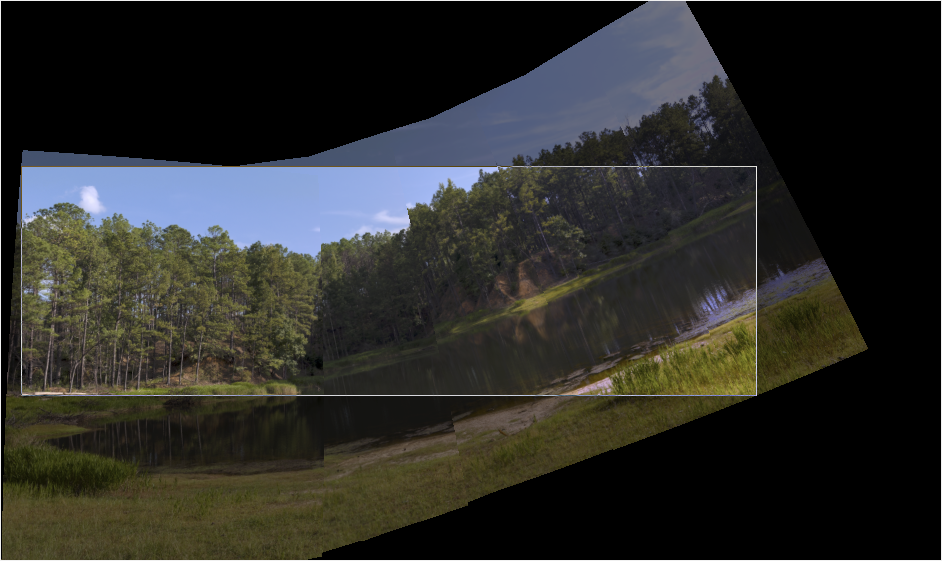
I have a horizontal series of five portrait images but the pano always curves upward to the right.
- Tripod was level
- Camera was level
- Plenty of overlap
- EXIF is in the TIFFs
- Sigma 17-70 DC lens at 36mm
- Camera is a Canon T8i / 850D, 1.6 crop sensor
For reference, here are thumbnails of the images, left to right, nice and level:
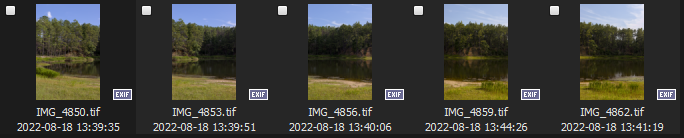
There are about 30-50 control points per image pair. Ideally I'd like to have more, but I've been successful with fewer and these look OK to me. None are in the sky, etc.

But the pano always looks like this:
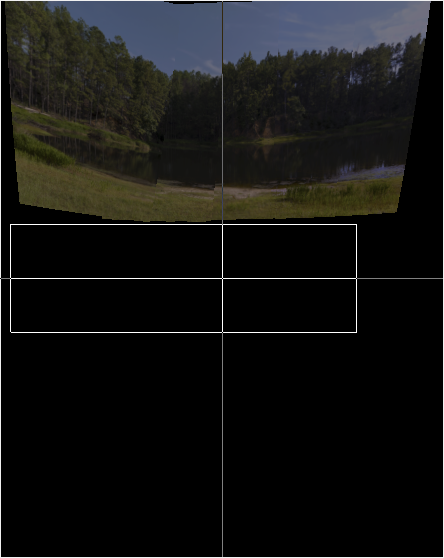
If I click Straighten, I get this:
I've enabled rotation detection, removal of sky control points, etc., but no change. However if I display CPs on the preview there are some in the sky, apparently but they're not visible on the Control Points tab:

I'm not super confident in what I'm reading, but this looks suspicious to me:
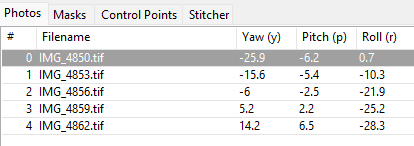
Why the seemingly excessive roll values?
If I try to optimize everything I get this:
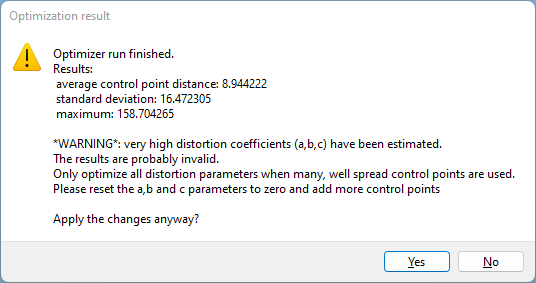
...so I click No.
Am I doing something wrong? I'm no Hugin / PT expert by a very long shot, but I've used it for more than a decade and have rarely if ever run into this kind of issue.
Thanks.

John Fine
Aug 18, 2022, 5:02:07 PM8/18/22
to hugi...@googlegroups.com
It is hard to see well in those tiny images, but it is still very clear that you didn't get picture 2 (the middle one) to fit. It is also clear that you have control points on clouds (that I expect moved between shots) connecting images 1 and 2.
I don't think those control points on clouds are actually doing much harm. But they are certainly doing no good. Delete them.
Why does image 2 fit so badly: I'm not sure. But I think it is a parallax problem. You have a cluster of CPs not far from the camera and another cluster quite far AND you must have moved the camera between shots. So it is confusing motion (translation) with rotation. Maybe you just didn't enable the necessary translation, or maybe the optimizer is just doing a rotten job. It often does a rotten job and needs a better starting place.
There are also projection issues that can lead to that kind of curvature (and I'm much less expert in that subtopic, so someone else could help more). But the CP/optimization problem is so bad in what you showed that it ought to be fixed first.
I'm currently experimenting with CP optimization issues in hugin++ and would like a few more problem examples. If you want to share the whole thing (images as well as pto file) I might be able to give back a good manual correction for your pto quickly (no promises, but part of longer term improving what happens automatically is manually tweaking the example to decide what should have happened). In this case no tweaks of the optimization make sense before zooming in to check which CPs are simply wrong.
John Fine
Aug 18, 2022, 5:11:52 PM8/18/22
to hugi...@googlegroups.com
I should have looked more carefully at everything you posted before replying based on some of it. Most of what I said is still correct. But the core problem is the lens correction.
We often let lens correction compensate for other fitting problems. Here that has gone badly wrong.
If you have correct parameters for the lens (and zoom level) from other projects, copy those and disable optimization. Otherwise disable all but b or otherwise do something to eliminate bad lens correction (which is worse than no lens correction). If you intentionally used bad lens correction to avoid enabling translation (I know some people think you should) don't do that.
With both translation and the basic (yaw in this case) rotation, other things can go wrong. That problem can be limited by turning off both lens correction (reset either to zero or to known reasonable values from other projects) and translation (reset to zero) then get things roughly right with just yaw, pitch and roll, then add translation, finally try adding lens correction. Save results at each stage in case things get suddenly worse.
Len Philpot
Aug 18, 2022, 7:00:33 PM8/18/22
to hugin and other free panoramic software
No problem sharing -- I sent a Google Drive link to you via email just moments ago.
Thanks.
johnfi...@gmail.com
Aug 18, 2022, 8:18:41 PM8/18/22
to hugin and other free panoramic software
I'm not seeing at all what I expected. So I may have been entirely wrong about all that lens stuff. So ignore most of what I said.
Instead you have some very very wrong control points that must be deleted and that might be the only important problem.
For example the two CPs connecting image 0 to image 2.
johnfi...@gmail.com
Aug 18, 2022, 8:45:41 PM8/18/22
to hugin and other free panoramic software
I wish my panoramas came together as well or as easily as that one.
After I emailed back the .pto with several garbage CPs removed, I tried stitching and the result is better than I've ever gotten without major effort.
The automatic CP detection sometimes creates a few garbage ones. If I remember correctly, all but one of your garbage CPs were on clouds. I never use the tool for auto removing CPs from clouds, but there is one. Likely it works.
Many people also use the main control point table (from the view menu) sorted by distance, to identify garbage CPs. In the state you sent the file, the approach was hopeless. The highest distances were perfectly good CPs and the bad ones were down of few positions on the list. Likely after removing the ones on clouds and reoptimizing, the last garbage one would have stood out on that list. I didn't try that.
In the control Points tab, the garbage CPs were so obvious, no real effort went into finding and deleting them (never works that way for my panoramas).
Once the garbage CPs were gone, your panorama had a better fit than I ever get even after being sure all my CPs are perfect to a fraction of a pixel.
Anyway, it is not an example for my enhancements to huggin++ for hard examples. But I'm glad I could help. And it is good for me to see examples demonstrating that my own are not that representative.

dkloi
Aug 24, 2022, 3:55:19 PM8/24/22
to hugin and other free panoramic software
Can you send me the link to the photos? Did you use a panohead? Parallax can cause problems.
Len Philpot
Aug 24, 2022, 4:04:02 PM8/24/22
to hugin and other free panoramic software
Actually, John and I corresponded via email and it turned out to basically be a few wayward CPs (in the sky, etc.) that needed to be removed. I used a leveled tripod and there were no nearby objects so parallax wasn't really a factor.
Thanks.
John Fine
Aug 24, 2022, 4:29:14 PM8/24/22
to hugi...@googlegroups.com
The only thing that might be an open question here is why Celeste didn't work.
On Wed, Aug 24, 2022 at 4:04 PM Len Philpot <lphil...@gmail.com> wrote:
Actually, John and I corresponded via email and it turned out to basically be a few wayward CPs (in the sky, etc.) that needed to be removed. I used a leveled tripod and there were no nearby objects so parallax wasn't really a factor.
I think I already corrected myself in this thread (not just by separate email).
Image 2 was connected to image 0 incorrectly by a CP on clouds. They weren't the same cloud and it wasn't near the tiny area of overlap between images 0 and 2. Very similarly, image 2 was connected to image 4 by a CP across not actually matching clouds far outside the actual overlap between 2 and 4. Those two CPs were bad enough to completely warp image 2 in the panorama.
Image 2 was also connected to image 1 by several CPs in clouds that did actually match AND there was no detectable change in the position of those clouds between the two shots (very fast photographer and/or unusually slow moving clouds). I guessed (but did not test) that leaving those CPs in was more likely to do harm than good. Again, the big question is why did Celeste leave them in.
Reply all
Reply to author
Forward
0 new messages