
Skip to first unread message

Molly
Feb 16, 2015, 3:55:37 PM2/16/15
to
Hello, everyone!
My apologies for the delay in posting this write-up from last week. Mid-terms are here, and I've been a little buried under my mountain of homework. I hope that you are all faring well with your own mountains!
Last week (Monday, Feb 9th), we began introducing ourselves to Ruby on Rails. Ruby on Rails is a very popular open source web application framework, and it is used by many web companies to build online applications.
Before we dive right into Ruby on Rails, or "RoR", there are a few concepts you should be familiar with.
Static Websites vs Dynamic (Data-Driven) Websites & Applications
- Q: We've learned some HTML & CSS, so can't we build websites that way?
- A: Yes, but we wouldn't be able to support users because HTML is static.
Websites are defined as being either Static or Dynamic. But what does that mean?
Static websites don't change their content depending on who looks at them. They always stay the same, regardless of users or new content. They have a "fixed state": they are unchanging until a developer comes and updates them by hand.
Dynamic websites can change their content frequently, and are more flexible than static sites. They can support user accounts, and will often change the data they display based on actions performed by the user.
Examples of Dynamic websites include:
- Gmail
- Google Drive
- Google Groups
- And many, many more.
In fact, the vast majority of websites online today are Dynamic websites.
- Q: How do Dynamic websites change their content? Why can they offer these interactive features?
- A: Because Dynamic websites are data-driven.
This means that somewhere on the back-end, there is some kind of data storage container.
Often, the data storage container is a database. There are other methods of storing data as well, but we're going to focus on databases because that's what we'll use in Ruby on Rails.
Introduction to Databases
A Database refers to any type of data storage structure that allows data to be:
- Created
- Read (searched and viewed)
- Updated
- Deleted
Traditional relational databases have Tables, which store data based on the data's category.
For example: in a Twitter-like app, you could expect to find the following tables in its database:
- Users
- Posts
- Friends
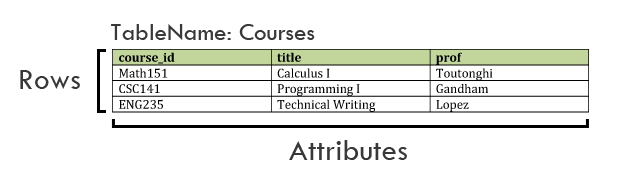
Another example: suppose we created an app for students to keep track of their class schedules.
In that app, we'd have a table called “Courses”, which could look like this:
Intro to Rails - Rails for Zombies
We're using CodeSchool.com's Rails for Zombies series to start learning Ruby on Rails. We completed Level 1 and 2 in Week 6. I'd highly recommend that you walk through them on your own time to get comfortable with the material.
Be sure to download the Rails for Zombies Slides before you start the Challenges!
They are a helpful reference for you to use while you practice your RoR!
Note: You won't be able to proceed to Level 2 until you complete Level 1's challenges.
[Prerequisites for Rails for Zombies]:
- Complete the Ruby Exercises from Week 5
- Optional & Recommended: Complete this Ruby Tutorial on Arrays and Hashes!
Have fun, and Happy Coding!
Reply all
Reply to author
Forward
0 new messages