
Giúp đỡ về việc đựa dữ liệu lên Combobox trên form và combobox trên datagridview trong mô hình 3 lớp.
3,263 views
Skip to first unread message

phandu...@gmail.com
Apr 26, 2013, 10:53:55 PM4/26/13
to hoidap-a...@googlegroups.com
Anh ơi e có xem bộ video về mô hình 3 lớp của anh thấy rất hay và bổ ích với người cũng mới bắt đầu như em . Em cũng mới học lập trình nên chưa biết nhiều lắm mong anh giúp đỡ.
Theo cái demo3layer bây giờ trong Product thêm cột chất lượng sản phẩm là kiểu bit (giá trị 1 = loại 1, giá trị 0= loại 2).
Thì ở lớp ProductDal ,ProductBll xử lí thế nào để lấy chất lượng sp là loại 1 và loại 2 gán vào combobox ạ.
Cả trong phần form_load.
Mong anh giúp đỡ.

Joseph Vu
Apr 27, 2013, 8:32:41 PM4/27/13
to hoidap-a...@googlegroups.com
ở lớp ProductDal ,ProductBll xử lí thế nào để lấy chất lượng sp là loại 1 và loại 2 gán vào combobox ạ.
- Danh sách lọai trong combobox sẽ không phụ thuộc vào ProductDal hoặc ProductBll, có nhiều cách làm để ra được danh sách này:
- Hard code tạo danh sách cho combobox
- Load từ một nguồn nào đó
- File config
- CSDL
- Lấy từ 1 config nào đó trong csdl
- Tạo bảng riêng chứa lọai
- Tóm lại danh sách lọai không phải nằm trong ProductDal và ProductBll
- Việc ta cần làm chỉ là khi sửa 1 sản phẩm thì thiết lập cái selectedValue của combobox là giá trị của cột lọai tương ứng trong csdl (con số 1 hoặc con số 0) mà thôi, cái này thuộc về GUI
Duong Phan
Apr 27, 2013, 10:09:24 PM4/27/13
to hoidap-a...@googlegroups.com
Vậy em xử lý thế này có được ko ạ?
Em nghĩ là cái hàm lấy danh sách sản phẩm sai nên nó ko thể chuyển được những dữ liệu kiểu 0.1 trong bảng csdl>> để hiển thị thành sản phẩm loại 1 và loại 2 trên combobox.
public DataTable LayLoaiSP()
{
//DataTable tb = new DataTable();
string sql = "SELECT DISTINCT LoaiSP,"
+ " NameLoaiSP =CASE LoaiSPWHEN 1 THEN N'Sản phẩm loại 1' "
+ "WHEN 0 THEN N'Sản phẩm loại 2' END FROM ap_product";
return DbConnect.read(sql);
}
>>>>>trong phần Gui private void Form1_Load(object sender, EventArgs e)
{
ProductBll a = new ProductBll();
//load lên combobox
cbLoaisp.DataSource = a.LayLoaiSP();//
cbLoaisp.DisplayMember = "NameLoaiSP ";
cbLoaisp.ValueMember = "LoaiSP";
//load lên combobox trên gridview
cbLoaisp.DataSource = a.LayLoaiSP();//
cbLoaisp.DisplayMember = "NameLoaiSP ";
cbLoaisp.ValueMember = "LoaiSP"
dataGridView1.DataSource = ProductBll.Laydanhsach();// lấy danh sách sản phẩm.
}
Em nghĩ là cái hàm lấy danh sách sản phẩm sai nên nó ko thể chuyển được những dữ liệu kiểu 0.1 trong bảng csdl>> để hiển thị thành sản phẩm loại 1 và loại 2 trên combobox.
Mong anh sửa giùm. Thanks
>>>>>>>>>>>>>>>>>>>>>>>> đây là class trong phần kết nối giống như demo3layer
using System;
using System.Data.SqlClient;
using System.Windows.Forms;
using System.Data;
namespace demo3Layer.dal
{
public class APCoreDbConnect
{
/*
* @todo read from database
* */
protected static DataTable read(string sql)
{
DataTable result = new DataTable();
if (!sql.ToUpper().Contains("SELECT"))
{
sql = "SELECT * FROM " + sql;
}
try
{
SqlDataAdapter adapter = new SqlDataAdapter(sql, demo3Layer.Properties.Settings.Default.apConnectionString);
adapter.FillSchema(result, SchemaType.Source);
adapter.Fill(result);
}
catch (Exception ex)
{
MessageBox.Show(Error.AnErrorHasBeenOccured + "\r\n" + ex.Message);
}
return result;
}
/*
* @todo read database table 's structure
* */
protected static DataTable readStructure(string tableName)
{
DataTable result = new DataTable();
string sql = "SELECT * FROM " + tableName;
try
{
SqlDataAdapter adapter = new SqlDataAdapter(sql, demo3Layer.Properties.Settings.Default.apConnectionString);
adapter.FillSchema(result, SchemaType.Source);
}
catch (Exception ex)
{
MessageBox.Show(Error.AnErrorHasBeenOccured + "\r\n" + ex.Message);
}
return result;
}
/*
* @todo write to database
* */
protected static int write(DataRow dr)
{
int result = 0;
string sql = "SELECT * FROM " + dr.Table.TableName;
DataTable dt = dr.Table;
try
{
SqlDataAdapter adapter = new SqlDataAdapter(sql, demo3Layer.Properties.Settings.Default.apConnectionString);
SqlCommandBuilder cmdBuilder = new SqlCommandBuilder(adapter);
result = adapter.Update(dt);
}
catch (Exception ex)
{
MessageBox.Show(Error.AnErrorHasBeenOccured + "\r\n" + ex.Message);
}
return result;
}
/*
* @todo: excute a sql
* if insert, return indentity id
* */
protected static int executeNonQuery(string sql)
{
int count = 0;
using (SqlConnection conn = new SqlConnection(demo3Layer.Properties.Settings.Default.apConnectionString))
{
if (conn.State == ConnectionState.Closed)
{
conn.Open();
}
SqlCommand cmd = new SqlCommand(sql, conn);
try
{
count = cmd.ExecuteNonQuery();
if (sql.ToUpper().IndexOf("INSERT INTO") == 0)
{
sql="Select @@Identity";
cmd.CommandText = sql;
count = int.Parse(cmd.ExecuteScalar().ToString());
}
}
catch (Exception ex)
{
MessageBox.Show(Error.AnErrorHasBeenOccured + "\r\n" + ex.Message);
}
}
return count;
}
/*
* @todo: get a single value
* */
protected static object executeScalar(string sql)
{
object result = null;
using (SqlConnection conn = new SqlConnection(demo3Layer.Properties.Settings.Default.apConnectionString))
{
if (conn.State == ConnectionState.Closed)
{
conn.Open();
}
SqlCommand cmd = new SqlCommand(sql, conn);
try
{
result = cmd.ExecuteScalar();
}
catch (Exception ex)
{
MessageBox.Show(Error.AnErrorHasBeenOccured + "\r\n" + ex.Message);
}
}
return result;
}
}
}
Joseph Vu
Apr 27, 2013, 10:39:57 PM4/27/13
to hoidap-a...@googlegroups.com
Chưa hiểu ý bạn,
bạn muốn thế nào?
1) Hiển thị combobox vào trong gridview
2) Khi click ở gridview thì hiển thị tương ứng với 1 combobox trên form
--
Bạn nhận được thư này vì bạn đã được đăng ký vào nhóm Google Groups "Hỏi đáp".
Để hủy đăng ký nhóm này và ngừng nhận email từ nhóm, hãy gửi email tới hoidap-alphapl...@googlegroups.com.
Để có thêm tùy chọn, hãy truy cập https://groups.google.com/groups/opt_out.
Joseph Vu
Phone: 016.59.57.22.11
Skype: vulehuan
Gtalk: vulehuan
Duong Phan
Apr 27, 2013, 11:03:27 PM4/27/13
to hoidap-a...@googlegroups.com
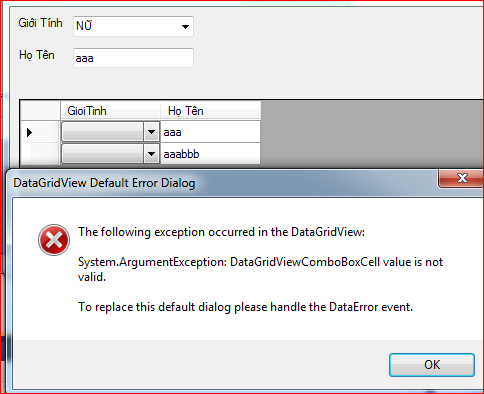

Hình có chú thích là khi cái cột giới tính e để kiểu DataGridviewtextboxColum, hình có lỗi là khi cột giới tính để là DataGirdviewcombobox
Vậy e nghĩ là:
1. có thể hàm xử lí giới tính sai? vì cái combobox giới tính bên trên chẳng liên quan gì tới cái gridview khi e binding dữ liệu lên cả :(
E làm theo mô hình 3 lớp của a hơi máy móc a thông cảm. e chưa hiểu sâu lắm :D
Joseph Vu
Apr 27, 2013, 11:12:30 PM4/27/13
to hoidap-a...@googlegroups.com
Bạn nén nguyên cái project rồi gửi mình xem thử bạn xử lý thế nào,
mình không thấy đọan code bạn xử lý khi click gridview thì bind combobox
Duong Phan
Apr 28, 2013, 7:20:21 AM4/28/13
to hoidap-a...@googlegroups.com
Anh Huân ơi nếu tối này a rảnh xem qua code đó giùm e với nhé.
Duong Phan
May 1, 2013, 5:44:05 AM5/1/13
to hoidap-a...@googlegroups.com
Cảm ơn anh Huân nhé. Em giải quyết được vấn đề rồi ạ.
Joseph Vu
May 1, 2013, 10:33:56 PM5/1/13
to hoidap-a...@googlegroups.com
Chúc mừng bạn nhé, hôm nay mình mới làm việc lại, mấy hôm rồi lễ nên đi suốt :D
Reply all
Reply to author
Forward
0 new messages