
Hst-query for document-Name
427 views
Skip to first unread message

andreas.h...@commercetools.de
Mar 30, 2015, 9:51:42 AM3/30/15
to hippo-c...@googlegroups.com
Hi,
I want to fetch a document by its name, but I don´t know which Folder is containing this document. So wanted to use the hst-query-language for fetching the document using that code:
But this query doesn´t return the document with the name "
Can someone help me to solve this problem.
Thanks Andi
I want to fetch a document by its name, but I don´t know which Folder is containing this document. So wanted to use the hst-query-language for fetching the document using that code:
protected Journal searchArticle(final HstRequest request, final String articleName) {
        Journal journal = null;

        final HstRequestContext ctx = request.getRequestContext();

        HippoBean siteContentBean = ctx.getSiteContentBaseBean();
        if (siteContentBean == null) {
            LOG.error("Scope for search is null");
            return journal;
        }
        try {
            HstQueryManager manager = ctx.getQueryManager();
            HstQuery hstQuery = manager.createQuery(siteContentBean, Journal.class);
            if (!StringUtils.isEmpty(articleName)) {
                // Name field
                Filter nameFilter = hstQuery.createFilter();
                nameFilter.addContains("jcr:name", articleName);
                hstQuery.setFilter(nameFilter);
            }
            System.out.println("####################### hippo query:" + hstQuery.getQueryAsString(true));
            HstQueryResult result = hstQuery.execute();
            HippoBeanIterator beans = result.getHippoBeans();
            if (beans.hasNext()) {
                journal = (Journal) beans.next();
            }
        } catch (QueryException e) {
            if (LOG.isDebugEnabled()) {
                LOG.warn("Error during search: ", e);
            } else {
                LOG.warn("Error during search: ", e.getMessage());
            }
        }
        return journal;
    }
But this query doesn´t return the document with the name "
articleName" and I don´t know whats wrong. Can someone help me to solve this problem.
Thanks Andi
commercetools GmbH
SPHERE.IO The E-Commerce Platform.
Adams-Lehmann-Strasse 44, 80797 München
Amtsgericht München, HRB 161496
Geschäftsführer: Denis Werner, Dirk Hörig, Dr. Robert Zores

Ard Schrijvers
Mar 30, 2015, 9:55:46 AM3/30/15
to hippo-c...@googlegroups.com
Hey Andi,
with the document name, do you then mean the jcr node or the display
name as shown in the cms? On the first you can query with the standard
hst query but the latter I think you cannot use normal hst query for
(since the display name is stored in separate node which is sibling of
document).
Regards Ard
> --
> Hippo Community Group: The place for all discussions and announcements about
> Hippo CMS (and HST, repository etc. etc.)
>
> To post to this group, send email to hippo-c...@googlegroups.com
> RSS:
> https://groups.google.com/group/hippo-community/feed/rss_v2_0_msgs.xml?num=50
> ---
> You received this message because you are subscribed to the Google Groups
> "Hippo Community" group.
> To unsubscribe from this group and stop receiving emails from it, send an
> email to hippo-communi...@googlegroups.com.
> Visit this group at http://groups.google.com/group/hippo-community.
> For more options, visit https://groups.google.com/d/optout.
--
Hippo Netherlands, Oosteinde 11, 1017 WT Amsterdam, Netherlands
Hippo USA, Inc.- 745 Atlantic Ave, Eight Floor, Boston MA 02111,
United states of America.
US +1 877 414 4776 (toll free)
Europe +31(0)20 522 4466
www.onehippo.com
with the document name, do you then mean the jcr node or the display
name as shown in the cms? On the first you can query with the standard
hst query but the latter I think you cannot use normal hst query for
(since the display name is stored in separate node which is sibling of
document).
Regards Ard
> Hippo Community Group: The place for all discussions and announcements about
> Hippo CMS (and HST, repository etc. etc.)
>
> To post to this group, send email to hippo-c...@googlegroups.com
> RSS:
> https://groups.google.com/group/hippo-community/feed/rss_v2_0_msgs.xml?num=50
> ---
> You received this message because you are subscribed to the Google Groups
> "Hippo Community" group.
> To unsubscribe from this group and stop receiving emails from it, send an
> email to hippo-communi...@googlegroups.com.
> Visit this group at http://groups.google.com/group/hippo-community.
> For more options, visit https://groups.google.com/d/optout.
--
Hippo Netherlands, Oosteinde 11, 1017 WT Amsterdam, Netherlands
Hippo USA, Inc.- 745 Atlantic Ave, Eight Floor, Boston MA 02111,
United states of America.
US +1 877 414 4776 (toll free)
Europe +31(0)20 522 4466
www.onehippo.com
andreas.h...@commercetools.de
Mar 30, 2015, 10:06:07 AM3/30/15
to hippo-c...@googlegroups.com
Hey Ard,
I think I want to search for the displayname (the name which you get when you call "someHippoBean.getName()"). So when I can´t use the normal hst query, is there a other way to get a Document by his displayname?
regards Andi
I think I want to search for the displayname (the name which you get when you call "someHippoBean.getName()"). So when I can´t use the normal hst query, is there a other way to get a Document by his displayname?
regards Andi
Ard Schrijvers
Mar 30, 2015, 10:30:07 AM3/30/15
to hippo-c...@googlegroups.com
On Mon, Mar 30, 2015 at 4:06 PM, <andreas.h...@commercetools.de> wrote:
> Hey Ard,
>
> I think I want to search for the displayname (the name which you get when
> you call "someHippoBean.getName()"). So when I can´t use the normal hst
> query, is there a other way to get a Document by his displayname?
The getName is the node name. This might be a bit different than the
> Hey Ard,
>
> I think I want to search for the displayname (the name which you get when
> you call "someHippoBean.getName()"). So when I can´t use the normal hst
> query, is there a other way to get a Document by his displayname?
display name you see in the cms.
Querying the node name should work. If someone from the top of his
head knows the field, please chime in. Otherwise I'll look it up later
Regards Ard
andreas.h...@commercetools.de
Mar 30, 2015, 10:41:59 AM3/30/15
to hippo-c...@googlegroups.com
Hi Ard,
thanks for your help. I allready tried to find the Fieldname for the nodename, but i didn´t find it. So thanks for helping me finding the nodename...
thanks for your help. I allready tried to find the Fieldname for the nodename, but i didn´t find it. So thanks for helping me finding the nodename...
Jeroen Reijn
Mar 31, 2015, 4:12:43 AM3/31/15
to hippo-c...@googlegroups.com
I guess you are referring to fn:name(), which is actually an expression and not so much a property?
in case you are searching for an exact match I would probably use:
Cheers,
Jeroen
You might want to try:
nameFilter.addContains("fn:name()", articleName);
nameFilter.addEqualTo("fn:name()", articleName);
Jeroen
Jeroen Reijn
Hippo
Amsterdam office - Oosteinde 11, 1017 WT Amsterdam
Hippo
Amsterdam office - Oosteinde 11, 1017 WT Amsterdam
Boston office - 745 Atlantic Ave, Eight Floor, Boston MA 02111, United states of America.
andreas.h...@commercetools.de
Mar 31, 2015, 5:16:51 AM3/31/15
to hippo-c...@googlegroups.com
Hi Jeroeon,
Thanks for your response. I have tested your suggested approach, but when I used:
I get the errorMessage:
So I Tried to used the fn:name property without brackets like:
But then I don´t get any result.
Do I have to escape the "fn:name()" property anyhow?
cheers
Andi
Thanks for your response. I have tested your suggested approach, but when I used:
Filter nameFilter = hstQuery.createFilter();
nameFilter.addEqualTo("fn:name()", articleName);
hstQuery.setFilter(nameFilter);
I get the errorMessage:
 org.hippoecm.hst.content.beans.query.exceptions.QueryException: Encountered "fn:name(" at line 1, column 150.
Was expecting one of:
    <ElementType> ...
    <AttributeType> ...
    <SchemaElementType> ...
    <SchemaAttributeType> ...
    "*" ...
    <NCNameColonStar> ...
    <StarColonNCName> ...
    <DocumentLpar> ...
    <DocumentLparForKindTest> ...
    <NodeLpar> ...
    <CommentLpar> ...
    <TextLpar> ...
    <ProcessingInstructionLpar> ...
    <ElementTypeForKindTest> ...
    <ElementTypeForDocumentTest> ...
    <AttributeTypeForKindTest> ...
    <SchemaElementTypeForKindTest> ...
    <SchemaElementTypeForDocumentTest> ...
    <SchemaAttributeTypeForKindTest> ...
    <ProcessingInstructionLparForKindTest> ...
    <TextLparForKindTest> ...
    <CommentLparForKindTest> ...
    <NodeLparForKindTest> ...
    <QName> ...
     for statement: for $v in //*[(@hippo:paths='996bcac5-86cf-49b5-a7a3-16a74863e814') and (@hippo:availability='live') and not(@jcr:primaryType='nt:frozenNode') and (@fn:name() = 'article1') and ((@jcr:primaryType='carhartt:journal'))] order by @jcr:score descending  return $v
So I Tried to used the fn:name property without brackets like:
Filter nameFilter = hstQuery.createFilter();
nameFilter.addEqualTo("fn:name", articleName);
hstQuery.setFilter(nameFilter);
But then I don´t get any result.
Do I have to escape the "fn:name()" property anyhow?
cheers
Andi

Jeroen Reijn
Mar 31, 2015, 7:39:57 AM3/31/15
to hippo-c...@googlegroups.com
I think the problem is that '@' which is added to the name function by the HST. Because it's a function and not a property this will indeed fail. I'm doing this all from the top of my head and I've never tried it myself, but if it will work you probably have to use it via
nameFilter.addJCRExpression("fn:name()='"+ articleName + "'")
I think it's worth trying the changed XPath query first in the repository interface http://localhost:8080/cms/repository/
Which should be /*[(@hippo:paths='996bcac5-86cf-49b5-a7a3-16a74863e814') and (@hippo:availability='live') and not(@jcr:primaryType='nt:frozenNode') and (fn:name() = 'article1') and ((@jcr:primaryType='carhartt:journal'))] order by @jcr:score descending
Let me know if that works for you.
Jeroen
--
Hippo Community Group: The place for all discussions and announcements about Hippo CMS (and HST, repository etc. etc.)
To post to this group, send email to hippo-c...@googlegroups.com
RSS: https://groups.google.com/group/hippo-community/feed/rss_v2_0_msgs.xml?num=50
---
You received this message because you are subscribed to the Google Groups "Hippo Community" group.
To unsubscribe from this group and stop receiving emails from it, send an email to hippo-communi...@googlegroups.com.
Visit this group at http://groups.google.com/group/hippo-community.
For more options, visit https://groups.google.com/d/optout.

Jennifer Amon
Feb 7, 2017, 10:42:46 AM2/7/17
to Hippo Community
I, too, am trying to do an xpath query for node.name, but the below syntax returns nothing. I thought there would be something like jcr:name that I could use to reference the name.
The node I am looking at has a value for my:sku that is equal to the name of the node.
This returns the node I want:
/jcr:root/content/documents/my-us-en/products/productline//element(*,my:Product)[hippostd:state='published' and my:sku='7345']
This returns nothing:
/jcr:root/content/documents/my-us-en/products/productline//element(*,my:Product)[hippostd:state='published' and fn:name()='7345']
...and I can't find anything to put in place of fn:name() that works to look at the node name.
So, how do I reference the node name in xpath, i.e. using the repository browser, or the xpath query field in the update/editor?
Thanks,
Jennifer

Lucas Vossberg
Feb 7, 2017, 12:28:24 PM2/7/17
to Hippo Community
Hallo,
I'm having the same problem.
A XPath query //element(*,website:Product) gives a result
/content/documents/website-xx/products/category/abc
But the query //element(*,website:Product)[fn:name()='abc'] gives no result.
ATM I'm reading all product nodes and do the filtering within the component. The above would be more efficient.
Lucas
I'm having the same problem.
A XPath query //element(*,website:Product) gives a result
/content/documents/website-xx/products/category/abc
But the query //element(*,website:Product)[fn:name()='abc'] gives no result.
ATM I'm reading all product nodes and do the filtering within the component. The above would be more efficient.
Lucas

Minos Chatzidakis
Feb 8, 2017, 3:58:27 AM2/8/17
to Hippo Community
Hi,
//element(*,website:Product)[fn:name()='abc']
seems to be working fine for me. What version of Hippo are you using?
cheers,
Minos
--
Hippo Community Group: The place for all discussions and announcements about Hippo CMS (and HST, repository etc. etc.)
To post to this group, send email to hippo-community@googlegroups.com
RSS: https://groups.google.com/group/hippo-community/feed/rss_v2_0_msgs.xml?num=50
---
You received this message because you are subscribed to the Google Groups "Hippo Community" group.
To unsubscribe from this group and stop receiving emails from it, send an email to hippo-community+unsubscribe@googlegroups.com.
Visit this group at https://groups.google.com/group/hippo-community.
Boston - 71 Summer Street, 2nd Floor, MA 02110 +1 877 414 47 76
London - 2 Eastbourne Terrace London W2 6LG +44 20 35 14 99 60
Oldenburg - Blumenstraße 1 26121 Oldenburg +49 441 36138 290
Minos Chatzidakis
Feb 8, 2017, 5:25:37 AM2/8/17
to Hippo Community
Fyi, I also tested to see whether the uppercase letter for the document type (Product) makes any difference, it doesn't, and also whether using "jcr:root" makes any difference, it does, things break in that case...use '/' instead or /content/.. or //.
hth!
Minos
Amsterdam - Oosteinde 11, 1017 WT Amsterdam +31 20 522 44 66
Boston - 71 Summer Street, 2nd Floor, MA 02110 +1 877 414 47 76
London - 2 Eastbourne Terrace London W2 6LG +44 20 35 14 99 60Oldenburg - Blumenstraße 1 26121 Oldenburg +49 441 36138 290
Lucas Vossberg
Feb 8, 2017, 6:00:57 AM2/8/17
to Hippo Community
Hallo Minos,
thank you very much for your feedback.
I've tested the query again and now it works for me too. I guess I used to wrong query string last time.
Later today I'll try to do the same query within a component.
Kind regards,
Lucas
thank you very much for your feedback.
I've tested the query again and now it works for me too. I guess I used to wrong query string last time.
Later today I'll try to do the same query within a component.
Kind regards,
Lucas
To post to this group, send email to hippo-c...@googlegroups.com
RSS: https://groups.google.com/group/hippo-community/feed/rss_v2_0_msgs.xml?num=50
---
You received this message because you are subscribed to the Google Groups "Hippo Community" group.
To unsubscribe from this group and stop receiving emails from it, send an email to hippo-communi...@googlegroups.com.
Visit this group at https://groups.google.com/group/hippo-community.
For more options, visit https://groups.google.com/d/optout.
Jennifer Amon
Feb 8, 2017, 8:39:37 AM2/8/17
to Hippo Community
Hippo CMS 11.0.3 Enterprise Edition
To post to this group, send email to hippo-c...@googlegroups.com
RSS: https://groups.google.com/group/hippo-community/feed/rss_v2_0_msgs.xml?num=50
---
You received this message because you are subscribed to the Google Groups "Hippo Community" group.
To unsubscribe from this group and stop receiving emails from it, send an email to hippo-communi...@googlegroups.com.
Visit this group at https://groups.google.com/group/hippo-community.
For more options, visit https://groups.google.com/d/optout.
Jennifer Amon
Feb 8, 2017, 8:57:53 AM2/8/17
to Hippo Community
Even just this does not return anything:
//element(*,my:Product)[fn:name()='7345']
This, however, returns 5 documents:
//element(*,my:Product)[my:sku='7345']
I double checked the node names in the console:
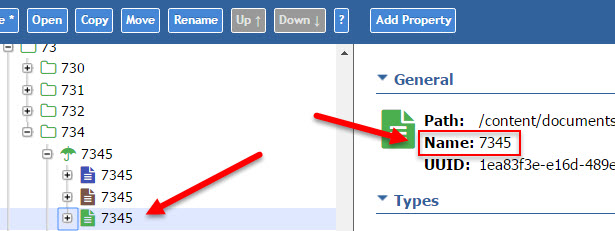
To post to this group, send email to hippo-c...@googlegroups.com
RSS: https://groups.google.com/group/hippo-community/feed/rss_v2_0_msgs.xml?num=50
---
You received this message because you are subscribed to the Google Groups "Hippo Community" group.
To unsubscribe from this group and stop receiving emails from it, send an email to hippo-communi...@googlegroups.com.
Visit this group at https://groups.google.com/group/hippo-community.
For more options, visit https://groups.google.com/d/optout.
--
Amsterdam - Oosteinde 11, 1017 WT Amsterdam +31 20 522 44 66
Boston - 71 Summer Street, 2nd Floor, MA 02110 +1 877 414 47 76
London - 2 Eastbourne Terrace London W2 6LG +44 20 35 14 99 60Oldenburg - Blumenstraße 1 26121 Oldenburg +49 441 36138 290

Marijan Milicevic
Feb 8, 2017, 9:09:36 AM2/8/17
to hippo-c...@googlegroups.com
On Wed, Feb 8, 2017 at 2:57 PM, Jennifer Amon <jen...@oh.rr.com> wrote:
Even just this does not return anything://element(*,my:Product)[fn:name()='7345']This, however, returns 5 documents://element(*,my:Product)[my:sku='7345']I double checked the node names in the console:
could you try to encode node name with: ISO9075.encode() method, so in your case it would be:
//element(*,my:Product)[fn:name()='_x0037_345']
cheers
marijan
To post to this group, send email to hippo-community@googlegroups.com
RSS: https://groups.google.com/group/hippo-community/feed/rss_v2_0_msgs.xml?num=50
---
You received this message because you are subscribed to the Google Groups "Hippo Community" group.
To unsubscribe from this group and stop receiving emails from it, send an email to hippo-community+unsubscribe@googlegroups.com.
Lucas Vossberg
Feb 8, 2017, 9:28:49 AM2/8/17
to Hippo Community
Maybe it has to do with the node name starting with a digit?
This page says when querying via Xpath, node names cannot start with a digit:
https://wiki.apache.org/jackrabbit/EncodingAndEscaping
Btw: Now I can also query from the component, like this:
HstQuery hstQuery = HstQueryBuilder.create(contentFolder).where(ConstraintBuilder.constraint(".").jcrExpression("fn:name()='" + product + "'")).ofTypes(Product.class).build();
Lucas
This page says when querying via Xpath, node names cannot start with a digit:
https://wiki.apache.org/jackrabbit/EncodingAndEscaping
Btw: Now I can also query from the component, like this:
HstQuery hstQuery = HstQueryBuilder.create(contentFolder).where(ConstraintBuilder.constraint(".").jcrExpression("fn:name()='" + product + "'")).ofTypes(Product.class).build();
Lucas
Jennifer Amon
Feb 8, 2017, 9:48:03 AM2/8/17
to Hippo Community
This works, but why?
Jennifer Amon
Feb 8, 2017, 9:52:28 AM2/8/17
to Hippo Community
it does. This works, for a product that does NOT have a leading digit.
//element(*,my:Product)[fn:name()='s6700']
So, what is the syntax that is usable via the repository browser or the xpath specification in the updater editor?
Thanks!! Getting closer.
Woonsan Ko
Feb 8, 2017, 9:54:58 AM2/8/17
to hippo-c...@googlegroups.com
To post to this group, send email to hippo-community@googlegroups.com
RSS: https://groups.google.com/group/hippo-community/feed/rss_v2_0_msgs.xml?num=50
---
You received this message because you are subscribed to the Google Groups "Hippo Community" group.
To unsubscribe from this group and stop receiving emails from it, send an email to hippo-community+unsubscribe@googlegroups.com.
Visit this group at https://groups.google.com/group/hippo-community.
For more options, visit https://groups.google.com/d/optout.
Amsterdam - Oosteinde 11, 1017 WT Amsterdam
Message has been deleted
Jennifer Amon
Feb 8, 2017, 2:56:45 PM2/8/17
to Hippo Community
So, I now know how to build a query that will work from within a program, but I still do NOT know what the equivalent syntax would be from the xpath field either in the repository browser or the updater editor. If we can figure that out, then what I REALLY want to do is this:
//element(*,my:Product)[fn:name()=my:sku]
Is there a way to compare one property to another in xpath?
I tried this, so I could get away from my fn:name() problems, and it did not work:
//element(*,my:Product)[hippostdpubwf:createdBy=hippostdpubwf:lastModifiedBy]
That should return a BUNCH of documents.
If I hardcode the username in there, it returns 98K+ documents:
Query executed
XPath query: //element(*,my:Product)[hippostdpubwf:createdBy='writeuser']Number of results found: 98,235
Lucas Vossberg
Feb 8, 2017, 3:30:11 PM2/8/17
to Hippo Community
Hi,
afaik you cannot do that with JCR v1.0. One of the operands needs to be a literal value. See [1] for reference.
If you need to search so many entries, I guess your best bet is to flag nodes upon creation or change of my:sku with an extra property.
Lucas
afaik you cannot do that with JCR v1.0. One of the operands needs to be a literal value. See [1] for reference.
If you need to search so many entries, I guess your best bet is to flag nodes upon creation or change of my:sku with an extra property.
Lucas
Lucas Vossberg
Feb 8, 2017, 3:54:10 PM2/8/17
to Hippo Community
Lucas Vossberg
Feb 8, 2017, 4:36:28 PM2/8/17
to Hippo Community
Jennifer, you should also have a look at the documentation of "derived data" [2], it is a solution to your problem.
Lucas
[2] https://www.onehippo.org/library/concepts/content-repository/derived-data.html
Lucas
[2] https://www.onehippo.org/library/concepts/content-repository/derived-data.html
Am Mittwoch, 8. Februar 2017 21:30:11 UTC+1 schrieb Lucas Vossberg:
Reply all
Reply to author
Forward
0 new messages