
Foobar server needs to transcode FLAC to WAV? M3U playlists on PC?
214 views
Skip to first unread message

ads...@gmail.com
Jun 1, 2018, 3:51:58 PM6/1/18
to Hi-Fi Cast Help Forum
For a little background, we are currently Sonos users (Play5 in kitchen and Connect in main system). Media are flac files on the PC (CD rips) and Spotify Premium.
In a secondary system, I have a Chromecast Audio connected via optical to a Denon AVR.
So, I’ve been playing with the free version of Hi-Fi Cast to stream FLAC files to the secondary system, and am thinking about purchasing the full version.
I’m using the UPnP/DLNA server plug-in in Foobar on the PC.
A couple questions:
- Should Hi-Fi cast be able to pull FLAC from the Foobar server without transcoding by the server?
I get errors unless I have Foobar set to transcode to WAV.
- Is it possible to see/select M3U playlists on the PC with Hi-Fi Cast?
- Should I consider installing a different/better server on the PC?
Thanks,
Adam

Hi-Fi Cast Developer
Jun 1, 2018, 6:35:16 PM6/1/18
to Hi-Fi Cast Help Forum
> Should
Hi-Fi cast be able to pull FLAC from the Foobar server without transcoding
by the server?
Yes, definitely. The Chromecast Audio has native support for FLAC so there should be no problem. Is there any chance your FLAC files begin with an ID3 tag? If that is the case then the CCA won't be able to play them.
> Is
it possible to see/select M3U playlists on the PC with Hi-Fi Cast?
Only if you server software supports this in which case they will simply appear in the Playlists tab in Hi-Fi Cast.
> Should
I consider installing a different/better server on the PC?
Maybe. Minimserver is very good and plays nicely with Hi-Fi Cast.
Cheers,
Brett
ads...@gmail.com
Jun 1, 2018, 7:13:26 PM6/1/18
to Hi-Fi Cast Help Forum
Thanks for the quick reply.
Could you please explain "FLAC files begin with an ID3 tag"?
I don't think they do because I briefly tested some flac files with the CCA and Plex server/app, and they would play.
Thanks for the tip on Minimserver.
Hi-Fi Cast Developer
Jun 1, 2018, 7:57:56 PM6/1/18
to Hi-Fi Cast Help Forum
>> Could you please explain "FLAC files begin with an ID3 tag"?
Sure. Some CD ripping software will prepend the contents of FLAC files with an ID3 tag (ie the same format used to embed metadata into MP3 files). AFAIK this is not consistent with the FLAC specification and so not surprisingly some players will not play these files (and they will not work with Hi-Fi Cast if you have the Chromecast gapless and/or Volume normalisation settings enabled).
On linux you can easily find out if a FLAC file has an ID3 tag by using this command:
hd -n 4 somefile.flac
The output for a FLAC with an ID3 tag will look like this:
00000000 49 44 33 03 |ID3.|
and without will look like this:
00000000 66 4c 61 43 |fLaC|
I'm not sure how you would do this on windows.

Mark w
Jun 2, 2018, 3:02:40 AM6/2/18
to Hi-Fi Cast Help Forum
In windows, hit the START button and type: cmd and hit ENTER
Then type: type somefile.flac|more and hit ENTER (The | sign is shift + \ key on my keyboard)
The first characters show: ID3. or fLaC
Type Ctrl + c and then Alt + F4 to quit the cmd-box
ads...@gmail.com
Jun 2, 2018, 9:36:51 AM6/2/18
to Hi-Fi Cast Help Forum
I was not able to successfully determine if my FLAC files have ID3. Could not get the windows test to work.
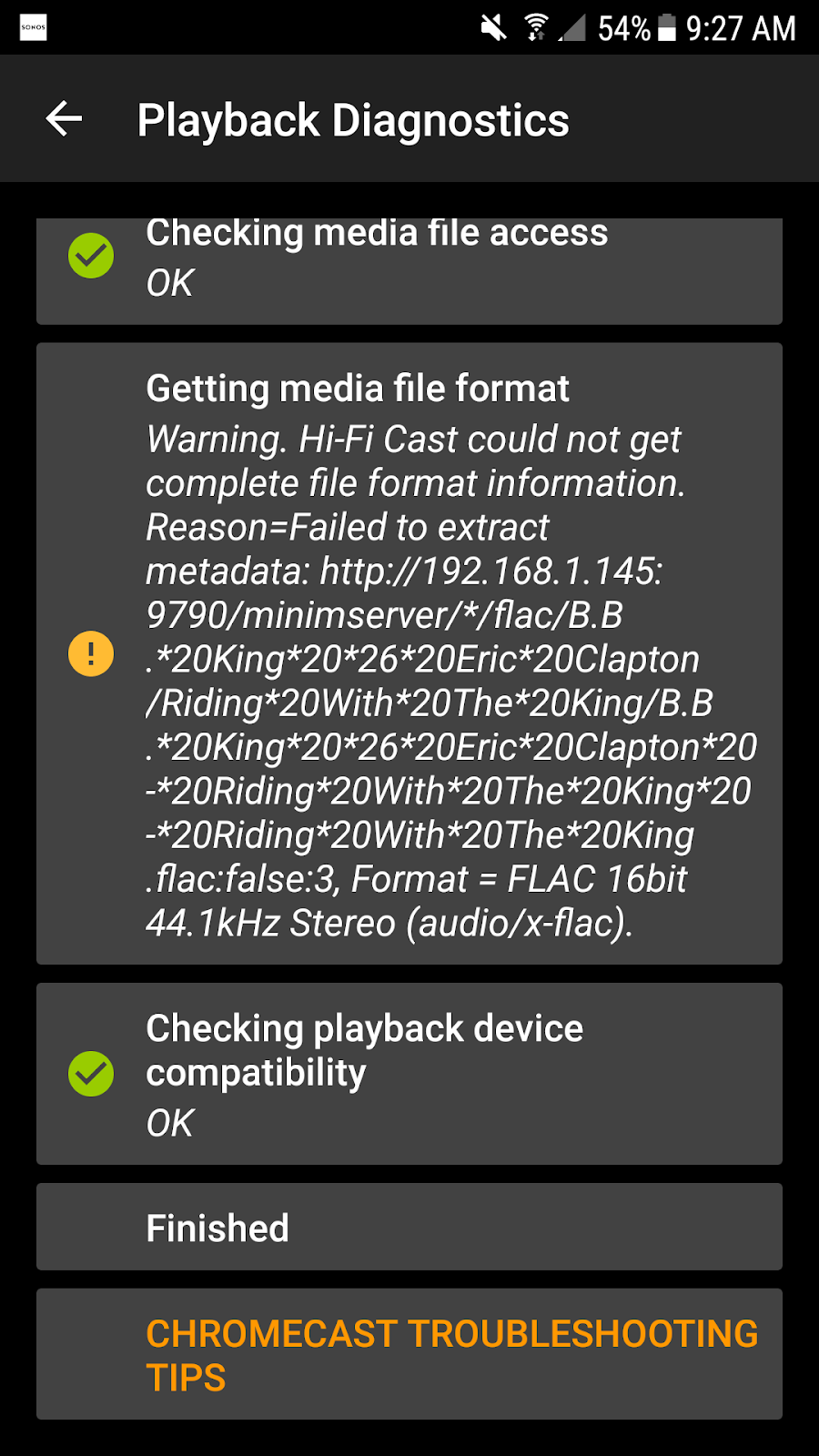
I did install MinimServer and also get FLAC playback errors. Here is a screenshot from my phone. Does this provide any insight into the cause for the errors?
Hi-Fi Cast Developer
Jun 3, 2018, 4:04:03 AM6/3/18
to Hi-Fi Cast Help Forum
Well that's consistent with my ID3 theory. If you send one of the (small) problematic FLAC files to hifi...@findhdmusic.com then I can a let you know either way.
ads...@gmail.com
Jun 3, 2018, 4:55:13 PM6/3/18
to Hi-Fi Cast Help Forum
Thanks, I just emailed you a FLAC file to look at.
Also, I don't see any transcoding options in Minimserver. I like the fact that my playlists are viewable in Hi-Fi Cast (they are not with the Foobar server).
However, I can transcode to wav in Foobar, so the FLAC files are at least playable.
Hi-Fi Cast Developer
Jun 3, 2018, 5:09:32 PM6/3/18
to Hi-Fi Cast Help Forum
I can confirm that the file you sent me does start with an ID3 tag. If you want to remove these tags I believe mp3tag can do it (tho' I've never tried it myself).
Some links that might be useful:
And you can transcode with Minimserver by using Minimstreamer.
Good luck :)
ads...@gmail.com
Jun 4, 2018, 8:42:02 AM6/4/18
to Hi-Fi Cast Help Forum
Well, that is interesting.
I used EAC to rip my CDs to FLAC, and they have worked without issues with Foobar, Squeezebox, and Sonos. With their current tags, I seem to have all the proper metadata for track sorting, selection, etc.
If I remove ID3 tags, will I loose the metadata (artist, album, track, genre, etc.)?
Also, why does transcoding to WAV fix the issue? The metadata tags in the FLAC files are still somehow apparently being used in the WAV stream.
Regardless, Minimserver/Minimstreamer and Hi-Fast Cast seem to be working great with my FLAC files transcoded to WAV.
I appreciate your excellent support in this thread!
Hi-Fi Cast Developer
Jun 5, 2018, 6:14:13 PM6/5/18
to Hi-Fi Cast Help Forum
>> If I remove ID3 tags, will I loose the metadata (artist, album, track, genre, etc.)?
I'm not sure. It depends on whether EAC also writes all of the metadata that is in the ID3 tag into the standard FLAC tags as well.
>> Also, why does transcoding to WAV fix the issue? The metadata tags in
the FLAC files are still somehow apparently being used in the WAV
stream.
Minimserver will still be extracting the metadata from the original FLAC+ID3 file (this is independent of transcoding). The transcoded stream is a valid WAV rather than an (invalid?) FLAC with a prepended ID3 tag and so the Chromecast Audio knows how to play it.
Reply all
Reply to author
Forward
0 new messages