
What am I doing wrong?/What is hg-git supposed to accomplish?
895 views
Skip to first unread message

brig...@gmail.com
Nov 5, 2014, 10:17:10 AM11/5/14
to hg-...@googlegroups.com
Hello all,
I apologize in advance for the primitive nature of my post, and if I'm posting in the wrong forum.
Per http://hg-git.github.io/ I installed Python (based on what I read, had to use the 32 bit version even though my computer is 64 bit) so I can get easy_install to install hg-git.
Then I added...
[extensions]
hgext.bookmarks =
hggit =
...to my .hgrc file.
After I commit my changes under Mercurial, are those changes automatically supposed to commit to github? Because it isn't.
Do I first push them via SourceTree? Because SourceTree has no record of my Mercurial commits.
How do I confirm I installed correctly?
Thanks for your help.
P.S. Will hg git push all my Mercurial history to github? If not, I might just drop Mercurial and use git directly.

Augie Fackler
Nov 5, 2014, 12:35:58 PM11/5/14
to hg-...@googlegroups.com
On Nov 5, 2014, at 10:17 AM, brig...@gmail.com wrote:
> Hello all,
>
> I apologize in advance for the primitive nature of my post, and if I'm posting in the wrong forum.
>
> Per http://hg-git.github.io/ I installed Python (based on what I read, had to use the 32 bit version even though my computer is 64 bit) so I can get easy_install to install hg-git.
>
> Then I added...
>
> [extensions]
> hgext.bookmarks =
> hggit =
>
> ...to my .hgrc file.
>
> After I commit my changes under Mercurial, are those changes automatically supposed to commit to github? Because it isn't.
> Do I first push them via SourceTree? Because SourceTree has no record of my Mercurial commits.
>
> How do I confirm I installed correctly?
'hg gexport' runs and has no errors.
>
> Thanks for your help.
>
> P.S. Will hg git push all my Mercurial history to github? If not, I might just drop Mercurial and use git directly.
>
> --
> You received this message because you are subscribed to the Google Groups "hg-git" group.
> To unsubscribe from this group and stop receiving emails from it, send an email to hg-git+un...@googlegroups.com.
> To post to this group, send email to hg-...@googlegroups.com.
> Visit this group at http://groups.google.com/group/hg-git.
> For more options, visit https://groups.google.com/d/optout.
brig...@gmail.com
Nov 5, 2014, 2:22:10 PM11/5/14
to hg-...@googlegroups.com
Augie,
Thank you for your help.
I typed "hg showconfig extensions" and I got some stuff about hg git, so that's good. Next, I typed "hg gexport" and it said "unknown command 'gexport'". So I typed "hg export" and it said.
*** failed to import extension hggit: No module named hggit
abort: export requires at least one changeset
Any ideas?
Yes, I am using Windows 7.
Thanks.
Adam
Augie Fackler
Nov 5, 2014, 3:01:55 PM11/5/14
to hg-...@googlegroups.com
On Nov 5, 2014, at 2:22 PM, brig...@gmail.com wrote:
Augie,Thank you for your help.I typed "hg showconfig extensions" and I got some stuff about hg git, so that's good. Next, I typed "hg gexport" and it said "unknown command 'gexport'". So I typed "hg export" and it said.*** failed to import extension hggit: No module named hggit
This is telling you that hg-git isn't installed in the Python that's in use by your hg installation. I don't know how to help you here since you're on windows.
abort: export requires at least one changesetAny ideas?Yes, I am using Windows 7.Thanks.Adam

Ben Kehoe
Nov 5, 2014, 3:17:28 PM11/5/14
to hg-...@googlegroups.com
In my mercurial.ini on Windows, I have the following line; instead of installing it into Python, you can just point it at the directory you installed to directly. This may fix the problem you're having.
hggit = C:\Program Files\hg-git\hggit
To address your other comments, I think you may be misunderstanding how hg-git works, and possibly don't fully grasp Git or Mercurial. Git and Mercurial are very similar DVCS's. You should read up on how they work, until you have a reasonable understanding of both systems, what repositories are, the difference between local repos and remote (like those on GitHub) and how that differs from tools that operate on repos (like SourceTree). For example, you do not "commit to GitHub"; rather, you push commits from a local repository to a GitHub repo.
Once you have the background, you'll see that both Mercurial and Git repos use a graph of commits that you can push and pull from other repositories. The purpose of hg-git is to allow Mercurial repositories to push and pull from Git repositories. So, for example, you can have a local Mercurial repository that you synchronize with a Git repository on GitHub.
--Ben
brig...@gmail.com
Nov 5, 2014, 3:40:22 PM11/5/14
to hg-...@googlegroups.com
Thank you all for your prompt responses.
I'm not finding an hg-git folder under either C:\Program Files or C:\Program Files (x86).
Also, I'm not finding a Mercurial.ini file (I'm using TortoiseHG, BTW).
Regards,
Adam
Ben Kehoe
Nov 5, 2014, 3:48:33 PM11/5/14
to hg-...@googlegroups.com
You need to install hg-git manually. In TortoiseHG workbench, go to File->Clone Repository, put http://bitbucket.org/durin42/hg-git as the source, and choose your destination directory on your computer wherever you want it. Note that you may run into problems installing it under Program Files because of permissions. But once you have that, inside that directory there should be an hggit directory.
Then, in TortoiseHG workbench, go to File->Settings, and under the "global" tab click "Edit File". Then add or edit the "hggit=" line to be "hggit = <path-to-that-hggit-directory>"
--

Erik Huelsmann
Nov 5, 2014, 3:52:16 PM11/5/14
to hg-...@googlegroups.com
Hi,
These days TortoiseHG includes hg-git, at least, I haven't had to do anything to get TortoiseHG to pull or push my changes with github. it's important to use the right URL though. Which url are you using?
Regards,
Erik.
--
Ben Kehoe
Nov 5, 2014, 3:56:50 PM11/5/14
to hg-...@googlegroups.com
Thanks, Erik! I wasn't aware of that.
Augie: maybe this should be stated on the hg-git main page? http://tortoisehg.readthedocs.org/en/latest/nonhg.html#hg-git-git
Augie Fackler
Nov 5, 2014, 3:59:17 PM11/5/14
to hg-...@googlegroups.com
That's a tortoise page you just linked? Ask them?
If you mean the github pages thing, feel encouraged to send a pull request.
Ben Kehoe
Nov 5, 2014, 4:07:38 PM11/5/14
to hg-...@googlegroups.com
To everyone: does anyone know of other tools that come with hg-git?
brig...@gmail.com
Nov 18, 2014, 10:49:53 AM11/18/14
to hg-...@googlegroups.com
Hello Erik,
When you say you haven't had to do anything to get TortoiseHG to pull or push your changes with github, does that include typing "hg gexport"?
I downloaded the latest TortoiseHG, and typing "hg gexport" no longer crashes.
However, I am unable to push. I get an "Error 404 (Not Found)...returned code 255" message even though I click the hyperlink and it takes me to the url.
I've added the [ui] setting to my .hgrc file and the [hostfingerprints] setting to my Mercurial.ini file.
Are you typing "hg gexport"? Are you changing your .hgrc or Mercurial.ini files?
Thank you in advance.
Adam
brig...@gmail.com
Nov 21, 2014, 10:46:13 AM11/21/14
to hg-...@googlegroups.com, brig...@gmail.com
OK, so I set a bookmark and I pulled and merged. Now I'm getting the "Invalid argument: when I push. Below is a traceback.
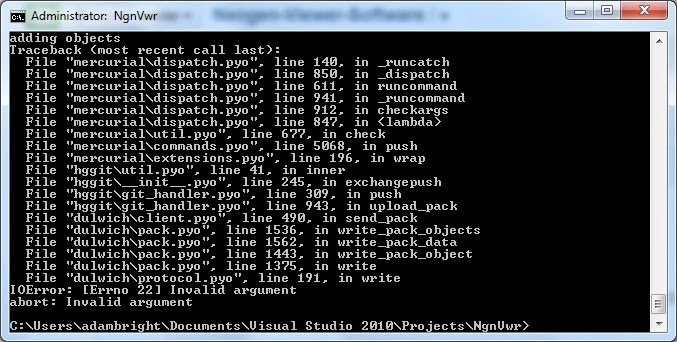
Any assistance would be appreciated.
Reply all
Reply to author
Forward
0 new messages