
WSJT-X settings SDR Console & HL2
2,244 views
Skip to first unread message

Ronald Meier
Jun 24, 2021, 3:25:29 PM6/24/21
to Hermes-Lite
I have set up HL2 with raspi to work remote. At home I would like to run SDR Console V3 with HL2 and WSJT-X. I can not figure out the proper settings. Tried to follow the guidelines of Hamskey with uBITX but failed.
Anybody any guidance?
73, Ronald

Robert Benedict
Jun 24, 2021, 5:43:39 PM6/24/21
to Hermes-Lite
Here's how mine is setup. You need a pair of virtual comm ports and a pair of virtual audio cables.
SDT Console
View->External Radio, in External Radio window click on "?" in upper left to configure port, my comm 16, radio Kenwood
receive VoiceMeeter Aux Input -> VoiceMeeter Aux Output
transmit VoiceMeeter Output <- VoiceMeeter Input
WSJT-X
Radio
rig: Kenwood TS2000
Cat Control: COM 15
Baud Rate 9600
PTT: CAT
Audio
Input: VoiceMeeter output
Output: VoiceMeeter Aux Input
73
Bob KD8CGH

radi...@mail.com
Jun 24, 2021, 6:35:10 PM6/24/21
to Hermes-Lite
Hi Ronald
See here for SDRC serial port configs:
For my virtual com port software I use
VSP Manager by K5FR. It works very well.
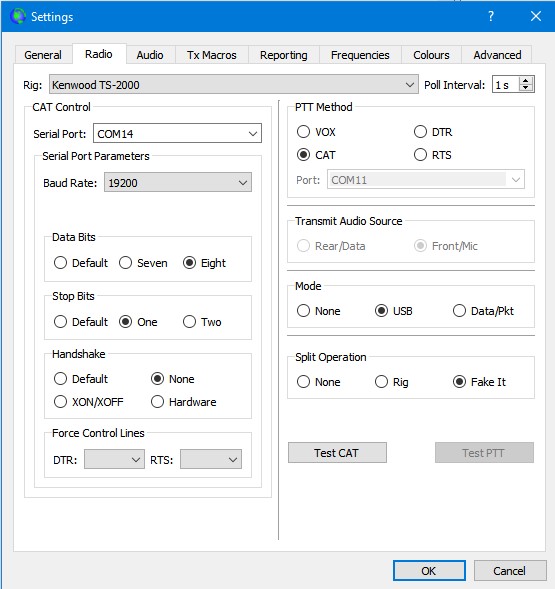
My WSJT-X settings:
Works just fine for me with Com Port 13 set to SDRC and Port 14 to WSJT-X.
Hope it helps.
73
Max
Ronald Meier
Jun 25, 2021, 2:47:40 PM6/25/21
to radi...@mail.com, Hermes-Lite
Thks Max,

But somehow I do not get the settings right. I downloaded VSP and tried to copy your settings but without luck. Any more detailed manual available
73 Ronald
--
You received this message because you are subscribed to a topic in the Google Groups "Hermes-Lite" group.
To unsubscribe from this topic, visit https://groups.google.com/d/topic/hermes-lite/rz4tUFGSx-E/unsubscribe.
To unsubscribe from this group and all its topics, send an email to hermes-lite...@googlegroups.com.
To view this discussion on the web visit https://groups.google.com/d/msgid/hermes-lite/1a0826ac-3f74-470c-a961-aec71d932389n%40googlegroups.com.
radi...@mail.com
Jun 25, 2021, 4:38:04 PM6/25/21
to Hermes-Lite
Hi Ronald

So you have a xcom port pair, Com9 and Com10. I have the lower (odd) port connecting to SDRC and the upper (even) port connecting to WJST-X. You have done it the other way around, but no matter, shoudl work just the same.
I cannot see from yoru screen grab if you have therefore enabled the even port to connect to SDRC.
So now in SDRC:
"Tools" tab > Options > Controllers
Then in the "controllers "window, you need to tick just Com14 so that it connects to SDRC, then the two programs should talk to each other.
See here the SDRC "Controllers" window:
73
Max
radi...@mail.com
Jun 25, 2021, 4:43:31 PM6/25/21
to Hermes-Lite
Sorry Ronald, typos all over on my last post. (In a hurry!).
So on YOUR setup you will of course tick COM10 in SDRC because you have COM9 of the pair allocated to WSJT-X..
As Bob says, of course you need to route audio to and from WJST-X using separate VACs but that should be straightforward. It's the control that I think you are finding tricky?
73
Max
Ronald Meier
Jun 25, 2021, 5:34:22 PM6/25/21
to radi...@mail.com, Hermes-Lite
Max, thks for the effort and finally receiving something. Any idea how I get the frequency in WSJT-X automatically sync with SDRC (red box)?
Also I see in your set up in SDRC under mode FT8, how do I set this?
As you can see, a complete new world to learn with HL2 and SDRC.
73 Ronald

--
You received this message because you are subscribed to a topic in the Google Groups "Hermes-Lite" group.
To unsubscribe from this topic, visit https://groups.google.com/d/topic/hermes-lite/rz4tUFGSx-E/unsubscribe.
To unsubscribe from this group and all its topics, send an email to hermes-lite...@googlegroups.com.
To view this discussion on the web visit https://groups.google.com/d/msgid/hermes-lite/a97cdc4b-6ba9-4810-8f6b-4e91e91d789cn%40googlegroups.com.
radi...@mail.com
Jun 25, 2021, 6:48:03 PM6/25/21
to Hermes-Lite
Hi Ronald

Really glad to hear that you now receive something.
The FT8 button you see in my setup is the filter width, not the mode. Mode is regular USB. was just a custom filter I added myself. You can add any custom filter you want and select/deselect those shown in the black panel by clicking the three dots in the filter box:
Just for info, perfectly happy to answer questions here about SDRC, but strictly speaking it's off the topic of HL2. You would be best joining the excellent and supportive SDRC Forum for any questions directly related to SDR Console. There's also a bunch of us on there with HL2s!
The closest there is to a manual for SDRC is by going to the main SDRC website, then hover over the nav buttons at the top of the page. There are loads of hidden drop-down menus there on lots of topics related to operation of SDRC and also set-up with some third party programs (like CW Skimmer for example):
Regarding the frequency display in WJST-X, can I ask, did you select the band using the drop-down box on WJST-X to the left of the big red frequency box? If so, it should be taking control of SDRC and automatically selecting the right frequency and then displaying it in the box on WJST-X? If it is not taking control of SDRC, then something still not quite right in the comms between WJST-X and SDRC. Don't forget to start the programs, SDRC first, then run WJST-X, then after a few seconds (assuming you don't see a warning about no connection from WJST-X), set the band with the drop-down on WJST-X and it should drive SDRC to the correct frequency (and select USB on SDRC as mode if it is not already).
Saw in your "Radio" settings in FT8 you had "Split Operation" set to None. You might want to select "Fake It" as the mode here? It works well with HL2.
Ronald, I'm sure you are very well versed in operating FT8 but just for others who are reading this who may not be, I point them to this excellent little basic tutorial from last year's RSGB online convention. It's what got me going on FT8 because I hadn't got a clue about this mode until I watched this and it's the video that prompted me to give it a try. Link starts video from 26'30" in:
Hope it helps.
73
Max
radi...@mail.com
Jun 25, 2021, 6:55:08 PM6/25/21
to Hermes-Lite
Apologies folks. I keep calling is WJST-X and I realise it is of course WSJT-X as per the subject header. Getting older and dummer!
Max

Anthony N1IG
Jun 25, 2021, 7:48:34 PM6/25/21
to Hermes-Lite
here's an alternative:
you can follow the same procedure but use SDRconsole instead of SparkSDR.
Ronald Meier
Jun 26, 2021, 4:02:47 AM6/26/21
to radi...@mail.com, Hermes-Lite
Thks Max for detailed answers. Some homework to do :-).
73
--
You received this message because you are subscribed to a topic in the Google Groups "Hermes-Lite" group.
To unsubscribe from this topic, visit https://groups.google.com/d/topic/hermes-lite/rz4tUFGSx-E/unsubscribe.
To unsubscribe from this group and all its topics, send an email to hermes-lite...@googlegroups.com.
To view this discussion on the web visit https://groups.google.com/d/msgid/hermes-lite/cd2d5779-bea8-4f78-b5cb-a00e1624f6a4n%40googlegroups.com.
Reply all
Reply to author
Forward
0 new messages