
Hazelcast partitions : primary and backup replicas
792 views
Skip to first unread message

Edmund Cheng
Feb 1, 2018, 12:57:18 AM2/1/18
to Hazelcast
hi all,
I have read through the documents online regarding this topic, but I still have some questions regarding the concepts.
Main thing is I wanted to find out if I can monitor the partition distribution(and within each partition, the primary/backup replicas) in a cluster.
Since I am not a java software engineer, I am trying to look at REST apis, JMX, management center etc.
1) Data partitioning : http://docs.hazelcast.org/docs/3.9.1/manual/html-single/index.html#data-partitioning
From the above link, it says:
"By default, Hazelcast offers 271 partitions. When you start a cluster with a single member, it owns all of 271 partitions (i.e., it keeps primary replicas for 271 partitions)."
From the diagram with 2 nodes, it seems like it has 542 partitions? (the black and blue partition illustrations)
Q: 271 partitions in the context of? is it per JVM? per Hazelcast instance across multiple JVMs?
2) Also taken from the above link:
"Each Hazelcast partition can have multiple replicas, which are distributed among the cluster members. One of the replicas becomes the
primary and other replicas are called backups. Cluster member which owns primary replica of a partition is called partition owner."Q: I am not very sure about the relationship between the partitions and its pri/backup replicas.
e.g if I insert something into a map: key1: value1 and key2: value2
partition 1: key1,value1 --> is this considered to be a pri replica?
partition 1: key2, value2 --> is this considered to be a pri replica?
partition 2: key1, value1 --> is this considered to be a backup replica of partition 1?
I may be looking at this from a wrong angle, so any advise will be great.
3) In the Management center reference page, I can see the clustered REST APIs for partition service:
{
"partitionCount":271,
"activePartitionCount":68
}
Q: what does activePartition count here means?
4) Last but not least, I just wanted to see the partition distribution and their relevant pri/back up replicas in a cluster.
Because I want to know if they are evenly distributed to survive a node crash or failover.
Any way other than writing java code to see this information?
Thanks.. any advise/help is appreciated...

Alparslan Avcı
Feb 1, 2018, 5:56:30 AM2/1/18
to Hazelcast
Hi Edmund,
Answers to your questions are inline:
From the diagram with 2 nodes, it seems like it has 542 partitions? (the black and blue partition illustrations)
Q: 271 partitions in the context of? is it per JVM? per Hazelcast instance across multiple JVMs?
A Hazelcast cluster has 271 primary partitions by default which are distributed among all instances, and these partitions have corresponding backup replicas as many as the configured backup count on data structures (such as Map). In the figure, the maps are configured with 1 backup, thus you see 542 (271 primary + 271 backup replica) partitions all in the cluster.
Q: I am not very sure about the relationship between the partitions and its pri/backup replicas.
e.g if I insert something into a map: key1: value1 and key2: value2
partition 1: key1,value1 --> is this considered to be a pri replica?
partition 1: key2, value2 --> is this considered to be a pri replica?
partition 2: key1, value1 --> is this considered to be a backup replica of partition 1?
I may be looking at this from a wrong angle, so any advise will be great.
Hazelcast uses the data in primary partitions when you perform an operation (such as Map.get or Map.put). Backup replicas are used when partitions are lost (such in the case of a cluster member crash) to re-build the primary partitions. So, when you insert a data to map, a partition is picked (using the partitioning function: http://docs.hazelcast.org/docs/3.9.1/manual/html-single/index.html#how-the-data-is-partitioned) and the primary replica of this partition is used for all regular operations. After the put operation, the backup replica is also updated but not used until the primary replica is lost.
3) In the Management center reference page, I can see the clustered REST APIs for partition service:
{
"partitionCount":271,
"activePartitionCount":68
}
Q: what does activePartition count here means?
"activePartitionCount" means that the number of partitions that the related member owned. Here, it is the member you called the REST API (192.168.2.78:5701).
4) Last but not least, I just wanted to see the partition distribution and their relevant pri/back up replicas in a cluster.
Because I want to know if they are evenly distributed to survive a node crash or failover.
Any way other than writing java code to see this information?
You can see the partition distribution from Management Center dashboard (see the screenshot below) and the REST API you mentioned above. It will help you to see if the partitions are distributed evenly over the cluster.
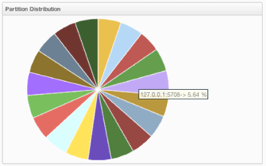
Regards,
Alparslan
Edmund Cheng
Feb 1, 2018, 8:50:08 AM2/1/18
to Hazelcast
Hi Alparsian,
Thank you for the great response..
I just have few queries about your answers..
1) A Hazelcast cluster has 271 primary partitions by default which are distributed among all instances, and these partitions have corresponding backup replicas as many as the configured backup count on data structures (such as Map). In the figure, the maps are configured with 1 backup, thus you see 542 (271 primary + 271 backup replica) partitions all in the cluster.
Q: So will this number show up Management center?
I mean I tried to start 2 JVMs in a cluster, and I see only 135 partitions owned by 1 member and 136 partitions owned by the other.
Why didnt i see 271/271? Is it because the partition aren't full?
2) Hazelcast uses the data in primary partitions when you perform an operation (such as Map.get or Map.put). Backup replicas are used when partitions are lost (such in the case of a cluster member crash) to re-build the primary partitions. So, when you insert a data to map, a partition is picked (using the partitioning function: http://docs.hazelcast.org/docs/3.9.1/manual/html-single/index.html#how-the-data-is-partitioned) and the primary replica of this partition is used for all regular operations. After the put operation, the backup replica is also updated but not used until the primary replica is lost.
Q: You used the term primary partitions and then primary replica, are you talking about the same thing?
Can i say for e.g partition 1 contains pri replicas of data and also possibly backup replica of other partition?
3) "activePartitionCount" means that the number of partitions that the related member owned. Here, it is the member you called the REST API (192.168.2.78:5701).
Q: in the e.g it says 68, it means only partitions of primary replicas? or its irrelevant as in 68 partitions is overall number including partitions with backup replica.
4) You can see the partition distribution from Management Center dashboard (see the screenshot below) and the REST API you mentioned above. It will help you to see if the partitions are distributed evenly over the cluster.
Q: Yes i saw that in the document page as well, but it doesn't tell me anything about the pri/backup replicas distribution within?
Say if i insert 10000 objects into the map spread across 6 JVMs, i would probably see that partitions will be divided by 6 in MC.
That's all i can see? I mean it literally means hazelcast would have spread all pri/backup replicas in the partitions evenly?
e,g I cannot tell if say partition 1 with pri replica is in member2, and the backup replica of that partition is in member 4 etc..
Basically viewing the partition table maybe?
Alparslan Avcı
Feb 1, 2018, 1:34:15 PM2/1/18
to Hazelcast
Hi again,
Let me clarify the terms "partition" and "replica". Partitions are memory segments that can contain data entries in each. Each Hazelcast partition can have multiple "replicas", which are distributed among the cluster members. One of the replicas becomes the "primary" and other replicas are called "backups". In other words, partitions are data groups where they are kept as replicas in the memory of Hazelcast cluster. Primary replicas are used to perform regular operations, backups are used when primaries are lost. Now, let me try to answer your questions:
Q: So will this number show up Management center?
I mean I tried to start 2 JVMs in a cluster, and I see only 135 partitions owned by 1 member and 136 partitions owned by the other.
Why didnt i see 271/271? Is it because the partition aren't full?
No, Management Center only shows the number of primary replica counts in the cluster members. So, it is normal to see these numbers.
Q: You used the term primary partitions and then primary replica, are you talking about the same thing?
Can i say for e.g partition 1 contains pri replicas of data and also possibly backup replica of other partition?
I think I explained this above. I also need to say that a cluster member can keep either a primary or a backup replica of a specific partition.
Q: in the e.g it says 68, it means only partitions of primary replicas? or its irrelevant as in 68 partitions is overall number including partitions with backup replica.
Yes, it is the number of primary replicas as it is in Management Center.
Q: Yes i saw that in the document page as well, but it doesn't tell me anything about the pri/backup replicas distribution within?
Say if i insert 10000 objects into the map spread across 6 JVMs, i would probably see that partitions will be divided by 6 in MC.
That's all i can see? I mean it literally means hazelcast would have spread all pri/backup replicas in the partitions evenly?
e,g I cannot tell if say partition 1 with pri replica is in member2, and the backup replica of that partition is in member 4 etc..
Basically viewing the partition table maybe?
Hazelcast distributes the data using the keys as it is explained here: http://docs.hazelcast.org/docs/latest/manual/html-single/index.html#how-the-data-is-partitioned
And unfortunately, you cannot see the partition table of cluster using a REST call or something similar. But why do you need to see the owner of the backup partitions? Maybe I can help if I can understand what you aim.
Regards,
Alparslan
Edmund Cheng
Feb 1, 2018, 11:44:08 PM2/1/18
to Hazelcast
Hi Alparslan,
Thanks once again.
My queries inline.
On Friday, February 2, 2018 at 2:34:15 AM UTC+8, Alparslan Avcı wrote:
Hi again,
Let me clarify the terms "partition" and "replica". Partitions are memory segments that can contain data entries in each. Each Hazelcast partition can have multiple "replicas", which are distributed among the cluster members. One of the replicas becomes the "primary" and other replicas are called "backups". In other words, partitions are data groups where they are kept as replicas in the memory of Hazelcast cluster. Primary replicas are used to perform regular operations, backups are used when primaries are lost. Now, let me try to answer your questions:Q: So will this number show up Management center?
I mean I tried to start 2 JVMs in a cluster, and I see only 135 partitions owned by 1 member and 136 partitions owned by the other.
Why didnt i see 271/271? Is it because the partition aren't full?No, Management Center only shows the number of primary replica counts in the cluster members. So, it is normal to see these numbers.
Ed: I see, so if it shows 136/135 for partition count between 2 nodes, it also does not necessary mean that they are all filled up with data correct?
Does it also meant for e.g
node 1: 135 partitions shown + ("the invisible" 136 backup replicas for node2)
node 2: 136 partitions shown + ("the invisible" 135 backup replicas for node1)
Q: You used the term primary partitions and then primary replica, are you talking about the same thing?
Can i say for e.g partition 1 contains pri replicas of data and also possibly backup replica of other partition?I think I explained this above. I also need to say that a cluster member can keep either a primary or a backup replica of a specific partition.
Ed: Yes I read the explanation, so in a nutshell, I can depict the following?
e.g
node 1 PartitionX: (pri) node 2 PartitionY: (backup -- also a partition which will not shown up in the MC)
______________________ _____________________
| [data1] - pri replica | | [data1] - backup replica |
| [data2] - pri replica | | [data2] - backup replica |
------------------------------------ ------------------------------------
(this partition does not hold backup replicas)
Q: in the e.g it says 68, it means only partitions of primary replicas? or its irrelevant as in 68 partitions is overall number including partitions with backup replica.
Yes, it is the number of primary replicas as it is in Management Center.
Ed: OK, so does it mean (271-68) = 203 partitions are empty at the time of query?
And also 68 replica counts (backup count =1) are residing in another node's backup replica.
Q: Yes i saw that in the document page as well, but it doesn't tell me anything about the pri/backup replicas distribution within?
Say if i insert 10000 objects into the map spread across 6 JVMs, i would probably see that partitions will be divided by 6 in MC.
That's all i can see? I mean it literally means hazelcast would have spread all pri/backup replicas in the partitions evenly?
e,g I cannot tell if say partition 1 with pri replica is in member2, and the backup replica of that partition is in member 4 etc..
Basically viewing the partition table maybe?Hazelcast distributes the data using the keys as it is explained here: http://docs.hazelcast.org/docs/latest/manual/html-single/index.html#how-the-data-is-partitionedAnd unfortunately, you cannot see the partition table of cluster using a REST call or something similar. But why do you need to see the owner of the backup partitions? Maybe I can help if I can understand what you aim.
Ed : As I mentioned, first thing is we wanted to ensure that all the pri/backup replicas are distributed across several nodes/JVMs in a glance.
.eg we set HOST_AWARE in declarative form in the xml file.
Now say I have 4 nodes with 1 hazelcast JVM running in each node. We start them in a cluster and say MC shows 25% for each member in the partition graph in MC.
So what does this tell me? I can say the pri replicas are evenly distributed for sure, so what about the backup replicas?
e.g I can't see like where is the backup replica of partition1 of node1 residing, is it in node2? node3? node4? so if i do shutdowns of nodes to see the HA, can I safely say that we have backups in the correct places and we wont lose anything?
Perhaps I am looking it at the wrong direction, so if you would enlighten me, that will be great.
Alparslan Avcı
Feb 2, 2018, 10:23:34 AM2/2/18
to Hazelcast
Hi Edmund,
See the answers below:
Ed: I see, so if it shows 136/135 for partition count between 2 nodes, it also does not necessary mean that they are all filled up with data correct?
Does it also meant for e.g
node 1: 135 partitions shown + ("the invisible" 136 backup replicas for node2)
node 2: 136 partitions shown + ("the invisible" 135 backup replicas for node1)
Yes, it doesn't mean they are filled up with data. And also yes, there are 135 backup replicas for node1 and 136 backup replicas for node2 in your case.
Ed: Yes I read the explanation, so in a nutshell, I can depict the following?
e.g
node 1 PartitionX: (pri) node 2 PartitionY: (backup -- also a partition which will not shown up in the MC)
______________________ _____________________
| [data1] - pri replica | | [data1] - backup replica |
| [data2] - pri replica | | [data2] - backup replica |
------------------------------------ ------------------------------------
(this partition does not hold backup replicas)
Actually it like this:
node 1 PartitionX: (primary replicas) node 2 PartitionX: (backup replicas -- also a partition which will not shown up in the MC)
______________________ _____________________
| [data1] - pri replica | | [data1] - backup replica |
| [data2] - pri replica | | [data2] - backup replica |
------------------------------------ ------------------------------------
They are called both as `PartitionX`, but one is primary replicas of PrimaryX, the other is backup replicas of the same PrimaryX.
Ed: OK, so does it mean (271-68) = 203 partitions are empty at the time of query?
And also 68 replica counts (backup count =1) are residing in another node's backup replica.
No, the primary replicas of other partitions are distributed among the cluster. This node only contains primary replicas for 68 partitions. The total partition count means that the total partitions among all the cluster members, as I stated earlier.
Partitions exist (are created) even if they do not contain any data in them.
Ed : As I mentioned, first thing is we wanted to ensure that all the pri/backup replicas are distributed across several nodes/JVMs in a glance.
.eg we set HOST_AWARE in declarative form in the xml file.
Now say I have 4 nodes with 1 hazelcast JVM running in each node. We start them in a cluster and say MC shows 25% for each member in the partition graph in MC.
So what does this tell me? I can say the pri replicas are evenly distributed for sure, so what about the backup replicas?
e.g I can't see like where is the backup replica of partition1 of node1 residing, is it in node2? node3? node4? so if i do shutdowns of nodes to see the HA, can I safely say that we have backups in the correct places and we wont lose anything?
Perhaps I am looking it at the wrong direction, so if you would enlighten me, that will be great.
I can say it is safe to shutdown a node when you have at least 1 backup configured and no migrations are running on the cluster. With the default HOST_AWARE partition distribution, the backup replica for a partition is placed in node other than the one that contain primary replica of the same partition.
There is no a public REST call or API to see the partition table, as I stated earlier. You can only see it by using some coding on the cluster side.
Edmund Cheng
Feb 2, 2018, 11:48:34 AM2/2/18
to Hazelcast
Hi Alparslan,
Appreciate your patience and advise. I understand a lot more now.
Just last few here.
Q:
And also 68 replica counts (backup count =1) are residing in another node's backup replica.
Ed : so for the replica part, is my assumption correct?
Q:
There is no a public REST call or API to see the partition table, as I stated earlier. You can only see it by using some coding on the cluster side.
Ed: I suppose only java APIs can expose more information?
I also saw in MC, there are entry counts and backup counts per member, do they represent the number of primary partitions and backup paritions?
Alparslan Avcı
Feb 2, 2018, 12:08:58 PM2/2/18
to Hazelcast
Hi again Edmund,
And also 68 replica counts (backup count =1) are residing in another node's backup replica.
Ed : so for the replica part, is my assumption correct?
Yes, your assumption is correct.
Ed: I suppose only java APIs can expose more information?
Yes, but these Java APIs are just some internal API calls, not public. So Hazelcast does not guarantee to change them in future.
I also saw in MC, there are entry counts and backup counts per member, do they represent the number of primary partitions and backup paritions?
No, they only represent the entry numbers as primary and as backup. They are not related to partitions / partition counts.
In summary; I can say that I don't see any advantage of knowing the locations of backup partitions, in terms of application logic. By default, backup operations are synchronous and configured with backup-count. In this case, backup operations block operations until backups are successfully copied to backup members (or deleted from backup members in case of remove) and acknowledgements are received. Therefore, backups are updated before a put operation is completed, provided that the cluster is stable. So, you do not need to check if the backups are placed in another node or not. If you perform a successful put operation, then your backup is also ready.
A small correction on my previous comment; not HOST_AWARE but PER_MEMBER partition group configuration is the default in Hazelcast clusters.
Regards,
Alparslan
Edmund Cheng
Feb 2, 2018, 12:43:46 PM2/2/18
to Hazelcast
Hi Alparslan,
"No, they only represent the entry numbers as primary and as backup. They are not related to partitions / partition counts. "
Ed : I just checked that again, you are right, the entries seem to be the actual data (i did map.entries in the console), not related to partitions.
"In summary; I can say that I don't see any advantage of knowing the locations of backup partitions, in terms of application logic. By default, backup operations are synchronous and configured with backup-count. In this case, backup operations block operations until backups are successfully copied to backup members (or deleted from backup members in case of remove) and acknowledgements are received. Therefore, backups are updated before a put operation is completed, provided that the cluster is stable. So, you do not need to check if the backups are placed in another node or not. If you perform a successful put operation, then your backup is also ready."
Ed : Yes I read that part as well regarding backups. Previously we were using IBM extremeScale as the in-memory grid, and it has a utility to show the partition/routing table for pri/replicas.
Of course Hazelcast has their own implementation and its about getting to know what sort of administration tools or ways to get information.
So i guess in this case, we need to declare the right properties in the xml file and let hazelcast does its work and do some HA tests.
Reply all
Reply to author
Forward
0 new messages