

xhunterko
Nov 24, 2015, 11:39:56 PM11/24/15
to HaxeFlixel
So. I've done some fiddling with bits and have come up with this:
Hooray! Right? No? No. See, every spot where there's light, is coming from a hidden invisible object. Which I'm calling sensor. This is because that for SOME reason, the group I was trying to add the original light object to, never wanted to add the lights? I've no idea. But it added the sensors just fine, for some reason. So I thought, okay, make the sensors both triggers and lights just add a flag triggering it's too states. Should be simple. Ha. Ha.
First, I added the flag in FlashDevelop, intending to add it to the Ogmo Editor object as well. So I do that and then look at Ogmo Editor. I look at the object and add a value to it like so:

I left the 'Default to true.' check box unchecked because if it IS true, it is supposed to be a light and behave like the one for the player only not following the player. So. I hit run and get the first screen shot. I am slightly confused. Because it's new, the objects should be preset to false, not the other way around. This is what the Ogmo level looks like in editing:

Now, when I click on the red square, or the sensor, the selection box changes to this:
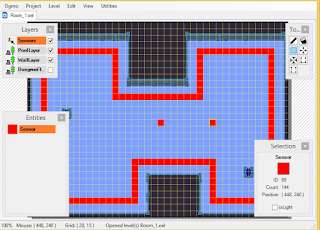
Now. The selected Sensor's isLight check box should be unchecked because it's false(not a light) at start Right? Got it? Okay.
Now. all the connected sensors, their isLight check boxes are checked. Which, would mean, they ARE lights like in the above first screen shot. I don't want that. I want the two sensors by themselves to be lights only, and the sensors that look like a border to not be lights. So those isLight check boxes should be unchecked and the two by themselves SHOULD be checked. Right? Here's screenshot number 2 before we go on:

So now let's look into code to try and find out what's going on here. Here's the Sensor class:
http://pastebin.com/Q2NwnDJs
That is exactly what I did at first, to test the concept. Which resulted in Screenshot 1. HOWEVER, that presented the problem of Screenshot 1 and the perceived boolean solution. So. Then, to prep it for Ogmo, I set isLight to False like so:
public var isLight:Bool = false;
Resulting in, logically, Screenshot 2. So I thought, okay, that proves the concept. And to set it up for Ogmo and switch it to:
public var isLight:Bool;
Leaving it undefined, of course, logically, results in Screenshot 2 because isLight is not defined in the class so it reverts to the "else" line and creates a transparent FlxSprite instead( I THINK). For the record, I am adding the Sensors just like any other Ogmo object.
Still with me? Okay. NOW I go back into Ogmo and begin editing around. I set all border Sensors to be unchecked. And the two lights to be checked. I save the level, hit run, and no change from the first screenshot. Confused, I thought maybe I understood Ogmo wrong. And did the opposite. No change. I swapped the code around like I explained, that changed things of course, regardless of what I did in Ogmo. As a case test, I went to edit my second level. There is no Sensor border around the edges like the first one. The only sensors in the level, are the two red squares shown. The one selected, it's isLight check box is checked. The one not selected, it's isLight check box is NOT checked. The results are the game play screen shot in the left. There are two lights even though only one sensor has it's isLight checked. Which, I think means it is true.

So, what is the problem here? I THINK data isn't being gotten from Ogmo? How do I make sure I get the data from Ogmo? Am I doing something else wrong that I don't know about?
What's the problem here now?

Hooray! Right? No? No. See, every spot where there's light, is coming from a hidden invisible object. Which I'm calling sensor. This is because that for SOME reason, the group I was trying to add the original light object to, never wanted to add the lights? I've no idea. But it added the sensors just fine, for some reason. So I thought, okay, make the sensors both triggers and lights just add a flag triggering it's too states. Should be simple. Ha. Ha.
First, I added the flag in FlashDevelop, intending to add it to the Ogmo Editor object as well. So I do that and then look at Ogmo Editor. I look at the object and add a value to it like so:

I left the 'Default to true.' check box unchecked because if it IS true, it is supposed to be a light and behave like the one for the player only not following the player. So. I hit run and get the first screen shot. I am slightly confused. Because it's new, the objects should be preset to false, not the other way around. This is what the Ogmo level looks like in editing:

Now, when I click on the red square, or the sensor, the selection box changes to this:
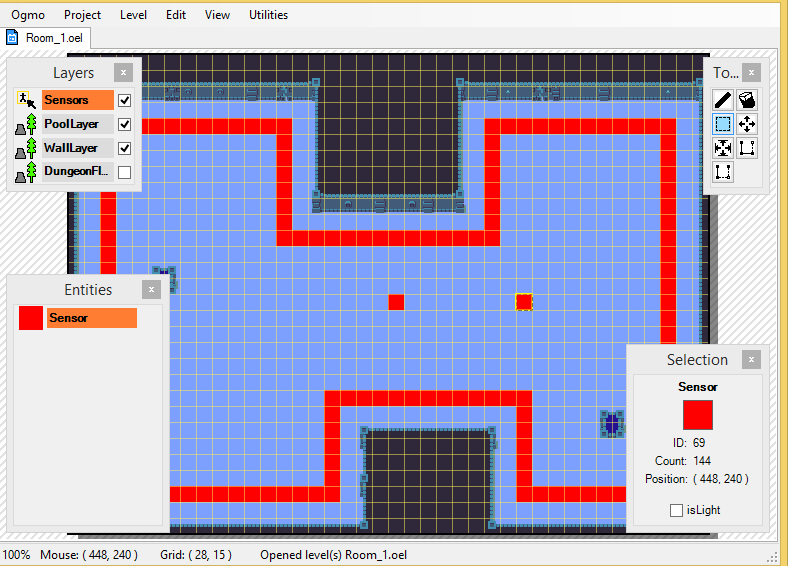
Now. The selected Sensor's isLight check box should be unchecked because it's false(not a light) at start Right? Got it? Okay.
Now. all the connected sensors, their isLight check boxes are checked. Which, would mean, they ARE lights like in the above first screen shot. I don't want that. I want the two sensors by themselves to be lights only, and the sensors that look like a border to not be lights. So those isLight check boxes should be unchecked and the two by themselves SHOULD be checked. Right? Here's screenshot number 2 before we go on:

So now let's look into code to try and find out what's going on here. Here's the Sensor class:
http://pastebin.com/Q2NwnDJs
That is exactly what I did at first, to test the concept. Which resulted in Screenshot 1. HOWEVER, that presented the problem of Screenshot 1 and the perceived boolean solution. So. Then, to prep it for Ogmo, I set isLight to False like so:
public var isLight:Bool = false;
Resulting in, logically, Screenshot 2. So I thought, okay, that proves the concept. And to set it up for Ogmo and switch it to:
public var isLight:Bool;
Leaving it undefined, of course, logically, results in Screenshot 2 because isLight is not defined in the class so it reverts to the "else" line and creates a transparent FlxSprite instead( I THINK). For the record, I am adding the Sensors just like any other Ogmo object.
private function placeEntities(entityName:String, entityData:Xml):Void
    {
        var x:Int = Std.parseInt(entityData.get("x"));
        var y:Int = Std.parseInt(entityData.get("y"));

        if (entityName == "Sensor")
        {
            var sensor:Sensor = new Sensor(x, y, darkness, 0xffFF8040);
            sensor.finalise();
            SensorGroup.add(sensor);
        }
    }
Still with me? Okay. NOW I go back into Ogmo and begin editing around. I set all border Sensors to be unchecked. And the two lights to be checked. I save the level, hit run, and no change from the first screenshot. Confused, I thought maybe I understood Ogmo wrong. And did the opposite. No change. I swapped the code around like I explained, that changed things of course, regardless of what I did in Ogmo. As a case test, I went to edit my second level. There is no Sensor border around the edges like the first one. The only sensors in the level, are the two red squares shown. The one selected, it's isLight check box is checked. The one not selected, it's isLight check box is NOT checked. The results are the game play screen shot in the left. There are two lights even though only one sensor has it's isLight checked. Which, I think means it is true.

So, what is the problem here? I THINK data isn't being gotten from Ogmo? How do I make sure I get the data from Ogmo? Am I doing something else wrong that I don't know about?
What's the problem here now?

byFd
Nov 25, 2015, 2:44:35 AM11/25/15
to HaxeFlixel
i have never worked with ogmo yet, but my guess is that you sensor class doesn't know what sensor is set to on or off in ogmo.
from a quick glance at your code and the documentation you should be able to tell each sensors isLight value from the entitydata variable in placeentities, so you could pass that value to you sensor constructor and set it there.
xhunterko
Nov 25, 2015, 6:41:06 PM11/25/15
to HaxeFlixel
Okay. So I took another look last night and tried a different approach. I looked at the Getting Started tutorial and noticed it had some success with checking for an enum value instead of a boolean. So I experimented a bit and switched from bool to integer. Because I know no way of checking for the value of a boolean. So I added the integer, hit run, and the lights work as expected now.
Reply all
Reply to author
Forward
0 new messages