
TBrowse and HbQt: Where we are ...
734 views
Skip to first unread message

Pritpal Bedi
Dec 22, 2012, 3:10:24 PM12/22/12
to harbou...@googlegroups.com
Hello Everybody
This message is just to keep on record the recent achievement.
The achievement which will attract many Clipper developers who
could never port their existing code to GUI but longed for long.
Now they can put more efforts and porting will be less of a pain.
TBrowse plus GET system leverages this effort.
Here we are. Just study this following code and see the sceen shot.
You will judge for yourselves.
harbour/addons/hbqtwidgets/tests/browser.prg
=================================
#include "hbtoqt.ch"
#include "hbqtgui.ch"
#include "inkey.ch"
#include "hbtrace.ch"
FUNCTION Main()
LOCAL oBrowse
LOCAL aTest0 := { "This", "is", "a", "browse", "on", "an", "array", "test", "with", "a", "long", "data" }
LOCAL aTest1 := { 1, 2, 3, 4, 5, 6, 7, 8, 10000, - 1000, 54, 456342 }
LOCAL aTest2 := { Date(), Date() + 4, Date() + 56, Date() + 14, Date() + 5, Date() + 6, Date() + 7, Date() + 8, Date() + 10000, Date() - 1000, Date() - 54, Date() + 456342 }
LOCAL aTest3 := { .T., .F., .T., .T., .F., .F., .T., .F., .T., .T., .F., .F. }
LOCAL n := 1
LOCAL oMain
hbqt_errorSys()
oMain := QMainWindow()
oMain:setWindowTitle( "TBrowse Implemented" )
oBrowse := HbQtBrowseNew( 5, 5, 16, 30, oMain, QFont( "Courier New", 10 ) )
oBrowse:colorSpec := "N/W*, N/BG, W+/R*, W+/B"
oBrowse:ColSep := hb_UTF8ToStrBox( "Γöé" )
oBrowse:HeadSep := hb_UTF8ToStrBox( "ΓòñΓòÉ" )
oBrowse:FootSep := hb_UTF8ToStrBox( "ΓòºΓòÉ" )
oBrowse:GoTopBlock := {|| n := 1 }
oBrowse:GoBottomBlock := {|| n := Len( aTest0 ) }
oBrowse:SkipBlock := {| nSkip, nPos | nPos := n, ;
n := iif( nSkip > 0, Min( Len( aTest0 ), n + nSkip ), ;
Max( 1, n + nSkip ) ), n - nPos }
oBrowse:AddColumn( HbQtColumnNew( "First", {|| n } ) )
oBrowse:AddColumn( HbQtColumnNew( "Second", {|| aTest0[ n ] } ) )
oBrowse:AddColumn( HbQtColumnNew( "Third", {|| aTest1[ n ] } ) )
oBrowse:AddColumn( HbQtColumnNew( "Forth", {|| aTest2[ n ] } ) )
oBrowse:AddColumn( HbQtColumnNew( "Fifth", {|| aTest3[ n ] } ) )
oBrowse:GetColumn( 1 ):Footing := "Number"
oBrowse:GetColumn( 2 ):Footing := "String"
oBrowse:GetColumn( 2 ):Picture := "@!"
oBrowse:GetColumn( 3 ):Footing := "Number"
oBrowse:GetColumn( 3 ):Picture := "999,999.99"
oBrowse:GetColumn( 3 ):colorBlock := {|nVal| iif( nVal < 0, {3,2}, iif( nVal > 500, {4,2}, {1,2} ) ) }
oBrowse:GetColumn( 4 ):Footing := "Dates"
oBrowse:GetColumn( 5 ):Footing := "Logical"
// needed since I've changed some columns _after_ I've added them to TBrowse object
oBrowse:Configure()
oBrowse:navigationBlock := {|nKey,xData,oBrw| Navigate( nKey, xData, oBrw ) }
//oBrowse:Freeze := 1 /* Use F6, f7 Keys */
hb_DispBox( 4, 4, 17, 31, hb_UTF8ToStrBox( "ΓöîΓöÇΓöÉΓöéΓöÿΓöÇΓööΓöé " ) )
oMain:setCentralWidget( oBrowse:oWidget )
oMain:resize( 360, 300 )
oMain:show()
QApplication():exec()
RETURN NIL
STATIC FUNCTION navigate( nKey, xData, oBrowse )
LOCAL lHandelled := .T.
HB_SYMBOL_UNUSED( xData )
DO CASE
CASE nKey == K_F6
oBrowse:freeze++
CASE nKey == K_F7
oBrowse:freeze--
CASE nKey == K_F8
Alert( oBrowse:ClassName() )
OTHERWISE
oBrowse:applyKey( nKey )
lHandelled := .T.
ENDCASE
RETURN lHandelled
========================================
And here is the screen shot:

Pritpal Bedi
a student of software analysis & concepts
Pritpal Bedi
Dec 22, 2012, 5:51:07 PM12/22/12
to harbou...@googlegroups.com
Hello Again
The following is the example of table TBrowse on a table with index.
harbour/addons/hbqtwidgets/browdb.prg
============================
REQUEST DBFCDX
#define HBQTBRW_CURSOR_NONE 1
#define HBQTBRW_CURSOR_CELL 2
#define HBQTBRW_CURSOR_ROW 3
FUNCTION Main()
LOCAL oMain, oBrw
hbqt_errorSys()
oMain := QMainWindow()
oMain:setWindowTitle( "Database TBrowse Implemented !" )
oBrw := BrowseMe( oMain )
IF ! Empty( oBrw )
oMain:setCentralWidget( oBrw:oWidget )
ENDIF
oMain:resize( 900, 450 )
oMain:show()
QApplication():exec()
dbCloseAll()
RETURN NIL
STATIC FUNCTION BrowseMe( oWnd )
LOCAL oBrowse, oColumn
LOCAL cPath := hb_DirBase() + ".." + hb_ps() + ".." + hb_ps() + ".." + hb_ps() + "tests" + hb_ps()
Set( _SET_DATEFORMAT, "yyyy.mm.dd" )
USE ( cPath + "test.dbf" ) NEW SHARED READONLY VIA 'DBFCDX'
IF NetErr()
Alert( "Could not open table!" )
RETURN NIL
ENDIF
IF ! hb_FileExists( cPath + "test.cdx" )
INDEX ON test->last TAG "LAST" TO ( cPath + "test.cdx" )
ENDIF
SET INDEX TO ( cPath + "test.cdx" )
DbGotop()
oBrowse := HbQtBrowseNew( 0,0, 20, 80, oWnd, QFont( "Courier New", 10 ) )
oBrowse:colorSpec := "N/W*, N/W, W+/R*, W+/B*, N/GR*, B+/GR*, N/R*"
/* Navigation Blocks */
oBrowse:skipBlock := {|n| DbSkipBlock( n ) }
oBrowse:goTopBlock := {| | DbGoTop() }
oBrowse:goBottomBlock := {| | DbGoBottom() }
oBrowse:horizontalScrollbar := .T. /* Not a TBrowse METHOD */
oBrowse:verticalScrollbar := .T. /* Not a TBrowse METHOD */
oBrowse:cursorMode := HBQTBRW_CURSOR_ROW /* Not a TBrowse METHOD */
/* Blocks TO control Scroolbars */
oBrowse:firstPosBlock := {| | 1 } /* Not a TBrowse METHOD */
oBrowse:lastPosBlock := {| | LastRec() } /* Not a TBrowse METHOD */
IF indexOrd() == 0
oBrowse:posBlock := {| | RecNo() } /* Not a TBrowse METHOD */
oBrowse:goPosBlock := {|n| DbGoto( n ) } /* Not a TBrowse METHOD */
oBrowse:phyPosBlock := {| | RecNo() } /* Not a TBrowse METHOD */
ELSE
oBrowse:posBlock := {| | OrdKeyNo() } /* Not a TBrowse METHOD */
oBrowse:goPosBlock := {|n| OrdKeyGoto( n ) } /* Not a TBrowse METHOD */
oBrowse:phyPosBlock := {| | OrdKeyNo() } /* Not a TBrowse METHOD */
ENDIF
oColumn := HbQtColumnNew( "Record #", {|| RecNo() } )
// oColumn:type := XBPCOL_TYPE_FILEICON
oBrowse:addColumn( oColumn )
oColumn := HbQtColumnNew( "Last Name", {|| TEST->last } )
oColumn:colorBlock := {|| iif( SubStr( TEST->first,1,1 ) $ "ANLH", { 6,2 }, { 1,2 } ) }
oBrowse:addColumn( oColumn )
oColumn := HbQtColumnNew( "First Name" , {|| TEST->first } )
oBrowse:addColumn( oColumn )
oColumn := HbQtColumnNew( "Salary" , {|| TEST->salary } )
oColumn:picture := "@Z 999,999.00"
oColumn:colorBlock := {|x| iif( x < 40000, { 7,2 }, { 1,2 } ) }
oBrowse:addColumn( oColumn )
oColumn := HbQtColumnNew( "HireDate" , {|| TEST->hireDate } )
oBrowse:addColumn( oColumn )
oColumn := HbQtColumnNew( "Age" , {|| TEST->age } )
oBrowse:addColumn( oColumn )
oColumn := HbQtColumnNew( "City" , {|| TEST->city } )
oBrowse:addColumn( oColumn )
oColumn := HbQtColumnNew( "State" , {|| TEST->state } )
oBrowse:addColumn( oColumn )
oColumn := HbQtColumnNew( "Zip" , {|| TEST->zip } )
oBrowse:addColumn( oColumn )
oColumn := HbQtColumnNew( "Notes" , {|| TEST->notes } )
oBrowse:addColumn( oColumn )
oBrowse:freeze := 1
RETURN oBrowse
/*----------------------------------------------------------------------*/
STATIC FUNCTION DbSkipBlock( n )
LOCAL nSkipped := 0
if n == 0
DBSkip( 0 )
elseif n > 0
do while nSkipped != n .and. TBNext()
nSkipped++
enddo
else
do while nSkipped != n .and. TBPrev()
nSkipped--
enddo
endif
RETURN nSkipped
/*----------------------------------------------------------------------*/
STATIC FUNCTION TBNext()
LOCAL nSaveRecNum := recno()
LOCAL lMoved := .T.
if Eof()
lMoved := .F.
else
DBSkip( 1 )
if Eof()
lMoved := .F.
DBGoTo( nSaveRecNum )
endif
endif
RETURN lMoved
/*----------------------------------------------------------------------*/
STATIC FUNCTION TBPrev()
LOCAL nSaveRecNum := Recno()
LOCAL lMoved := .T.
DBSkip( -1 )
if Bof()
DBGoTo( nSaveRecNum )
lMoved := .F.
endif
RETURN lMoved
===============================
And here is the Output:

marco bra
Dec 22, 2012, 7:29:06 PM12/22/12
to harbou...@googlegroups.com
Pritpal,
i'm on Ubuntu 12.10 32 bits (at home pc) it is good to see you works is compiling and working in a good way as usual...
i update the qtcontribs libs and test the samples with this commands:i'm on Ubuntu 12.10 32 bits (at home pc) it is good to see you works is compiling and working in a good way as usual...
cd ~/src/harbour/addons
svn update
Updating '.':
U hbqtwidgets/hbqtbrowse.prg
U hbide/edit.prg
Aggiornato alla revisione 121.
hbmk2 qtcontribs.hbp
cd ~/src/harbour/addons/hbqtwidgets/tests
hbmk2 browdb.prg -rebuildall -run
Thanks...
Marco
--
--
You received this message because you are subscribed to the Google
Groups "Harbour Users" group.
Unsubscribe: harbour-user...@googlegroups.com
Web: http://groups.google.com/group/harbour-users
--
Linux Infinite Freedom
I'm writing from this place:
http://www.openstreetmap.org/?lat=44.39945&lon=8.6798&zoom=15&layers=M

Pritpal Bedi
Dec 24, 2012, 4:15:47 AM12/24/12
to harbou...@googlegroups.com
Hello Everybody
In continuation, this is the recent commit:
2012-12-23 23:55 UTC-0800 Pritpal Bedi (bedipritpal at hotmail.com)
* hbqtwidgets/hbqtstd.ch
+ Added: clause LASTGETBLOCK <lastGetBlock>
With this QREAD command looks as:
#command QREAD [ [ PARENT ] <GetParent> ] ;
[ FONT <oFont> ] ;
[ LINESPACING <nSpc> ] ;
[ TITLE <title> ] ;
[ ICON <icon> ] ;
[<nomodal:NOMODAL> ] ;
[ PROPERTIES <prop> ] ;
[ LASTGETBLOCK <bLast> ] ;
=> ;
HbQtReadGets( @GetList, SayList, <GetParent>, <oFont>, <nSpc>, ;
<title>, <icon>, <.nomodal.>, <{prop}>, <{bLast}> )
; Read below.
* hbqtwidgets/hbqtgetlist.prg
+ Added: method lastGetBlock( bBlock ) SETGET
Placeholder to hold <lastGetBlock> of QREAD.
* hbqtwidgets/hbqtgetsys.prg
+ Implemented: to detect if GET in focus is the last GET in current GetList,
and if yes, then fire the <lastGetObject> block. The check
is performed in :postValidate() method.
* hbqtwidgets/hbqtbrowse.prg
+ Implemented: browser row editor honoring the :preBlock, :postBlock, :picture
properties of columns. Thanks to QGET/QREAD of HbQt which made it possible
to happen. The whole process is application controlled as per the true spirit
of TBrowse. The following methods are exposed to the application:
:editBlock( bBlock ) GETSET
The block is responsible to "SAVE" data collected with editor widget.
If no :editBlock is specifed, a simple oColumn:block is evaluated
with modified data as its only parameter.
:editBlock has to be defined as:
oBrowse:editBlock := {|oBrw, aOriginal, aModified, aCaptions| ;
SaveMyData( oBrw, aOriginal, aModified, aCaptions ) }
at the minimum. Application may pass other parameters to the "SAVE"
function as appropriate. Here is brief description of 4 parameters:
<oBrw> No need to explain, it is oBrowse in question.
<aOriginal> Array holding original values of the columns before "SAVE"
is requested. It is sent to facilitate better control
on determining what needs to be saved in real.
<aModified> Array holding modified values of the columns.
<aCaptions> Array holding <oColumn:heading> property. This facilitates
to recognize which data item needs to be updated.
NOTE: Tbrowse does not know anything about the data source. Also columns
in a browse can be ordered to any position. So it is difficult
to guess where a modified value needs be saved. Here comes the
importance of <oColumn:heading>. I believe, you all must be
providing unique headings to columns, and if not, please set
your code right to grab the power of GUI editing.
:openEditor( cTitle, lSaveOnLastGet, lDownAfterSave )
The method needs to be called by the application, generally detecing
an event in :navigationBlock, but may be by other means also. This opens
a modal dialog adjoining the right edge of browser viewport. Editor will
display <cTitle> in the title-bar. The position and size will be saved
for current session of underlying browser. Next invocation will position
it at last closing coordinates. Edotor is composed of a scrollable
QFormLayout based form containing the GETs of columns data. At the bottom
are 5 buttons with corresponding accelerator keys. Focus will be
positioned on the first GET ( column ). Navigation of the GETs is
per Harbour standards. WHEN, VALID and PICTURE instance variables are
applied over the GETs.
When last GET is hit by ENTER, <lSaveOnLastGet> [Defaults to TRUE], will
be examined. If TRUE, the <lastGetBlock> is fired with 4 parameters, i.e.,
<oBrw><aOriginal><aModified><aCaptions>. A LOGICAL is expected as the
return value of the <lastGetBlock>. If it is TRUE, no further action is
taken. If FALSE, <oColumn:block> is fired with modified value as parameter.
Then <lDownAfterSave> [Defaults to TRUE] is examined. If TRUE, the browser
is moved with :down(), column values are gathered, GETs are populated
with new row value. The process goes on until user closes the Editor.
Editor can be closed either by ESCAPing or clicking on X button.
The bottom area buttons offer following functionality:
<Save> <ALT+S > Triggers "SAVE" action as described above.
<Down> <ALT+DownArrow> Moves the browser :down() and refresh the GETs.
<Up> <ALT+UpArrow > Moves the browser :up() and refresh the GETs.
<Btm> <ALT+PageDown > Moves the browser :goBottom() and refresh the GETs.
<Top> <ALT+PageUp > Moves the browser :goTop() and refresh the GETs.
The design and layout of the EDITOR is not yet final and may undergo
needed changes as per user inputs.
* hbqtwidgets/tests/browser.prg
+ Added: needed code to demonstrate the above mechanism.
Press F12 to activate the Editor.
; Enjoy, and play with new toy.

Abe Buchinger
Dec 24, 2012, 8:41:45 AM12/24/12
to harbou...@googlegroups.com
On Mon, Dec 24, 2012 at 4:15 AM, Pritpal Bedi <bedipr...@gmail.com> wrote:
Hello Everybody
Is this pure HBQT part of HBXBP?
Pritpal Bedi
Dec 24, 2012, 11:31:44 AM12/24/12
to harbou...@googlegroups.com
Hi
>Is this pure HBQT part of HBXBP?
>Is this pure HBQT part of HBXBP?
Pure HbQt.

Massimo Belgrano
Dec 24, 2012, 11:52:16 AM12/24/12
to harbou...@googlegroups.com
Great Feature Implemented from Pritpal
Download from http://sourceforge.net/projects/qtcontribs/files/
Download from http://sourceforge.net/projects/qtcontribs/files/
and follow at https://groups.google.com/forum/?fromgroups=#!forum/qtcontribs
Now is possible convert clipper/harbour app in gui in few steep
and it run also in linux/mac os and many mobile function
Now is possible convert clipper/harbour app in gui in few steep
and it run also in linux/mac os and many mobile function
--
--
You received this message because you are subscribed to the Google
Groups "Harbour Users" group.
Unsubscribe: harbour-user...@googlegroups.com
Web: http://groups.google.com/group/harbour-users
Massimo Belgrano
Delta Informatica S.r.l. (http://www.deltain.it/) (+39 0321 455962)
Sviluppo software per Lan e Web - Consulenza informatica - Formazione -Grafica Aziendale - Siti Web Intereattivi
Pritpal Bedi
Dec 25, 2012, 8:11:29 PM12/25/12
to harbou...@googlegroups.com
Hello Again
Please observe this commit r126:
2012-12-25 15:40 UTC-0800 Pritpal Bedi (bedipritpal at hotmail.com)
* hbide/hbide_v.ch
* Version bump.
* hbqt/qtgui/hbqt_hbqabstractitemmodel.cpp
! Minor.
+ hbqtwidgets/hbqtwidgets.qrc
+ hbqtwidgets/resources/*.png
+ Resource Images.
* hbqtwidgets/hbqtwidgets.hbp
+ Added: hbqtwidgets.qrc
* hbqtwidgets/hbqtgetlist.prg
+ Added: __hbqtImage( cPngWithoutExt )
The function can be used in appln also to obtain many
common usage images. This may eliminate the need to have
application local images. Hopefully will reduce the burden
on application part.
* hbqtwidgets/hbqtbrowse.prg
% Changed: :editBlock's parameters.
oBrw:editBlock := {| oBrw, aOrg, aMod, aCap | ... }
=>
oBrw:editBlock := {| aMod, {aOrg,aCap}, oBrw | ... }
It is in accordance with decided protocol where any application
supplied codeBlock, implemented over and above TBrowse blocks,
will be fired with three parameters. First parameter will represent
the most expected return value, 2nd will contain any additional
data important and ancilliary to the 1st param, and 3rd will
always be browse object in evaluating the block.
% Changed: method :openEditor(...) => edit(...)
method :edit() => editCell()
Confirms to general common sense.
+ Implemented: ToolBar on top of the browser window.
Toolbar can be toggled to be displayed/hidden. Toolbar contains common
actions a user always expect off a GUI browser, viz.,
Edit | Print | Search | GoTop | Up | Down | GoBottom | PanHome | Left |
Right | PanEnd | ComboToColumn | MoveFirst | MoveLeft | MoveRight | MoveLast
Toggling the display of toolbar is controlled via ACCESS | ASSIGN method :toolbar.
oBrw:toolbar := ! oBrw:toolbar
By default ToolBar is hidden.
<Print> option is not active yet.
+ Implemented: activation/execution of context menu. This is controlled as:
oBrw:contextMenuBlock := {| oPos, NIL, oBrw | ... }
When context menu request is detected, HbQtBrowse will look for :contextMenuBlock,
and if found, will evaluate it with global mouse position (QPoint) as 1st param,
NIL as 2nd, and Self as 3rd. It will be the responsibility of appln to respond
to this event.
And if :contextMenuBlock will not be supplied by the appln, a default context
menu will be executed with some of the actions available on the toolbar.
+ Implemented: StatusBar at the bottom of the browse window.
Again it is controlled by application, like:
oBrw:statusbar := .T.
OR
oBrw:statusbar := ! oBrw:statusbar
To display message on the StatusBar:
oBrw:statusMessage := cMessage
To clear the StatusBar:
oBrw:statusMessage := ""
By default ToolBar is hidden.
+ Implemented: SEARCH feature, interface and building blocks only.
Application will take responsibility to carry on the search operation.
HbQtBrowser merely provides the interface to communicate between browser
interface and application code. How ...
1. Appln will post a block as:
oBrw:searchBlock := {|xSearch, nColPos, oBrw| ... }
2. The SEARCH event could be started either by browser interface or
application inside :navigationBlock.
Interface: Click on the <Search> toolbar button.
Application: calling oBrw:search( xValue ).
In both instances, a single GET in a modal window will be presented.
If appln has initiated the SEARCH, and has provided <xValue> in
:search( xValue ) call, then this variable is GET. If click on
<Search> icon has initiated it, or <xValue> == NIL, then the
value contained in current hilighted cell of browser will be GET.
In the latter case, column's PICTURE is also applied to it.
GET will terminate on RETURN press, and searchBlock will be evaluated
with GET value as 1st param. From here it is the responsibility of
the appln to perform the actual search.
The demo code is included in tests/browser.prg and test/browdb.prg.
browser.prg addresses it for an array, while browdb.prg on a table.
* hbqtwidgets/tests/browdb.prg
* hbqtwidgets/tests/browser.prg
+ Added: code to demonstrate above features.
; NEXT: Printing a browser.
And look at these:


Pritpal Bedi
Dec 26, 2012, 7:05:01 PM12/26/12
to harbou...@googlegroups.com
Hello Again
And this is the r128.
2012-12-26 15:23 UTC-0800 Pritpal Bedi (bedipritpal at hotmail.com)
* hbqtwidgets/hbqtbrowse.prg
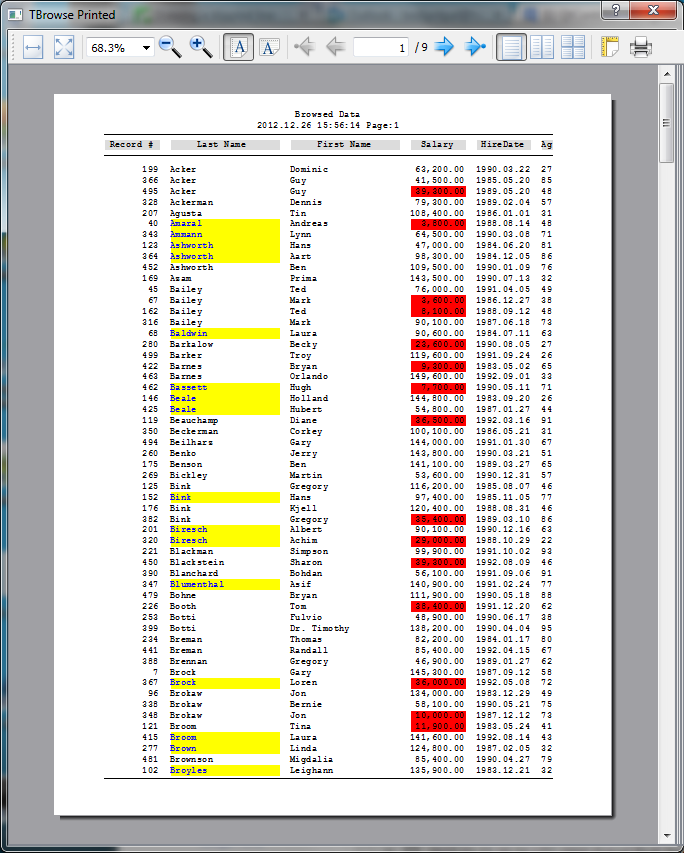
+ Implemented: Browser Printing. How...
Activation:
Application code - oBrw:print( cPrinter, lOpenPrintDialog )
Interface - <Print> icon on the browser toolbar
After Activation:
Looks for oBrw:title. If a value is found, then it is interpreted as
SWITCH valtype( ::title )
CASE "C"
aTitle := hb_aTokens( ::title, ";" ) - Just like Alert().
CASE ""A"
aTitle := ::title
CASE "B"
aTitle := Eval( ::title, NIL, NIL, oBrw )
Again <aTitle> is tested for string or array, and treated as above.
ENDSWITCH
<aTitle> defaults to { "Browsed Data" }
<aTitle> is then printed on top of each page printed.
First 5 Lines are significant. If more are supplied, those are ignored.
Next line after <aTitle> is done with is :
DtoC( Date() ) + " " + Time() + " " + "Page:" + hb_ntos( #pageNo )
Next follow Headers Line.
Then follows the actual data.
Columns are printed exactly as seen in the browser, with same font,
picture and colors. So it gives a WYSIWYG look. Most of the time printed
output is pleasing.
The only those columns, counted from left, make up to the printed output
as many fit into the page width for printer in question. To start with
PORTRAIT mode is selected, but you can always get LANDSCAPE output
from the PREVIEWER dialog. More columns then will be automatically
accomodated.
I found a nasty bug, apparently in Qt itself, as follows:
If QPrintDialog is executed, either inside browse code, or inside
previwer window, application GPFs. So far I have not found a solution
what is happening. It may be due that my laptop is not actively
connected to a printer and hence Qt has some issues there. Later
I will revisit the code in my office to get more clues. Till
then...
If you find motivation to debug, please uncomment some code in
hbqtbrowse.prg and recompile yourself. If you find any solution,
please report me back.
And this is the output :
Pritpal Bedi
Dec 29, 2012, 4:18:56 AM12/29/12
to harbou...@googlegroups.com
Hello
Commit # 130 will really matter to all of you who can now
think of real port of there application to GUI world. Read carefully:
2012-12-29 00:19 UTC-0800 Pritpal Bedi (bedipritpal at hotmail.com)
* hbqt/qtgui/hbqt_hbqtableview.cpp
* hbqt/qtgui/hbqt_hbqtableview.h
* hbqt/qtgui/qth/HBQTableView.qth
+ Added: method - QRect visualRect( QModelIndex )
The method was a "vrtual protected".
* hbqtwidgets/hbqtstd.ch
+ Added: QREAD ... NOFOCUSFRAME
Flag to disable displaying a red bordered frame around the active GET.
Was needed to implement in-place editing of browser cells ( Read below ).
* hbqtwidgets/hbqtgetlist.prg
* hbqtwidgets/hbqtgetsys.prg
% Changed: the way FocusFrame was being constructed.
Now every GetList has its own oFocusFrame instead of a single frame across
the whole application, which had a drawback to not show-up if multiple
GET screens were floated at once. Also the visiblility of focus frame
is controllable by QREAD clause NOFOCUSFRAME.
* hbqtwidgets/hbqtbrowse.prg
+ Implemented: in-place cell editing with PICTURE, COLOR, WHEN, VALID clauses.
This is in addition to record editing in a separate adjoining dialog which
is called by application as oBrw:edit(...) or by clicking on the <Edit>
icon of browser toolbar.
On the contrary, Cell editing is only callable by the application. This
can be called as :
oBrw:editCell( [<cPicture>], [<cColor>], [<bWhen>], [<bValid>] ) -> xModifiedValue
<cPicture> Defaults to oColumn:picture.
<cColor> Defaults to "N/BG*"
<bWhen> Defaults to oColumn:preBlock
<bValid> Defaults to oColumn:postBlock
How it works;
...
oBrw:navigationBlock( {|...| NavigateMe(...) } )
...
FUNCTION NavigateMe( nKey...)
SWITCH nKey
CASE K_SH_F12
xModifiedValue := oBrw:editCell()
IF xModifiedValue != NIL /* In Case ESC is Pressed */
// Save xModifiedValue at appropriate container.
ENDIF
ENDSWITCH
The above is the minimum required. If :editCell() is called without
supplying any arguments, then defaults are applied to GET the value.
If ESCape is pressed on the GET then NIL is returned. In that case
appln can take the appropriate action.
Current highlighted cell is subject to :cellEdit() call.
oColumn:block with <xModifiedValue> is __ALWAYS__ called when
RETURN is pressed on GET and is postValidated.
* hbqtwidgets/tests/browser.prg
+ Added code to demonstrate how to use cell editing.
* hbqtwidgets/tests/browdb.prg
+ Added: following CASE statement in navigation SWITCH:
CASE nKey == K_SH_F12
IF dbRLock()
oBrowse:panHome()
oBrowse:Right()
FOR i := 2 TO oBrowse:colCount()
xResult := oBrowse:editCell() /* HbQt Entention */
IF xResult == NIL
EXIT /* ESCape is pressed */
ENDIF
SWITCH oBrowse:getColumn( i ):heading
CASE "Last Name" ; REPLACE TEST->last WITH xResult ; EXIT
CASE "First Name" ; REPLACE TEST->first WITH xResult ; EXIT
CASE "Salary" ; REPLACE TEST->Salary WITH xResult ; EXIT
CASE "HireDate" ; REPLACE TEST->HireDate WITH xResult ; EXIT
CASE "Age" ; REPLACE TEST->Age WITH xResult ; EXIT
CASE "City" ; REPLACE TEST->City WITH xResult ; EXIT
CASE "State" ; REPLACE TEST->State WITH xResult ; EXIT
CASE "Zip" ; REPLACE TEST->Zip WITH xResult ; EXIT
CASE "Notes" ; REPLACE TEST->Notes WITH xResult ; EXIT
ENDSWITCH
oBrowse:refreshCurrent()
IF i < oBrowse:colCount()
oBrowse:Right()
ENDIF
NEXT
IF xResult != NIL
dbCommit()
ENDIF
dbRUnlock()
ENDIF
OTHERWISE
; This demonstrate the exact usage one might had employed in Clipper
application to fetch data entry in a browser. In any real-world
senario, ground is ready to be exploited. Now I can dream of porting
my Harbour simulated console/GUI applns to HbQt.
And here is the output:
Pritpal Bedi
Jan 3, 2013, 7:24:56 PM1/3/13
to harbou...@googlegroups.com
Hello
And this is the ChangeLog of r132:
2012-01-03 13:50 UTC-0800 Pritpal Bedi (bedipritpal at hotmail.com)
* hbqtwidgets/hbqtstd.ch
+ Added: HBQTBRW_* constants, usable to configure HbQtBrowse interface.
* hbqtwidgets/hbqtalert.prg
+ Implemented: Function
HbQtGetSome( <xVariable>, [<xCaption>], [<xPicture>], [<xWhen>], [<xValid>], [<cTitle>] ) -> <xVariable>
A general purpose function to fetch values of one or many GETS in a modal dialog.
<xVariable> an array of variables or a single variable to GET.
If <xVariable> is an array of variables then all the following
parameters must be an array of attributes matching the length of
<xVariables>. Function does not check for the number of array indexes.
<xCaption> variable(s)|Literal(s) describing the GET. Defaults to "Variable_" + hb_ntos( nIndex ).
<xPicture> variable(s)|Literal(s) of PICTURE templates. Defaults to "".
<xWhen> block(s) to supply for :preValidate. Defaults to {|| .T. }.
<xValid> block(s) to supply for :postValidate. Defaults to {|| .T. }.
<cTitle> Title to display on GETs dialog's titlebar. Defaults to "Enter Some Values!".
RETURNS <xVariable> in the form they are supplied to the function. If ESCape is
pressed then original values supplied to the function are returned.
GETs dialog is centered on the window which has focus at the time of
calling this function.
NOTE: Name of the function may be changed. If you have a better name, please forward.
* hbqtwidgets/hbqtbrowse.prg
+ Added: <GoTo> icon on the browser's toolbar to navigate to a designated record.
+ Implemented: ACCESS/ASSIGN method :gotoBlock to execute :goto() method, either via
appln call or activating it via toolbar icon <Goto>. Interface just exposes the
visual elements to inform the appln about user interaction. The actual navigation
is performed at the appln level only. How...
Appln: oBrowse:gotoBlock := {|| GotoMyRecord() }
User: Clicks on the <Goto> icon. :gotoBlock is evaluated.
Appln:
STATIC FUNCTION GotoMyRecord()
LOCAL nRec, nPRec := RecNo()
IF ( nRec := HbQtGetSome( nPRec, "Record Number", , , , "GoTo ?" ) ) > 0
dbGoto( nRec )
ELSE
RETURN .F.
ENDIF
RETURN nPRec != nRec
If the :gotoBlock returns TRUE, the browser is refreshed, otherwise not.
+ Added: <Indexes> combobox on the browser's toolbar to change the index order.
+ Implemented: ACCESS/ASSIGN method :indexes. This accepts an array of index information as:
AAdd( aIndexes, { "Natural Order", {|oBrw| dbSetOrder( 0 ), oBrw:refreshAll(), oBrw:forceStable() } } )
AAdd( aIndexes, { "Last Name" , {|oBrw| dbSetOrder( 1 ), oBrw:refreshAll(), oBrw:forceStable() } } )
oBrowse:indexes := { aIndexes, 2 }
First element of <aIndexes> is used to populate the <Indexes> combobox.
Second element is a codeblock which will be executed when an option in combobox
is activated.
Second element of :indexes ASSIGNed array is used to activate <Indexes> combobox.
<Indexes> combobox is viaible only if appln has supplied :indexes information.
This is a convenient mechanism to armour the end user with many more options.
% ReImplemented <Search> option. Please discard the previous documentation.
This new implementation empowers you with executing an incremental search,
a search within the unindexed field and much more. How...
Appln: oBrowse:searchBlock := {|xValue,nMode,oBrw| LookMySearch( xValue,nMode,oBrw ) }
->
{ [<xValue>], [<cPicture>], [<nMode]> }
Appln: Inside :navigationBlock - :search( [<xValue>], [<cPicture>], [<nMode]> )
Interface: <Search> icon - :search()
METHOD Search( [<xValue>], [<cPicture>], [<nMode]> )
If [<xValue>] == NIL, :searchBlock will be called to obtain <Search> info as:
IF HB_ISBLOCK( ::searchBlock )
aInfo := Eval( ::searchBlock, NIL, NIL, Self )
ENDIF
It will be the responsibility of the appln to supply info regarding what to fetch
and how to respond to search creteria. If appln does not return back an array of
3 elements, viz., 1. What to search as a variable of type CDNL, viz.,
space( 30 ), 0, or whatever, and mode of search (read below), then these three values
defaults to : 1. the value returned by Eval( ::getColumn( ::colPos ):block )
2. ::getColumn( ::colPos ):picture
3. HBQTBRW_SEARCH_ONCE
Other options:
HBQTBRW_SEARCH_INCREMENTAL
HBQTBRW_SEARCH_BYFIELD
depending upon the above three values, interface exposes a modal GET at the
last+ row of the browser window to fetch <Search> value, initially set with
value of <xValue>.
The next action is carried out in accordance with <nMode>:
IF nMode == HBQTBRW_SEARCH_ONCE
Dialog to fetch value is closed, :serachBlock is evaluated again with modified
<xValue>, <nMode> and <Self>. Appln takes appropriate action. Typicaly,
appln will invoke this mode if an index is active.
IF nMode == HBQTBRW_SEARCH_INCREMENTAL
Dialog to fetch serach value stays, with every change in the GET value,
:serachBlock is evaluated with modified <xValue>, <nMode> and <Self>.
Appln takes appropriate action. Dialog to fetch search value stays until
RETURN is pressed which mark the end of the <Search> event. For the duration
of search, browser cursor is changed to ROW mode. Typicaly,
appln will invoke this mode if an index is active.
IF nMode == HBQTBRW_SEARCH_BYFIELD
Dialog to fetch value is closed. A timer event is started inside the interface
at a 10 ms interval, which calls :searchBlock as usual. Then :searchBlock is
expected to return TRUE or FALSE to flag that <Search> is found or not. If NOT,
then browser is moved down by one row. If YES or :hitBottom is detected then
<Serach> event is terminated. Appln can detect <ESC> press in the :navigationBlock,
and can terminate the <Search> accordingly (study example below).
In case of nMode == INCREMENTAL, after <Search> event is terminated,
:searchBlock is once again evaluated with no parameters. This is useful
to implement a lookup browser.
Here is a minimum useful example, you can extend it to extreme:
STATIC nLastKey := 0
FUNCTION Main()
LOCAL oBrowse := ...
oBrowse:searchBlock := {|xValue,nMode,oBrw| LookMySearch( xValue,nMode,oBrw ) }
oBrowse:navigationBlock := {|nKey,xData,oBrw| HandleMyOptions( nKey,xData,oBrw ) }
RETURN NIL
STATIC FUNCTION HandleMyOptions( nKey,xData,oBrowse )
LOCAL xResult, i
LOCAL lHandelled := .T.
nLastKey := nKey
...
RETURN .t.
STATIC FUNCTION LookMySearch( xValue,nMode,oBrw )
LOCAL nRec
IF xValue == NIL .AND. oBrw == NIL
/* search is finished, take other action, this will help to build a selectable browser */
Alert( "Current Record Number Is : " + hb_ntos( RecNo() ) )
ELSEIF xValue == NIL /* Interface is requesting to initiate search */
IF IndexOrd() == 1
RETURN { Space( Len( TEST->last ) ), NIL, HBQTBRW_SEARCH_INCREMENTAL }
ELSE
RETURN { NIL, NIL, HBQTBRW_SEARCH_BYFIELD }
ENDIF
ELSE
IF IndexOrd() == 1 /* Interface is requesting to do the search as per needs */
nRec := RecNo()
IF ! dbSeek( Trim( xValue ) )
dbGoto( nRec )
ELSE
oBrw:refreshAll()
ENDIF
ELSEIF nMode == HBQTBRW_SEARCH_BYFIELD
IF nLastKey == K_ESC
nLastKey := 0
RETURN .T.
ENDIF
RETURN Eval( oBrw:getColumn( oBrw:colPos ):block ) = xValue
ENDIF
ENDIF
RETURN .T.
* hbqtwidgets/tests/browdb.prg
* hbqtwidgets/tests/browser.prg
+ Added: constructs to demonstrate above features.
And here is the image for an INCREMENTAL search browser:

APityu
Apr 18, 2013, 8:10:54 AM4/18/13
to harbou...@googlegroups.com
The QGET, QREAD command does not support accented characters (öüóőúéáűíÖÜÓŐÚÉÁŰÍ). Simply can not be entered into the input field. Can anyone help?
Pritpal Bedi
Apr 18, 2013, 3:31:27 PM4/18/13
to harbou...@googlegroups.com
Hi
The QGET, QREAD command does not support accented characters (öüóőúéáűíÖÜÓŐÚÉÁŰÍ). Simply can not be entered into the input field. Can anyone help?
Please post your queries at
Pritpal Bedi
Reply all
Reply to author
Forward
0 new messages