
upper("ñ")
705 views
Skip to first unread message

Yakano
Dec 1, 2014, 5:31:15 AM12/1/14
to harbou...@googlegroups.com
Hi everyone.
As I wrote in subject, my problem is that I can't get expected value ("Ñ") for UPPER("ñ"). Ñ and ñ are spanish characters and I found similar problems with accented vowels (áéíóúü).
This problems are also present, when using PICT "@!" in a GET and, to insert Ñ in a GET, I must select uppercase by keyboard. Idem for vowels.
It seems that spanish chars are not recognized as part of alphabet.
I have inserted this code on PRG's, but only affects to the name of a day in the week.
Request HB_LANG_ES
HB_LangSelect('ES')
I'm using HB30+console+mingw and I have no problems on screen, all chars are showed right (ñ,vowels, char box, etc..), but in GET it doesn't works.
Can someone help me?
Thanks

Juan L. Gamero
Dec 1, 2014, 11:04:40 AM12/1/14
to harbou...@googlegroups.com
Hi,
You must use the correct codepage:
Please, insert this line at the top of the main prg:
REQUEST HB_CODEPAGE_ESWIN
Then, select the REQUESTed codepage with:
hb_cdpSelect( "ESWIN" )
And see if that helps.
Best regards,
--
Juan L. Gamero
You must use the correct codepage:
Please, insert this line at the top of the main prg:
REQUEST HB_CODEPAGE_ESWIN
Then, select the REQUESTed codepage with:
hb_cdpSelect( "ESWIN" )
And see if that helps.
Best regards,
--
Juan L. Gamero
Yakano
Dec 2, 2014, 5:49:28 AM12/2/14
to harbou...@googlegroups.com
Hello, Juan
REQUEST HB_CODEPAGE_ESWIN
hb_cdpSelect( "ESWIN" )
Thanks for your help.
I have been trying your method: both upper and pict work properly, but then chars box are wrong displayed on screen, even when I call the application in a .bat file that before charge codepage 437 by command "chcp 437".
Original application was developed in clipper 5.2e and I don't know why but ñ=chr(164) and Ñ=chr(165), that is cp437, but my clipper makes upper(chr(164))='Ñ' and indexes are ok, that is ABC...MNÑOP...Z.
So, when using default harbour codepage EN, char Ñ is ordered after Z and pict and upper fails.
And, when using harbour ESWIN, it seems to work properly, indexes, upper and pict, but boxes and accented vowels are wrong.
Is there an option to save time keeping 5.2e functionality, now i'm not programmer and I'm making an effort to keep clipper->harbour application alive for old friends/customers?
Any ideas will be appreciated!
Yakano
Dec 2, 2014, 6:32:45 AM12/2/14
to harbou...@googlegroups.com
Hi again
I forget to explain that when using ESWIN and get some data ñ=chr(241) and Ñ=chr(209). But, the old databases have allways Ñ as chr(165), because I allways use pict "@!" for chars to avoid problems.
I would like to keep this compatibility (without become crazy) XD
Someone in spanish enviromment has had same problem?
Thanks
Juan L. Gamero
Dec 2, 2014, 6:52:36 AM12/2/14
to harbou...@googlegroups.com
Hi,
Attached is a self contained sample with two screenshots, one with codepage 850 selected in the command prompt and another with the codepage 437. Both seems ok (tested in Win7). Sorry but I have not HB30 to test with it.
I can think of some tips to play with them:
- Leave the original command prompt codepage (850?). Harbour should handle it for you (AFAIK) once you select the correct HARBOUR codepage (ESWIN).
- Avoid using Chr() or similar with non ASCII chars. Use HB_DispBox(), HB_DispOutAtBox(), etc.
Hope it helps,
--
Juan L. Gamero
Attached is a self contained sample with two screenshots, one with codepage 850 selected in the command prompt and another with the codepage 437. Both seems ok (tested in Win7). Sorry but I have not HB30 to test with it.
I can think of some tips to play with them:
- Leave the original command prompt codepage (850?). Harbour should handle it for you (AFAIK) once you select the correct HARBOUR codepage (ESWIN).
- Avoid using Chr() or similar with non ASCII chars. Use HB_DispBox(), HB_DispOutAtBox(), etc.
Hope it helps,
--
Juan L. Gamero

Alex Strickland
Dec 2, 2014, 6:57:55 AM12/2/14
to harbou...@googlegroups.com
Hi
I think you should upgrade to the nightly release. Klas Engwall has
written eloquently and frequently about the benefits. Actually I see one
of the e-mails was to you...
--
Regards
Alex
written eloquently and frequently about the benefits. Actually I see one
of the e-mails was to you...
--
Regards
Alex
Juan L. Gamero
Dec 2, 2014, 7:30:43 AM12/2/14
to harbou...@googlegroups.com
Yakano:
You must take the time to understand the concept of codepages in Harbour and apply the correct ones on each level or you'll enter a labyrinth. Please remember that you are mixing old (437) codepages with actual codepages (850, WIN, etc).
- Console: By selecting the ESWIN Harbour CP, you are letting Harbour to do all the translations and it seems ok.
- Database: Must select the correct codepage in wich your data is stored to let Harbour do the correct translations. Take a look at Alexander's tutorial (http://www.kresin.ru/en/hrbfaq.html#_Doc5) and see how can you select the CODEPAGE in the USE command or the dbUseArea() function.
Here are the spanish codepages you can select, choose the one that fits your DBF data:
You must take the time to understand the concept of codepages in Harbour and apply the correct ones on each level or you'll enter a labyrinth. Please remember that you are mixing old (437) codepages with actual codepages (850, WIN, etc).
- Console: By selecting the ESWIN Harbour CP, you are letting Harbour to do all the translations and it seems ok.
- Database: Must select the correct codepage in wich your data is stored to let Harbour do the correct translations. Take a look at Alexander's tutorial (http://www.kresin.ru/en/hrbfaq.html#_Doc5) and see how can you select the CODEPAGE in the USE command or the dbUseArea() function.
Here are the spanish codepages you can select, choose the one that fits your DBF data:
| ES850 | Spanish (Modern) CP-850 |
| ES850C | Spanish CP-850 (ntxspa.obj compatible) |
| ES850M | Spanish CP-850 (mdxspa.obj compatible) |
| ESISO | Spanish (Modern) ISO-8859-1 |
| ESMWIN | Spanish (Modern) ISO-8859-1 |
| ESWIN | Spanish (Modern) Windows-1252 |
Best regards,
--
Juan L. Gamero

M.FACCIO adinet
Dec 2, 2014, 9:01:16 AM12/2/14
to harbou...@googlegroups.com
You have in test directory, CPINFO.PRG, you should compile in clipper
and in harbour and compare if they are the same
I was using Cliper 5.2e. I harbour I use
REQUEST HB_LANG_ES
REQUEST HB_CODEPAGE_ES850C
.............
HB_CDPSELECT('ES850C')
HB_LANGSELECT('ES')
and in harbour and compare if they are the same
I was using Cliper 5.2e. I harbour I use
REQUEST HB_LANG_ES
REQUEST HB_CODEPAGE_ES850C
.............
HB_CDPSELECT('ES850C')
HB_LANGSELECT('ES')
Yakano
Dec 3, 2014, 12:35:31 PM12/3/14
to harbou...@googlegroups.com
[FROM TRANSLATE.GOOGLE]
Hi guys.
Thank you very much everyone for your contributions; all have been very helpful.
As you recommend, lately I've read a lot about code pages and think I have the concept a little clearer. However, the more I go into this world more I sink; it's like quicksand had under my feet ... Thanks for helping me out, without your help would be dead ... :)
I follow the instructions Maurizio and Juan: After several tests with codes ES *, it appears that ES850C page is the one closest to what I need; but not completely match the original cp437 and would have to change much code data forms, which in some cases are stored in memo fields databases to obtain a lower load module clipper (we all know the limitations of memory that had ).
From what I gather from a post by Klas Engwall 01/12/2013(https://groups.google.com/forum/#!searchin/harbour-users/hb_cdpselect/harbour-users/wUQcctYLGac/FLMDLjfSNfkJ) these issues are still relevant in HB3.2. As soon get a stable 3.0 application will jump to 3.2. I promised! :)
In that post, Klas mentioned SV437C (created by Przemek at his suggestion, I think, for compatibility), so start testing this code page hoping to maintain greater compatibility with cp437. The plots are in the same positions as in cp437, but upper () and pict "@!" fail with ñ-chr (164). Bad luck. :(
Discover the possible code pages that may be required in this post [https://github.com/harbour/core/blob/master/include/hbcpage.hbx] and start testing IT437. Neither him, does not work. Common faults in SV437C.
My application uses DBFCDX. Now I try to use the information you give me the link Juan Alexander Kresin to open the DBF's a different page that is no default application. But I think it is too complex for me and neglect. Seeking something more direct and simple.
Finally, I think the best solution is to use ES850C, although not pefect. Sign plotting or square root chr (251) is lost, the sign of euro as epsilon chr (238) links Dual / single and back boxes and some other ...
I wonder, given the large number of applications in Spanish based clipper, if there was a possibility of creating a hypothetical page ES437C codes, which has the same graphics that cp437 representations, but meets its functions upper () and pict clause "@!", as he did in clipper 5.2e with ntxspa.obj. I would like to help, but unfortunately do not have enough knowledge to do so.
This issue seems old, as Antonio Linares discussed in this link [http://forums.fivetechsupport.com/viewtopic.php?f=6&t=10193&sid=cc9cf0b1e8c051bb89e7c4e1e5485a7b] you see in the need to correct the same fault (or similar) 6 years ago in 2008.
Greetings to all.
[ORIGINAL EN ESPAÑOL]
Hola chicos.
Muchas gracias a todos por vuestras aportaciones; todas han sido muy útiles.
Como recomendáis, últimamente he leído mucho acerca de las páginas de códigos y creo que tengo el concepto un poco más claro. Sin embargo, cuanto más me adentro en este mundo más me hundo; es como si tuviese arenas movedizas bajo mis pies... Gracias por echarme una mano, sin vuestra ayuda estaría muerto... :)
Sigo las instrucciones de Maurizio y Juan: Tras varias pruebas con códigos ES*, parece que la página ES850C es la que más se aproxima a lo que necesito; pero no coincide totalmente con la cp437 original y tendría que cambiar mucho código de formularios de datos, que en algunos casos están almacenados en campos memo de bases de datos para obtener un modulo de carga menor en clipper (todos sabemos las limitaciones de memoria que tenía).
Por lo que deduzco de un post de 2013-12-01 de Klas Engwall (https://groups.google.com/forum/#!searchin/harbour-users/hb_cdpselect/harbour-users/wUQcctYLGac/FLMDLjfSNfkJ) estos problemas siguen estando de actualidad en HB3.2. Tan pronto consiga una aplicación estable con 3.0 saltaré a 3.2. Prometido! :)
En ese post, Klas menciona SV437C (creado por Przemek a propuesta suya, creo, por compatibilidad), por lo que inicio pruebas con esta página de código con la esperanza de que mantenga mayor compatibilidad con cp437. Las representaciones gráficas están en las mismas posiciones que en cp437, pero upper() y pict "@!" fallan con ñ-chr(164). Mala suerte. :(
Descubro las posibles páginas de código que se pueden requerir en este post [https://github.com/harbour/core/blob/master/include/hbcpage.hbx] y comienzo pruebas con IT437. Tampoco lo consigo, no funciona. Mismos fallos que en SV437C.
Mi aplicación usa DBFCDX. Ahora intento usar la información que me da Juan en el enlace a Alexander Kresin, para abrir los DBF's con una página distinta a la que hay por defecto en la aplicación. Pero pienso que es demasiado complejo para mi y abandono. Busco algo más directo y sencillo.
Finalmente, creo que la mejor solución es usar ES850C, aunque no sea pefecta. Se pierde el signo de punteo o raiz cuadrada chr(251), el signo de euro como letra epsilon chr(238), enlaces de cajas dobles/simples y viceversa y algunos otros...
Me pregunto, dada la gran cantidad de aplicaciones en español basadas en clipper, si no habría una posibilidad de crear una hipotética página de códigos ES437C, que tenga las mismas representaciones gráficas que la cp437, pero que responda adecuadamente a las funciones upper() y cláusula pict "@!", como hacía en clipper 5.2e con ntxspa.obj. Quisiera ayudar, pero lamentablemente no tengo suficiente conocimiento para hacerlo.
Esta incidencia parece antigua, pues Antonio Linares comenta en este link [http://forums.fivetechsupport.com/viewtopic.php?f=6&t=10193&sid=cc9cf0b1e8c051bb89e7c4e1e5485a7b] que se ve en la necesidad de corregir este mismo fallo (o similar) hace 6 años en 2008.
Saludos a todos.
Juan L. Gamero
Dec 3, 2014, 5:16:43 PM12/3/14
to harbou...@googlegroups.com
Yakano:
Yet, another Harbour option that can solve your box chars problems under codepage ESXXX (I hope your brain won't blow up but I am sure that when you settle on the codepages behavior it will be satisfying):
Assumed that you set your main app codepage like p.e. ES850 you can define another codepage for drawing the graphical characters, like this:
#include "gtinfo.ch"
HB_GtInfo( HB_GTI_BOXCP, "EN" ) // a.k.a. CP437
So harbour will use this CP when you call functions that print graphics characters (and still you have the main app CP for "normal" text, sorting, casing, etc). Appart from the standard Clipper functions you have extended Harbour API:
- HB_DispBox( <nTop>, <nLeft>, <nBottom>, <nRight>, [ <cBoxChar> ], [ <cnColor> ] ) -> <NIL>
- HB_DispOutAtBox( <nTop>, <nLeft>, <cText>, <cnColor> ) -> <NIL> (the same as DispOut() but draws characters with the "ATTR_BOX", therefore, using the BOXCP codepage.
I don't know how this will play with HB30 but you can give a try (remember: I doubt that using Chr(X) for printing graphics chars will work).
Best regards,
--
Juan L. Gamero

Francesco Perillo
Dec 3, 2014, 5:24:02 PM12/3/14
to harbou...@googlegroups.com
From what I understand from his writing, the forms are stored in memofields and not drawn in code...
I may be wrong since I don't use codepages but I remember something about the possibility to use different codepages on the screen with some GTs...--
--
You received this message because you are subscribed to the Google
Groups "Harbour Users" group.
Unsubscribe: harbour-user...@googlegroups.com
Web: http://groups.google.com/group/harbour-users
---
You received this message because you are subscribed to the Google Groups "Harbour Users" group.
To unsubscribe from this group and stop receiving emails from it, send an email to harbour-user...@googlegroups.com.
For more options, visit https://groups.google.com/d/optout.

Klas Engwall
Dec 3, 2014, 7:13:09 PM12/3/14
to harbou...@googlegroups.com
Hi Yakano,
> As you recommend, lately I've read a lot about code pages and think I
> have the concept a little clearer. However, the more I go into this
> world more I sink; it's like quicksand had under my feet ... Thanks for
> helping me out, without your help would be dead ... :)
>
> I follow the instructions Maurizio and Juan: After several tests with
> codes ES *, it appears that ES850C page is the one closest to what I
> need; but not completely match the original cp437 and would have to
> change much code data forms, which in some cases are stored in memo
> fields databases to obtain a lower load module clipper (we all know the
> limitations of memory that had ).
>
> From what I gather from a post by Klas Engwall
> 01/12/2013(https://groups.google.com/forum/#!searchin/harbour-users/hb_cdpselect/harbour-users/wUQcctYLGac/FLMDLjfSNfkJ)
> these issues are still relevant in HB3.2. As soon get a stable 3.0
> application will jump to 3.2. I promised! :)
>
> In that post, Klas mentioned SV437C (created by Przemek at his
> suggestion, I think, for compatibility), so start testing this code page
> hoping to maintain greater compatibility with cp437. The plots are in
> the same positions as in cp437, but upper () and pict "@!" fail with
> ñ-chr (164). Bad luck. :(
The Swedish codepage in Clipper was badly inconsistent, so it was
impossible to create an identical codepage for (x)Harbour back in 2005
or 2006. There were upper()/lower() conversions that resulted in
nothing, and there was one character that converted into something
completely irrelevant. Then Przemek invented an alternate method for
creating codepages, so it was possible to make one that was identical to
the crap Nantucket had created. That is the one with the "C" suffix.
When a Clipper app and a Harbour app access the same dbf files it is
mandatory that the two of them create ***absolutely identical*** collations.
I know nothing about Spanish codepages, but I can see that there are two
of them with "C" suffixes and numerical arrays in them, just like the
SV437C. And one of them is ntxspa.obj compatible, according to the
HB_CP_INFO constant. That leads to the question what codepage module you
use with Clipper. Not ntxspa.obj, apparently?
> Finally, I think the best solution is to use ES850C, although not
> pefect.
You absolutely must have a codepage that matches the old one 100% if
Clipper and Harbour applications access the same data. It ***has*** to
be perfect. M.FACCIO adnet suggested to compile and run cpinfo.prg from
the tests directory. A few years ago you could easily build a new
codepage from the resulting cpinfo.txt file, but today I suspect that it
requires a little more work after the codepage system was updated with
the numerical arrays you can see in existing "C" codepages. But if you
post a zipped cpinfo.txt you might get help with that.
> Sign plotting or square root chr (251) is lost, the sign of euro
> as epsilon chr (238) links Dual / single and back boxes and some other ...
Juan suggested to use one of the box functions instead of SAY'ing that
kind of characters. Did you try it? The default box codepage is "EN"
(which is CP437), so you do not need to set it, just use the box functions.
You may want to review this commit:
2012-10-01 19:13 UTC+0200 Viktor Szakats (vszakats.net/harbour)
and also search the changelog for HB_GTI_BOXCP. Although I have only
used the standard CP437 box characters with hb_dispbox(), you can set
things up to display any Unicode character by setting the box codepage
to UTF8EX and specifying the number of the codepage character, as far as
I understand. But I suspect that you will have to upgrade to Harbour
3.2.0dev for that.
Francesco caught that some of your problems are related to reading a mix
of text and box characters from memo fields. That is of course a
complication. And unless you find a way to translate those mixes on the
fly, it is possible that creating an ES437C codepage is the only way to
find a quick solution. But again, it would be interesting to know how
your Clipper application was set up regarding use of codepage.
> I wonder, given the large number of applications in Spanish based
> clipper, if there was a possibility of creating a hypothetical page
> ES437C codes, which has the same graphics that cp437 representations,
> but meets its functions upper () and pict clause "@!", as he did in
> clipper 5.2e with ntxspa.obj. I would like to help, but unfortunately do
> not have enough knowledge to do so.
Yes, everything is possible. I just wonder, knowing that Spanish users
make the largest Harbour user segment, why nobody else seems to need
CP437 based Spanish codepages.
Regards,
Klas
> As you recommend, lately I've read a lot about code pages and think I
> have the concept a little clearer. However, the more I go into this
> world more I sink; it's like quicksand had under my feet ... Thanks for
> helping me out, without your help would be dead ... :)
>
> I follow the instructions Maurizio and Juan: After several tests with
> codes ES *, it appears that ES850C page is the one closest to what I
> need; but not completely match the original cp437 and would have to
> change much code data forms, which in some cases are stored in memo
> fields databases to obtain a lower load module clipper (we all know the
> limitations of memory that had ).
>
> From what I gather from a post by Klas Engwall
> 01/12/2013(https://groups.google.com/forum/#!searchin/harbour-users/hb_cdpselect/harbour-users/wUQcctYLGac/FLMDLjfSNfkJ)
> these issues are still relevant in HB3.2. As soon get a stable 3.0
> application will jump to 3.2. I promised! :)
>
> In that post, Klas mentioned SV437C (created by Przemek at his
> suggestion, I think, for compatibility), so start testing this code page
> hoping to maintain greater compatibility with cp437. The plots are in
> the same positions as in cp437, but upper () and pict "@!" fail with
> ñ-chr (164). Bad luck. :(
impossible to create an identical codepage for (x)Harbour back in 2005
or 2006. There were upper()/lower() conversions that resulted in
nothing, and there was one character that converted into something
completely irrelevant. Then Przemek invented an alternate method for
creating codepages, so it was possible to make one that was identical to
the crap Nantucket had created. That is the one with the "C" suffix.
When a Clipper app and a Harbour app access the same dbf files it is
mandatory that the two of them create ***absolutely identical*** collations.
I know nothing about Spanish codepages, but I can see that there are two
of them with "C" suffixes and numerical arrays in them, just like the
SV437C. And one of them is ntxspa.obj compatible, according to the
HB_CP_INFO constant. That leads to the question what codepage module you
use with Clipper. Not ntxspa.obj, apparently?
> Finally, I think the best solution is to use ES850C, although not
> pefect.
Clipper and Harbour applications access the same data. It ***has*** to
be perfect. M.FACCIO adnet suggested to compile and run cpinfo.prg from
the tests directory. A few years ago you could easily build a new
codepage from the resulting cpinfo.txt file, but today I suspect that it
requires a little more work after the codepage system was updated with
the numerical arrays you can see in existing "C" codepages. But if you
post a zipped cpinfo.txt you might get help with that.
> Sign plotting or square root chr (251) is lost, the sign of euro
> as epsilon chr (238) links Dual / single and back boxes and some other ...
kind of characters. Did you try it? The default box codepage is "EN"
(which is CP437), so you do not need to set it, just use the box functions.
You may want to review this commit:
2012-10-01 19:13 UTC+0200 Viktor Szakats (vszakats.net/harbour)
and also search the changelog for HB_GTI_BOXCP. Although I have only
used the standard CP437 box characters with hb_dispbox(), you can set
things up to display any Unicode character by setting the box codepage
to UTF8EX and specifying the number of the codepage character, as far as
I understand. But I suspect that you will have to upgrade to Harbour
3.2.0dev for that.
Francesco caught that some of your problems are related to reading a mix
of text and box characters from memo fields. That is of course a
complication. And unless you find a way to translate those mixes on the
fly, it is possible that creating an ES437C codepage is the only way to
find a quick solution. But again, it would be interesting to know how
your Clipper application was set up regarding use of codepage.
> I wonder, given the large number of applications in Spanish based
> clipper, if there was a possibility of creating a hypothetical page
> ES437C codes, which has the same graphics that cp437 representations,
> but meets its functions upper () and pict clause "@!", as he did in
> clipper 5.2e with ntxspa.obj. I would like to help, but unfortunately do
> not have enough knowledge to do so.
make the largest Harbour user segment, why nobody else seems to need
CP437 based Spanish codepages.
Regards,
Klas
Yakano
Dec 4, 2014, 10:42:59 AM12/4/14
to harbou...@googlegroups.com
Good Morning.
Thanks for the effort you put to help me. I hope not to bore you with my insistence, but I'll recap my old application if I'm doing the wrong approach.
My old Clipper application, as I said, is in Clipper 5.2e, but does not use the codepage cp850, cp437 it is used the whole application (DFB, gets, says) and I really do not know why; perhaps we purchased to Nantucket an English version updated to 5.2 and Spanish 5.2e, but I'm not sure.
On some machines that load the page 850 (common in Spanish) I had to use the "chcp 437" command before calling the application from a file.bat, to get the characters onscreen out well, but that does not affect data collection or as stored remains cp437.ina
In some cases I use char fields to store binary data (some cases encrypted and other cases each bit is used as flag on/off). I hope any automatic translation was made beteen code pages when I use ES850C instead of EN.
The problem with the solutions provided is that if I fix one thing, spoiling another (maybe I'm a little dizzy). I do not get it to work like *my* clipper version (I no longer know if it is normal or a weirdo).
In Clipper application *** upper (chr (164)) = 'Ñ' = chr (165) *** even using cp437 *** (!). Can anyone confirm that it happens in your old version of Clipper? Maybe something changed from 5.2e to 5.3?
In Harbour I can get this with ES850 and ES850C, but ES850C which has more similarities with boxes and accented vowels, although others fail because it is different from cp437 (attached images).
The codepage that properly interpreted indexes was ES850C (compatible ntxspa.obj, I guess also DBFCDX), which maintains order ... MN * Ñ * OP ... the other place the * Ñ * Z behind . I tried to concurrently access Clipper and Harbour on it dbf, because it can happen temporarily, and everything seems fine, by the moment.
By using cp437 there are characters like the euro, which are not available. In that case (using the imagination: P) I used abundantly chr (238) = '∈' (epsilon) to fill the gap. I have not checked the entire application, but certainly encounter more, for example chr (251) = '√' (tap), etc ...
Juan:
The code page ES850C gives almost no problems with boxes, because most single or double use, only a few are mixed and I'm able to change. Also as fperillo said, much of the forms are read says memo fields in databases, so using HB_DispBox and adapt these forms (over two thousand) would be fatal for my health. ;)
fperillo:
I think UTF8 scares me even than ADAPTOR characters that differ between cp437 and ES850C. : O
Klas:
With the suffix "C" (for compatibility / clipper) I only found ES850C. Can you tell which is the other ES***C or where to find the list?
Initially used DBFNTX but before the (then) feared Y2K was changed to DBFCDX, but no character translation was made. We simply indexed and if databases with memo fields each field is copied to a temporary base, erased the initial, temporary was renamed and indexed.
The databases contain always uppercase (0..9 A..Z) and Ñ = chr (164). There may also be ç = chr (135) and Ç = chr (128), as incomprehensible to Clipper5.2e (at least mine) upper (chr (135)) = 'ç' = chr (135).
I have generated cpinfo.exe (hbmk2 cpinfo.prg) and executed with various parameters (code pages). I do not know exactly if this is what I should do; please if
need other information on this utility, detail what I have to do.
The application is still in console harbour mode. HB_GTI_BOXCP is for console or graphical environment? No further changes I think it will only get confuse.
If you need I send some .LNK file or some component of "my" Clipper, please tell me which.
I do not know why ES437C is no needed for the rest of Spanish users, but I've read that many posts correcting issues with the code. Perhaps passing a graphical interface or operating system change, simply change the values stored in DBF and pass ESWIN and do not care to maintain full compatibility, then start even more important changes that change chr (165) = 'Ñ '(ES850c) by chr (209) =' Ñ '(ESWIN). But time is not my case, but if I can bring this project to the end, it may be worthwhile to take a step more in the future ...
Best regards, Yakano.
Klas Engwall
Dec 4, 2014, 8:04:56 PM12/4/14
to harbou...@googlegroups.com
Hi Yakano,
> Thanks for the effort you put to help me. I hope not to bore you with my
> insistence, but I'll recap my old application if I'm doing the wrong
> approach.
>
> My old Clipper application, as I said, is in Clipper 5.2e, but does not
> use the codepage cp850, cp437 it is used the whole application (DFB,
> gets, says) and I really do not know why; perhaps we purchased to
> Nantucket an English version updated to 5.2 and Spanish 5.2e, but I'm
> not sure.
I do not see any references to ntxspa.obj or similar in your Clipper
link scripts, so apparently you are using the original English 437
codepage with no modifiers and in straight ASCII collation order?
Here is a CP437 character chart:
http://en.wikipedia.org/wiki/Code_page_437
That page has further links to other relevant character charts for DOS,
Windows etc
> On some machines that load the page 850 (common in Spanish) I had to use
> the "chcp 437" command before calling the application from a file.bat,
> to get the characters onscreen out well, but that does not affect data
> collection or as stored remains cp437.ina
I never used the chcp utility with Clipper, and that worked well for the
characters I use in Swedish. I only had to sacrifice the tick mark
chr(151), and that was never a big deal for me.
> In some cases I use char fields to store binary data (some cases
> encrypted and other cases each bit is used as flag on/off). I hope any
> automatic translation was made beteen code pages when I use ES850C
> instead of EN.
If you use the same codepage for the VM, Set(_SET_CODEPAGE), as for the
saving of data in dbfs, Set(_SET_DBCODEPAGE), there is no automatic
translation. But if for example you set the _SET_CODEPAGE to a WIN or
ISO codepage and the _SET_DBCODEPAGE to a codepage based on 437 or 850,
then you have to take special care with your binary data, or it will be
modified in the automatic translation. I solve that problem by
converting binary data to hexadecimal before saving.
> The problem with the solutions provided is that if I fix one thing,
> spoiling another (maybe I'm a little dizzy). I do not get it to work
> like *my* clipper version (I no longer know if it is normal or a weirdo).
Yes, you have to know what you do before you do it :-). That is why it
is important to study the available codepages and to make sure the
codepages used in your Clipper application and your Harbour application
use *exactly* the same codepages for saving data in dbfs (that is the
Set(_SET_DBCODEPAGE) codepage setting in Harbour). If there is the
slightest mismatch between the two, and both access the same data, there
*is* going to be index corruption sooner or later. Testing box drawing
functions to see how CP437 or Unicode box characters can be used on the
same screen as for example ESWIN text also helps you understand what
Harbour can do.
> In Clipper application *** upper (chr (164)) = 'Ñ' = chr (165) *** even
> using cp437 *** (!). Can anyone confirm that it happens in your old
> version of Clipper? Maybe something changed from 5.2e to 5.3?
That is CP437, as you can see in the Wikipedia page I linked to above.
It has nothing to do with Clipper versions unless you changed nation
module (ntxspa.obj for example) between the the versions.
> In Harbour I can get this with ES850 and ES850C, but ES850C which has
> more similarities with boxes and accented vowels, although others fail
> because it is different from cp437 (attached images).
>
> The codepage that properly interpreted indexes was ES850C (compatible
> ntxspa.obj,
Do you mean that you use ntxspa.obj with Clipper after all?
> I guess also DBFCDX), which maintains order ... MN * Ñ * OP
> ... the other place the * Ñ * Z behind . I tried to concurrently access
> Clipper and Harbour on it dbf, because it can happen temporarily, and
> everything seems fine, by the moment.
Don't try to concurrently access the data, use the cpinfo utility with
Clipper too and compare the output. Sorry, I should have been more clear
about that yesterday. It compiles with Clipper too if you modify the
call to Main(). The output from Clipper is the output that whatever
Harbour codepage you use must match.
> By using cp437 there are characters like the euro, which are not
> available. In that case (using the imagination: P) I used abundantly chr
> (238) = '∈' (epsilon) to fill the gap. I have not checked the entire
> application, but certainly encounter more, for example chr (251) = '√'
> (tap), etc ...
That is where the box functions come into the picture.
> The code page ES850C gives almost no problems with boxes, because most
> single or double use, only a few are mixed and I'm able to change. Also
> as fperillo said, much of the forms are read says memo fields in
> databases, so using HB_DispBox and adapt these forms (over two thousand)
> would be fatal for my health. ;)
Yes, that is why I said yesterday that the quickest solution might be to
stay with the 437 based codepage also on screen, at least for the time
being. If the Clipper application uses no nation module, collation
should be in straight ASCII order, and the default EN codepage in
Harbour should match it. But apparently there is something that does not
match. So run the cpinfo test in Clipper with your usual Clipper setup
and see what result you get.
> With the suffix "C" (for compatibility / clipper) I only found ES850C.
> Can you tell which is the other ES***C or where to find the list?
Sorry, when looking at the directory again with fresher eyes :-) there
is CPES850M, mdxspa.obj compatible, which uses the same system with
numerical arrays for setting up the collation. The "normal" way to build
a codepage, one that does not have to follow Clipper peculiarities, is
to use the Unicode based character list in src\codepage\l_es.h (for
Spanish) (must be viewed with a Unicode enabled editor or it will look
like crap) and just include it in a .c file with some specific settings
to create a new codepage. But you seem to need a CPES437C codepage that
is based on what cpinfo reports when run from Clipper.
> Initially used DBFNTX but before the (then) feared Y2K was changed to
> DBFCDX, but no character translation was made. We simply indexed and if
> databases with memo fields each field is copied to a temporary base,
> erased the initial, temporary was renamed and indexed.
>
> The databases contain always uppercase (0..9 A..Z) and Ñ = chr (164).
> There may also be ç = chr (135) and Ç = chr (128), as incomprehensible
> to Clipper5.2e (at least mine) upper (chr (135)) = 'ç' = chr (135).
Yes, and again that is the character mappings in the Wikipedia page I
linked to.
> I have generated cpinfo.exe (hbmk2 cpinfo.prg) and executed with various
> parameters (code pages). I do not know exactly if this is what I should
> do; please if
> need other information on this utility, detail what I have to do.
Please run it one more time, compiled with Clipper and linked with
whatever nation module you might normally link with your Clipper
application (if any).
> The application is still in console harbour mode. HB_GTI_BOXCP is for
> console or graphical environment? No further changes I think it will
> only get confuse.
It is for integrating box characters from codepage "X" with normal text
from codepage "Y" on the same TUI screen.
> If you need I send some .LNK file or some component of "my" Clipper,
> please tell me which.
>
> I do not know why ES437C is no needed for the rest of Spanish users, but
> I've read that many posts correcting issues with the code. Perhaps
> passing a graphical interface or operating system change, simply change
> the values stored in DBF and pass ESWIN and do not care to maintain full
> compatibility, then start even more important changes that change chr
> (165) = 'Ñ '(ES850c) by chr (209) =' Ñ '(ESWIN). But time is not my
> case, but if I can bring this project to the end, it may be worthwhile
> to take a step more in the future ...
If it was a question about only reading text from files and creating
screens with boxes and such from code, then I would suggest
Set(_SET_CODEPAGE,"ESWIN") and Set(_SET_DBCODEPAGE,"ES437C") when that
dbcodepage exists, but the integrated text and boxes in your memo fields
makes everything more complicated.
But let us start with the Clipper output from cpinfo and take it from there.
Regards,
Klas
> Thanks for the effort you put to help me. I hope not to bore you with my
> insistence, but I'll recap my old application if I'm doing the wrong
> approach.
>
> My old Clipper application, as I said, is in Clipper 5.2e, but does not
> use the codepage cp850, cp437 it is used the whole application (DFB,
> gets, says) and I really do not know why; perhaps we purchased to
> Nantucket an English version updated to 5.2 and Spanish 5.2e, but I'm
> not sure.
link scripts, so apparently you are using the original English 437
codepage with no modifiers and in straight ASCII collation order?
Here is a CP437 character chart:
http://en.wikipedia.org/wiki/Code_page_437
That page has further links to other relevant character charts for DOS,
Windows etc
> On some machines that load the page 850 (common in Spanish) I had to use
> the "chcp 437" command before calling the application from a file.bat,
> to get the characters onscreen out well, but that does not affect data
> collection or as stored remains cp437.ina
characters I use in Swedish. I only had to sacrifice the tick mark
chr(151), and that was never a big deal for me.
> In some cases I use char fields to store binary data (some cases
> encrypted and other cases each bit is used as flag on/off). I hope any
> automatic translation was made beteen code pages when I use ES850C
> instead of EN.
saving of data in dbfs, Set(_SET_DBCODEPAGE), there is no automatic
translation. But if for example you set the _SET_CODEPAGE to a WIN or
ISO codepage and the _SET_DBCODEPAGE to a codepage based on 437 or 850,
then you have to take special care with your binary data, or it will be
modified in the automatic translation. I solve that problem by
converting binary data to hexadecimal before saving.
> The problem with the solutions provided is that if I fix one thing,
> spoiling another (maybe I'm a little dizzy). I do not get it to work
> like *my* clipper version (I no longer know if it is normal or a weirdo).
is important to study the available codepages and to make sure the
codepages used in your Clipper application and your Harbour application
use *exactly* the same codepages for saving data in dbfs (that is the
Set(_SET_DBCODEPAGE) codepage setting in Harbour). If there is the
slightest mismatch between the two, and both access the same data, there
*is* going to be index corruption sooner or later. Testing box drawing
functions to see how CP437 or Unicode box characters can be used on the
same screen as for example ESWIN text also helps you understand what
Harbour can do.
> In Clipper application *** upper (chr (164)) = 'Ñ' = chr (165) *** even
> using cp437 *** (!). Can anyone confirm that it happens in your old
> version of Clipper? Maybe something changed from 5.2e to 5.3?
It has nothing to do with Clipper versions unless you changed nation
module (ntxspa.obj for example) between the the versions.
> In Harbour I can get this with ES850 and ES850C, but ES850C which has
> more similarities with boxes and accented vowels, although others fail
> because it is different from cp437 (attached images).
>
> The codepage that properly interpreted indexes was ES850C (compatible
> ntxspa.obj,
> I guess also DBFCDX), which maintains order ... MN * Ñ * OP
> ... the other place the * Ñ * Z behind . I tried to concurrently access
> Clipper and Harbour on it dbf, because it can happen temporarily, and
> everything seems fine, by the moment.
Clipper too and compare the output. Sorry, I should have been more clear
about that yesterday. It compiles with Clipper too if you modify the
call to Main(). The output from Clipper is the output that whatever
Harbour codepage you use must match.
> By using cp437 there are characters like the euro, which are not
> available. In that case (using the imagination: P) I used abundantly chr
> (238) = '∈' (epsilon) to fill the gap. I have not checked the entire
> application, but certainly encounter more, for example chr (251) = '√'
> (tap), etc ...
> The code page ES850C gives almost no problems with boxes, because most
> single or double use, only a few are mixed and I'm able to change. Also
> as fperillo said, much of the forms are read says memo fields in
> databases, so using HB_DispBox and adapt these forms (over two thousand)
> would be fatal for my health. ;)
stay with the 437 based codepage also on screen, at least for the time
being. If the Clipper application uses no nation module, collation
should be in straight ASCII order, and the default EN codepage in
Harbour should match it. But apparently there is something that does not
match. So run the cpinfo test in Clipper with your usual Clipper setup
and see what result you get.
> With the suffix "C" (for compatibility / clipper) I only found ES850C.
> Can you tell which is the other ES***C or where to find the list?
is CPES850M, mdxspa.obj compatible, which uses the same system with
numerical arrays for setting up the collation. The "normal" way to build
a codepage, one that does not have to follow Clipper peculiarities, is
to use the Unicode based character list in src\codepage\l_es.h (for
Spanish) (must be viewed with a Unicode enabled editor or it will look
like crap) and just include it in a .c file with some specific settings
to create a new codepage. But you seem to need a CPES437C codepage that
is based on what cpinfo reports when run from Clipper.
> Initially used DBFNTX but before the (then) feared Y2K was changed to
> DBFCDX, but no character translation was made. We simply indexed and if
> databases with memo fields each field is copied to a temporary base,
> erased the initial, temporary was renamed and indexed.
>
> The databases contain always uppercase (0..9 A..Z) and Ñ = chr (164).
> There may also be ç = chr (135) and Ç = chr (128), as incomprehensible
> to Clipper5.2e (at least mine) upper (chr (135)) = 'ç' = chr (135).
linked to.
> I have generated cpinfo.exe (hbmk2 cpinfo.prg) and executed with various
> parameters (code pages). I do not know exactly if this is what I should
> do; please if
> need other information on this utility, detail what I have to do.
whatever nation module you might normally link with your Clipper
application (if any).
> The application is still in console harbour mode. HB_GTI_BOXCP is for
> console or graphical environment? No further changes I think it will
> only get confuse.
from codepage "Y" on the same TUI screen.
> If you need I send some .LNK file or some component of "my" Clipper,
> please tell me which.
>
> I do not know why ES437C is no needed for the rest of Spanish users, but
> I've read that many posts correcting issues with the code. Perhaps
> passing a graphical interface or operating system change, simply change
> the values stored in DBF and pass ESWIN and do not care to maintain full
> compatibility, then start even more important changes that change chr
> (165) = 'Ñ '(ES850c) by chr (209) =' Ñ '(ESWIN). But time is not my
> case, but if I can bring this project to the end, it may be worthwhile
> to take a step more in the future ...
screens with boxes and such from code, then I would suggest
Set(_SET_CODEPAGE,"ESWIN") and Set(_SET_DBCODEPAGE,"ES437C") when that
dbcodepage exists, but the integrated text and boxes in your memo fields
makes everything more complicated.
But let us start with the Clipper output from cpinfo and take it from there.
Regards,
Klas
Yakano
Dec 5, 2014, 8:05:31 AM12/5/14
to harbou...@googlegroups.com
Hi Klas.
Thanks again for your interest.
I do not see any references to ntxspa.obj or similar in your Clipper link scripts, so apparently you are using the original English 437 codepage with no modifiers and in straight ASCII collation order?
No, there is nothing. Sorry for insistence, but... upper('ñ')='Ñ' ***unsing cp437***. So, if I use cp437, maybe it was a harbour compatibility bug??? I don't have other copy of clipper to test if that usual.
I never used the chcp utility with Clipper, and that worked well for the characters I use in Swedish. I only had to sacrifice the tick mark chr(151), and that was never a big deal for me.
That reaffirms my guess, I'm using cp437 and need this chcp command to fix screen outputs in some cases. My tick-mark is chr(251) and the problem is that is stored on tables (by user), and I would like to keep it without change, if possible. It's much pretty and more associated with "ok" than "¹" :)
If you use the same codepage for the VM, Set(_SET_CODEPAGE), as for the saving of data in dbfs, Set(_SET_DBCODEPAGE), there is no automatic translation. But if for example you set the _SET_CODEPAGE to a WIN or ISO codepage and the _SET_DBCODEPAGE to a codepage based on 437 or 850, then you have to take special care with your binary data, or it will be modified in the automatic translation. I solve that problem by converting binary data to hexadecimal before saving.
I'll pay attention. Thanks for warning. I don't use _SET_DBCODEPAGE and I think I'll don't use it, that sounds like problems for me.
Yes, you have to know what you do before you do it :-).
I'm trying Klas... ;) I hope to get it before my retirement...XD
That is CP437, as you can see in the Wikipedia page I linked to above. It has nothing to do with Clipper versions unless you changed nation module (ntxspa.obj for example) between the the versions.
I think I touch nothing... :O NTXSPA:OBJ = Modified: 1995/05/10, 5:25:00 and, as you said before, I doubt I'm using it, cpinfo reports NTXSORT.
Do you mean that you use ntxspa.obj with Clipper after all?
No, at this time I doubt I was Yakano XD. I mean that when I use Harbour+ES850C, I get same results that with Clipper. That is: right alphabetical order (...MNÑOP...), upper() works, pict"@!" works, but except for some chars on screen (epsilon, tick-mark, etc...).
Don't try to concurrently access the data, use the cpinfo utility with Clipper too and compare the output. Sorry, I should have been more clear about that yesterday. It compiles with Clipper too if you modify the call to Main(). The output from Clipper is the output that whatever Harbour codepage you use must match.
Don't worry. Now some users are working on real environmet with EN codepage and they report this issue, that make me stop all and recap about what appened.
Yes, that is why I said yesterday that the quickest solution might be to stay with the 437 based codepage also on screen, at least for the time being. If the Clipper application uses no nation module, collation should be in straight ASCII order, and the default EN codepage in Harbour should match it. But apparently there is something that does not match. So run the cpinfo test in Clipper with your usual Clipper setup and see what result you get.
I did and results are below.
If it was a question about only reading text from files and creating screens with boxes and such from code, then I would suggest Set(_SET_CODEPAGE,"ESWIN") and Set(_SET_DBCODEPAGE,"ES437C") when that dbcodepage exists, but the integrated text and boxes in your memo fields makes everything more complicated.
So, better I don't talk about how I use some memo field (after change to DBFCDX) to store data using macro expression, that alowed me to have more than 1024 fields on database and add next fileds with no structure data base modification. I fill various fields with something like this...
Var[001]={||''}
Var[002]={||CtoD(' - - ')}
Var[003]={||Val('0')}
... and then join it in an array using macros, with low amount of var names and lower module charge for Clipper. I supose that does not matter for Harbour .
The "normal" way to build a codepage, one that does not have to follow Clipper peculiarities, is to use the Unicode based character list in src\codepage\l_es.h (for Spanish) (must be viewed with a Unicode enabled editor or it will look like crap) and just include it in a .c file with some specific settings to create a new codepage. But you seem to need a CPES437C codepage that is based on what cpinfo reports when run from Clipper.
What do you need I send to create this codepage?
Please run it one more time, compiled with Clipper and linked with whatever nation module you might normally link with your Clipper application (if any).
I make a small change on cpinfo.prg, to avoid problems compiling
#ifdef __HARBOUR__
procedure main( cdp, info, unicode )
#else
parameters cdp, info, unicode
#endif
To compile Clipper, I install Harbour 3.2 nightly (my jump is nearest) in same computer. I compile with Clipper and link with rtlink (only file cpinfo.obj) and blinker (using @cpinfo.lnk similar to the .lnk I send before). Results are similar, I think, in both cases.
If some extra information is needed, please make me know...
Warm regards, Yakano.
Klas Engwall
Dec 5, 2014, 9:37:02 AM12/5/14
to harbou...@googlegroups.com
Hi Yakano,
> Thanks again for your interest.
>
> I do not see any references to ntxspa.obj or similar in your Clipper
> link scripts, so apparently you are using the original English 437
> codepage with no modifiers and in straight ASCII collation order?
>
> No, there is nothing. Sorry for insistence, but... upper('ñ')='Ñ'
> ***unsing cp437***. So, if I use cp437, maybe it was a harbour
> compatibility bug??? I don't have other copy of clipper to test if that
> usual.
Spoiler alert :-)
Your Clipper cpinfo output is not identical to what I get with my
Clipper 5.2e and *no* nation module, so I can only guess that
Nantucket/CA had different versions of "5.2e Intl (x216)" in different
countries. It looks like your Clipper has CP850 built in. Back to that
later ...
> I never used the chcp utility with Clipper, and that worked well for
> the characters I use in Swedish. I only had to sacrifice the tick
> mark chr(151), and that was never a big deal for me.
Sorry, a slip of the finger, it is of course chr(251) here too
> That reaffirms my guess, I'm using cp437 and need this chcp command to
> fix screen outputs in some cases. My tick-mark is chr(251) and the
> problem is that is stored on tables (by user), and I would like to keep
> it without change, if possible. It's much pretty and more associated
> with "ok" than "¹" :)
I think that can be a problem when the special character is read from
file together with normal text and not created with code at the moment
of display.
> If you use the same codepage for the VM, Set(_SET_CODEPAGE), as for
> the saving of data in dbfs, Set(_SET_DBCODEPAGE), there is no
> automatic translation. But if for example you set the _SET_CODEPAGE
> to a WIN or ISO codepage and the _SET_DBCODEPAGE to a codepage based
> on 437 or 850, then you have to take special care with your binary
> data, or it will be modified in the automatic translation. I solve
> that problem by converting binary data to hexadecimal before saving.
>
>
> I'll pay attention. Thanks for warning. I don't use _SET_DBCODEPAGE and
> I think I'll don't use it, that sounds like problems for me.
Not using that setting means that you are stuck with the same codepage,
that is already used in the files, also on screen. Whether that is a
problem or not is another question.
> Yes, you have to know what you do before you do it :-).
>
> I'm trying Klas... ;) I hope to get it before my retirement...XD
OK :-)
> That is CP437, as you can see in the Wikipedia page I linked to
> above. It has nothing to do with Clipper versions unless you changed
> nation module (ntxspa.obj for example) between the the versions.
>
> I think I touch nothing... :O NTXSPA:OBJ = Modified: 1995/05/10,
> 5:25:00 and, as you said before, I doubt I'm using it, cpinfo reports
> NTXSORT.
>
> Do you mean that you use ntxspa.obj with Clipper after all?
>
> No, at this time I doubt I was Yakano XD. I mean that when I use
> Harbour+ES850C, I get same results that with Clipper. That is: right
> alphabetical order (...MNÑOP...), upper() works, pict"@!" works, but
> except for some chars on screen (epsilon, tick-mark, etc...).
Yes. When I compare your 850C Harbour output from yesterday with your
Clipper output from today there are *no* differences. So you are in fact
using a Spanish CP850 codepage in your Clipper application! If you do
not do that by linking a nation module, then the only explanation must
be ... magic ... or something that Nantucket did. :-)
My cpinfo output from Clipper with no nation module only reports A-Z and
a-z, no accents, umlauts, tildes etc, and Harbour with no codepage (that
is "EN" by default) gives the exact same result.
> If it was a question about only reading text from files and
> creating screens with boxes and such from code, then I would
> suggest Set(_SET_CODEPAGE,"ESWIN") and Set(_SET_DBCODEPAGE,"ES437C")
> when that dbcodepage exists, but the integrated text and boxes in
> your memo fields makes everything more complicated.
>
> So, better I don't talk about how I use some memo field (after change
> to DBFCDX) to store data using macro expression, that alowed me to have
> more than 1024 fields on database and add next fileds with no structure
> data base modification. I fill various fields with something like this...
> Var[001]={||''}
> Var[002]={||CtoD(' - - ')}
> Var[003]={||Val('0')}
> ... and then join it in an array using macros, with low amount of var
> names and lower module charge for Clipper. I supose that does not matter
> for Harbour .
Installed memory is the limit ...
> The "normal" way to build a codepage, one that does not have to
> follow Clipper peculiarities, is to use the Unicode based character
> list in src\codepage\l_es.h (for Spanish) (must be viewed with a
> Unicode enabled editor or it will look like crap) and just include
> it in a .c file with some specific settings to create a new
> codepage. But you seem to need a CPES437C codepage that is based on
> what cpinfo reports when run from Clipper.
>
> What do you need I send to create this codepage?
Based on the results above, I am not sure if a CP437 Spanish codepage
would actually be of much help. You already have a collation that is
identical to the one in your Clipper application. The only remaining
thing is the display of the tickmark and a few other characters, unless
I am forgetting something now. But I did a quick test and modified the
existing cpes850c.c into cpes437c.c (attached) by just replacing all 850
references with 437 references in the file. It does display the tickmark
correctly, but I have not tested it further.
To test it, include the .c file in your project, request and set that
codepage, and see what happens. There are no guarantees :-)
> To compile Clipper, I install Harbour 3.2 nightly (my jump is nearest)
> in same computer. I compile with Clipper and link with rtlink (only file
> cpinfo.obj) and blinker (using @cpinfo.lnk similar to the .lnk I send
> before). Results are similar, I think, in both cases.
Ah, yes, that's right, you are still using 3.0, which means that my
"fix" will not work at all until you make that switch. Yet another
reason to upgrade :-)
Regards,
Klas
> Thanks again for your interest.
>
> I do not see any references to ntxspa.obj or similar in your Clipper
> link scripts, so apparently you are using the original English 437
> codepage with no modifiers and in straight ASCII collation order?
>
> No, there is nothing. Sorry for insistence, but... upper('ñ')='Ñ'
> ***unsing cp437***. So, if I use cp437, maybe it was a harbour
> compatibility bug??? I don't have other copy of clipper to test if that
> usual.
Your Clipper cpinfo output is not identical to what I get with my
Clipper 5.2e and *no* nation module, so I can only guess that
Nantucket/CA had different versions of "5.2e Intl (x216)" in different
countries. It looks like your Clipper has CP850 built in. Back to that
later ...
> I never used the chcp utility with Clipper, and that worked well for
> the characters I use in Swedish. I only had to sacrifice the tick
> mark chr(151), and that was never a big deal for me.
> That reaffirms my guess, I'm using cp437 and need this chcp command to
> fix screen outputs in some cases. My tick-mark is chr(251) and the
> problem is that is stored on tables (by user), and I would like to keep
> it without change, if possible. It's much pretty and more associated
> with "ok" than "¹" :)
file together with normal text and not created with code at the moment
of display.
> If you use the same codepage for the VM, Set(_SET_CODEPAGE), as for
> the saving of data in dbfs, Set(_SET_DBCODEPAGE), there is no
> automatic translation. But if for example you set the _SET_CODEPAGE
> to a WIN or ISO codepage and the _SET_DBCODEPAGE to a codepage based
> on 437 or 850, then you have to take special care with your binary
> data, or it will be modified in the automatic translation. I solve
> that problem by converting binary data to hexadecimal before saving.
>
>
> I'll pay attention. Thanks for warning. I don't use _SET_DBCODEPAGE and
> I think I'll don't use it, that sounds like problems for me.
that is already used in the files, also on screen. Whether that is a
problem or not is another question.
> Yes, you have to know what you do before you do it :-).
>
> I'm trying Klas... ;) I hope to get it before my retirement...XD
> That is CP437, as you can see in the Wikipedia page I linked to
> above. It has nothing to do with Clipper versions unless you changed
> nation module (ntxspa.obj for example) between the the versions.
>
> I think I touch nothing... :O NTXSPA:OBJ = Modified: 1995/05/10,
> 5:25:00 and, as you said before, I doubt I'm using it, cpinfo reports
> NTXSORT.
>
> Do you mean that you use ntxspa.obj with Clipper after all?
>
> No, at this time I doubt I was Yakano XD. I mean that when I use
> Harbour+ES850C, I get same results that with Clipper. That is: right
> alphabetical order (...MNÑOP...), upper() works, pict"@!" works, but
> except for some chars on screen (epsilon, tick-mark, etc...).
Clipper output from today there are *no* differences. So you are in fact
using a Spanish CP850 codepage in your Clipper application! If you do
not do that by linking a nation module, then the only explanation must
be ... magic ... or something that Nantucket did. :-)
My cpinfo output from Clipper with no nation module only reports A-Z and
a-z, no accents, umlauts, tildes etc, and Harbour with no codepage (that
is "EN" by default) gives the exact same result.
> If it was a question about only reading text from files and
> creating screens with boxes and such from code, then I would
> suggest Set(_SET_CODEPAGE,"ESWIN") and Set(_SET_DBCODEPAGE,"ES437C")
> when that dbcodepage exists, but the integrated text and boxes in
> your memo fields makes everything more complicated.
>
> So, better I don't talk about how I use some memo field (after change
> to DBFCDX) to store data using macro expression, that alowed me to have
> more than 1024 fields on database and add next fileds with no structure
> data base modification. I fill various fields with something like this...
> Var[001]={||''}
> Var[002]={||CtoD(' - - ')}
> Var[003]={||Val('0')}
> ... and then join it in an array using macros, with low amount of var
> names and lower module charge for Clipper. I supose that does not matter
> for Harbour .
> The "normal" way to build a codepage, one that does not have to
> follow Clipper peculiarities, is to use the Unicode based character
> list in src\codepage\l_es.h (for Spanish) (must be viewed with a
> Unicode enabled editor or it will look like crap) and just include
> it in a .c file with some specific settings to create a new
> codepage. But you seem to need a CPES437C codepage that is based on
> what cpinfo reports when run from Clipper.
>
> What do you need I send to create this codepage?
would actually be of much help. You already have a collation that is
identical to the one in your Clipper application. The only remaining
thing is the display of the tickmark and a few other characters, unless
I am forgetting something now. But I did a quick test and modified the
existing cpes850c.c into cpes437c.c (attached) by just replacing all 850
references with 437 references in the file. It does display the tickmark
correctly, but I have not tested it further.
To test it, include the .c file in your project, request and set that
codepage, and see what happens. There are no guarantees :-)
> To compile Clipper, I install Harbour 3.2 nightly (my jump is nearest)
> in same computer. I compile with Clipper and link with rtlink (only file
> cpinfo.obj) and blinker (using @cpinfo.lnk similar to the .lnk I send
> before). Results are similar, I think, in both cases.
"fix" will not work at all until you make that switch. Yet another
reason to upgrade :-)
Regards,
Klas
Yakano
Dec 5, 2014, 12:03:49 PM12/5/14
to harbou...@googlegroups.com
Hi again Klas
Spoiler alert :-)
Your Clipper cpinfo output is not identical to what I get with my
Clipper 5.2e and *no* nation module, so I can only guess that
Nantucket/CA had different versions of "5.2e Intl (x216)" in different
countries. It looks like your Clipper has CP850 built in. Back to that
later ...
OMG!!! Thats not good. True?
I think that can be a problem when the special character is read from
file together with normal text and not created with code at the moment
of display.
No matter if it is previously stored by Clipper or by Harbour, allways chr(251) is stored, but it shows "¹" when I use ES850C and tick-mark when using EN codepage.
Yes. When I compare your 850C Harbour output from yesterday with your
Clipper output from today there are *no* differences. So you are in fact
using a Spanish CP850 codepage in your Clipper application! If you do
not do that by linking a nation module, then the only explanation must
be ... magic ... or something that Nantucket did. :-)
I'm going to check all links slowly, if I link a nation module is not intentioned. I'll also check environment variables and my own library. And I'll rename NTXSPA.OBJ for isolation from nation module. It is compatible ntxspa.obj with DBFCDX rdd? In any case I'll rename it. I'll post results...
Based on the results above, I am not sure if a CP437 Spanish codepage
would actually be of much help. You already have a collation that is
identical to the one in your Clipper application. The only remaining
thing is the display of the tickmark and a few other characters, unless
I am forgetting something now. But I did a quick test and modified the
existing cpes850c.c into cpes437c.c (attached) by just replacing all 850
references with 437 references in the file. It does display the tickmark
correctly, but I have not tested it further.
To test it, include the .c file in your project, request and set that
codepage, and see what happens. There are no guarantees :-)
I have never used a file.c in my project. I just include it in file.hbp ???
Ah, yes, that's right, you are still using 3.0, which means that my
"fix" will not work at all until you make that switch. Yet another
reason to upgrade :-)
Yes, I surrender, sooner or later destiny comes ... ;D
Regards, Yakano
Klas Engwall
Dec 5, 2014, 3:35:07 PM12/5/14
to harbou...@googlegroups.com
Hi Yakano,
>> Spoiler alert :-)
>> Your Clipper cpinfo output is not identical to what I get with my
>> Clipper 5.2e and *no* nation module, so I can only guess that
>> Nantucket/CA had different versions of "5.2e Intl (x216)" in different
>> countries. It looks like your Clipper has CP850 built in. Back to that
>> later ...
>>
>> OMG!!! Thats not good. True?
It is not necessarily bad. A "plain" EN codepage, like the one that is
the default in my Clipper version, would not handle your ñ and Ñ etc
properly. Whether the codepage that is present in you Clipper project is
linked specifically or included by default is not really important.
> No matter if it is previously stored by Clipper or by Harbour, allways
> chr(251) is stored, but it shows "¹" when I use ES850C and tick-mark
> when using EN codepage.
In your Clipper project you have what you need, in terms of collation
(upper(), lower(), correct order). Without running chcp you get a "¹" in
Clipper too, with chcp you get the tickmark you want. In Harbour 3.2,
using the ES437 codepage I hacked from the ES850 equivalent you will
hopefully get the same result, including the tickmark and all the box
characters. But you have to test it to verify that it works as expected.
> I'm going to check all links slowly, if I link a nation module is not
> intentioned. I'll also check environment variables and my own library.
> And I'll rename NTXSPA.OBJ for isolation from nation module. It is
> compatible ntxspa.obj with DBFCDX rdd? In any case I'll rename it. I'll
> post results...
It doesn't really matter. The important thing is that the cpinfo output
from your Clipper application, with whatever is currently linked or not
linked, is identical to the cpinfo output from Harbour with the ES850
codepage. The rest is history.
>> To test it, include the .c file in your project, request and set that
>> codepage, and see what happens. There are no guarantees :-)
>
> I have never used a file.c in my project. I just include it in file.hbp ???
Yes, it is as simple as that. Just remember to include the .c file
extension so the Harbour compiler does not go searching for a .prg file
of the same name.
>> Ah, yes, that's right, you are still using 3.0, which means that my
>> "fix" will not work at all until you make that switch. Yet another
>> reason to upgrade :-)
>
> Yes, I surrender, sooner or later destiny comes ... ;D
It is quite painless, not at all like going to the dentist :-)
But as I have said many times in this newsgroup, since Harbour 3.2.0dev
is not a stable release, although it is extremely stable almost every
single day, it is mandatory to keep an eye on the developer list to see
if any bugs are found in the release you settle for.
Regards,
Klas
>> Spoiler alert :-)
>> Your Clipper cpinfo output is not identical to what I get with my
>> Clipper 5.2e and *no* nation module, so I can only guess that
>> Nantucket/CA had different versions of "5.2e Intl (x216)" in different
>> countries. It looks like your Clipper has CP850 built in. Back to that
>> later ...
>>
>> OMG!!! Thats not good. True?
the default in my Clipper version, would not handle your ñ and Ñ etc
properly. Whether the codepage that is present in you Clipper project is
linked specifically or included by default is not really important.
> No matter if it is previously stored by Clipper or by Harbour, allways
> chr(251) is stored, but it shows "¹" when I use ES850C and tick-mark
> when using EN codepage.
(upper(), lower(), correct order). Without running chcp you get a "¹" in
Clipper too, with chcp you get the tickmark you want. In Harbour 3.2,
using the ES437 codepage I hacked from the ES850 equivalent you will
hopefully get the same result, including the tickmark and all the box
characters. But you have to test it to verify that it works as expected.
> I'm going to check all links slowly, if I link a nation module is not
> intentioned. I'll also check environment variables and my own library.
> And I'll rename NTXSPA.OBJ for isolation from nation module. It is
> compatible ntxspa.obj with DBFCDX rdd? In any case I'll rename it. I'll
> post results...
from your Clipper application, with whatever is currently linked or not
linked, is identical to the cpinfo output from Harbour with the ES850
codepage. The rest is history.
>> To test it, include the .c file in your project, request and set that
>> codepage, and see what happens. There are no guarantees :-)
>
> I have never used a file.c in my project. I just include it in file.hbp ???
extension so the Harbour compiler does not go searching for a .prg file
of the same name.
>> Ah, yes, that's right, you are still using 3.0, which means that my
>> "fix" will not work at all until you make that switch. Yet another
>> reason to upgrade :-)
>
> Yes, I surrender, sooner or later destiny comes ... ;D
But as I have said many times in this newsgroup, since Harbour 3.2.0dev
is not a stable release, although it is extremely stable almost every
single day, it is mandatory to keep an eye on the developer list to see
if any bugs are found in the release you settle for.
Regards,
Klas
Juan L. Gamero
Dec 5, 2014, 9:46:37 PM12/5/14
to harbou...@googlegroups.com
Yakano, Klass:
First of all, sorry but I have not been able to follow all the posts in this thread
thorough. Bear with me if I missed something:
As we are now aware of, codepages or charsets (andm all collation stuff that is involved)
are a complex topic and, when we try to resurrect some old Clipper stuff, it can be
really a nightmare.
I admit I have been a little confused with the 437 and the 850 codepages as
they share pretty much of the spanish characters. f.e. "Ñ", accented vowels,
"Ç", etc. This has been the reason for some confusion on my side, because in 437
Chr(165)="Ñ" and in 850 Chr(165)="Ñ". To my surprise, with the accented
vowels, only the lower-case ones are common to both codepages and the upper-case accented
vowels are completely missing from the 437 codepage (except the "É").
IMHO, maybe we have been overlooking some important details:
- Source file encoding: Yakano, from what I´ve reading you were using the "OEM"
(aka 437) codepage when you edited your PRG files in the MS-DOS days (as I
myself did in those old days). This is important because this is the first "
encoding" that we do with the characters. If you use the source files encoded
in the 437 or 850 codepages there is no problem (as for example with the "Ñ"
character because the character code is the same [165]). But if you re-edit
with a Windows editor and you change the encoding to "ANSI" (codepage-1252 in
my case) then the character-code for the "Ñ" becomes 209!! Thats a little
problem if somebody are not aware of it.
So, to clarify: Did you used the codepage 437 when editing your source PRG files
and those files are the same that you are trying to recompile with Harbour?
- GT subsystem: Not all GT drivers in Harbour behave "exactly" equal. Under windows
we have GTWIN (wich uses the console or command-prompt), GTWVT (wich uses a pure
GUI window and simulates a character console) and allways the GTSTD wich uses
standard Input/Output. I have assumed from the beggining that you where using
the GTWIN driver (wich OTOH is the default in windows, but i'm not sure).
- FONT: Not all fonts can draw or have the graphics characters of the MS-DOS 437
codepages. I suspect this can be one of the reasons for not being succesful with
the conversion (as a side note, back in 2013, Przemek added support to some GT
drivers to draw graphics characters as "pixmaps" independendly of the selected
font capabilities).
- chcp or console codepage: At this point, I'm not sure if this setting
has any impact if we stick to GTWIN.
All that said, and if I have understood well your Clipper and Harbour configuration
I think I have come to a point that can be partially solution (at least, it seems
quite close).
Test environment:
- Clipper 5.3b Ints. without any national collation module
- Blinker 5.10
- DOSBox MS-DOS 5.00
- Harbour tree from 2013-04-09 (sorry, the closest that I have to HB30).
- GTWIN driver
- Windows Vista SP2 64bits
- Command prompt (Lucida Console font)
- Source files enconded with OEM codepage (437). The same for both builds.
As you can see in the screenshots, the output are exactly the same, with
all the graphical characters, the sorting is the same, the upper and lower
output is the same. I've not tested the GET behaviour and the databases but
I think it should not be different. I want to remark that under Harbour/GTWIN
with this configuration the chcp setting (437/850) in command-prompt doesn't
change the output!.
I know that you have said in other post that the sorting was right with your
configuration. I can't get it to sort them right, but anyway I think it can
bring some ideas to test with.
Also, attached are the OEMSRC.PRG wich I have used with Clipper and Harbour.
Maybe you can test with your environtment and post the results.
I hope it will push closer to the goal.
Best regards,
--
Juan L. Gamero
Yakano
Dec 6, 2014, 1:18:34 AM12/6/14
to harbou...@googlegroups.com
Hi Klas
Yes, it is as simple as that. Just remember to include the .c file
extension so the Harbour compiler does not go searching for a .prg file
of the same name.
Ok. I'm going to test it carefully in different windows version and I'll share results. That may take some time. I've got not full time for programming.
It is quite painless, not at all like going to the dentist :-)
I hope... XD
But as I have said many times in this newsgroup, since Harbour 3.2.0dev
is not a stable release, although it is extremely stable almost every
single day, it is mandatory to keep an eye on the developer list to see
if any bugs are found in the release you settle for.
Thanks for the tip.
Regards, Yakano
Yakano
Dec 6, 2014, 3:04:55 AM12/6/14
to harbou...@googlegroups.com
Hi Juan
I admit I have been a little confused with the 437 and the 850 codepages asthey share pretty much of the spanish characters. f.e. "Ñ", accented vowels,"Ç", etc. This has been the reason for some confusion on my side, because in 437Chr(165)="Ñ" and in 850 Chr(165)="Ñ". To my surprise, with the accentedvowels, only the lower-case ones are common to both codepages and the upper-case accentedvowels are completely missing from the 437 codepage (except the "É").
Me too (+1)
So, to clarify: Did you used the codepage 437 when editing your source PRG files
and those files are the same that you are trying to recompile with Harbour?
Yes, "first coding" is still used. I'm using ConTEXT (terminal-font) and when I have to insert especial characters, I must copy them from windows charmap(terminal-font) or from a especial_coded.prg(with old codes). I made a capture to show you how I see your oemscr.prg and ConTEXT editor options.
May be my clipper was using SPA nation module for upper/lower (even if I don't especify) and I use 437 hard coding? Is that important?
- GT subsystem: Not all GT drivers in Harbour behave "exactly" equal. Under windows
we have GTWIN (wich uses the console or command-prompt), GTWVT (wich uses a pureGUI window and simulates a character console) and allways the GTSTD wich usesstandard Input/Output. I have assumed from the beggining that you where usingthe GTWIN driver (wich OTOH is the default in windows, but i'm not sure).
I don't know which one I'm using, any of them has been requested, I suposse ... standard?. How can I show this information? Perhaps that is really the matter?
//This is the new code for harbour
Request HB_LANG_ES
HB_LangSelect('ES')
Request HB_CODEPAGE_ES850C
HB_CdpSelect('ES850C')
//Continue Clipper code
Request DBFCDX
RddSetDefault('DBFCDX')
- FONT: Not all fonts can draw or have the graphics characters of the MS-DOS 437codepages. I suspect this can be one of the reasons for not being succesful withthe conversion (as a side note, back in 2013, Przemek added support to some GTdrivers to draw graphics characters as "pixmaps" independendly of the selectedfont capabilities).
One more new thing... I'm so happy... XDDD
- chcp or console codepage: At this point, I'm not sure if this settinghas any impact if we stick to GTWIN.
I'll test different windows versions, winth chcp 437/850 and we'll see differences...
As you can see in the screenshots, the output are exactly the same, withall the graphical characters, the sorting is the same, the upper and loweroutput is the same. I've not tested the GET behaviour and the databases butI think it should not be different. I want to remark that under Harbour/GTWINwith this configuration the chcp setting (437/850) in command-prompt doesn'tchange the output!.I know that you have said in other post that the sorting was right with yourconfiguration. I can't get it to sort them right, but anyway I think it canbring some ideas to test with.
Output screen match with Clipper in my test (w7-64bits; font={lucida|consolas,bitmap}, hb30). I can get similar functionality with EN codepage, but sorting is not right and upper() fails, as pict"@!", and this is even more important that screen output.
Sorting, upper and pict are right when using ES850/ES850C, wrong when using EN, like in your oemscr utility. It should be <ANA><AÑA><AOA>, it's the same I get when using codepage EN, and using codepage EN upper doesn't work, neighter in your sort test.
I modify your oemscr.prg adding ...
Request HB_LANG_ES
HB_LangSelect('ES')
Request HB_CODEPAGE_ES850C
HB_CdpSelect('ES850C')
... and then sorting is OK (well, upper for 'ç' and upper_cased_vowels doesn't work, but at least it's same behaviour than clipper, it does like clipper did)
... and then out screen for graphicals chars is wrong (well, for some of them, accented_vowels are ok, but others no, tick-mark, episilon, ertc...)
Can you test it on your system, please?
Also, attached are the OEMSRC.PRG wich I have used with Clipper and Harbour.Maybe you can test with your environtment and post the results.
Yes, results are below (hb3.0). I'm going to jump to hb32 If I get differents results I'll tell you...
I hope it will push closer to the goal.
Me too, I'm goig to be crazy... ;)
I'm going to jump to hb32 and redo all test... Please, give me enough time...
Best regards, yakano
Yakano
Dec 8, 2014, 2:32:38 AM12/8/14
to harbou...@googlegroups.com
Hi Klas and Juan
Sorry for delaying, but I've got some inescapable family needs.
Klas:
***Thanks*** Your ES437C works in oemsrc test from Juan. I add spanish Üü characters and it works fine too. output/upper/lower/sort all seems that works properly. I'm so excited!
I just finish to jump from hb30 to hb32, painless, as you told ;). Today I'll test it deeply.
Do you think this ES437C is a codepage full compatible and I can concurrently open same table from Clipper and Harbour?
Juan:
Gracias! You help me so much. Finally it seems that preselected codepage is irrelevant. I get same results.
Group proposal:
I don't know why this is the first time that something like this ES437C has been needed, but for full compatibility with Clipper behaviour and in order to prevent same needs in the future, I think it should be added to the official hb32dev. Excuse my inexperienced audacity, but maybe some HB developer can jump into this post and evaluate it. If the solution given by Klas works (and it seems it does) I can continue linking cpes437c.c to my project without troubles, but if some one has same problem, the solution can be hide between thousands and will be not easy to find.
Best regards, Yakano,
Klas Engwall
Dec 8, 2014, 5:05:45 PM12/8/14
to harbou...@googlegroups.com
Hi Yakano,
> Sorry for delaying, but I've got some inescapable family needs.
No worries, first things first :-)
> ***Thanks*** Your ES437C works in oemsrc test from Juan. I add spanish
> Üü characters and it works fine too. output/upper/lower/sort all seems
> that works properly. I'm so excited!
>
> I just finish to jump from hb30 to hb32, painless, as you told ;). Today
> I'll test it deeply.
>
> Do you think this ES437C is a codepage full compatible and I can
> concurrently open same table from Clipper and Harbour?
As Juan said, the main difference between CP437 and CP850 is that the
former has several box characters (and the tickmark) that are missing in
the latter, and on the other hand, the latter has several uppercase
accented letters, like ÁÀÂÓÒÕÚÙÛ etc, that are missing in the former. So
whether it will work for you or not depends on if those accented
characters are present in your data or not. You have posted pictures of
oemsrc output for both, so put them side by side and compare them, and
also investigate what your data is like.
About the collation, your ES850C cpinfo output was identical to your
Clipper cpinfo output, and the ES437C I hacked was not changed in the
collation strings, so as fas as I understand there will be no index
corruption even if you use all of them on the same data files. But it
will look funny if your users start typing any of those uppercase
accented letters (except É, which exists in all the codepages in
question) and get box characters instead.
> I don't know why this is the first time that something like this ES437C
> has been needed, but for full compatibility with Clipper behaviour and
> in order to prevent same needs in the future, I think it should be added
> to the official hb32dev. Excuse my inexperienced audacity, but maybe
> some HB developer can jump into this post and evaluate it. If the
> solution given by Klas works (and it seems it does) I can continue
> linking cpes437c.c to my project without troubles, but if some one has
> same problem, the solution can be hide between thousands and will be not
> easy to find.
Maybe, but anyone with Harbour sources downloaded can do what I did in
less than 60 seconds :-). I just changed all "850" references to "437"
in the .c source file.
I think I mentioned the other day that my impression is that there are
more Spanish speaking Harbour users than users from any other language,
and there does not seem to have been any demand for a Spanish CP437 in
15 years, so maybe your situation is a little unusual.
Regards,
Klas
> Sorry for delaying, but I've got some inescapable family needs.
> ***Thanks*** Your ES437C works in oemsrc test from Juan. I add spanish
> Üü characters and it works fine too. output/upper/lower/sort all seems
> that works properly. I'm so excited!
>
> I just finish to jump from hb30 to hb32, painless, as you told ;). Today
> I'll test it deeply.
>
> Do you think this ES437C is a codepage full compatible and I can
> concurrently open same table from Clipper and Harbour?
former has several box characters (and the tickmark) that are missing in
the latter, and on the other hand, the latter has several uppercase
accented letters, like ÁÀÂÓÒÕÚÙÛ etc, that are missing in the former. So
whether it will work for you or not depends on if those accented
characters are present in your data or not. You have posted pictures of
oemsrc output for both, so put them side by side and compare them, and
also investigate what your data is like.
About the collation, your ES850C cpinfo output was identical to your
Clipper cpinfo output, and the ES437C I hacked was not changed in the
collation strings, so as fas as I understand there will be no index
corruption even if you use all of them on the same data files. But it
will look funny if your users start typing any of those uppercase
accented letters (except É, which exists in all the codepages in
question) and get box characters instead.
> I don't know why this is the first time that something like this ES437C
> has been needed, but for full compatibility with Clipper behaviour and
> in order to prevent same needs in the future, I think it should be added
> to the official hb32dev. Excuse my inexperienced audacity, but maybe
> some HB developer can jump into this post and evaluate it. If the
> solution given by Klas works (and it seems it does) I can continue
> linking cpes437c.c to my project without troubles, but if some one has
> same problem, the solution can be hide between thousands and will be not
> easy to find.
less than 60 seconds :-). I just changed all "850" references to "437"
in the .c source file.
I think I mentioned the other day that my impression is that there are
more Spanish speaking Harbour users than users from any other language,
and there does not seem to have been any demand for a Spanish CP437 in
15 years, so maybe your situation is a little unusual.
Regards,
Klas
Yakano
Dec 9, 2014, 2:16:58 AM12/9/14
to harbou...@googlegroups.com
Hi Klas
As Juan said, the main difference between CP437 and CP850 is that the
former has several box characters (and the tickmark) that are missing in
the latter, and on the other hand, the latter has several uppercase
accented letters, like ÁÀÂÓÒÕÚÙÛ etc, that are missing in the former. So
whether it will work for you or not depends on if those accented
characters are present in your data or not. You have posted pictures of
oemsrc output for both, so put them side by side and compare them, and
also investigate what your data is like.
About the collation, your ES850C cpinfo output was identical to your
Clipper cpinfo output, and the ES437C I hacked was not changed in the
collation strings, so as fas as I understand there will be no index
corruption even if you use all of them on the same data files. But it
will look funny if your users start typing any of those uppercase
accented letters (except É, which exists in all the codepages in
question) and get box characters instead.
Yes, I did. All goals have been reached. Now I hope users dont't make me go back and all works as expected.
Maybe, but anyone with Harbour sources downloaded can do what I did in
less than 60 seconds :-). I just changed all "850" references to "437"
in the .c source file.
I think I mentioned the other day that my impression is that there are
more Spanish speaking Harbour users than users from any other language,
and there does not seem to have been any demand for a Spanish CP437 in
15 years, so maybe your situation is a little unusual.
Yes, perphaps I have a mixed Clipper 5.2e that use cp437, but sort and upper/lower like spanish people expected. I can't explain that point, but seems like this.
Thank you for yout interest, I am indebted to you and the group.
Best regards!!!

Gabriel Ornelas
Jun 23, 2015, 1:18:15 AM6/23/15
to harbou...@googlegroups.com
Hi,
this code vfp convert a ascii string to utf8. but i don't find similar
function to "BitRShift()".
somebody can help me
* Basado en un articulo de elem_125 en everything2.com:
* http://everything2.com/title/Converting+ASCII+to+UTF-8
*
PROCEDURE Ascii2UTF8(pcString)
LOCAL cBuff, c, i, h, l
cBuff = ""
FOR i = 1 TO LEN(pcString)
c = ASC(SUBS(pcString,i,1))
IF c < 128
cBuff = cBuff + CHR(c)
ELSE
h = BITOR(BITRSHIFT(c,6),0xC0) // hb_bitOr( BitRShift(c,6),0xC0 )
Function similar to "BitRShift()" in harbour ??
l = BITOR(BITAND(c,0x3F),0x80) // hb_BITOR( hb_BITAND(c,0x3F),0x80)
cBuff = cBuff + CHR(h) + CHR(l)
ENDIF
ENDFOR
RETURN cBuff
* Basado en informacion de wikipedia:
* http://en.wikipedia.org/wiki/UTF-8
*
PROCEDURE UTF82Ascii(pcString)
LOCAL cBuff, i, nAsc, c
nAsc = 0
cBuff = ""
FOR i = 1 TO LEN(pcString)
*
c = ASC(SUBS(pcString,i,1))
IF c < 128
IF nAsc > 0
cBuff = cBuff + CHR(nAsc)
nAsc = 0
ENDIF
cBuff = cBuff + CHR(c)
ELSE
IF BITTEST(c,6)
nSize = BITRSHIFT(BITAND(c,0x60),5) // ??
nAsc = BITLSHIFT(BITCLEAR(BITCLEAR(c,7),6),6 * (nSize - 1)) // ??
ELSE
nAsc = BITOR(nAsc, BITCLEAR(BITCLEAR(c,7),6)) //
ENDIF
ENDIF
*
ENDFOR
RETURN cBuff
Regards
this code vfp convert a ascii string to utf8. but i don't find similar
function to "BitRShift()".
somebody can help me
* Basado en un articulo de elem_125 en everything2.com:
* http://everything2.com/title/Converting+ASCII+to+UTF-8
*
PROCEDURE Ascii2UTF8(pcString)
LOCAL cBuff, c, i, h, l
cBuff = ""
FOR i = 1 TO LEN(pcString)
c = ASC(SUBS(pcString,i,1))
IF c < 128
cBuff = cBuff + CHR(c)
ELSE
h = BITOR(BITRSHIFT(c,6),0xC0) // hb_bitOr( BitRShift(c,6),0xC0 )
Function similar to "BitRShift()" in harbour ??
l = BITOR(BITAND(c,0x3F),0x80) // hb_BITOR( hb_BITAND(c,0x3F),0x80)
cBuff = cBuff + CHR(h) + CHR(l)
ENDIF
ENDFOR
RETURN cBuff
* Basado en informacion de wikipedia:
* http://en.wikipedia.org/wiki/UTF-8
*
PROCEDURE UTF82Ascii(pcString)
LOCAL cBuff, i, nAsc, c
nAsc = 0
cBuff = ""
FOR i = 1 TO LEN(pcString)
*
c = ASC(SUBS(pcString,i,1))
IF c < 128
IF nAsc > 0
cBuff = cBuff + CHR(nAsc)
nAsc = 0
ENDIF
cBuff = cBuff + CHR(c)
ELSE
IF BITTEST(c,6)
nSize = BITRSHIFT(BITAND(c,0x60),5) // ??
nAsc = BITLSHIFT(BITCLEAR(BITCLEAR(c,7),6),6 * (nSize - 1)) // ??
ELSE
nAsc = BITOR(nAsc, BITCLEAR(BITCLEAR(c,7),6)) //
ENDIF
ENDIF
*
ENDFOR
RETURN cBuff
Regards
![Bernard Mouille [w]'s profile photo](http://lh3.googleusercontent.com/a-/ALV-UjUjVoXp8GkqTX0vmRdTMRNEm4hbDLWdlP8m_T_Cvsu_U4CW-i8=s40-c)


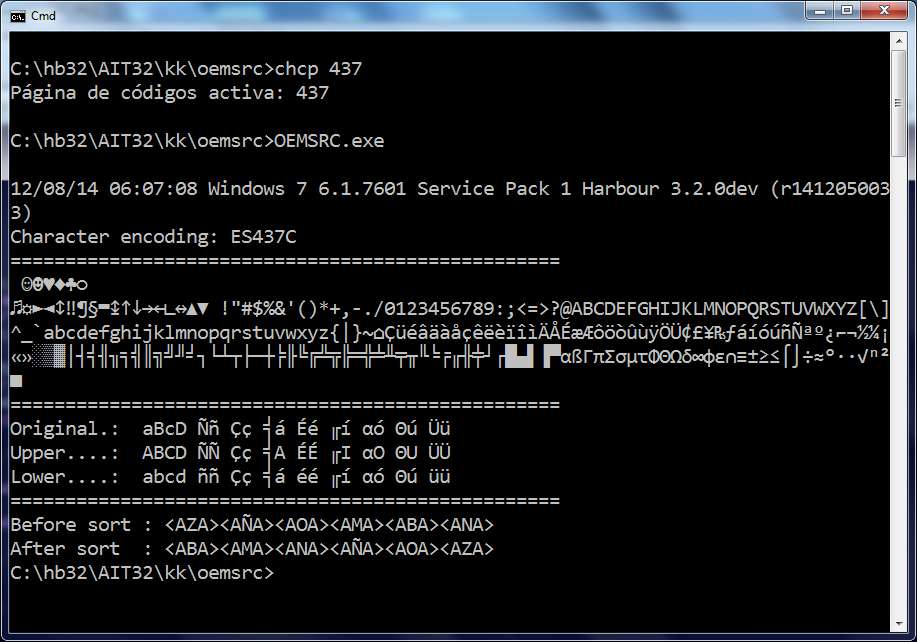
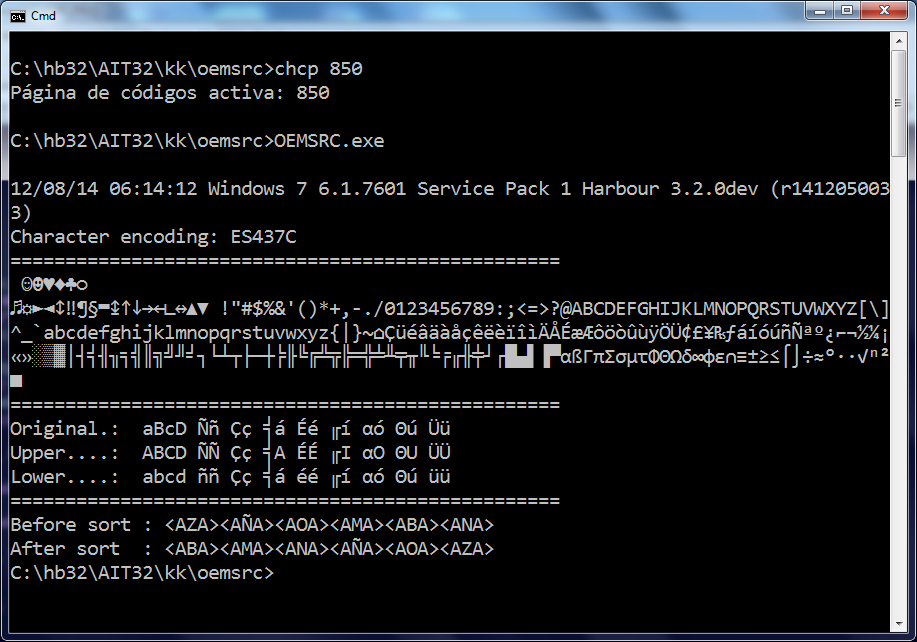
Bernard Mouille [w]
Jun 23, 2015, 3:20:31 AM6/23/15
to harbou...@googlegroups.com
Hello Gabriel,
Have you try the Harbour functions :
hb_UTF8ToStr( cString )
hb_StrToUTF8( cString )
Regards,
Bernard.
-----Message d'origine-----
De : harbou...@googlegroups.com [mailto:harbou...@googlegroups.com]
De la part de Gabriel Ornelas
Envoyé : mardi 23 juin 2015 07:18
À : harbou...@googlegroups.com
Objet : [harbour-users] Convert Ascii to Utf8 ??
Have you try the Harbour functions :
hb_UTF8ToStr( cString )
hb_StrToUTF8( cString )
Regards,
Bernard.
-----Message d'origine-----
De : harbou...@googlegroups.com [mailto:harbou...@googlegroups.com]
De la part de Gabriel Ornelas
Envoyé : mardi 23 juin 2015 07:18
À : harbou...@googlegroups.com
Objet : [harbour-users] Convert Ascii to Utf8 ??
Reply all
Reply to author
Forward
0 new messages