
GetEnv("ProgramFiles") fails 64bits
319 views
Skip to first unread message

Yakano
Jan 8, 2021, 8:36:08 AM1/8/21
to Harbour Users
Hello
I need to run an external application, that is why I have been using the GetEnv () and / or GteE () function to retrieve the environment variable "ProgramFiles", check if it is installed and show the corresponding warning if it is not.
Well, this application can now be 32 or 64 bits, and when consulting GetEnv ('ProgramFiles') it always returns "C: \ Program Files (x86)" and it does the same when consulting GetEnv ('ProgramFiles (x86)' ) on Windows 10 64-bit machines.
It's easy to remove "(x86)" from the value returned by GetEnv ('ProgramFiles'), but I think something should be corrected there.
Best regards.

Bernard Mouille
Jan 8, 2021, 9:29:58 AM1/8/21
to Harbour Users
Hello Yakano,
That I use :
? hb_getenv( "SystemRoot" )
? hb_getenv( "Windir" )
? hb_getenv( "ProgramFiles" )
? hb_getenv( "ProgramW6432" )
? hb_getenv( "ProgramFiles(x86)
Run cmd, commans << set >> and you look all hb_getenv.
Regards,
Bernard.
Yakano
Jan 13, 2021, 7:49:21 AM1/13/21
to Harbour Users
Hi Bernard,
I mean that when uses "set" from command line ProgramFiles and ProgramFiles(x86) have different values, but from Harbour GetEnv() and GetE() return equal values...
I don't knew "ProgramW6432", I test it and works for me.
Thankyou !!!
Best regards, Yakano
Bernard Mouille
Jan 13, 2021, 9:04:57 AM1/13/21
to Harbour Users
In the old Windows versions, I think that it was wow64 or
ProgramWOW64 or something like this.
KR
Bernard

Tony Quick
Feb 2, 2021, 10:06:25 AM2/2/21
to Harbour Users
In case you didn't know, it's a Windows "feature" that causes it.
When a 32-bit process is created by a 64-bit process, or when a 64-bit process is created by a 32-bit process, WOW64 sets the environment variables for the created process as shown in the following table.
Environment Variables
Process
Environment variables
64-bit process:
PROCESSOR_ARCHITECTURE=AMD64 or PROCESSOR_ARCHITECTURE=IA64 or PROCESSOR_ARCHITECTURE=ARM64
ProgramFiles=%ProgramFiles%
ProgramW6432=%ProgramFiles%
CommonProgramFiles=%CommonProgramFiles%
CommonProgramW6432=%CommonProgramFiles%
Windows Server 2008, Windows Vista, Windows Server 2003 and Windows XP: The ProgramW6432 and CommonProgramW6432 environment variables were added starting with Windows 7 and Windows Server 2008 R2.
32-bit process:
PROCESSOR_ARCHITECTURE=x86
PROCESSOR_ARCHITEW6432=%PROCESSOR_ARCHITECTURE%
ProgramFiles=%ProgramFiles(x86)%
ProgramW6432=%ProgramFiles%
CommonProgramFiles=%CommonProgramFiles(x86)%
CommonProgramW6432=%CommonProgramFiles%
64-bit process:
PROCESSOR_ARCHITECTURE=AMD64 or PROCESSOR_ARCHITECTURE=IA64 or PROCESSOR_ARCHITECTURE=ARM64
ProgramFiles=%ProgramFiles%
ProgramW6432=%ProgramFiles%
CommonProgramFiles=%CommonProgramFiles%
CommonProgramW6432=%CommonProgramFiles%
Windows Server 2008, Windows Vista, Windows Server 2003 and Windows XP: The ProgramW6432 and CommonProgramW6432 environment variables were added starting with Windows 7 and Windows Server 2008 R2.
32-bit process:
PROCESSOR_ARCHITECTURE=x86
PROCESSOR_ARCHITEW6432=%PROCESSOR_ARCHITECTURE%
ProgramFiles=%ProgramFiles(x86)%
ProgramW6432=%ProgramFiles%
CommonProgramFiles=%CommonProgramFiles(x86)%
CommonProgramW6432=%CommonProgramFiles%
Regards,
Tony

Bernard Mouille
Feb 3, 2021, 3:37:32 AM2/3/21
to Harbour Users
Hello Yakano,
Sorry, I make a mistake.
Regards,
Bernard.
Yakano
Feb 3, 2021, 4:09:33 AM2/3/21
to Harbour Users
Hello Toni
This "feature" is what I didn't know...
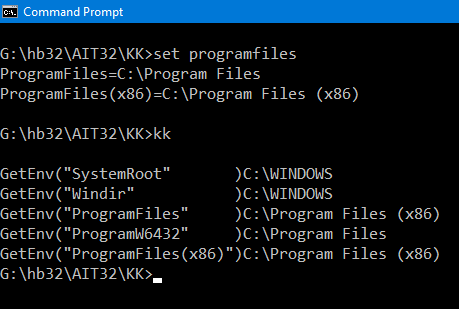
My app is 32bits and when it run in 64bits y get the attached image.
So, it seems nothing was wrong in Harbour, I just have to adapt to the results (and I did even unknowing it)
Thanks for your master class, my friend ;)
Thanks for your master class, my friend ;)
Best regards

Yakano
Feb 3, 2021, 4:10:37 AM2/3/21
to Harbour Users
Thanks, my friend
Reply all
Reply to author
Forward
0 new messages