
scanner and printer (USB) in harbour
1,267 views
Skip to first unread message

Occaso
Jan 4, 2012, 3:42:03 PM1/4/12
to Harbour Users
Can I use a scanner and printer (USB) with Harbour?
II use windows xp.
Where can I find some sample code?
Thanks to all.
II use windows xp.
Where can I find some sample code?
Thanks to all.

Clippero
Jan 5, 2012, 6:47:09 AM1/5/12
to Harbour Users
On 4 ene, 15:42, Occaso <giuliome...@gmail.com> wrote:
> ¿Puedo usar un escáner y la impresora (USB) con el puerto?
> II utiliza Windows XP.
> ¿Dónde puedo encontrar algunos ejemplos de código?
> Gracias a todos.
[Esp]
El scanner no sabría decirte si se puede usar desde harbour
A la impresora si puedes usarla desde harbour
Un método es usar NET USE y decirle a Windows que es una impresora
conectada a un puerto LPT
NET USE LPTn \\localhost\impresora o \\ip del equipo que tiene la
impresora\impresora compartida
Otra opción es direccionar tu actual listado a un archivo .prn o .txt
y luego copiarlo a \\localhost\impresora o \\ip del equipo que tiene
la impresora\impresora compartida
Otra opción es generar un archivo .pdf con tu listado y correr un
programa que abra el .pdf y te permita imprimirlo, guardar como,
enviar por email ,e tc.
Si querés poner tipos de letra y demás, siempre es mas facil con el
método del .pdf ya que para hacerlo directo sobre la impresora hay que
tener los códigos para los tipos de letra de cada impresora.
[Eng Google]
The scanner can not tell you if you can use from harbor
A printer if you can use from harbor
One method is to use NET USE Windows and tell it is a printer
connected to an LPT port
LPTn NET USE \ \ localhost \ printer or \ \ ip of the computer that
has the printer \ shared printer
Another option is to address your current list to a file .Prn or .Txt
and then copy it to \ \ localhost \ printer or \ \ ip of the computer
that has the printer \ shared printer
Another option is to generate a .Pdf file with your list and run a
program that opens. Pdf and you can print, save as, email, etc.
If you want to put other fonts and it is always easier with the
method. Pdf because to do so directly on the printer must have the
codes for fonts on each printer.
Suerte, Fermín

Giovanni Di Maria
Jan 5, 2012, 7:59:04 AM1/5/12
to Harbour Users
I Occaso
I send you an example of mine, about use of printer, with Harbour.
You can use the object Win_Prn()
Regards
Giovanni Di Maria
#include "common.ch"
#include "hbwin.ch"
PROCEDURE Main( cPar1 )
LOCAL k,nPrn := 1
LOCAL aPrn := WIN_PRINTERLIST()
LOCAL oPrinter
//---------------------------------------------------
CLS
nPrn := AChoice( 3, 1, 15 ,70, aPrn)
cls
? "Stai stampando su ",aPrn[nPrn]
//---------------------------------------------------
oPrinter := Win_Prn():New( aPrn[nPrn] )
oPrinter:Landscape := .F.
oPrinter:FormType := WIN_DMPAPER_A4
oPrinter:Copies := 1
//---------------------------------------------------
oPrinter:Create()
oPrinter:startDoc( "stampa" )
oPrinter:SetPen( WIN_PS_SOLID, 1, HB_WIN_RGB_RED )
//---------------------------------------------------
oPrinter:Bold( WIN_FW_EXTRABOLD )
oPrinter:NewLine()
oPrinter:TextOut( "Giovanni Bold" )
//---------------------------------------------------
oPrinter:Bold( WIN_FW_DONTCARE )
oPrinter:NewLine()
oPrinter:TextOut("Giovanni Bold 2")
//---------------------------------------------------
oPrinter:NewLine()
oPrinter:UnderLine( .T. )
oPrinter:Italic( .T. )
oPrinter:SetFont( "Courier New", 7, { 3, -50 } ) // Compressed
print
oPrinter:TextOut( "Testina" )
//---------------------------------------------------
oPrinter:SetPrc( oPrinter:Prow() + 3, 20 )
oPrinter:Bold( WIN_FW_DONTCARE )
oPrinter:TextOut( "Salve MONDO" )
//---------------------------------------------------
oPrinter:NewLine()
oPrinter:NewLine()
oPrinter:NewLine()
oPrinter:UnderLine( .F. )
oPrinter:Italic( .F. )
oPrinter:Bold( WIN_FW_DONTCARE )
oPrinter:SetFont( "Arial", 10, 0 )
oPrinter:SetColor( HB_WIN_RGB_BLACK )
for k=1 to 10
oPrinter:TextOut( "Numero in stampa: " + str(k) )
oPrinter:NewLine()
next k
//---------------------------------------------------
oPrinter:NewLine()
oPrinter:NewLine()
oPrinter:SetFont( "Lucida Console", 18, 0 ) // Large print
oPrinter:SetColor( HB_WIN_RGB_GREEN )
oPrinter:TextOut( "FORME GEOMETRICHE" )
oPrinter:Box( 0, oPrinter:PosY + 100, 100, oPrinter:PosY + 200 )
oPrinter:Arc( 200, oPrinter:PosY + 100, 300, oPrinter:PosY + 200 )
oPrinter:Ellipse( 400, oPrinter:PosY + 100, 500, oPrinter:PosY +
200 )
oPrinter:FillRect( 600, oPrinter:PosY + 100, 700, oPrinter:PosY +
200, HB_WIN_RGB_RED )
//---------------------------------------------------
oPrinter:EndDoc()
oPrinter:Destroy()
RETURN
I send you an example of mine, about use of printer, with Harbour.
You can use the object Win_Prn()
Regards
Giovanni Di Maria
#include "common.ch"
#include "hbwin.ch"
PROCEDURE Main( cPar1 )
LOCAL k,nPrn := 1
LOCAL aPrn := WIN_PRINTERLIST()
LOCAL oPrinter
//---------------------------------------------------
CLS
nPrn := AChoice( 3, 1, 15 ,70, aPrn)
cls
? "Stai stampando su ",aPrn[nPrn]
//---------------------------------------------------
oPrinter := Win_Prn():New( aPrn[nPrn] )
oPrinter:Landscape := .F.
oPrinter:FormType := WIN_DMPAPER_A4
oPrinter:Copies := 1
//---------------------------------------------------
oPrinter:Create()
oPrinter:startDoc( "stampa" )
oPrinter:SetPen( WIN_PS_SOLID, 1, HB_WIN_RGB_RED )
//---------------------------------------------------
oPrinter:Bold( WIN_FW_EXTRABOLD )
oPrinter:NewLine()
oPrinter:TextOut( "Giovanni Bold" )
//---------------------------------------------------
oPrinter:Bold( WIN_FW_DONTCARE )
oPrinter:NewLine()
oPrinter:TextOut("Giovanni Bold 2")
//---------------------------------------------------
oPrinter:NewLine()
oPrinter:UnderLine( .T. )
oPrinter:Italic( .T. )
oPrinter:SetFont( "Courier New", 7, { 3, -50 } ) // Compressed
oPrinter:TextOut( "Testina" )
//---------------------------------------------------
oPrinter:SetPrc( oPrinter:Prow() + 3, 20 )
oPrinter:Bold( WIN_FW_DONTCARE )
oPrinter:TextOut( "Salve MONDO" )
//---------------------------------------------------
oPrinter:NewLine()
oPrinter:NewLine()
oPrinter:NewLine()
oPrinter:UnderLine( .F. )
oPrinter:Italic( .F. )
oPrinter:Bold( WIN_FW_DONTCARE )
oPrinter:SetFont( "Arial", 10, 0 )
oPrinter:SetColor( HB_WIN_RGB_BLACK )
for k=1 to 10
oPrinter:TextOut( "Numero in stampa: " + str(k) )
oPrinter:NewLine()
next k
//---------------------------------------------------
oPrinter:NewLine()
oPrinter:NewLine()
oPrinter:SetFont( "Lucida Console", 18, 0 ) // Large print
oPrinter:SetColor( HB_WIN_RGB_GREEN )
oPrinter:TextOut( "FORME GEOMETRICHE" )
oPrinter:Box( 0, oPrinter:PosY + 100, 100, oPrinter:PosY + 200 )
oPrinter:Arc( 200, oPrinter:PosY + 100, 300, oPrinter:PosY + 200 )
oPrinter:Ellipse( 400, oPrinter:PosY + 100, 500, oPrinter:PosY +
200 )
oPrinter:FillRect( 600, oPrinter:PosY + 100, 700, oPrinter:PosY +
200, HB_WIN_RGB_RED )
//---------------------------------------------------
oPrinter:EndDoc()
oPrinter:Destroy()
RETURN
Giulio Mesti
Jan 5, 2012, 11:20:01 AM1/5/12
to harbou...@googlegroups.com
Thanks for the reply. My original program is written in DBIII in 1989, compiled with Clipper 3.0 and now with Harbour. The sources are all PRG.
Excuse my ignorance. How do I enter your listing into my program?
I enclose the original listing, which launches the print.
Thanks in advance
MY PRG
****************** begin
***crtvst.prg
***3:03:39 3/24/1989
clear
oraini="00.00"
orafine="00.00"
Sesso=" "
art=" "
des=" "
set date italian
datum=date()
@5,5say "PRINT CRTVST"
do while .t.
@9,5 say "M/F" get sesso pict "!"
@11,5 say "DATE" get datum
@13,5 say "DALLE ORE" get oraini pict "99.99"
@13,28say "ALLE ORE" get orafine pict "99.99"
read
if sesso $"MFE"
exit
endif
enddo
if sesso="M"
art="il"
des="o"
endif
if sesso="F"
art="la"
des="a"
endif
if sesso="E"
clear
retu
endif
orario="dalle ore "+oraini+" alle ore "+orafine
if oraini=orafine
orario=""
endif
SET DEVICE TO PRINTER
SET PRINTER ON
SET CONSOLE OFF
@0,1 say " "
@1,0 say "Dott. XXX"
@ 2,0 say "Medico-Chirurgo"
@ 3,0 say "SPECIALISTA IN XX"
@ 4,0 say "Amb.: "
@ 5,0 say "tel-fax "
@ 10,5 say " Si attesta che "
@ 13,0 say art+" Paziente "+trim(cgn)+" "+nme
@ 14,0 say "e' stat"+des+" sottopost"+des+" in data odierna"
@15,0say orario
@16,0 say "A VISITA SPECIALISTICA"
@ 19,0 say "Si rilascia a richiesta dell' interessat"+des
@ 20,0 say "per gli usi consentiti dalle vigenti leggi"
@ 21,0 say "e regolamenti in tale forma, in esenzione"
@22,0 say "Marca ENPAM."
@ 30,22 say "In fede"
@ 35,15 say "dott. XXX"
@ 38,0 say ", "
@ 38,9 say datum
?chr(12)
?chr(27)+'@'
set device to screen
set printer to
set date ansi
clear
retu
°°°°°end
P:S:
This program can print using Visual Fox but not with Harbour
Excuse my ignorance. How do I enter your listing into my program?
I enclose the original listing, which launches the print.
Thanks in advance
MY PRG
****************** begin
***crtvst.prg
***3:03:39 3/24/1989
clear
oraini="00.00"
orafine="00.00"
Sesso=" "
art=" "
des=" "
set date italian
datum=date()
@5,5say "PRINT CRTVST"
do while .t.
@9,5 say "M/F" get sesso pict "!"
@11,5 say "DATE" get datum
@13,5 say "DALLE ORE" get oraini pict "99.99"
@13,28say "ALLE ORE" get orafine pict "99.99"
read
if sesso $"MFE"
exit
endif
enddo
if sesso="M"
art="il"
des="o"
endif
if sesso="F"
art="la"
des="a"
endif
if sesso="E"
clear
retu
endif
orario="dalle ore "+oraini+" alle ore "+orafine
if oraini=orafine
orario=""
endif
SET DEVICE TO PRINTER
SET PRINTER ON
SET CONSOLE OFF
@0,1 say " "
@1,0 say "Dott. XXX"
@ 2,0 say "Medico-Chirurgo"
@ 3,0 say "SPECIALISTA IN XX"
@ 4,0 say "Amb.: "
@ 5,0 say "tel-fax "
@ 10,5 say " Si attesta che "
@ 13,0 say art+" Paziente "+trim(cgn)+" "+nme
@ 14,0 say "e' stat"+des+" sottopost"+des+" in data odierna"
@15,0say orario
@16,0 say "A VISITA SPECIALISTICA"
@ 19,0 say "Si rilascia a richiesta dell' interessat"+des
@ 20,0 say "per gli usi consentiti dalle vigenti leggi"
@ 21,0 say "e regolamenti in tale forma, in esenzione"
@22,0 say "Marca ENPAM."
@ 30,22 say "In fede"
@ 35,15 say "dott. XXX"
@ 38,0 say ", "
@ 38,9 say datum
?chr(12)
?chr(27)+'@'
set device to screen
set printer to
set date ansi
clear
retu
°°°°°end
P:S:
This program can print using Visual Fox but not with Harbour
Giulio Mesti
Jan 5, 2012, 11:28:20 AM1/5/12
to harbou...@googlegroups.com
Excuse me .. I correct the previous post.
". My original program is written in DBIII in 1989, compiled with Clipper 5.3 and now with Harbour 3.0"
". My original program is written in DBIII in 1989, compiled with Clipper 5.3 and now with Harbour 3.0"

Massimo Belgrano
Jan 5, 2012, 1:17:13 PM1/5/12
to harbou...@googlegroups.com
Your program works if you map lpt1:
--
Massimo Belgrano
net use lpt1 \\server\printer
or
G_PORTA=
WIN_PRINTERPORTTONAME (WIN_PRINTERGETDEFAULT( ))
set printer to &G_PORTA
SET DEVICE TO PRINTER
add to mk2 hbwin.lib
Look in your Harbour folder :
CONTRIB\HBWIN\TESTS\testprn.prg
CONTRIB\HBWIN\TESTS\testprn.prg
2012/1/5 Giulio Mesti <giuli...@gmail.com>
Excuse me .. I correct the previous post.
". My original program is written in DBIII in 1989, compiled with Clipper 5.3 and now with Harbour 3.0"
--
You received this message because you are subscribed to the Google
Groups "Harbour Users" group.
Unsubscribe: harbour-user...@googlegroups.com
Web: http://groups.google.com/group/harbour-users
Massimo Belgrano
Occaso
Jan 5, 2012, 2:30:16 PM1/5/12
to Harbour Users
Thank you again. I solved by setting a few minutes ago my laser
printer (HP 1022) as follows:
1) Share the printer: YES
2) active ports 1 LPT and USB 001
3) Enable printer pooling: YES
4) sends it directly to the printer: YES
Unfortunately I can not set the printer font, font size, etc. .. The
only available character appears in Courier
New 12 ..
Is there any chance more user-friendly as Visual ..?
printer (HP 1022) as follows:
1) Share the printer: YES
2) active ports 1 LPT and USB 001
3) Enable printer pooling: YES
4) sends it directly to the printer: YES
Unfortunately I can not set the printer font, font size, etc. .. The
only available character appears in Courier
New 12 ..
Is there any chance more user-friendly as Visual ..?
Massimo Belgrano
Jan 6, 2012, 3:44:33 AM1/6/12
to harbou...@googlegroups.com
you must made a choice if you want print directly to printer or use win_printer objet (you need rewrite your prg) or write a pdf (rewrite too)
the win_prn object way
oPrinter := Win_Prn():New( aPrn[nPrn] )
oPrinter:Create()
oPrinter:startDoc( "stampa" )
oPrinter:startDoc( "stampa" )
//---------------------------------------------------
oPrinter:Bold( WIN_FW_EXTRABOLD )
oPrinter:NewLine()
oPrinter:TextOut( "Giovanni Bold" )
oPrinter:Bold( WIN_FW_EXTRABOLD )
oPrinter:NewLine()
oPrinter:TextOut( "Giovanni Bold" )
the pdf way
LOCAL pdf := HPDF_New()
HPDF_Page_TextOut( page, 60, height - 80, "<Standard Type1 fonts samples>")
HPDF_Page_EndText( page )
seem sample c:\harbour\contrib\hbhpdf\tests\harupdf.prg
2012/1/5 Occaso <giuli...@gmail.com>
Massimo Belgrano
Occaso
Jan 6, 2012, 4:27:34 AM1/6/12
to Harbour Users
Thank you. Try it now.
Occaso
Jan 6, 2012, 4:42:49 AM1/6/12
to Harbour Users
I apologize if I return to this subject. Is there an easier way to
handle the pinter (and the scanner, images, etc.) such as Visual Basic
or Visual FoxPro. Is there any chance with HGM or minigui, without
rewriting the entire application? If yes .. I find a tutorial to
compile the exe?
handle the pinter (and the scanner, images, etc.) such as Visual Basic
or Visual FoxPro. Is there any chance with HGM or minigui, without
rewriting the entire application? If yes .. I find a tutorial to
compile the exe?
Massimo Belgrano
Jan 6, 2012, 4:49:01 AM1/6/12
to harbou...@googlegroups.com
afaik no
I apologize if I return to this subject. Is there an easier way to
handle the pinter (and the scanner, images, etc.) such as Visual Basic
or Visual FoxPro. Is there any chance with HGM or minigui, without
rewriting the entire application? If yes .. I find a tutorial to
compile the exe?
--
Massimo Belgrano
Massimo Belgrano
Occaso
Jan 6, 2012, 5:08:03 AM1/6/12
to Harbour Users
Thanks again, Massimo.x. There is a possibility to use a GUI editor to
insert labels and text boxes without entering @ x, y say ".."...
minigui can serve the purpose? I find a tutorial for using it with my
code?
insert labels and text boxes without entering @ x, y say ".."...
minigui can serve the purpose? I find a tutorial for using it with my
code?
Massimo Belgrano
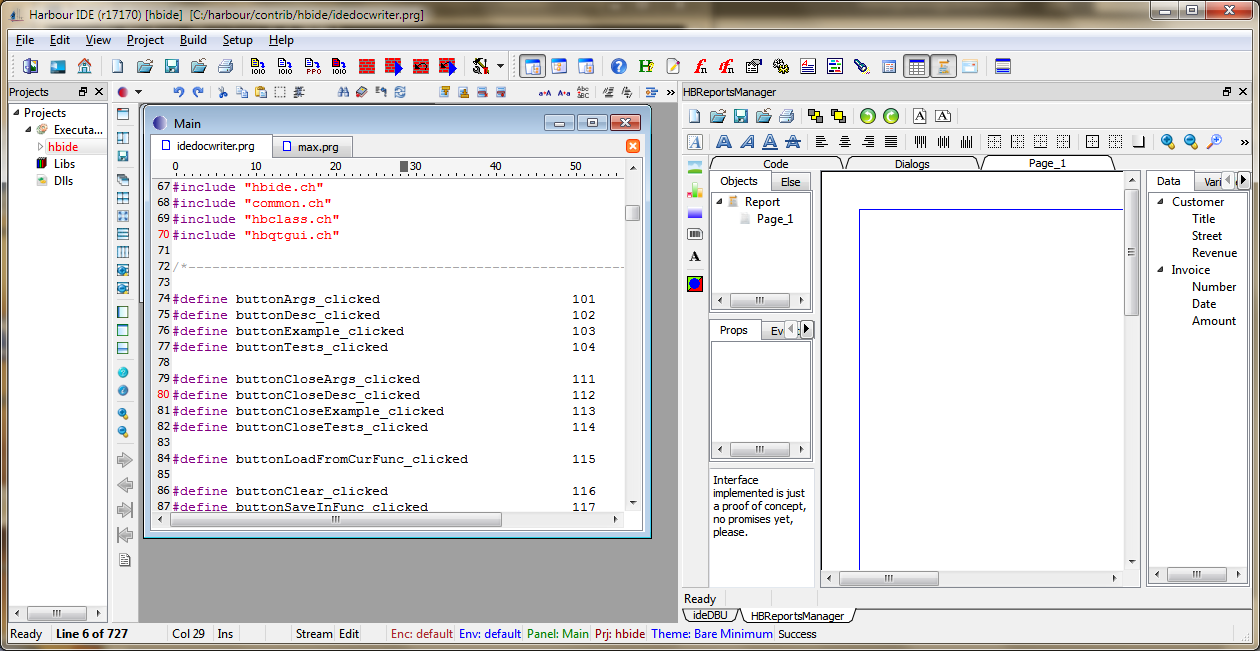
Jan 6, 2012, 6:51:54 AM1/6/12
to harbou...@googlegroups.com
not jet ready, hbide have a working progress feature
--
Massimo Belgrano
--
You received this message because you are subscribed to the Google
Groups "Harbour Users" group.
Unsubscribe: harbour-user...@googlegroups.com
Web: http://groups.google.com/group/harbour-users
Massimo Belgrano

Pritpal Bedi
Jan 6, 2012, 1:41:54 PM1/6/12
to Harbour Users
Hi
> > Thanks again, Massimo.x. There is a possibility to use a GUI editor to
> > insert labels and text boxes without entering @ x, y say ".."...
It is CUI Screen Designer.
It is complete but output is not inserted in
current source being edited, instead is flushed to
a disk .prg file.
Pritpal Bedi
> > Thanks again, Massimo.x. There is a possibility to use a GUI editor to
> > insert labels and text boxes without entering @ x, y say ".."...
> not jet ready, hbide have a working progress feature
> Start hbide from bin folder and view hbReportmanager
No. It is not ReportsManager.
> Start hbide from bin folder and view hbReportmanager
It is CUI Screen Designer.
It is complete but output is not inserted in
current source being edited, instead is flushed to
a disk .prg file.
Pritpal Bedi
Massimo Belgrano
Jan 6, 2012, 3:31:08 PM1/6/12
to harbou...@googlegroups.com
Hi Pritpal
hbReportmanager (in view menu) now Interface implemented is just a proof of concept
do you plan same evolution?
--
Massimo Belgrano
Massimo Belgrano
Reply all
Reply to author
Forward
0 new messages