
Handsontable cell type as a dropdown ID selection
2,282 views
Skip to first unread message

Arief Debyatman
Jul 28, 2013, 11:14:45 AM7/28/13
to handso...@googlegroups.com
My requirement is as follows:
==================================================
Database structures:
==================================================
Main table structure:
- Car ID (numeric)
- Car Price (numeric)
Car ID (numeric) refers to another table (Car List table) with structure:
- Car ID (numeric)
- Car Name (text)
- Car Description (text)
==================================================
User interface (handsontable):
==================================================
Main table:
- Car Name (handsontable cell type)
- Car Price (numeric)
Car Name (handsontable cell type dropdown table):
- Car Name (text)
- Car Description (text)
==================================================
Challenges:
==================================================
1. How to automatically set the related Car ID into database since we only have Car Name in the handsontable?
If we need to set the hidden Car ID column in the handsontable fot this purpose, how to set it since we are not displaying it in the handsontable?
2. When we are displaying the dropdown table (for handsontable cell type), the selection is becoming a cell-wise instead of row-wise.
In this case, I can click a Car Description and the description will go to the parent/main table instead of the related Car Name.
This will mislead the main table editing. So, can we make it to be a row-wise selection?
Cheers,
Arief

codename-
Jul 28, 2013, 11:19:45 AM7/28/13
to handso...@googlegroups.com
Q1: You can add hidden columns to Handsontable. For more information look here: http://handsontable.com/demo/datasources.html#array-hidden
Q2: I don't understand. Can you add some images or demo for this?
Q2: I don't understand. Can you add some images or demo for this?
Arief Debyatman
Jul 28, 2013, 11:31:29 AM7/28/13
to handso...@googlegroups.com
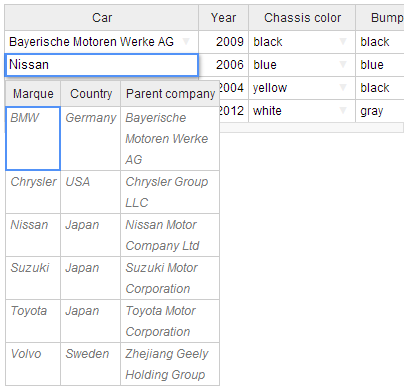
We can click on "Parent Company" and it will be set into the "Car" column. This should not be happened cause we need only car name (Marque) to be filled to the Car column. See that I can set Bayerische Motoren Werke AG to fill the Car column.
Regards,
Arief
codename-
Jul 28, 2013, 11:44:46 AM7/28/13
to handso...@googlegroups.com
I think that you need write your own editor for that. This can be based on original one. You need change this line, I think...
afterOnCellMouseDown: function () {
var sel = this.getSelected();
parent.TEXTAREA.value = this.getDataAtCell(sel[0], sel[1]);
parent.instance.destroyEditor();
},
In more details: you need change sel[1] for 0 in this call this.getDataAtCell(sel[0], sel[1]);
afterOnCellMouseDown: function () {
var sel = this.getSelected();
parent.TEXTAREA.value = this.getDataAtCell(sel[0], sel[1]);
parent.instance.destroyEditor();
},
In more details: you need change sel[1] for 0 in this call this.getDataAtCell(sel[0], sel[1]);
codename-
Jul 28, 2013, 11:46:19 AM7/28/13
to handso...@googlegroups.com
Oh! Now I see that this expression is also called when user hi enter key. You need change it also in this line:
beforeOnKeyDown: function (event) {
switch (event.keyCode) {
case 27: //esc
parent.instance.destroyEditor(true);
break;
case 13: //enter
var sel = this.getSelected();
parent.TEXTAREA.value = this.getDataAtCell(sel[0], sel[1]);
parent.instance.destroyEditor();
break;
beforeOnKeyDown: function (event) {
switch (event.keyCode) {
case 27: //esc
parent.instance.destroyEditor(true);
break;
case 13: //enter
var sel = this.getSelected();
parent.TEXTAREA.value = this.getDataAtCell(sel[0], sel[1]);
parent.instance.destroyEditor();
Arief Debyatman
Jul 28, 2013, 12:12:51 PM7/28/13
to handso...@googlegroups.com
I tried to change, but now I cannot click any of the columns.
Can you see and review this: http://jsfiddle.net/ardby/G5rJh/
Thanks a lot!
Arief Debyatman
Jul 28, 2013, 7:02:43 PM7/28/13
to handso...@googlegroups.com
OK, finally I get it works!
Any suggestions for more elegant code are welcome.
Arief
codename-
Jul 29, 2013, 5:47:01 PM7/29/13
to handso...@googlegroups.com
This could be more elegant:
var prn = $('#example1').handsontable('getInstance')
You could close this in global variable or in closure. And this is not working when I use my keyboard to navigate over second table. For example: I can set Japan as a car using arrows and hitting enter key.
var prn = $('#example1').handsontable('getInstance')
You could close this in global variable or in closure. And this is not working when I use my keyboard to navigate over second table. For example: I can set Japan as a car using arrows and hitting enter key.
Reply all
Reply to author
Forward
0 new messages