
Pleae help in setting up hadoop in eclipse in Ubuntu using VMWare

Raj
Hi Pavan,
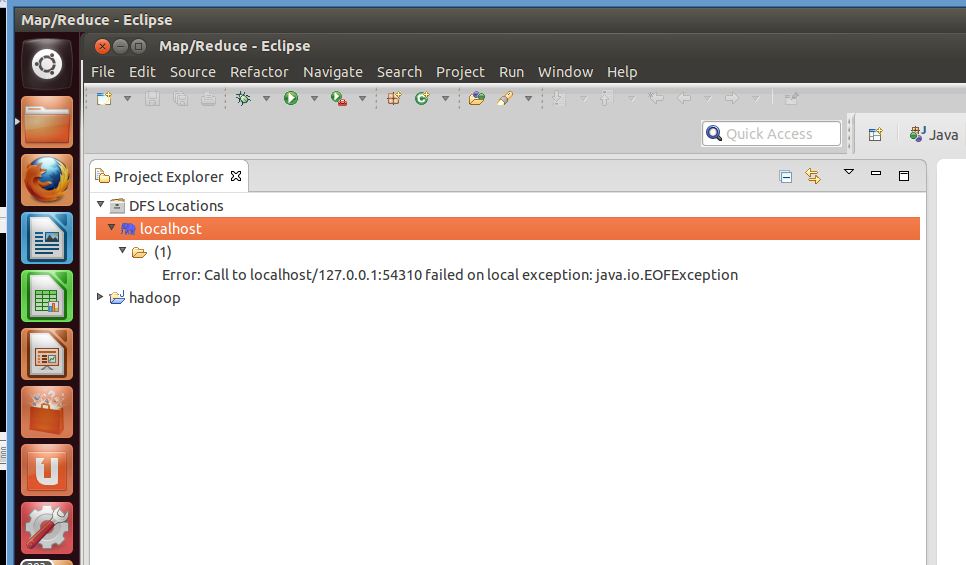
I tried to setup Hadoop in eclipse but DFS Location is be giving below error.
Error:call to localhost/127.0.0.1:54311 failed on local exception:java.io.EOFException
1. Download Hadoop-20-2 and installed on Ubuntu usign VMware tool.
2. Started all nodes ./start-all.sh (NameNode, DataNode, TaskTracker, JobTracker, SecondaryNameNode)
3. Downloaded eclipse
4. copied hadoop-0.20.2-eclipse-plugin.jar in eclips plugin folder.
5. Started eclipse
6. Imported hadoop project
7. Add Map/Reduce server
8. When tried to see DLS locations I am getting error "Error:call to localhost/127.0.0.1:54311 failed on local exception:java.io.EOFException"
Please help Pawan to sortout this issue, I am struggling from two days. I tried installing different eclipse hadoop plugins unfortunately without success :(.
Regards,
Raj

PAVAN KUMAR Reddy
2- Now, add following 5 jars from your HADOOP_HOME/lib folder to the hadoop-eclipse-plugin-*/lib folder, you have got just now after extracting the plugin :
commons-configuration-1.6.jar
commons-httpclient-3.0.1.jar
commons-lang-2.4.jar
jackson-core-asl-1.0.1.jar
jackson-mapper-asl-1.0.1.jar
--
You received this message because you are subscribed to the Google Groups "HadoopOnlineTraining9" group.
To unsubscribe from this group and stop receiving emails from it, send an email to hadooponlinetrai...@googlegroups.com.
For more options, visit https://groups.google.com/groups/opt_out.