
Tap Area Custom Exit Not Allowed
5,898 views
Skip to first unread message

james.mich...@gmail.com
Dec 12, 2017, 9:57:38 AM12/12/17
to Google Web Designer beta
Hi there,
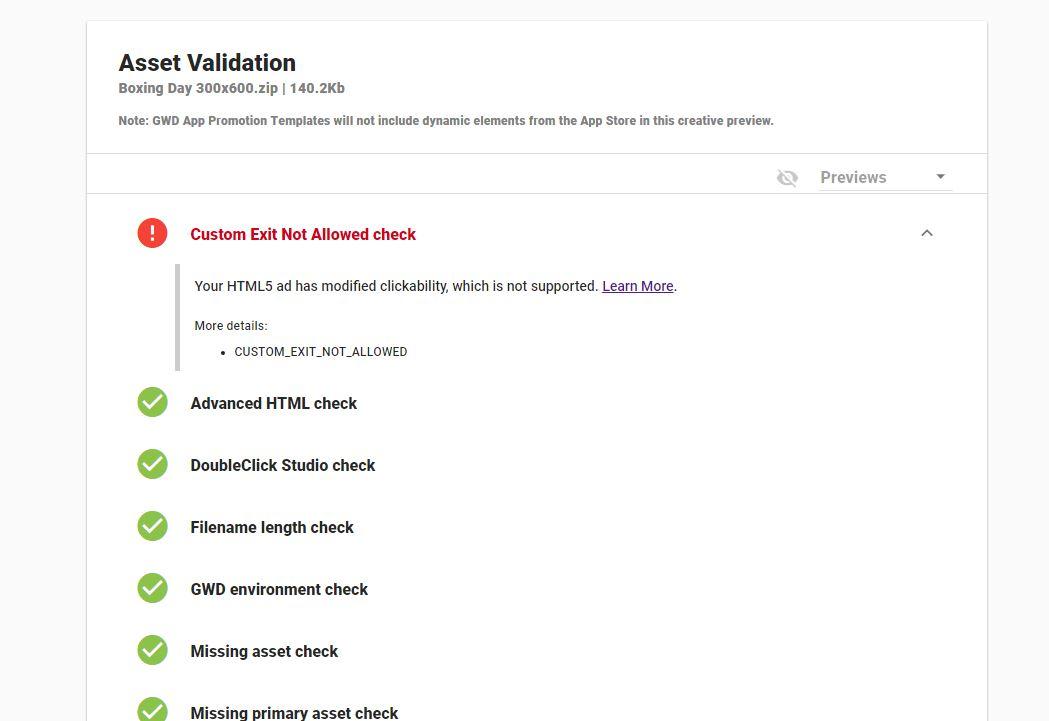
I'm just having some issues using the Tap Area component for my ads - i've attached a couple of files to show what i'm talking about.
Just need to know how to link my ads to the site now i can't use this component.
Many thanks
James

Kent Myers
Dec 12, 2017, 1:49:40 PM12/12/17
to Google Web Designer beta
I believe this is a recent change and some ad types can no longer accept custom exit events. The exit event should be added automatically when publishing your ad.
Hope that helps,
Kent
Google Web Designer team

Daniel Antonucci
Dec 12, 2017, 6:13:57 PM12/12/17
to Google Web Designer beta
Hi kent,
from the HTML validator I don't see any clickable area.
And your documentation is not updated:
And now I am very in trouble. I don't understand how fix this.
Daniel Antonucci
Dec 12, 2017, 6:36:35 PM12/12/17
to Google Web Designer beta
I am sorry but the explanation is insane:
Your HTML5 ad is modifying clickability, which is not supported.
Kent Myers
Dec 12, 2017, 6:42:50 PM12/12/17
to Google Web Designer beta
Sorry this has been frustrating. You may remove all exit events from your ad. When uploaded to Adwords any click will exit to the landing page. Note this new policy does not affect dynamic ads.
Daniel Antonucci
Dec 12, 2017, 11:43:27 PM12/12/17
to Google Web Designer beta
Hi Kent,
it is not only frustrating, it is worst. We designer are as always abandoned to everything, even by Google. I have providers that are unable to populate an url in AdWords so I had to put it manually in the creative, I have others providers who need a clicktag snippet because they use adwords through a third party service. Tomorrow I will unable to handle this with them.
From the new IAB guidelines there is not written that we don't need to use anymore a clickthroug id https://www.iab.com/wp-content/uploads/2017/07/IABNewAdPortfolio_Transition_Guide_2017-07.pdf (pag. 14)
Now we don't have control on what is going to happen, and I can't rely on other people regarding my job. With this change you put a lot of people in trouble. I have not idea when you changed the rules because the last week I sent a campaign without any issue with my (now old and) tailored templates. But tomorrow you had put me and other people in a critical condition, because not all the majority of the designers work in IT company where hopefully people are tech savvy, most of us work in environment where if you use more than two technical definition your managers get uncomfortable and don't trust on your words because they aren't tech savvy, usually they think you are trying to cheating them. If tomorrow my providers will be unable to set up properly the campaign because this change is going to affect them as well, they will complain about my job not about Google, and if for this reason the campaign is not going to start as my managers planned, I am going to be fired, not you, not even the one who decided to make the change without informing the designers who rely on GWD.
I used to create web banners by code as well through Animate CC, I can continue to work with other tools but for tomorrow I can just crossing the fingers, sincerely I don't know if I can continue to rely in GWD, I love this project, but what is happened but my job in danger and I can't risk my job just because someone decided to change an adwords behavior.
it is not only frustrating, it is worst. We designer are as always abandoned to everything, even by Google. I have providers that are unable to populate an url in AdWords so I had to put it manually in the creative, I have others providers who need a clicktag snippet because they use adwords through a third party service. Tomorrow I will unable to handle this with them.
From the new IAB guidelines there is not written that we don't need to use anymore a clickthroug id https://www.iab.com/wp-content/uploads/2017/07/IABNewAdPortfolio_Transition_Guide_2017-07.pdf (pag. 14)
Now we don't have control on what is going to happen, and I can't rely on other people regarding my job. With this change you put a lot of people in trouble. I have not idea when you changed the rules because the last week I sent a campaign without any issue with my (now old and) tailored templates. But tomorrow you had put me and other people in a critical condition, because not all the majority of the designers work in IT company where hopefully people are tech savvy, most of us work in environment where if you use more than two technical definition your managers get uncomfortable and don't trust on your words because they aren't tech savvy, usually they think you are trying to cheating them. If tomorrow my providers will be unable to set up properly the campaign because this change is going to affect them as well, they will complain about my job not about Google, and if for this reason the campaign is not going to start as my managers planned, I am going to be fired, not you, not even the one who decided to make the change without informing the designers who rely on GWD.
I used to create web banners by code as well through Animate CC, I can continue to work with other tools but for tomorrow I can just crossing the fingers, sincerely I don't know if I can continue to rely in GWD, I love this project, but what is happened but my job in danger and I can't risk my job just because someone decided to change an adwords behavior.


mesa3...@gmail.com
Dec 15, 2017, 12:02:55 PM12/15/17
to Google Web Designer beta
Ok, i understand that we have to eliminate any exit event we used to add in the past,.. but the question is: Do we have to keep tap area, or eliminate it too?
Kent Myers
Dec 15, 2017, 12:11:19 PM12/15/17
to Google Web Designer beta
You can probably delete it, especially if it was only created for the old custom exit event. If your taparea contained artwork for example that you wanted to keep, then leaving it should pose no problem. I think the issue is more about removing the exit event than the taparea component.
Daniel Antonucci
Dec 15, 2017, 12:27:54 PM12/15/17
to Google Web Designer beta
Hi Kent,
if you keep the tap-area but there is a layer above probably it will not work, I guess so.
je...@tmrw.com.sg
Mar 12, 2018, 2:12:32 AM3/12/18
to Google Web Designer beta
Hi, has anyone managed to keep the tap area and make it work with a layer of clickthrough/exit event?
Reply all
Reply to author
Forward
0 new messages