
Tap area component needs to be removed

stefa...@gmail.com
I have recently uploaded our banners to AdWords to be told the following:
"It looks like you are using clickability modified using Tap Area. Google Display Network will no longer support new HTML5 ads with clickability modified using Tap Area in ads from Google Web Designer or using Javascript ExitApi.exit() in ads from other tools. At the same time, existing HTML5 ads with these features will start to be placed in Disapproved status. To fix a disapproved ad, please remove any uses of Tap Area or calls to Javascript ExitApi.exit(). You need to remove modifiability as well."
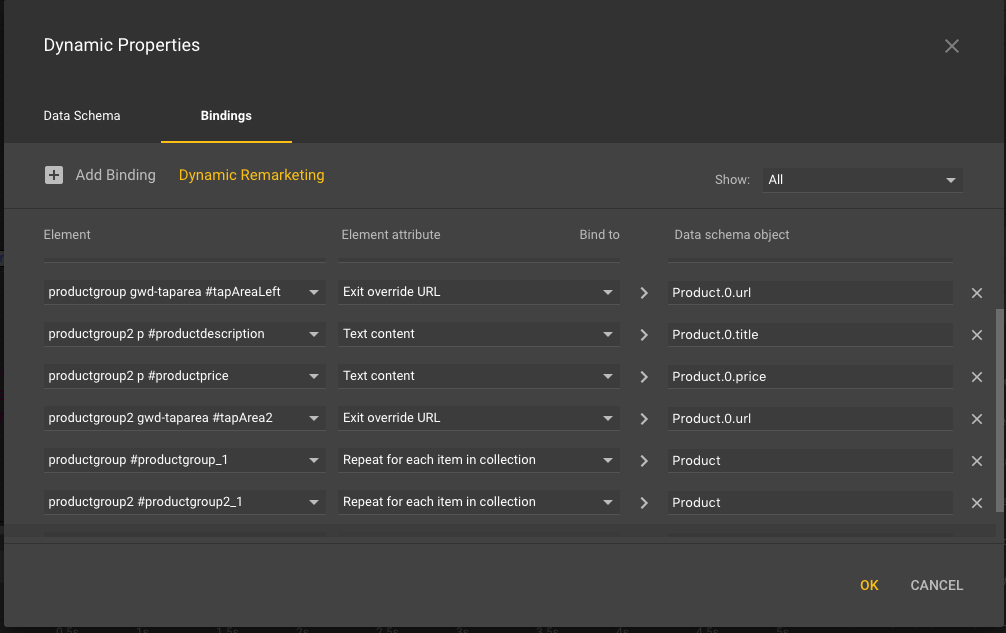
here are my dynamic properties (see screenshot attached);
Does this mean I will have to replace my Tap Area with a div or something else?
If i delete my Tap Area components then its not going to be possible for products in the carousel to click through.
Any help would be appreciated in terms of what I can do to make this update

San Khong
stefa...@gmail.com
How will i be able to allow the banner to stay clickable but remove the tap area component?
San Khong
stefa...@gmail.com
San Khong
stefa...@gmail.com
Ive attached a screenshot above to show you how its setup.
produtgroup2 gwd-taparea uses an Exit override URL based on the url from the feed product.0.url which repeats for each item.
My main issue is If i strip out the tap area component this will all be lost & the banner will not understand what to bind the feed URL data to.
stefa...@gmail.com
The Tap Area component is pulling in the product URL dynamically:
<gwd-taparea data-gwd-grp-id="tapArea2" class="gwd-grp-dzlg gwd-taparea-4pmp" bind-exit-override-url="Product.0.url"></gwd-taparea>
San Khong

anee...@gmail.com
I am having the same issue! Created html5 ads without tap area with GWD and when it uploaded as image ad in adwords, the ad appears in display networks and click is all working, but when hovering the mouse cursor it doesn't change to the finger one. I am seeing other html5 ads with clickable cursor and all. How to enable that without tap area?


Kent
Switch to Code view and add this CSS to the html or body rule:
cursor: pointer;