Video Tag / proper insert!

727 views
Skip to first unread message

djthere...@gmail.com

unread,
Oct 3, 2013, 2:48:04 PM10/3/13
to gwd...@googlegroups.com
Thank you all!

I have 2 questions regarding the video tag...........

1) How do I put all 3 video types as the source, mp4, ogv, webm, (where do I reference all 3?

2) If the files are in the same folder as the index file is that considered to be the assets / relative path!
or are all files supposed to be online?

I don't know about writing code much!

Thanks

Kishore Subramanian

unread,
Oct 3, 2013, 4:35:08 PM10/3/13
to gwd...@googlegroups.com
Are you building an Ad (DoubleClick/Admob) or a HTML page?

If you are using a HTML page, then http://www.html5rocks.com/en/tutorials/video/basics/ is a good source of information about Video tag.
If you are building an Ad, you can also use the Video component (from the components panel on the right hand side). You can add the source names of all formats in a comma separated string the sources textbox. 

- Kishore (GWD team)

Naresh Rajkumar

unread,
Oct 3, 2013, 4:37:56 PM10/3/13
to gwd...@googlegroups.com


On Thursday, October 3, 2013 11:48:04 AM UTC-7, djthere...@gmail.com wrote:
Thank you all!

I have 2 questions regarding the video tag...........  

1) How do I put all 3 video types as the source,  mp4, ogv, webm,   (where do I reference all 3?

Just add each url one after the other in the  "sources" in the properties panel.
And ***make sure they are comma separated ***

2) If the files are in the same folder as the index file is that considered to be the assets / relative path!
    or are all files supposed to be online?


We support both local files and online files(full video serving file path)
Try it out.
For local files tthey don't have to be in the same folder, you just have to give the full valid path.


Chef LeeZ

unread,
Mar 30, 2014, 6:59:16 AM3/30/14
to gwd...@googlegroups.com

Does the GWD video tag insert work? Does html 5 not show .wmv video used below? Also tried to insert Youtube provided share link and used a poster picture .. The poster picture works but the video still fails to show any download activity. The link in your previous answer may be able to insert video by inserting all the code but why reference this if  the GWD video tag is functional?


Chef LeeZ

unread,
Mar 31, 2014, 4:16:02 AM3/31/14
to gwd...@googlegroups.com
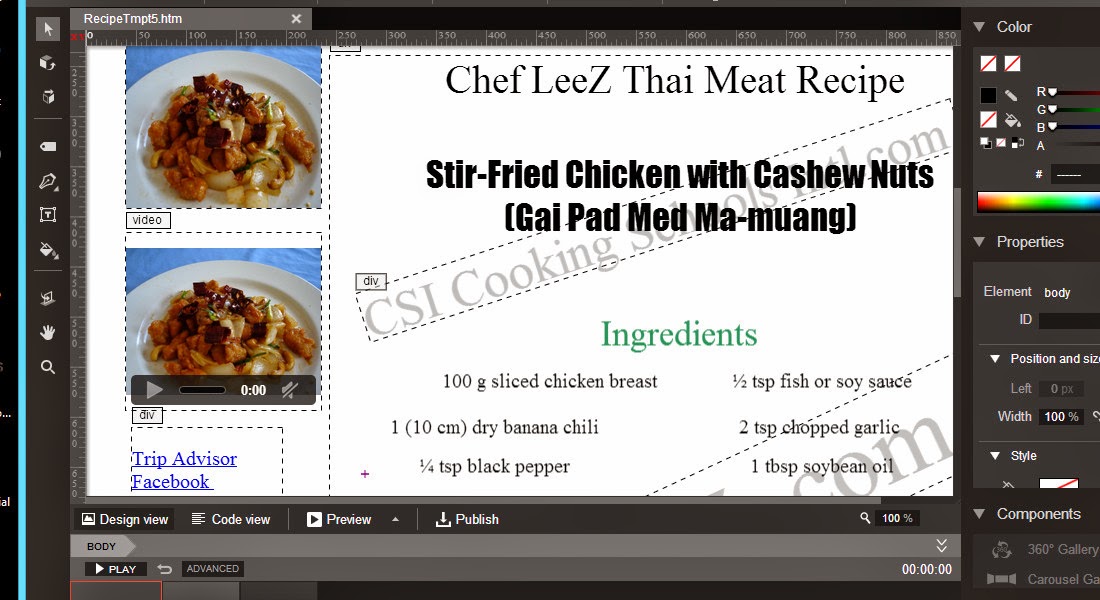
Below is the first string of code inserted, adjusted before removing the GWD WYSIWYG provided <video> code and the result is exactly the same but without position and size controls.  SO the problem still exists, Why does this HTML 5 function fail and what is the work around? 


Results in this 

And the play control fails to show any activity .. same, same as the GWD WYSIWYG generated container, 

The GWD generated container put the non playable video in a specific location.


We'd Love to have videos on our HTML page .. how can this be done?


ewschang

unread,
Mar 31, 2014, 7:45:57 PM3/31/14
to gwd...@googlegroups.com
Hi Chef Leez,

It seems that in the code view screenshot, you are setting the video source to a youtube video. When you use Video tag, you will need to use video files in .mp4, .ogg, and .webm formats for video source. They are the supported formats for HTML 5 Video. For youtube video, it is better to use it with YouTube Component. 

Thanks,
Emily (GWD Team)


Chef LeeZ

unread,
Apr 1, 2014, 12:26:06 AM4/1/14
to gwd...@googlegroups.com
Who'da guessed HTML 5 is limited to .mp4, .ogg, and .webm formats. This could be added to the title of the video properties and save a lot of frustration.  Right beside it could be a link to a free video reformating program, a program that can do a file of videos of various formats and convert the contents of the folder into one of the accepted formats.

We have 50+ videos I will need to reformat. What are your recommended softwares for converting video formats? and then will it play on GWD created HTML 5 site? do you have a website URL that demonstrates this?

HTML 5 there are no functional component options  .. which makes using youtube component impossible with HTML5 components options.


jennygr...@gmail.com

unread,
Apr 16, 2014, 7:30:54 PM4/16/14
to gwd...@googlegroups.com
Chef LeeZ,

I don't know if anyone answered your questions, but I've been doing HTML5 in-banner videos for a few months now using Doubleclick Studio Templates and I've just started also using Google Web Designer. And I've been successful with both, but I was in your same boat when I was first learning HTML5 videos.

This website: http://www.zamzar.com/

Will save your life!! It's free to convert one video at a time, which works for me. But 50+ videos, you'll probably have to join the monthly. I don't think it's a huge cost and may be worth it.

It will convert your FLV to MP4 and WEBM and your MP4 to OGG!!

It's the BEST!!

Good luck!!

Chef LeeZ

unread,
Apr 16, 2014, 7:42:15 PM4/16/14
to gwd...@googlegroups.com
Thanx for the info ...

We have been successful at creating ad banners and double click banners as well .. but when married to an html web designer page they do not function together when viewed on a mobile device.


Chef LeeZ

unread,
Apr 16, 2014, 7:46:16 PM4/16/14
to gwd...@googlegroups.com
Just tested the site link you provided and am sorry to say there is no longer a free version but thanx anyway.

jennygr...@gmail.com

unread,
Apr 17, 2014, 4:20:00 PM4/17/14
to gwd...@googlegroups.com
I just checked the link. There is a free way to upload a video to convert. It's absolutely free, but you have to convert one at a time. I just did it to test. I converted an MP4 to an ogg. It worked.

Chef LeeZ

unread,
Apr 17, 2014, 7:11:14 PM4/17/14
to gwd...@googlegroups.com
Hey, you're right.  The home page offers it. I will try it later. Last time Iwas attempting to join up and that's where it's not free.

Thanx again.
Reply all
Reply to author
Forward
0 new messages