
matlab cannot invoke gurobi
338 views
Skip to first unread message

Kang Li
Sep 5, 2013, 4:14:32 AM9/5/13
to gur...@googlegroups.com
I'm a fresh man of gurobi , so I copied some correct code to start .
First I install gurobi 5.5.0 , second I set the path of maltab R2010b as the picture shows :
But when I run the code , matlab showed :Cannot invoke gurobi: no such program.
I can seldom find information about this problem on google and it bothers me a lot .
If anyone knows how to solve this problem , please tell me , thank you very much !

Christopher Maes
Sep 5, 2013, 11:11:05 AM9/5/13
to gur...@googlegroups.com
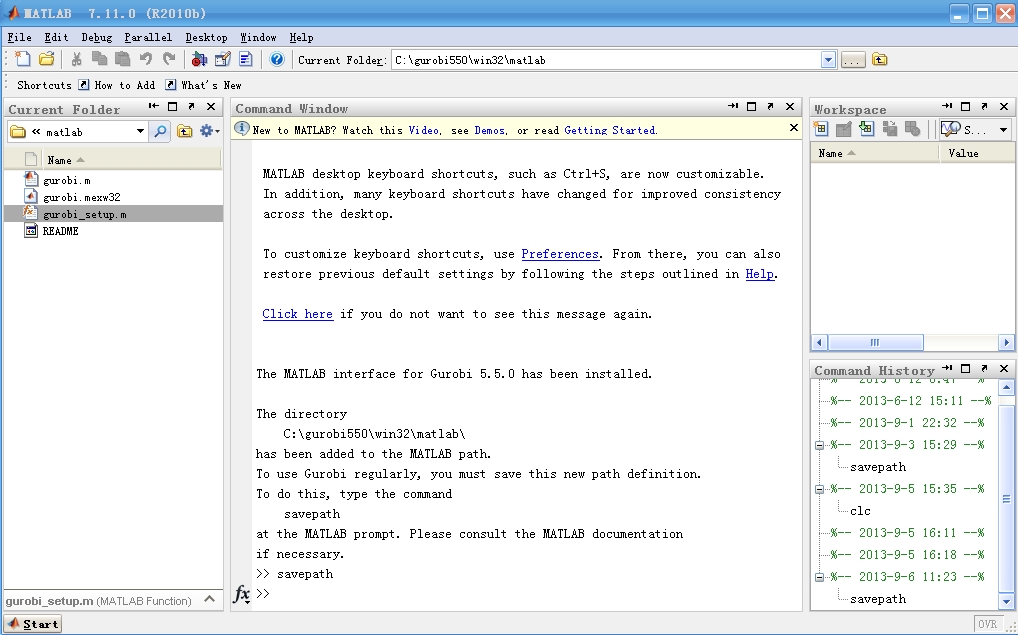
What happens if you change to the directory C:\gurobi550\win32\matlab and run:
>> gurobi_setup
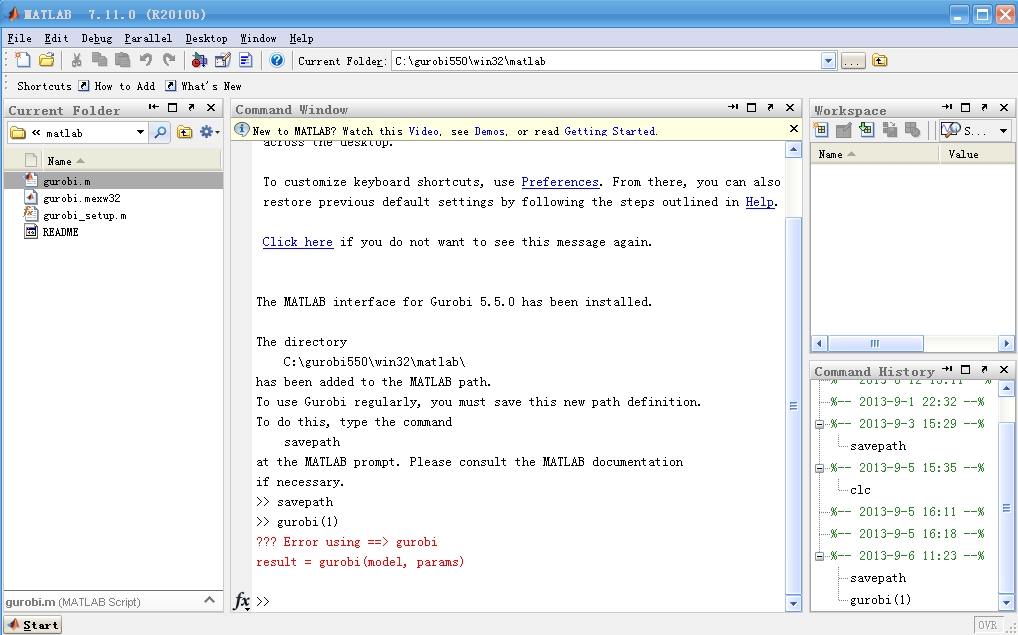
>> gurobi(1)
Can you send a screenshot of running the above commands in MATLAB?
If Gurobi is installed correctly you should see an error message like:
Error using gurobi
result = gurobi(model, params)
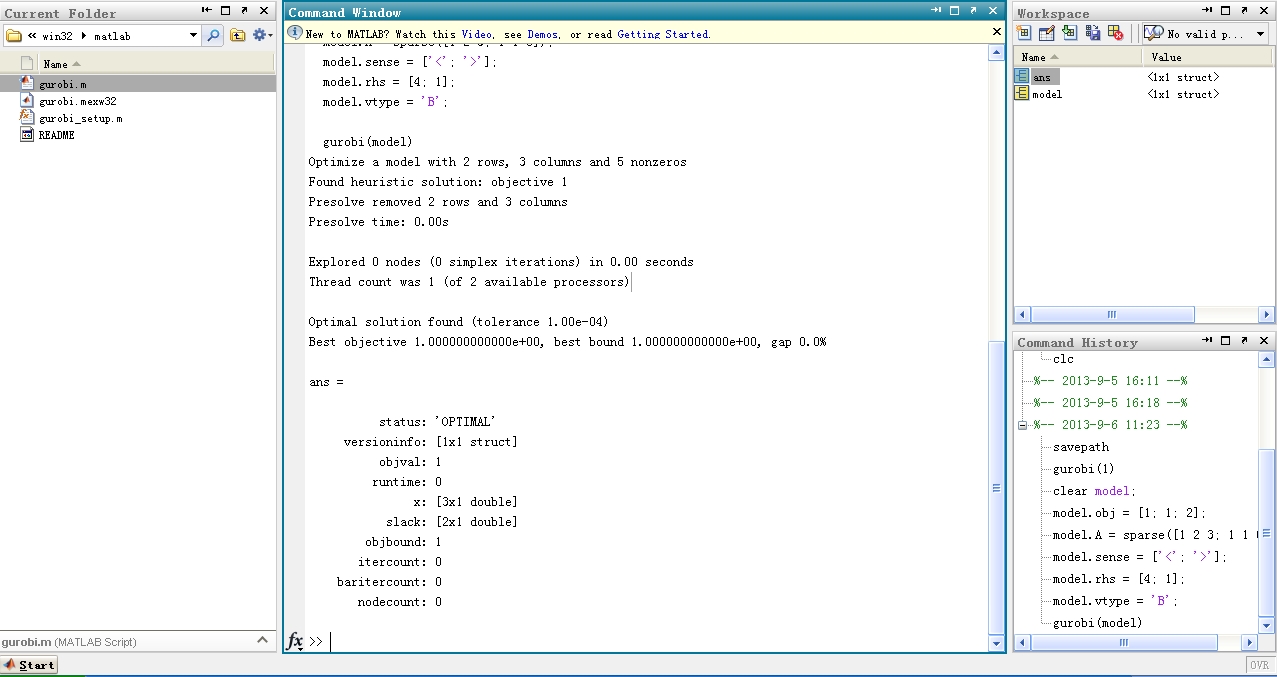
If you see that error message, the next thing to try is to solve the following simple model, by entering the commands below:
clear model;
model.obj = [1; 1; 2];
model.A = sparse([1 2 3; 1 1 0]);
model.sense = ['<'; '>'];
model.rhs = [4; 1];
model.vtype = 'B';
gurobi(model)
If Gurobi is installed correctly you should see output like "Optimal Solution found"
Chris
Kang Li
Sep 6, 2013, 12:21:38 AM9/6/13
to gur...@googlegroups.com
Thank you for your advice .
I did as you told , and the screenshot of running MATLAB shows below :
Then I run gurobi(1) : the result is below
After I run your code , matlab gives the answer :
But when I run oher code , it shows Cannot invoke gurobi : no such program

By the way ,my m-code is :
m=80;
n=100;
orig=1:m;
dest=1:n;
supply=round(n*rand(1,m)+1);
demand=round(m*rand(1,n)+1);
if sum(supply)>sum(demand)
demand(1)=demand(1)+sum(supply)-sum(demand);
else
supply(1)=supply(1)+sum(demand)-sum(supply);
end
demand=demand*sum(supply)/sum(demand);
supply=[orig(:) supply(:)];
demand=[dest(:) demand(:)];
cost=[orig(:) rand(m,n)];
dlmwrite('orig',orig,' ');
dlmwrite('dest',dest,' ');
dlmwrite('supply',supply,' ');
dlmwrite('demand',demand,' ');
dlmwrite('cost',cost,' ');
!ampl transp2.mod
delete orig
delete dest
delete supply
delete demand
delete cost
and my mod-code is :
and my mod-code is :
set ORIG; # origins
set DEST; # destinations
param supply {ORIG} >= 0; # amounts available at origins
param demand {DEST} >= 0; # amounts required at destinations
check: sum {i in ORIG} supply[i] = sum {j in DEST} demand[j];
param cost {ORIG,DEST} >= 0; # shipment costs per unit
var Trans {ORIG,DEST} >= 0; # units to be shipped
minimize Total_Cost:
sum {i in ORIG, j in DEST} cost[i,j] * Trans[i,j];
subject to Supply {i in ORIG}:
sum {j in DEST} Trans[i,j] = supply[i];
subject to Demand {j in DEST}:
sum {i in ORIG} Trans[i,j] = demand[j];
data;
set ORIG:= include orig;
set DEST:= include dest;
param supply :=include supply;
param demand :=include demand;
param cost : include dest :=
include cost;
option solver gurobi ;
solve;
The writer told me the there is no problem with the code and I should install gurobi in matlab .
As you can see , the gurobi is installed correctly in matlab , so I do not know what to do now ~
The writer told me the there is no problem with the code and I should install gurobi in matlab .
As you can see , the gurobi is installed correctly in matlab , so I do not know what to do now ~
Christopher Maes
Sep 9, 2013, 9:10:42 AM9/9/13
to gur...@googlegroups.com
Hi Kang,
From your screenshots I can tell that the Gurobi MATLAB interface is
correctly installed and working. However, it looks like you are not
using the Gurobi MATLAB interface. You are building a data file for
AMPL and then calling AMPL from MATLAB.
It's fine to do that, but you will need to make sure that AMPL and the
Gurobi-AMPL interface is correctly installed on your machine. In
particular, the error:
"gurobi". You should make sure this is in your PATH.
For more information on setting up AMPL with Gurobi, please see the
following docs:
http://www.gurobi.com/documentation/5.5/ampl-gurobi-guide/
Thanks,
Chris
From your screenshots I can tell that the Gurobi MATLAB interface is
correctly installed and working. However, it looks like you are not
using the Gurobi MATLAB interface. You are building a data file for
AMPL and then calling AMPL from MATLAB.
It's fine to do that, but you will need to make sure that AMPL and the
Gurobi-AMPL interface is correctly installed on your machine. In
particular, the error:
Cannot invoke gurobi: no such program
means that AMPL can't find the solver interface program named
"gurobi". You should make sure this is in your PATH.
For more information on setting up AMPL with Gurobi, please see the
following docs:
http://www.gurobi.com/documentation/5.5/ampl-gurobi-guide/
Thanks,
Chris
Kang Li
Sep 10, 2013, 10:49:19 AM9/10/13
to gur...@googlegroups.com
Thank you for your advice , I have worked it out .
The solution is to download "amplgurobilink5.5.0_mswin32" form
http://www.gurobi.com/download/gurobi-optimizer
and copy it to the current root of matlab with AMPL.exe
and don't forget to change the "option solver gurobi" to "option solver gurobi_ampl".
However , thanks a lot , you really do me a favour !
在 2013年9月9日星期一UTC+8下午9时10分42秒,Chris Maes写道:
The solution is to download "amplgurobilink5.5.0_mswin32" form
http://www.gurobi.com/download/gurobi-optimizer
and copy it to the current root of matlab with AMPL.exe
and don't forget to change the "option solver gurobi" to "option solver gurobi_ampl".
However , thanks a lot , you really do me a favour !
在 2013年9月9日星期一UTC+8下午9时10分42秒,Chris Maes写道:
Reply all
Reply to author
Forward
0 new messages