setting parameters has no effect for Gurobi error: out-of-memory

658 views
Skip to first unread message

sumerhu...@gmail.com

unread,
Aug 29, 2018, 1:13:37 AM8/29/18
to Gurobi Optimization
Hello,


I am using Gurobi as the solver in Julia to solve the Integer programming problem but now encountered the out-of-memory error.
![Capture|690x138](upload://pw0RtLo1Oo5ARPckAkN3dkghkEH.png) 
I understand that Gurobi has parameters such as NodefileStart and Thread to deal with this problem (http://www.gurobi.com/documentation/8.0/refman/nodefilestart.html#parameter:NodefileStart). I have been trying to use these parameters, however, error persists. For example, I set NodefileStart=0.1, but 10 hours later, Gurobi threw the error and stopped. But when I check my disks, there is no new file written. 

I am wondering 
1) am I using the code to set parameters correctly? 
It looks correct -- when I set TimeLimit=10 in the code, the solver will stop in 10 seconds. But why would there be no new files written to store the information when the memory is not enough? Below is my code:

using JuMP, Gurobi, ConditionalJuMP
env = Gurobi.Env()
m = Model(solver=GurobiSolver(env))
cd("$(homedir())/Desktop")
pwd()
setparams!(env, TimeLimit=54000, Symmetry=2, NodefileStart=0.1, NodefileDir="D:\\nodes", ResultFile="MySolution.sol")

If timelimit is reached and solver is stopped, I would use below to update parameters:

setparams!(env, MIPFocus=3, TimeLimit=7200, Cuts=3, Symmetry=2, ResultFile="MySolution.sol")
setSolver(m,GurobiSolver(env))

2) if the code to set parameters is correct, why wouldn't it work? Is it because the root cause of memory not enough is not node files but some other reasons? Then what it is?
The code is running in a virtual machine with 16 cores. I tried setting Thread=1 or 2 or 4, but has no use.


Many thanks.


Best Regards,
Summer

sumerhu...@gmail.com

unread,
Aug 29, 2018, 9:40:08 AM8/29/18
to Gurobi Optimization

Capture.PNG


Forgot to attach the error screenshot.

在 2018年8月29日星期三 UTC+8下午1:13:37,sumerhu...@gmail.com写道:

Ed Rothberg

unread,
Aug 29, 2018, 10:59:14 AM8/29/18
to Gurobi Optimization
You set parameters on models.  Here are our docs on setting parameters in Java, for reference...


It is possible to set them on environments (as the Julia interface appears to do), but that can lead to confusing behavior, since models get their own environments and changes on the original environment have no effect on the model once it has been created.

The fix in your case is to move the 'setparams' call to before the Model constructor.  The Julia interface should really be extended to allow parameters to be set on models, though.

Ed


Oscar Dowson

unread,
Aug 30, 2018, 12:50:10 AM8/30/18
to Gurobi Optimization
Just to follow up on this for anyone else who stumbles upon this issue, the Julia interface allows parameters to be set on models by passing them to the GurobiSolver object instead of the env as follows:

env = Gurobi.Env()
model = Model(solver = GurobiSolver(env, TimeLimit=10))

x-ref:
https://discourse.julialang.org/t/is-the-code-correct-to-set-parameters-in-gurobi/14226/3

Oscar

sumerhu...@gmail.com

unread,
Aug 30, 2018, 12:50:10 AM8/30/18
to Gurobi Optimization
Thank you very much Ed.

I reduced the problem size and increased the memory to 128G. Now it remains ok.

I would take note of this and try later if the problem comes out again. Thanks again!


在 2018年8月29日星期三 UTC+8下午10:59:14,Ed Rothberg写道:

sumerhu...@gmail.com

unread,
Aug 31, 2018, 3:05:10 AM8/31/18
to Gurobi Optimization
The out-of-memory problem still persists even after I set the parameter on the model:

error msg out of memory m4 2.PNG


My questions are: 

1) I reset NodefileStart and Threads but no effect. Is the code correct?
#In the first place#

using JuMP, Gurobi

env = Gurobi.Env()

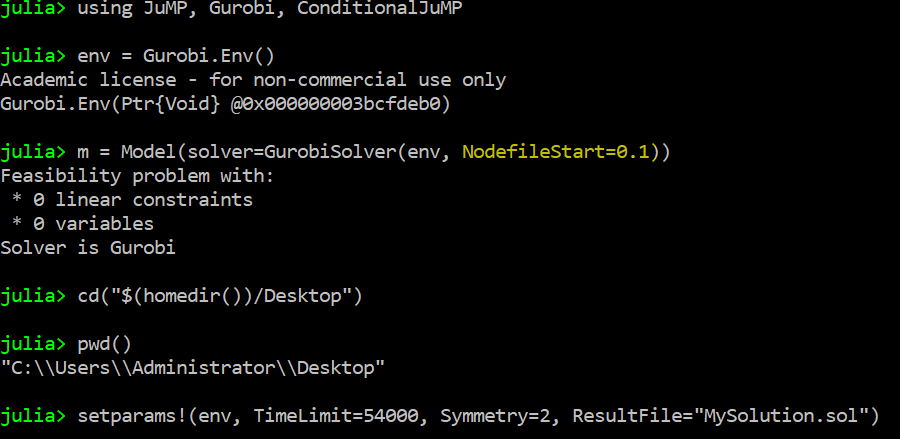
m = Model(solver=GurobiSolver(env, NodefileStart=0.1))


#after the error message comes out, I reset the solver and env but still no effect#


setparams!(env, Threads=1, NodefileStart=0.1)
setSolver(m,GurobiSolver(env, Threads=1, NodefileStart=0.1))


2) if the code is correct, why wouldn't they help? What is the root cause of the out-of-error message? 

From my observation, after defining the problem, memory remains enough. After type in "solve(m)", memory usage starts to climb up until Gurobi throws error message "out-of-memory" then memory drops to the original level.

out of memory m4 2.PNG


Besides, I found out below from Gurobi website (http://www.gurobi.com/support/faqs/index.php?id=4294958). Does below apply to my case? If so, what else can I do to continue solving the problem? 


32. What can be done to avoid an out-of-memory condition?

3. For a MIP that requires a large number of nodes, use node files, which are specially designed for optimization; they are more efficient than general-purpose virtual memory from the operating system. To use node files, set the NodefileStart parameter to a value like 0.5. Note that NodefileStart has no effect for continuous models or for MIP models that solve at or near the root node.


Thank you very much.


Best Regards,

Summer


I found some material from Gurobi website (http://www.gurobi.com/support/faqs/index.php?id=4294958), is this case fall under here?

Capture.PNG

And it looks like my computer still have some space left not to the level of no memory:

memory for m4 2.PNG

1) if yes, why would setting NodefileStart as below has no effect? Is it the code? 

code.PNG


2) if no, what is the root cause? what can I do to continue solving the problem?

Many thanks.


Best Regards,
Summer
在 2018年8月30日星期四 UTC+8下午12:50:10,sumerhu...@gmail.com写道:
Reply all
Reply to author
Forward
0 new messages