
Problems in the [mvn install]
169 views
Skip to first unread message

hongzhi huang
Mar 22, 2021, 7:30:41 AM3/22/21
to GraphWalker
Hello:
I am a beginner following [https://github.com/GraphWalker/graphwalker-project].I met this problem in the process of [mvn install].How should I solve it?
Regards
Huanghongzhi

Kristian Karl
Mar 22, 2021, 11:53:02 AM3/22/21
to GraphWalker
Hi,
From my Windows machine with java version 11.0.8 installed, I ran:
mvnw clean package
with no problem.
What output do you get when you run the following? (I assume that you run the command from a Windows command terminal)
mvnw -version
Note: The mvnw command and tool is provided by graphwalker-project. It makes sure you get the correct maven version, without the need to install it yourself.
Best Kristian
hongzhi huang
Mar 23, 2021, 10:56:20 AM3/23/21
to GraphWalker
Hello:
I still get the same error:
This is my Java version
This is the result of [mvnw Clean Package] :
And this is result of [
mvnw -version ] :
I run these code on CMD.
Regards
Huanghongzhi
Kristian Karl
Mar 23, 2021, 11:32:27 AM3/23/21
to GraphWalker
Hi,
<plugin>
<groupId>pl.project13.maven</groupId>
<artifactId>git-commit-id-plugin</artifactId>
<version>4.0.4</version>
Seams like the version 4.0.3 of the git-commit-id-plugin is not working with java 16.
Could you change the version from 4.0.3 to 4.0.4 in the pom.xml and see if it makes any difference?
The pom.xml at row 457 in the graphwalker root folder should look like:
<groupId>pl.project13.maven</groupId>
<artifactId>git-commit-id-plugin</artifactId>
<version>4.0.4</version>
Best Kristian
hongzhi huang
Mar 23, 2021, 2:36:24 PM3/23/21
to GraphWalker
Hello:
Thank you very much for your help. I have successfully installed it. But I have a problem with CLI.I don't know how to use it, when I run it do I get this:
Is this normal?
Best regards
Huanghongzhi
Kristian Karl
Mar 24, 2021, 2:40:17 AM3/24/21
to GraphWalker
Hi,
For the command line tool specifically, have a look at https://github.com/GraphWalker/graphwalker-project/wiki/Command-Line-Tool
You should also check out https://github.com/GraphWalker/graphwalker-project/wiki
Best Kristian
hongzhi huang
Mar 24, 2021, 8:14:38 AM3/24/21
to GraphWalker
Hello:
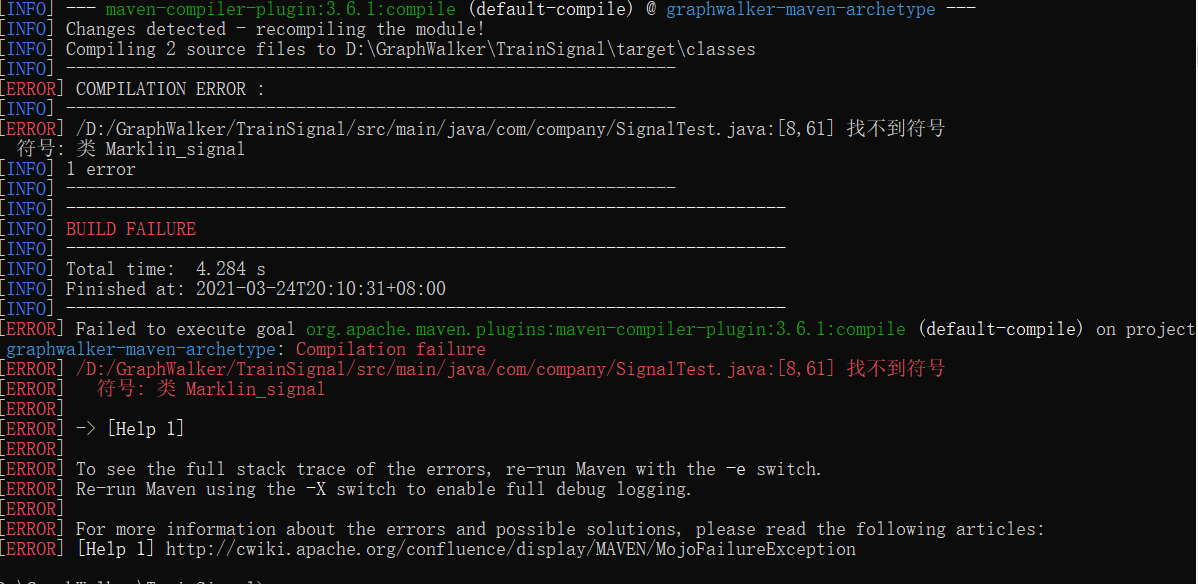
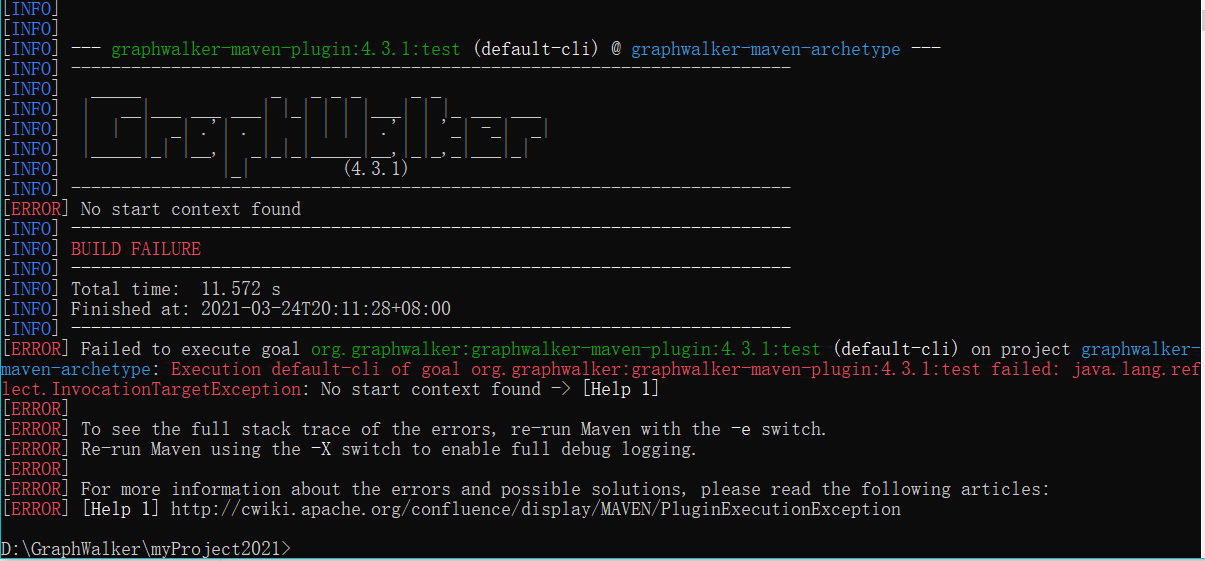
I follow the website and find that sudo does not work on CMD.So I run as administrator.But I still get the same result as before.
In addition, I am able to use Studio successfully.But always fails in testing,like this:
And this:
=====
I tried some solutions like:mvn clean,Check java\maven\graphwalker version.
But it doesn't work.
Regards
Huangghongzhi
Kristian Karl
Mar 25, 2021, 3:24:34 AM3/25/21
to GraphWalker
Hi,
Could you provide a minimal working example project of your problems?
You can follow instructions here on how to do that.
You can follow instructions here on how to do that.
Just seeing screenshots of the errors is not enough to determine the root cause of your issues I'm afraid.
Best Kristian
hongzhi huang
Mar 25, 2021, 10:37:30 AM3/25/21
to GraphWalker
Hello:
Best Huanghongzhi
Sure,this is my sample project: g...@gitee.com:hhz04/graphwalerk_personal_sample.git
Best Huanghongzhi
Kristian Karl
Mar 26, 2021, 3:31:21 AM3/26/21
to GraphWalker
Hi,
Thanks for the example project, it cleared things up.
Your model and you project looks fine :-)
1. When running the model:
$ java -jar graphwalker-cli-4-3-1.jar offline -g src/main/resources/com/company/SmallTest.json
{"currentElementName":"v_VerifyInitialState"}
{"currentElementName":"e_FirstAction"}
{"currentElementName":"v_VerifyFirstAction"}
{"currentElementName":"e_AnotherAction"}
{"currentElementName":"v_NewVertex"}
{"currentElementName":"e_SomeOtherAction"}
{"currentElementName":"v_NewVertex"}
{"currentElementName":"e_SomeOtherAction"}
{"currentElementName":"v_NewVertex"}
{"currentElementName":"e_SomeOtherAction"}
{"currentElementName":"v_NewVertex"}
{"currentElementName":"e_SomeOtherAction"}
{"currentElementName":"v_NewVertex"}
{"currentElementName":"e_SomeOtherAction"}
{"currentElementName":"v_NewVertex"}
{"currentElementName":"e_SomeOtherAction"}
{"currentElementName":"v_NewVertex"}
{"currentElementName":"e_SomeAction"}
{"currentElementName":"v_VerifyFirstAction"}
2. Using your Runner class:
$ mvn compile exec:java -Dexec.cleanupDaemonThreads=false -Dexec.mainClass="com.company.Runner"
:
:
:
08:19:13.309 [com.company.Runner.main()] DEBUG org.graphwalker.core.machine.SimpleMachine - Context: com.company.SomeSmallTest@76203f44
08:19:13.309 [com.company.Runner.main()] DEBUG org.graphwalker.core.machine.ExecutionContext - Execute method: 'e_SomeAction' in model: 'SmallTest'
Running: e_SomeAction
08:19:13.309 [com.company.Runner.main()] DEBUG org.graphwalker.core.machine.SimpleMachine - Context: com.company.SomeSmallTest@76203f44
08:19:13.309 [com.company.Runner.main()] DEBUG org.graphwalker.core.machine.ExecutionContext - Execute method: 'v_VerifyFirstAction' in model: 'SmallTest'
Running: v_VerifyFirstAction
Done: [{
"totalFailedNumberOfModels": 0,
"totalNotExecutedNumberOfModels": 0,
"totalNumberOfUnvisitedVertices": 0,
"verticesNotVisited": [],
"totalNumberOfModels": 1,
"totalCompletedNumberOfModels": 1,
"totalNumberOfVisitedEdges": 4,
"totalIncompleteNumberOfModels": 0,
"edgesNotVisited": [],
"vertexCoverage": 100,
"totalNumberOfEdges": 4,
"totalNumberOfVisitedVertices": 3,
"edgeCoverage": 100,
"totalNumberOfVertices": 3,
"totalNumberOfUnvisitedEdges": 0
}]
[INFO] ------------------------------------------------------------------------
[INFO] BUILD SUCCESS
[INFO] ------------------------------------------------------------------------
[INFO] Total time: 5.353 s
[INFO] Finished at: 2021-03-26T08:19:13+01:00
[INFO] ------------------------------------------------------------------------
:
:
Running: v_NewVertex
08:24:33.941 [main] DEBUG org.graphwalker.core.machine.SimpleMachine - Context: com.company.SomeSmallTest@43b25b5a
08:24:33.941 [main] DEBUG org.graphwalker.core.machine.ExecutionContext - Execute method: 'e_SomeAction' in model: 'SmallTest'
Running: e_SomeAction
08:24:33.941 [main] DEBUG org.graphwalker.core.machine.SimpleMachine - Context: com.company.SomeSmallTest@43b25b5a
08:24:33.941 [main] DEBUG org.graphwalker.core.machine.ExecutionContext - Execute method: 'v_VerifyFirstAction' in model: 'SmallTest'
Running: v_VerifyFirstAction
[INFO] ------------------------------------------------------------------------
[INFO]
[INFO] Result :
[INFO]
[INFO] {
"totalFailedNumberOfModels": 0,
"totalNotExecutedNumberOfModels": 0,
"totalNumberOfUnvisitedVertices": 0,
"verticesNotVisited": [],
"totalNumberOfModels": 1,
"totalCompletedNumberOfModels": 1,
"totalNumberOfVisitedEdges": 4,
"totalIncompleteNumberOfModels": 0,
"edgesNotVisited": [],
"vertexCoverage": 100,
"totalNumberOfEdges": 4,
"totalNumberOfVisitedVertices": 3,
"edgeCoverage": 100,
"totalNumberOfVertices": 3,
"totalNumberOfUnvisitedEdges": 0
}
[INFO]
[INFO] ------------------------------------------------------------------------
[INFO] BUILD SUCCESS
[INFO] ------------------------------------------------------------------------
[INFO] Total time: 6.307 s
[INFO] Finished at: 2021-03-26T08:24:34+01:00
[INFO] ------------------------------------------------------------------------
Thanks for the example project, it cleared things up.
Your model and you project looks fine :-)
1. When running the model:
$ java -jar graphwalker-cli-4-3-1.jar offline -g src/main/resources/com/company/SmallTest.json
{"currentElementName":"v_VerifyInitialState"}
{"currentElementName":"e_FirstAction"}
{"currentElementName":"v_VerifyFirstAction"}
{"currentElementName":"e_AnotherAction"}
{"currentElementName":"v_NewVertex"}
{"currentElementName":"e_SomeOtherAction"}
{"currentElementName":"v_NewVertex"}
{"currentElementName":"e_SomeOtherAction"}
{"currentElementName":"v_NewVertex"}
{"currentElementName":"e_SomeOtherAction"}
{"currentElementName":"v_NewVertex"}
{"currentElementName":"e_SomeOtherAction"}
{"currentElementName":"v_NewVertex"}
{"currentElementName":"e_SomeOtherAction"}
{"currentElementName":"v_NewVertex"}
{"currentElementName":"e_SomeOtherAction"}
{"currentElementName":"v_NewVertex"}
{"currentElementName":"e_SomeAction"}
{"currentElementName":"v_VerifyFirstAction"}
2. Using your Runner class:
$ mvn compile exec:java -Dexec.cleanupDaemonThreads=false -Dexec.mainClass="com.company.Runner"
:
:
:
08:19:13.309 [com.company.Runner.main()] DEBUG org.graphwalker.core.machine.SimpleMachine - Context: com.company.SomeSmallTest@76203f44
08:19:13.309 [com.company.Runner.main()] DEBUG org.graphwalker.core.machine.ExecutionContext - Execute method: 'e_SomeAction' in model: 'SmallTest'
Running: e_SomeAction
08:19:13.309 [com.company.Runner.main()] DEBUG org.graphwalker.core.machine.SimpleMachine - Context: com.company.SomeSmallTest@76203f44
08:19:13.309 [com.company.Runner.main()] DEBUG org.graphwalker.core.machine.ExecutionContext - Execute method: 'v_VerifyFirstAction' in model: 'SmallTest'
Running: v_VerifyFirstAction
Done: [{
"totalFailedNumberOfModels": 0,
"totalNotExecutedNumberOfModels": 0,
"totalNumberOfUnvisitedVertices": 0,
"verticesNotVisited": [],
"totalNumberOfModels": 1,
"totalCompletedNumberOfModels": 1,
"totalNumberOfVisitedEdges": 4,
"totalIncompleteNumberOfModels": 0,
"edgesNotVisited": [],
"vertexCoverage": 100,
"totalNumberOfEdges": 4,
"totalNumberOfVisitedVertices": 3,
"edgeCoverage": 100,
"totalNumberOfVertices": 3,
"totalNumberOfUnvisitedEdges": 0
}]
[INFO] ------------------------------------------------------------------------
[INFO] BUILD SUCCESS
[INFO] ------------------------------------------------------------------------
[INFO] Total time: 5.353 s
[INFO] Finished at: 2021-03-26T08:19:13+01:00
[INFO] ------------------------------------------------------------------------
3. Using mvn graphwalker:test
But if you want to use the graphwalker:test plugin, you need to add the @Graphwalker annotation to your
model class implementation. Grapphwalker does not use the generator and start element information
from the model json file when using the plugin.
This is what you need to add:
$ git diff
diff --git a/myProject2021/src/main/java/com/company/SomeSmallTest.java b/myProject2021/src/main/java/com/company/SomeSmallTest.java
index a0e26d7..ecb303d 100644
--- a/myProject2021/src/main/java/com/company/SomeSmallTest.java
+++ b/myProject2021/src/main/java/com/company/SomeSmallTest.java
@@ -1,6 +1,7 @@
package com.company;
import org.graphwalker.core.machine.ExecutionContext;
+import org.graphwalker.java.annotation.GraphWalker;
/**
* Implements the GraphWalker model: src/main/resources/SmallTest.json
@@ -9,6 +10,7 @@ import org.graphwalker.core.machine.ExecutionContext;
* running: mvn graphwalker:generate-sources
* also: mvn compile
*/
+@GraphWalker(start = "v_VerifyInitialState")
public class SomeSmallTest extends ExecutionContext implements SmallTest {
@Override
Now you can run:
$ mvn graphwalker:test:
:
Running: v_NewVertex
08:24:33.941 [main] DEBUG org.graphwalker.core.machine.SimpleMachine - Context: com.company.SomeSmallTest@43b25b5a
08:24:33.941 [main] DEBUG org.graphwalker.core.machine.ExecutionContext - Execute method: 'e_SomeAction' in model: 'SmallTest'
Running: e_SomeAction
08:24:33.941 [main] DEBUG org.graphwalker.core.machine.SimpleMachine - Context: com.company.SomeSmallTest@43b25b5a
08:24:33.941 [main] DEBUG org.graphwalker.core.machine.ExecutionContext - Execute method: 'v_VerifyFirstAction' in model: 'SmallTest'
Running: v_VerifyFirstAction
[INFO] ------------------------------------------------------------------------
[INFO]
[INFO] Result :
[INFO]
[INFO] {
"totalFailedNumberOfModels": 0,
"totalNotExecutedNumberOfModels": 0,
"totalNumberOfUnvisitedVertices": 0,
"verticesNotVisited": [],
"totalNumberOfModels": 1,
"totalCompletedNumberOfModels": 1,
"totalNumberOfVisitedEdges": 4,
"totalIncompleteNumberOfModels": 0,
"edgesNotVisited": [],
"vertexCoverage": 100,
"totalNumberOfEdges": 4,
"totalNumberOfVisitedVertices": 3,
"edgeCoverage": 100,
"totalNumberOfVertices": 3,
"totalNumberOfUnvisitedEdges": 0
}
[INFO]
[INFO] ------------------------------------------------------------------------
[INFO] BUILD SUCCESS
[INFO] ------------------------------------------------------------------------
[INFO] Total time: 6.307 s
[INFO] Finished at: 2021-03-26T08:24:34+01:00
[INFO] ------------------------------------------------------------------------
I hoped it helped, Kristian
hongzhi huang
Mar 26, 2021, 10:17:01 AM3/26/21
to GraphWalker
Hello:

Thank you! It worked.
But there still exists problem in another sample even if I tried this method , maybe it's not for the same reason.
Could you confirm whether this problem is the problem of the sample itself or my setting is wrong.
Project : g...@gitee.com:hhz04/graphwalerk_signal_sample.git
Best regards
Huanghongzhi
Kristian Karl
Mar 30, 2021, 3:29:46 AM3/30/21
to GraphWalker
Hi,
I think your problem is in the pom.xml file. There are different versions of graphwalker mentioned.
Try this patch:
Try this patch:
$ git diff pom.xml
diff --git a/TrainSignal/pom.xml b/TrainSignal/pom.xml
index 4a4d114..4c661e5 100644
--- a/TrainSignal/pom.xml
+++ b/TrainSignal/pom.xml
@@ -31,12 +31,12 @@
<modelVersion>4.0.0</modelVersion>
<groupId>org.graphwalker</groupId>
- <version>4.0.1</version>
+ <version>4.3.1</version>^M
<artifactId>graphwalker-maven-archetype</artifactId>
<name>GraphWalker Example</name>
<properties>
- <graphwalker.version>4.0.1</graphwalker.version>
+ <graphwalker.version>4.3.1</graphwalker.version>^M
<project.build.sourceEncoding>UTF-8</project.build.sourceEncoding>
<project.reporting.outputEncoding>UTF-8</project.reporting.outputEncoding>
</properties>
@@ -45,7 +45,7 @@
<dependency>
<groupId>org.graphwalker</groupId>
<artifactId>graphwalker-core</artifactId>
- <version>4.3.1</version>
+ <version>${graphwalker.version}</version>^M
</dependency>
<dependency>
<groupId>org.graphwalker</groupId>
hongzhi huang
Apr 4, 2021, 4:42:39 PM4/4/21
to GraphWalker
Hello:
I'm sorry for the late reply. Thank you very much. All my problems have been solved.
Best regards
Huanghongzhi
Reply all
Reply to author
Forward
0 new messages