
When attempting to creating a new project in IntelliJ: java.lang.NoSuchFieldError: USE_COMPILE_SERVER
733 views
Skip to first unread message

Casey Banner
Jul 24, 2014, 9:31:25 PM7/24/14
to gosu...@googlegroups.com
I have installed the Gosu IntelliJ plugin (I tried both via the repo, and via zip file). The JDK I have is 1.8. The Default Gosu SDK does show up in my project defaults.
When attempting to create a new project I get this error:
Plugin 'com.guidewire.gosu' failed to initialize and will be disabled. Please restart IntelliJ IDEA.
java.lang.NoSuchFieldError: USE_COMPILE_SERVER
at gw.plugin.ij.core.PluginLoaderUtil.disableIJExternalCompiler(PluginLoaderUtil.java:382)
at gw.plugin.ij.core.GosuProjectComponent.initComponent(GosuProjectComponent.java:68)
at com.intellij.openapi.components.impl.ComponentManagerImpl$ComponentConfigComponentAdapter$1.getComponentInstance(ComponentManagerImpl.java:548)
at com.intellij.openapi.components.impl.ComponentManagerImpl$ComponentConfigComponentAdapter.getComponentInstance(ComponentManagerImpl.java:590)
at com.intellij.util.pico.DefaultPicoContainer.getLocalInstance(DefaultPicoContainer.java:225)
at com.intellij.util.pico.DefaultPicoContainer.getInstance(DefaultPicoContainer.java:212)
at com.intellij.util.pico.DefaultPicoContainer.getComponentInstance(DefaultPicoContainer.java:199)
at org.picocontainer.alternatives.AbstractDelegatingMutablePicoContainer.getComponentInstance(AbstractDelegatingMutablePicoContainer.java:75)
at com.intellij.openapi.components.impl.ComponentManagerImpl.createComponent(ComponentManagerImpl.java:121)
at com.intellij.openapi.components.impl.ComponentManagerImpl.createComponents(ComponentManagerImpl.java:112)
at com.intellij.openapi.components.impl.ComponentManagerImpl.init(ComponentManagerImpl.java:89)
at com.intellij.openapi.project.impl.ProjectImpl.init(ProjectImpl.java:296)
at com.intellij.openapi.project.impl.ProjectManagerImpl.initProject(ProjectManagerImpl.java:280)
at com.intellij.openapi.project.impl.ProjectManagerImpl.newProject(ProjectManagerImpl.java:233)
at com.intellij.openapi.project.ex.ProjectManagerEx.createProject(ProjectManagerEx.java:71)
at com.intellij.ide.util.projectWizard.ProjectBuilder.createProject(ProjectBuilder.java:79)
at com.intellij.ide.impl.NewProjectUtil.doCreate(NewProjectUtil.java:110)
at com.intellij.ide.impl.NewProjectUtil.createFromWizard(NewProjectUtil.java:80)
at com.intellij.ide.impl.NewProjectUtil.createNewProject(NewProjectUtil.java:75)
at com.intellij.ide.actions.NewProjectAction.actionPerformed(NewProjectAction.java:28)
at com.intellij.openapi.actionSystem.ex.ActionUtil.performActionDumbAware(ActionUtil.java:164)
at com.intellij.openapi.actionSystem.impl.ActionButton.actionPerformed(ActionButton.java:170)
at com.intellij.openapi.actionSystem.impl.ActionButton.performAction(ActionButton.java:133)
at com.intellij.openapi.actionSystem.impl.ActionButton.processMouseEvent(ActionButton.java:313)
at java.awt.Component.processEvent(Component.java:6281)
at java.awt.Container.processEvent(Container.java:2229)
at java.awt.Component.dispatchEventImpl(Component.java:4872)
at java.awt.Container.dispatchEventImpl(Container.java:2287)
at java.awt.Component.dispatchEvent(Component.java:4698)
at java.awt.LightweightDispatcher.retargetMouseEvent(Container.java:4832)
at java.awt.LightweightDispatcher.processMouseEvent(Container.java:4492)
at java.awt.LightweightDispatcher.dispatchEvent(Container.java:4422)
at java.awt.Container.dispatchEventImpl(Container.java:2273)
at java.awt.Window.dispatchEventImpl(Window.java:2719)
at java.awt.Component.dispatchEvent(Component.java:4698)
at java.awt.EventQueue.dispatchEventImpl(EventQueue.java:735)
at java.awt.EventQueue.access$200(EventQueue.java:103)
at java.awt.EventQueue$3.run(EventQueue.java:694)
at java.awt.EventQueue$3.run(EventQueue.java:692)
at java.security.AccessController.doPrivileged(Native Method)
at java.security.ProtectionDomain$1.doIntersectionPrivilege(ProtectionDomain.java:76)
at java.security.ProtectionDomain$1.doIntersectionPrivilege(ProtectionDomain.java:87)
at java.awt.EventQueue$4.run(EventQueue.java:708)
at java.awt.EventQueue$4.run(EventQueue.java:706)
at java.security.AccessController.doPrivileged(Native Method)
at java.security.ProtectionDomain$1.doIntersectionPrivilege(ProtectionDomain.java:76)
at java.awt.EventQueue.dispatchEvent(EventQueue.java:705)
at com.intellij.ide.IdeEventQueue.defaultDispatchEvent(IdeEventQueue.java:697)
at com.intellij.ide.IdeEventQueue._dispatchEvent(IdeEventQueue.java:520)
at com.intellij.ide.IdeEventQueue.dispatchEvent(IdeEventQueue.java:335)
at java.awt.EventDispatchThread.pumpOneEventForFilters(EventDispatchThread.java:242)
at java.awt.EventDispatchThread.pumpEventsForFilter(EventDispatchThread.java:161)
at java.awt.EventDispatchThread.pumpEventsForHierarchy(EventDispatchThread.java:150)
at java.awt.EventDispatchThread.pumpEvents(EventDispatchThread.java:146)
at java.awt.EventDispatchThread.pumpEvents(EventDispatchThread.java:138)
at java.awt.EventDispatchThread.run(EventDispatchThread.java:91)

Luca Boasso
Jul 24, 2014, 11:39:51 PM7/24/14
to gosu...@googlegroups.com
The stable one is working on Java 7, you can get a Gosu plugin compatible with Java 8 here:
http://gosu-lang.org/nexus/content/repositories/snapshots/com/guidewire/studio/idea-gosu-plugin/3-java8-SNAPSHOT/idea-gosu-plugin-3-java8-20140724.203235-1-plugin.zip
It's still experimental and you have to install it from disk. It woks on Intellij 12http://gosu-lang.org/nexus/content/repositories/snapshots/com/guidewire/studio/idea-gosu-plugin/3-java8-SNAPSHOT/idea-gosu-plugin-3-java8-20140724.203235-1-plugin.zip
--
You received this message because you are subscribed to the Google Groups "gosu-lang" group.
To unsubscribe from this group and stop receiving emails from it, send an email to gosu-lang+...@googlegroups.com.
To post to this group, send email to gosu...@googlegroups.com.
Visit this group at http://groups.google.com/group/gosu-lang.
For more options, visit https://groups.google.com/d/optout.

Hertz
Jul 28, 2014, 7:28:38 PM7/28/14
to gosu...@googlegroups.com
Using Java 7 and following all the steps multiple times I get the same error as Casey.
Luca Boasso
Jul 28, 2014, 7:52:53 PM7/28/14
to gosu...@googlegroups.com
Could you please list the steps you followed?
On Mon, Jul 28, 2014 at 4:28 PM, Hertz <develop...@gmail.com> wrote:
Using Java 7 and following all the steps multiple times I get the same error as Casey.
--
Hertz
Jul 28, 2014, 8:03:28 PM7/28/14
to gosu...@googlegroups.com
1. I installed the plugin by follow in the steps in the Gosu Reference Guide
2. I checked to make sure Java 7 was installed correctly. I'm using jdk1.7
3. I checked to make sure Groovy was disabled and that Gosu was in the plugin list
4. I checked to make sure Default Gosu SDK was correct
5. Restart IDEA and clicked new project
6. Selected Gosu module on the left side ( no other options ) and clicked next
7. Put in a project name and selected the Default Gosu SDK and clicked finish.
This is were the error appeared. I am running Windows 8.1 64-bit
Java version 1.07._65
Luca Boasso
Jul 28, 2014, 8:08:21 PM7/28/14
to gosu...@googlegroups.com
after step 7, once you open your new project, if you go to Project Structure > Project > Project SDK, do you see selected Default Gosu SDK?
Hertz
Jul 28, 2014, 9:50:27 PM7/28/14
to gosu...@googlegroups.com
I can choose my SDK during step 7 and I choose Default Gosu SDK but after step 7 it crashes. So I cant open a project.
Luca Boasso
Jul 28, 2014, 10:58:26 PM7/28/14
to gosu...@googlegroups.com
Could you please join this our IRC channel http://webchat.freenode.net/?channels=gosulang
so that we can solve troubleshoot the issue together?
I'm onlineso that we can solve troubleshoot the issue together?
On Mon, Jul 28, 2014 at 6:50 PM, Hertz <develop...@gmail.com> wrote:
I can choose my SDK during step 7 and I choose Default Gosu SDK but after step 7 it crashes. So I cant open a project.
--
hertz developer
Jul 28, 2014, 11:01:03 PM7/28/14
to gosu...@googlegroups.com
I can't tonight but I will see if I can get on tommorow I will let you know
Luca Boasso
Jul 28, 2014, 11:05:45 PM7/28/14
to gosu...@googlegroups.com
Sure no problem.
I haven't seen that error before so it would be nice if I can reproduce it as well so that I can fix it.On Mon, Jul 28, 2014 at 8:01 PM, hertz developer <develop...@gmail.com> wrote:
I can't tonight but I will see if I can get on tommorow I will let you know
--

Maciek J
Aug 5, 2014, 9:29:01 AM8/5/14
to gosu...@googlegroups.com
I have the same error, did you solve it guys?
Luca Boasso
Aug 5, 2014, 11:50:01 AM8/5/14
to gosu...@googlegroups.com
I was not able to reproduce the issue.
Could you join this IRC chat?http://webchat.freenode.net/?channels=gosulang
Hertz
Aug 5, 2014, 12:44:59 PM8/5/14
to gosu...@googlegroups.com
Turns out for me I was using IDEA version 13 instead of 12. I would make sure you don't have the latest version of IDEA but IDEA 12.
Then you follow the instructions here : http://gosu-lang.github.io/doc/wwhelp/wwhimpl/js/html/wwhelp.htm#href=Gosu%20Reference%20Guide/getting-started-gosu-opensource.04.2.html#1520477
You can find older versions of IntelliJ IDEA here : http://confluence.jetbrains.com/display/IntelliJIDEA/Previous+IntelliJ+IDEA+Releases?_ga=1.257930443.1754597842.1407255742
If you still get an error I would check with Luca on the IRC.
Then you follow the instructions here : http://gosu-lang.github.io/doc/wwhelp/wwhimpl/js/html/wwhelp.htm#href=Gosu%20Reference%20Guide/getting-started-gosu-opensource.04.2.html#1520477
You can find older versions of IntelliJ IDEA here : http://confluence.jetbrains.com/display/IntelliJIDEA/Previous+IntelliJ+IDEA+Releases?_ga=1.257930443.1754597842.1407255742
If you still get an error I would check with Luca on the IRC.
Luca Boasso
Aug 5, 2014, 12:45:18 PM8/5/14
to gosu...@googlegroups.com
Apparently the root cause was that the Gosu plugin was installed on Intellij 13 while we currently support only Intellij 12.
You can find Intellij 12 here:
http://download.jetbrains.com/idea/ideaIC-12.1.4.exe
You can find Intellij 12 here:
http://download.jetbrains.com/idea/ideaIC-12.1.4.exe

Carlos Quintanilla
Dec 2, 2014, 11:51:38 AM12/2/14
to gosu...@googlegroups.com
Hi There,
It looks like the link to download Intellij 12.x (http://download.jetbrains.com/idea/ideaIC-12.1.4.exe) is not accessible anymore. If anyone is experiencing the same, you can also download it from CNET: http://download.cnet.com/IntelliJ-IDEA-Community-Edition/3000-2212_4-75126090.html
and then click on the link called: Direct Download Link
Carlos
Luca Boasso
Dec 2, 2014, 12:40:42 PM12/2/14
to gosu...@googlegroups.com
Thanks, I'll update the website shortly with that link

Brian Chang
Dec 2, 2014, 6:53:29 PM12/2/14
to gosu...@googlegroups.com
Don't link to CNET - here's the current location of Jetbrains' archive of previous releases:
http://confluence.jetbrains.com/display/IntelliJIDEA/Previous+IntelliJ+IDEA+Releases
http://confluence.jetbrains.com/display/IntelliJIDEA/Previous+IntelliJ+IDEA+Releases
There's a link to this on the main download page. Search for "previous versions"
Luca Boasso
Dec 2, 2014, 7:13:21 PM12/2/14
to gosu...@googlegroups.com
I was already linking at that one but they removed the minor version 12.1.4.
I'll point to the more "recent" http://download.jetbrains.com/idea/ideaIC-12.1.7b.exeCarlos Quintanilla
Dec 5, 2014, 2:16:45 PM12/5/14
to gosu...@googlegroups.com
Hi There,
Thanks for the link to the latest version 12.1.7, I downloaded it and installed the 3.7 plug-in successfully.
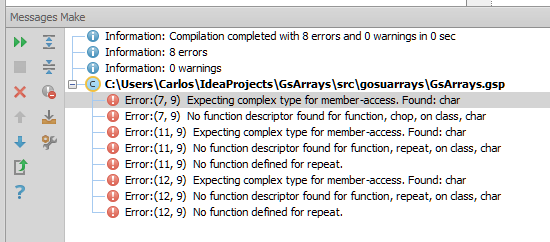
I'm writing a very simple program based on the getting started page and got the following:

Looks like string literals of single character using single quotes cannot access the String enhancements. Adding one extra character to the single quoted string literal works fine.
I didn't test the program without the IDE so maybe it is an IDE bug.
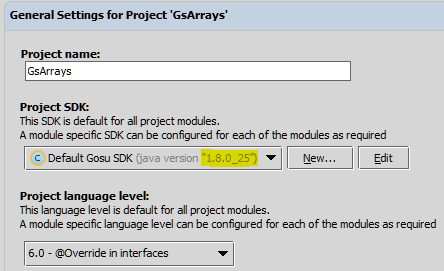
These are my settings:

Regards,
Carlos
Luca Boasso
Dec 5, 2014, 2:37:41 PM12/5/14
to gosu...@googlegroups.com
String literals enclosed in single quotes and of length 1 are treated as chars .
On the other hand you can do this:
var s : String = 'c' // Explicitly declaring the type
s.length()
var l = ('c' as String).length //Casting to String
To unsubscribe from this group and stop receiving emails from it, send an email to gosu-lang+unsubscribe@googlegroups.com.
To post to this group, send email to gosu...@googlegroups.com.
Visit this group at http://groups.google.com/group/gosu-lang.
For more options, visit https://groups.google.com/d/optout.
--
You received this message because you are subscribed to the Google Groups "gosu-lang" group.
To unsubscribe from this group and stop receiving emails from it, send an email to gosu-lang+unsubscribe@googlegroups.com.
To post to this group, send email to gosu...@googlegroups.com.
Visit this group at http://groups.google.com/group/gosu-lang.
For more options, visit https://groups.google.com/d/optout.
--
You received this message because you are subscribed to the Google Groups "gosu-lang" group.
To unsubscribe from this group and stop receiving emails from it, send an email to gosu-lang+unsubscribe@googlegroups.com.
To post to this group, send email to gosu...@googlegroups.com.
Visit this group at http://groups.google.com/group/gosu-lang.
For more options, visit https://groups.google.com/d/optout.
--
You received this message because you are subscribed to the Google Groups "gosu-lang" group.
To unsubscribe from this group and stop receiving emails from it, send an email to gosu-lang+unsubscribe@googlegroups.com.
To post to this group, send email to gosu...@googlegroups.com.
Visit this group at http://groups.google.com/group/gosu-lang.
For more options, visit https://groups.google.com/d/optout.
--
You received this message because you are subscribed to the Google Groups "gosu-lang" group.
To unsubscribe from this group and stop receiving emails from it, send an email to gosu-lang+unsubscribe@googlegroups.com.

Siva Nasanakota
Aug 11, 2015, 10:01:19 AM8/11/15
to gosu-lang
Hi Luca,
I have installed Intelli J Studio Community Edition (12.1.7) ,disabled groovy and dependency plugins, added Gosu Plugin 3.7. My machine has JDK 1.6.0_30 set as JAVA_HOME as environment variable. I will be neededing it for some of my older applicaitons to run. I know the setup I have works with JDK1.7.0_79, but don't know how to override Default Gosu SDK in intelliJ. Any suggestions?
-Siva
I have installed Intelli J Studio Community Edition (12.1.7) ,disabled groovy and dependency plugins, added Gosu Plugin 3.7. My machine has JDK 1.6.0_30 set as JAVA_HOME as environment variable. I will be neededing it for some of my older applicaitons to run. I know the setup I have works with JDK1.7.0_79, but don't know how to override Default Gosu SDK in intelliJ. Any suggestions?
-Siva
Siva Nasanakota
Aug 11, 2015, 10:30:59 AM8/11/15
to gosu-lang
Hi Luca.
I was able to figure it out myself. Below are the steps I did.
1 ) ALT + SHIT + CTLRL + S -> Settings->SDK
2) Remove 1.6 (old) jdk
3) Added 1.7 JDK
4) On Default Gosu SDK ( Removed all JARS related to 1.6 jars and added 1.7 jars for Tools and Lib folder in JDKs). Done same with Source Path as well.
Restarted the intellij and it did the trick..
-Siva
I was able to figure it out myself. Below are the steps I did.
1 ) ALT + SHIT + CTLRL + S -> Settings->SDK
2) Remove 1.6 (old) jdk
3) Added 1.7 JDK
4) On Default Gosu SDK ( Removed all JARS related to 1.6 jars and added 1.7 jars for Tools and Lib folder in JDKs). Done same with Source Path as well.
Restarted the intellij and it did the trick..
-Siva

Pradeep Kumar Batchu
Aug 23, 2015, 9:11:09 PM8/23/15
to gosu-lang
Hi,
I see this is old thread, Hope plug in and version might be updated by now. I installed latest version of intellijIdea. Here is my setting.
IntelliJ IDEA: Version 14.1.4
Gosu Plug in latest from repository.
Project SDK: SDK 1.7.0_13
I am getting the same error.
Please help me out in this set up.
Thanks,
Pradeep
Pradeep Kumar Batchu
Aug 23, 2015, 10:18:24 PM8/23/15
to gosu-lang
I updated JDK to 1.8.0.60. still not working
Pradeep Kumar Batchu
Aug 23, 2015, 10:20:07 PM8/23/15
to gosu-lang
Gosu version:1.6.1
Plugin: idea-gosu-plugin-3.10.1
Luca Boasso
Aug 24, 2015, 2:55:29 PM8/24/15
to gosu...@googlegroups.com
You have to use intellij 12
http://download.jetbrains.com/idea/ideaIC-12.1.7b.exe
Pradeep Kumar Batchu
Aug 27, 2015, 12:26:31 AM8/27/15
to gosu-lang
I already installed the 12.1.7b version and installed gosu plug in. On start of the intellij, i am getting following error

Java version i am using is JDK 1.8.0_60
Pradeep Kumar Batchu
Aug 27, 2015, 1:01:13 AM8/27/15
to gosu-lang
I have done following as well.
1.changed java_home to 1.7
2.installed3.1 version gosu plug in
3. Now i am getting following error. Please help

Pradeep Kumar Batchu
Aug 27, 2015, 2:08:21 AM8/27/15
to gosu-lang
IT WORKED!!!!!!!!!!
Installed version 12.1.7b intellij
Associated project SDK as jdk 1.7
Gosu plug in used is 3.7
I am able to open the Gosu module successfully with out any issues.
Luca thanks for your help.
Reply all
Reply to author
Forward
0 new messages