
Mojo's Maven Plugin for GWT - general questions
461 views
Skip to first unread message

Magnus
Feb 25, 2017, 11:35:44 PM2/25/17
to GWT Users
Hello,
Thanks
Magnus
I am evaluating Mojo's Maven Plugin for GWT using GWT:2.8.0 and Eclipse Neon.
The docs contain some statements that don't work in my environment.
Using Eclipse:The Google Plugin for Eclipse automatically handles launching DevMode with a simple right click on your module gwt.xml file "run as > web application".
When I right-click on my gwt.xml-file, the menu entry "Run As" doesn't contain such a command. It only contains "Run Configurations...".
In addition, how can I start a debug session that stops on breakpoints in the server-side part of the code?
Another point are all the modifications of the pom.xml file suggested by the docs.
Do you have to add them manually to the pom.xml file? I thought that everything is generated when using the maven artefact?
Thanks
Magnus

Rodolfo Raya
Feb 26, 2017, 6:28:12 AM2/26/17
to google-we...@googlegroups.com
Hi,
In "Package Explorer" right click on the project and there you can select "Run As" -> "Web Application".
Regards,
Rodolfo
--
You received this message because you are subscribed to the Google Groups "GWT Users" group.
To unsubscribe from this group and stop receiving emails from it, send an email to google-web-tool...@googlegroups.com.
To post to this group, send email to google-we...@googlegroups.com.
Visit this group at https://groups.google.com/group/google-web-toolkit.
For more options, visit https://groups.google.com/d/optout.
Magnus
Feb 26, 2017, 9:58:37 AM2/26/17
to GWT Users
Hello Rodolfo,
What's wrong?
Thanks
Magnus
no, I don't have that:

It's a fresh Eclipse Neon installation with a working GWT eclipse plugin (The other GWT related menu entries are present.)
The project was created like this:
mvn archetype:generate \-DarchetypeGroupId=org.codehaus.mojo \-DarchetypeArtifactId=gwt-maven-plugin \-DarchetypeVersion=2.8.0
Then, it was imported into eclipse by selecting "Import existing maven projects".
What's wrong?
Thanks
Magnus
Rodolfo Raya
Feb 26, 2017, 11:47:31 AM2/26/17
to google-we...@googlegroups.com
Hi,
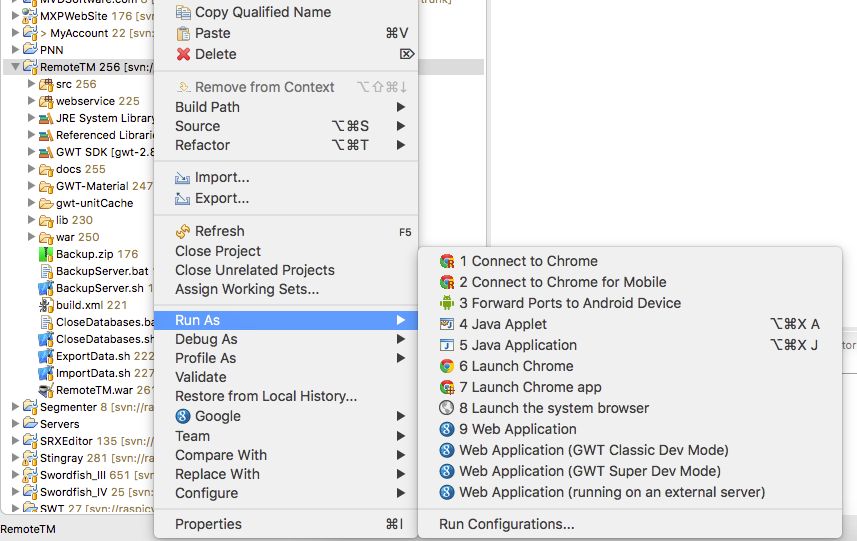
I create projects using Google Plugin for Eclipse. If I want to have it under Maven, I then add Maven nature to the project.
If you start by creating the project with the Google plugin, you will see this:
Once you have a GWT-based project, you can right click on the project and select "Configure" > "Convert to Maven Project"
Hope this helps,
Rodolfo
--
Magnus
Feb 26, 2017, 2:01:29 PM2/26/17
to GWT Users
Hello Rodolfo,
Thanks
Magnus
ok, this is an explanation, thanks!
But I'd prefer to create projects in maven and import them as existing maven projects for several reasons, which are not important here.
One of them is that eclipse should be the optional component here, as an IDE, one of many, which should not be essential to project creation.
Given that you can run the project with "mvn gwt:run": Can you add the debug launchers manually?
What about "mvn eclipse:eclipse", which shouldn't be used anymore, as told in another thread?
Thanks
Magnus
Rodolfo Raya
Feb 26, 2017, 5:13:47 PM2/26/17
to google-we...@googlegroups.com
Hi,
I can't help you with Maven commands. I only use it for managing some dependencies in a few projects that force me to use Maven.
Creating GWT projects with the plugin allows me to run and debug. That's all I need.
Best,
Rodolfo
--
Magnus
Feb 26, 2017, 10:09:27 PM2/26/17
to GWT Users
Hi Rodolfo,
I am using the GWT plugin for eclipse since I know GWT. One goal with moving to maven is to be able to do most of the important things on the command line and to be independent of eclipse and the eclipse plugin.
thank you for your help!
I am using the GWT plugin for eclipse since I know GWT. One goal with moving to maven is to be able to do most of the important things on the command line and to be independent of eclipse and the eclipse plugin.
But wait! Even the documentation of Mojo's Maven plugin shows how to create a GWT project with the mvn command:
Using the Archetype
Use it as you would any other Maven archetype to create a template/stub project.
 mvn archetype:generate \
   -DarchetypeGroupId=org.codehaus.mojo \
   -DarchetypeArtifactId=gwt-maven-plugin \
   -DarchetypeVersion=2.8.0
And then it says how to use it in eclipse:
Using Eclipse
The Google Plugin for Eclipse automatically handles launching DevMode with a simple right click on your module gwt.xml file "run as > web application".
This means that it should be possible (and intended) to use existing maven projects in eclipse like shown by the docs.
I still must be doing something wrong and I hope that someone can clarify this...
Magnus

Ignacio Baca Moreno-Torres
Feb 27, 2017, 2:29:03 AM2/27/17
to GWT Users
But you are using the old eclipse plugin with the old maven plugin, try this tutorial https://youtu.be/xeanOpvrbBQ, and watch all other recent videos in this channel.
Magnus
Feb 27, 2017, 9:48:51 PM2/27/17
to GWT Users
Hello Ignacio,
Thanks
Magnus
thank you for the Youtube-Link.
Concerning the old GWT plugin:
I am using Eclipse Neon with the corresponding GWT plugin from here:
This is the official GWT plugin for Eclipse Neon. Is this outdated??
Concerning the old maven plugin:
It shows how to create a Maven project using eclipse. But I'd prefer to create it outside eclipse, like shown in the documentation for Mojo's Maven plugin:
[https://gwt-maven-plugin.github.io/gwt-maven-plugin/user-guide/archetype.html]
Is this documentation outdated? Where can I find the new one?
Anyhow, I would prefer to create the project outside eclipse (like shown in the documentation above). How can I do that?
Thanks
Magnus

Thomas Broyer
Feb 28, 2017, 4:25:58 AM2/28/17
to GWT Users
On Tuesday, February 28, 2017 at 3:48:51 AM UTC+1, Magnus wrote:
Hello Ignacio,thank you for the Youtube-Link.Concerning the old GWT plugin:I am using Eclipse Neon with the corresponding GWT plugin from here:This is the official GWT plugin for Eclipse Neon. Is this outdated??
See https://developers.google.com/eclipse/ ⇒ “The Google Plugin for Eclipse will not be supported past Eclipse 4.6 Neon. Developers may replace its functionality as follows: […] For GWT, install the GWT Eclipse plugin.”
Concerning the old maven plugin:It shows how to create a Maven project using eclipse. But I'd prefer to create it outside eclipse, like shown in the documentation for Mojo's Maven plugin:[https://gwt-maven-plugin.github.io/gwt-maven-plugin/user-guide/archetype.html]Is this documentation outdated? Where can I find the new one?
Anyhow, I would prefer to create the project outside eclipse (like shown in the documentation above). How can I do that?
I recommend building POMs "from scratch" (or possibly start with a simple JAR or WAR archetype) and then add the GWT dependencies and the gwt-maven-plugin to it (possibly adopting the gwt-app packaging from net.ltgt.gwt.maven:gwt-maven-plugin).
You can also use the WebAppCreator from GWT: java -cp "/path/to/gwt-dev-2.8.0.jar:/path/to/gwt-user-2.8.0.jar" com.google.gwt.user.tools.WebAppCreator -maven com.example.myapp.MyApp; this should give you something similar to the Mojo plugin's archetype, but using net.ltgt.gwt.maven:gwt-maven-plugin. This is not the setup I'd recommend (puts client and server code in the same Maven module), but it works (this is the setup used in GWT's samples).
Magnus
Feb 28, 2017, 10:30:24 PM2/28/17
to GWT Users
Hello,
Thanks
Magnus
thank you all for your help. BTW: This is a great group!
Let me summarize, where I am now:
- Eclipse Neon
- GWT Eclipse Plugin V3
upgraded from Eclipse 4.6 Neon - Mojo's Maven Plugin for Eclipse
still this one for now, see below
Now the eclipse context menu on the project name looks like this:

But calling "GWT Development mode" results in this message:
Usage: at least one module must be supplied
I don't understand this message, because I provided a name for a module when I created the project.
Where can I go from here?
I have the newest eclipse with the right GWT plugin
And I have Mojo's GWT plugin, which is not deprecated, as mentioned in the post Thomas referred to:
If it's not deprecated, then how can I get it working?
I would like to stay with this configuration for a while, since I don't like hopping to the next tool/plugin as soon as there are difficulties with the current one.
So please, as long there is nothing deprecated in my setup, what's still wrong then?
Now to the other approaches:
- Using the "tbroyer" maven plugin for GWT:
I believe that this is the better, more scaleable plugin. But as already mentioned in another thread, I cannot live with the fact that this plugin creates 4 top-layer projects for one application. Although there is a hierarchy at the file system level, there is a flat list of projects shown eclipse's standard view, which is the package view. There are also three sub packages when creating a new GWT project with the GWT eclipse plugin, but they show up in a hierarchical manner, when you select "hierarchical view". The tbroyer project remains flat. I don't know how someone wants to work with n projects shown um as n*4 entries in this view? - Create maven project "from scratch"
This may be instructive, but it's not a good approach when you are at the very beginning with maven, as I am. For now, I need a tool that creates a maven project for me.
Remember where I am coming from: I used to create my GWT projects solely with the eclipse plugin, without Maven. This is what I want to get rid of. I already love to change things like the JDK or GWT version just by editing the pom.xml file and Maven does all the rest. However, I never used many GWT modules in my projects and for my first steps with Maven I would like to have something equivalent. I am sure that this would be important for many new users.
Now that all my tools are up to date, there must be an approach for me...
Thanks
Magnus
Magnus
Mar 2, 2017, 11:06:19 AM3/2/17
to GWT Users
Hello,
Magnus
no more posts here? :-)
I have looked inside some pom.xml files. What if really beginning from scratch, like Thomas recommended? How would you modify a pom.xml so that you can start a debugging session in eclipse?
Magnus

Jens
Mar 2, 2017, 12:11:57 PM3/2/17
to GWT Users
But calling "GWT Development mode" results in this message:Usage: at least one module must be suppliedI don't understand this message, because I provided a name for a module when I created the project.
Sounds like Eclipse / the GWT plugin can not find your *.gwt.xml files of your project. Could it be that your source folder is not correctly detected/configured in the Eclipse project? Or because you are using some Maven archetype the *.gwt.xml files live in /PROJECT_NAME/src/main/resources but that folder isn't marked as source root in your project build path settings?
After you have fixed the source folder issue it should work. You should already have a GWT run configuration after choosing on of the entries in the context menu you have shown in your previous mail. If you configure it and open the GWT section you will see that you have no available modules, which causes the error you are seeing.
-- J.
Ignacio Baca Moreno-Torres
Mar 2, 2017, 5:27:43 PM3/2/17
to GWT Users
The new plugin is called GWT Eclipse Plugin. The full explanation here https://www.youtube.com/watch?v=x04sufQce-Y. If you are starting a new project it's strongly recommended that you use the new maven plugin (https://github.com/tbroyer/gwt-maven-plugin). I think that it is much easier if you upload your project to github, so we can run it locally or comment directly on the source code.
Start from scratch is a good idea, but get inspired by https://github.com/tbroyer/gwt-maven-archetypes and https://github.com/tbroyer/gwt-maven-plugin/tree/master/src/it. IMO first try to compile, run and package the project using just maven. When this works, try to make it work in eclipse. BUT, hehe I personally thinks that this is not necessary, if you are comfortable debugging in chrome, makes no sense to use anything else than the gwt:codeserver goal. We use project configuration based on modular-webapp tbroyer archetype, and we use always the maven goals. We use the tomcat goal for the server and the gwt:codeserver for the client. You can run the goal using eclipse, and if you debug the tomcat goal you actually debug tomcat. The obvious advantage, this works everywhere and exactly the same way, command line, ci, eclipse or intellij.
So for example, this client only project https://github.com/ibaca/rxcanvas-gwt/blob/master/pom.xml should be imported correctly in eclipse (actually any ide supporting maven). But instead of using the eclipse gwt runner, use the gwt:devmode goal. :) this is my personal approach, probably not the recommended one (if such thing exists), but this is a pretty simple, easy to share and non-ide dependant strategy, so try it, if you get used to it this actually simplify your project configuration.
--
Ignacio Baca Moreno-Torres
Mar 4, 2017, 3:23:02 AM3/4/17
to Ignacio Baca Moreno-Torres, GWT Users
Oh, the new tutorial it is exactly what you are looking for (https://youtu.be/Wxlh_E8uyq4).
Magnus
Mar 4, 2017, 11:30:38 AM3/4/17
to GWT Users
On Thursday, March 2, 2017 at 6:11:57 PM UTC+1, Jens wrote:
Sounds like Eclipse / the GWT plugin can not find your *.gwt.xml files of your project. Could it be that your source folder is not correctly detected/configured in the Eclipse project? Or because you are using some Maven archetype the *.gwt.xml files live in /PROJECT_NAME/src/main/resources but that folder isn't marked as source root in your project build path settings?
Yes, the *.gwt.xml files live in a resources folder:

But this folder is also marked as source root:

You should already have a GWT run configuration after choosing on of the entries in the context menu you have shown in your previous mail. If you configure it and open the GWT section you will see that you have no available modules
This is correct. But I cannot add any modules in this dialog.
Magnus
Magnus
Mar 4, 2017, 11:35:48 AM3/4/17
to GWT Users
Hello Ignacio,
I used to create a tbroyer project (modular web app) like this:
thanks for your help. I see that I'll have to give tbroyer's approach another try.
However, something seems to have change since the last time I did.
I used to create a tbroyer project (modular web app) like this:
mvn archetype:generate \-DarchetypeCatalog=https://oss.sonatype.org/content/repositories/snapshots/ \-DarchetypeGroupId=net.ltgt.gwt.archetypes \-DarchetypeArtifactId=modular-webapp \-DarchetypeVersion=1.0-SNAPSHOT
Now the current/new documentations says:
Add the plugin to your POM, enabling extensions to get the new packagings, and configuring your module name:Basic usage
So the documentation assumes that there already is some maven project.
How do you create a new maven project for a tbroyer style web app?
Nevertheless, the video you posted agains hows that there are 4 top-level projects shown in eclpse.
I would be glad if you could fix this...
Magnus
I would be glad if you could fix this...
Magnus
Ignacio Baca Moreno-Torres
Mar 5, 2017, 5:02:37 AM3/5/17
to GWT Users
But this is the documentation of the plugin, not the documentation of the archetype. Follow the archetype documentation, or one of the Brandon tutorial. 👍😊
Magnus
Mar 7, 2017, 12:29:07 AM3/7/17
to GWT Users
But this is the documentation of the plugin, not the documentation of the archetype. Follow the archetype documentation, or one of the Brandon tutorial. 👍😊
Ok, I see: The plugin can be used in any maven project and the archetype is just one template for them...
Thanks
Reply all
Reply to author
Forward
0 new messages