
Hide Column in CellTable
378 views
Skip to first unread message

Abdullah
Mar 24, 2015, 6:43:55 AM3/24/15
to google-we...@googlegroups.com
Hi,
How to hide the columns in gwt Cell table?I need column for grouping purpose but don't want to show in table.Is there any way to hide..Any clue?
Message has been deleted
Abdullah
Mar 24, 2015, 8:54:06 AM3/24/15
to google-we...@googlegroups.com
From the below thread
Lot of suggestion is to use add/removeColumnStyleName but i used the same in my code but still not able to hide the column.See the below code snippet..
Code:
TextColumn<ContactInfor> empIdTxt = new TextColumn<ContactInfor>() {
@Override
public String getValue(ContactInfor object) {
return object.empId;
}
};
cellTable.addColumn(empIdTxt, "EMPLOYEE ID");
TextColumn<ContactInfor> addressTxt = new TextColumn<ContactInfor>() {
@Override
public String getValue(ContactInfor object) {
return object.address;
}
};
cellTable.addColumn(addressTxt, "ADDRESS");
cellTable.setRowData(loadContactInfo());
cellTable.addColumnStyleName(1, "hide"); // added stylename to the Column with index 1
CSS:
Added this class in stylesheet
.hide {
display: none;
}
Is any other think is missed out here?

Jens
Mar 24, 2015, 11:43:19 AM3/24/15
to google-we...@googlegroups.com
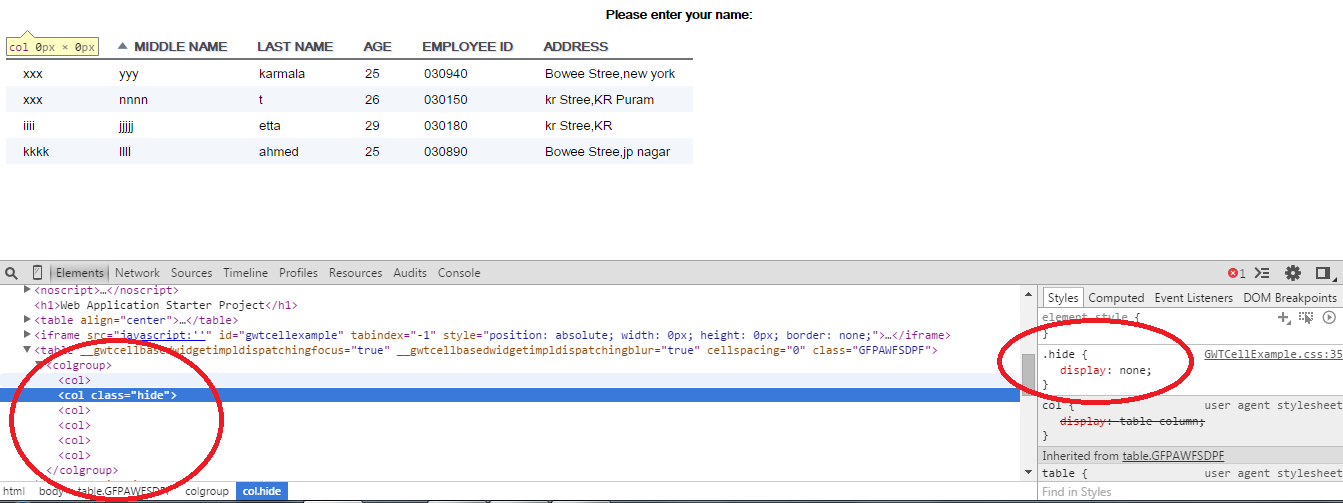
cellTable.addColumnStyleName(1, "hide"); // added stylename to the Column with index 1CSS:Added this class in stylesheet.hide {display: none;}
Hopefully it is a normal CSS file and not a CssResource? Check your browsers dev tools to see what is going on with your css.
-- J.

Jens
Mar 24, 2015, 3:30:59 PM3/24/15
to google-we...@googlegroups.com
I see. On the <col> element you need to use "visibility:collapse" to hide the entire column. However browser support is pretty poor for it, seems to only work well in Firefox.
The other thread you have linked pretty much has all information available to solve your issue. Basically you have to show/hide each cell in a column like the guy in the last post did with JQuery.
If the number of columns in your table is fixed and known then you could also use the following css (example for 3 columns):
/* thead: th cells */
.hide-col-1 th:nth-of-type(1),
.hide-col-2 th:nth-of-type(2),
.hide-col-3 th:nth-of-type(3),
/* tbody/tfoot: td cells */
.hide-col-1 td:nth-of-type(1),
.hide-col-2 td:nth-of-type(2),
.hide-col-3 td:nth-of-type(3) {
display:none;
}
Then you can add/remove "hide-col-1" to the table and the corresponding column will be hidden. Here is a jsfiddle that hides the second column: http://jsfiddle.net/odbqq04x/
-- J.
Reply all
Reply to author
Forward
0 new messages